Java Basic Problems

Java: Add value to a vector which is inside another vector.

Sometimes what we do in java programming, we add value to a vector and then adds that vector to another vector (Vector inside another vector).

For example

(“X”,”Y”,”Z”) is in Vector    name

name.add(“X”);

name.add(“Y”);

name.add(“Z”);

(“M”, “N”,”O”) is in Vector name1

name1.add(“M”);

name1.add(“N”);

name1.add(“O”);

Add  this  name and  name1 vector in nameContainer Vector

nameContainer.add(name);

nameContainer.add(name1);

So, if you want to add another value  or    modify  the vector  name and name1  which are inside nameContainer Vector,  do the following  according to the given code.

Code Example

 import java.util.Vector;

public class VectorDemo

{

 VectorDemo()

{

Vector name=new Vector();

Vector name1=new Vector();

Vector name2=new Vector();

name2.add(“Its me”);

Vector nameContainer=new Vector();

name.add(“X”);

name.add(“Y”);

name.add(“Z”);

nameContainer.add(name);

name1.add(“M”);

name1.add(“N”);

name1.add(“O”);

nameContainer.add(name1);

System.out.println(“Before NameContainer Value:”+nameContainer.get(0));

((Vector)nameContainer.get(0)).add(“HI”);

System.out.println(“name get 0 and 1:”+name.get(0)+” “+name.get(1));

System.out.println(“AfterNameContainer Value:”+nameContainer.get(0));

((Vector)nameContainer.get(0)).add(name2.get(0));

System.out.println(“AfterNameContainer Value:”+nameContainer.get(0).toString());

}

public static void main(String args[])

{

VectorDemo x=new VectorDemo();

}

}

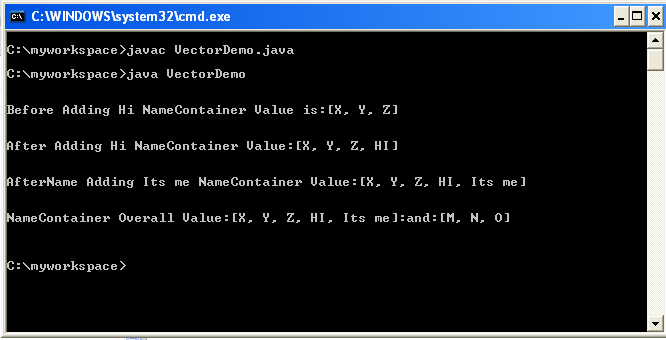
OUTPUT:
Java Basic Problems

JPanel Layout: How to add CheckBox Vertically or Horizontally in JPanel using BoxLayout

We can use BoxLayout in Java to add or show CheckBox Vertically or Horizontally in JPanel.

According to our need in software we have to code in such a way that  CheckBox should appear in JPanel  in Horizontal or Vertical  position.

For  Vertical Position of CheckBox in JPanel : javax.swing.BoxLayout.Y_AXIS       is used

For  Horizontal Position of CheckBox in JPanel : javax.swing.BoxLayout.X_AXIS   is used


Sample  Java code example:


        private javax.swing.JScrollPane jsp_jobWorkProcess = null;

        JCheckBox chk_Embrodary=new JCheckBox(“Embrodary”);

        JCheckBox chk_Cutting=new JCheckBox(“Cutting”);

        JCheckBox cb_Sewing=new JCheckBox(“Sewing”);

        JButton jb_next= new JButton();

        private javax.swing.JScrollPane getSst_jobWorkProcess()

            {

 if(jsp_jobWorkProcess == null) {

 jsp_jobWorkProcess = new javax.swing.JScrollPane();      

JPanel panel=new JPanel();

panel.setLayout(new javax.swing.BoxLayout(panel, javax.swing.BoxLayout.Y_AXIS));

JLabel lblHeader=new JLabel(“Job Work Process Selection”);

                                    panel.add(lblHeader);

                                    panel.add(chk_Embrodary);

                                    panel.add(chk_Cutting);

                                    panel.add(cb_Sewing);

                                    panel.add(getJb_Next());

                                    jsp_jobWorkProcess.setBounds(37, 248, 179, 120);

                                    jsp_jobWorkProcess.setViewportView(panel);

                        }

                        return jsp_jobWorkProcess;

            }
.adcode{display:block;}

Java Basic Problems

Java: How to Know in which line Java Exception Occurred?

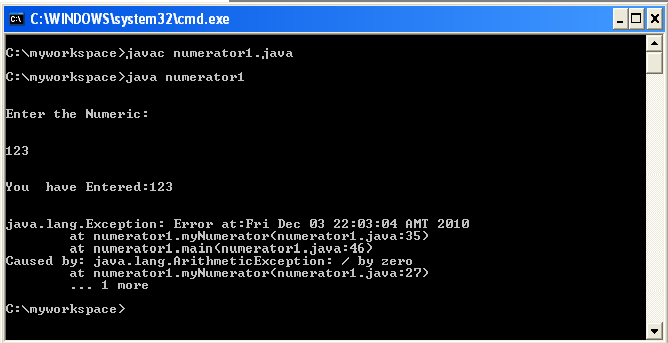
There is  a very simple way to know where and which line exception occurs in your java code, and it is  very useful tool for diagnosing an Exception.printStackTrace()  is that simple tool which will help you to diagnose your code in an easy way

It  will tell you what happened  and  where (in which line )  in the code this exception  happened

 printStackTrace()  is  a method of the Throwable class. All Exceptions are a subclass of that class.

It’s a great debugging tool.

Here is the code example with output to show the function of  printStackTrace()

import java.io.*;

class numerator1

{

static String input;

static int intInput;

                        public void myNumerator()

                        {

                                                            try

                                                            {

            BufferedReader br=new BufferedReader(new InputStreamReader(System.in));

            System.out.println(“\n”);

                                                            System.out.println(“Enter the Numeric:”);

                                                            System.out.println(“\n”);

                                                            input=br.readLine();

                                                            intInput=Integer.parseInt(input);

                                                            System.out.println(“\n”);

                                                            System.out.println(“You  have Entered:”+intInput);

                                                            System.out.println(“\n”);

                                                            intInput=intInput/0;

      //It will cause an error as I have divided the input number by zero(0)

      //java.lang.ArithmeticException: / by zero  (Check the Output)        

                                                            System.out.println(“\n”);

                                                            }

                                                            catch(Exception e)

                                                            {

                                                            //System.out.println(“Error:”+e.getMessage());

                                    Exception newEx = new Exception(“Error at:”+new java.util.Date()+””,e);

                                    newEx.printStackTrace();

                                                            }

                        }

public static void main(String args[])

{

numerator1 x=new numerator1();

x.myNumerator();

}

}OUTPUT:

Java Basic Problems

Java: Comparison between Vector value and String Value

If you want to compare the String value stored  in a Vector with another  String value then its for you. I have given here a better Comparison solution to compare the value in

 a Vector with another String.
Here is the code example:
import java.util.Vector;
public class MainClass {

 public MainClass() {

 Vector vec=new Vector();

 vec.add(“Jhony”);

 String name=”Jhony”;

 /*********************Better Way***************************/

  if(vec.get(0).toString().trim().equalsIgnoreCase(name))

  {

   System.out.println(“First Try Name Match”); 

  }

  else

  {

   System.out.println(“First Try Name Not Matched”); 

  }

   /*********************End of: Better Way***************************/

 /*********************Not so Better Way***************************/

  if(vec.get(0).toString()==name)

  {

  System.out.println(“Second Try Name Match”);

  }

  else

  {

  System.out.println(“Second Try Name Not Matched”);

  }

  /****************End of : Not so Better Way**********************/

  }

public static void main(String[] args) {

MainClass x=new MainClass();

  }

}


Java Basic Problems

Java: Checkbox value to Vector

If CheckBox is selected  True will be added in the Vector    if CheckBox is not selected  False will be added.

Sometimes we may need in java programming to do such code where  if any CheckBox is selected than  True should need to be added in the Vector  in the same way, if  CheckBox is not selected then False will be added in Vector.

Here is the code snippet by which you can solve the problem described  above.

Vector data=new Vector();

 data.add((chkbox_buyer_name.isSelected()?”true”:”false”)+””);

 data.add((chkbox_item_number.isSelected()?”true”:”false”)+””);

 data.add((cb_order_number.isSelected()?”true”:”false”)+””);

 data.add((chkbox_style_number.isSelected()?”true”:”false”)+””);

 data.add((chkbox_style_description.isSelected()?”true”:”false”)+””);


Java Basic Problems

Java: How to know which menu item is clicked??

Sometimes in java, while we do GUI programming to prepare software we add menu bar(For example javax.swing.JMenuItem jMenuItem).In the menu bar we add various menu items according to our necessity.
While adding menu item, we have to indicate which menu item is clicked and which action need to be performed on that click.


Here I have given a code snippet to identify which menu item is clicked.                                              

             private javax.swing.JMenuItem jMenuItem = null;

              private javax.swing.JMenuItem jMenuItem1 = null;

                                                jMenuItem.setText(“Approve” );

                                                jMenuItem1.setText(“Reject” );

               if(jMenuItem.getText().trim().equalsIgnoreCase(“Approve” )   )

                                    {

                                                           Do the following action

——-

—-

                                      }