Home | Need Help? | Archives
April 7, 2012 12:01 pm
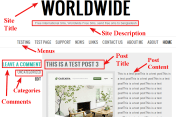
Theme Chunk is another nice theme of Automattic. Here i am sharing you some modification techniques of css which you can use to beautify your theme design.
So,if you have wordpress.com or wordpress.org blog and if you are willing to use Chunk Theme by Automattic then this modification will help u a lot to give it a new look.
If you have any question feel free to ask me in Comments section.
#site-title a {
color: #000000;
font-family: georgia;
font-size: 34px;
letter-spacing: 1px;
text-decoration: none;
}
#header {
min-height: 167px;
padding-top: 0;
width: 800px;
}
#site-title {
text-transform: none;
}
#site-description {
color: red;
display: inline-block;
font-family: times New Roman;
font-size: 14px;
font-weight: 300;
}
#menu ul li.current_page_item > a, #menu ul li.current_page_ancestor > a, #menu ul li.current-menu-item > a {
color: blue;
}
#menu a {
color: blue;
font-family: times New Roman;
font-size: 18px;
margin: 0 10px;
padding: 10px 0;
text-decoration: none;
text-transform: uppercase;
}
#menu ul ul li:hover>a {
color: black !important;
}
#site-description {
display: none;
}
**** Remove the Site Title text (if u have)
and paste the following code
#header {
background-image: url(“http://christensen.everythingregarding.com/wp-content/themes/socrates/header-images/uploads/defaultheader.jpg”);
background-repeat: no-repeat;
margin-top: 8px;
min-height: 180px;
padding-top: 0;
width: 800px;
}
.hentry .entry-meta .date a {
color: red;
font-family: times New Roman;
font-size: 17px;
font-weight: normal;
}
.hentry .entry-meta .comments a {
color: #36BCAB;
font-family: georgia;
font-size: 18px;
font-weight: bold;
text-decoration: none;
}
.entry-title a {
color: #666666;
font-family: cursive;
font-size: 18px;
text-decoration: none;
}
.hentry .main {
color: black;
font-family: cursive;
line-height: 19px;
text-align: left;
}
.entry-content a img {
border: 10px solid pink;
}
.entry-content a:hover img {
border: 10px solid red !important;
}
.hentry .entry-meta .cat-links {
display: none;
}
.hentry .entry-meta .comments a {
color: #36BCAB;
display: none;
}
#respond #reply-title {
color: red;
font-family: times New Roman;
font-size: 26px;
margin-bottom: 2px;
}
blockquote {
background: none repeat scroll 0 0 #EEEEEE;
border-left: 10px solid #36BCAB;
color: #000000;
font-family: Georgia,Arial,Helvetica,sans-serif;
font-size: 15px;
padding: 10px;
text-align: justify;
}
a.more-link {
color: red;
font-size: 15px;
font-weight: bold;
font-family: times New Roman;
}
span.tag-links {
display: none;
}
#comments #comments-title {
background: none repeat scroll 0 0 green;
border-radius: 3px 3px 3px 3px;
color: white;
display: block;
font-size: 20px;
font-weight: normal;
padding: 5px 20px;
text-shadow: 0 -1px 0 rgba(0, 0, 0, 0.1);
}
.comment .comment-author cite {
color: red;
font-family: times New Roman;
font-size: 18px;
font-style: normal;
font-weight: bold;
}
.comment .comment-author cite a {
color: red !important;
font-family: times New Roman;
font-size: 18px;
font-style: normal;
font-weight: bold;
}
.comment p, .reblog p {
color: black;
font-family: cursive;
font-size: 15px;
line-height: 20px;
}
.sticky .main {
background: none repeat scroll 0 0 lightBlue;
}
.entry-title {
background-color: darkRed;
}
.entry-title a {
color: white;
padding-left: 3px;
}
.widget-title {
color: red;
font-family: ‘Oswald’,Helvetica,Arial,sans-serif;
font-size: 16px;
margin: 0 0 12px;
text-transform: uppercase;
}
.widget a:hover {
color: blue;
}
.widget a {
color: blue;
font-family: tahoma;
font-size: 15px;
text-decoration: none;
}

Posted by allaboutbasic
Categories: Web Development & WordPress
Tags:
Mobile Site | Full Site
Get a free blog at WordPress.com Theme: WordPress Mobile Edition by Alex King.

Excellent article! Extremely well written; concise and informative.
I’d like to get in touch with you. Please send me an email if possible!
LikeLike
By os1 on April 9, 2012 at 9:15 pm
Hi,
thanks a lot bro…
Prakash
LikeLike
By allaboutbasic on April 9, 2012 at 10:12 pm
hi! super helpful stuff!
just a couple quick questions..
1 – is there a way to change the background colour of the description box?
2 – if i’m going to have numerous pages (in the menu section, i have home, about, etc), is there a way to ensure that the title of the posts on the other pages are uniform with the home page?
LikeLike
By emmarobertson89 on April 25, 2012 at 8:18 pm
sorry, for #2 – that the title FONT/size etc of the posts on the other pages..
LikeLike
By emmarobertson89 on April 25, 2012 at 8:18 pm
Hi Emma Robertson
If you want to change the description background color of theme Chunk pls try the following code
#site-description {
background: -moz-linear-gradient(red, green) repeat scroll 0 0 #F1F1F1 !important;
color: white !important;
}
Regardig question 2..
Font is same everywhere ..u need any changes?
pls let me know..
Om
LikeLike
By allaboutbasic on April 25, 2012 at 9:26 pm
hi!
thanks! but the code you gave me doesn’t seem to be working, nothing has changed.
as for the fonts…not sure, if you look on little-city.ca, on the about page, the entry title is still in the default font from the chunk theme. how can i change it so that it’s the same as the home page?
LikeLike
By emmarobertson89 on April 26, 2012 at 12:44 pm
scratch that – got the code working for the description box! thank you so much!
LikeLike
By emmarobertson89 on April 26, 2012 at 12:48 pm
Hi Emmarobertson89..
Ok..just let me know if u need any help..
Om
LikeLike
By allaboutbasic on April 26, 2012 at 3:39 pm
Hi Om,
Do you know if I can place the menu in the left sidebar? Or any other widget?
Greetings, Rena
LikeLike
By biodanzafabriek on January 23, 2013 at 5:39 pm
Hi Rena.. Yes u can place menu in the left sidebar… i have modified the theme to
add a left sidebar in that same place
check this one
https://allaboutbasic.com/2012/08/13/wordpress-theme-chunk-with-sidebar-in-homepage/
Om
LikeLike
By allaboutbasic on January 24, 2013 at 9:12 pm
Hi Om,
Is there any way to have background images on the left and right side of the posts like other blogs? Not sure if chunk theme can do this.
Here is an example with the Illogical Computer site of the images to the left and right that I am talking about – http://illogicalcomputer.com/
LikeLike
By imveryape on March 11, 2013 at 4:34 pm
Hi Imveryape
yes..it will be possible …but the background image u used is problematic to make it look like the illogicalcomputer….
Om
LikeLike
By allaboutbasic on March 11, 2013 at 8:33 pm
I could easily replace the image. I am just wondering whether or not I could set it up like that. Where the center is where the content goes, and the sides are borders that can be filled in with images.
Thanks in advance, your help is very much appreciated!
LikeLike
By imveryape on March 11, 2013 at 8:37 pm
Hi imveryape
just for example….use the following code
body.home {
background-attachment: fixed;
background-image: url(“http://illogicalcomputer.files.wordpress.com/2013/01/11_illogicalcomputerbackground1.jpg”) !important;
background-position: center top;
background-repeat: repeat-y;
}
#container {
background: none repeat scroll 0 0 black !important;
}
Om
LikeLike
By allaboutbasic on March 11, 2013 at 8:52 pm
I’ll give that a try. And I am assuming the “illogical computer” jpg is what I could replace with my own image, right?
And could I change the #container color by just writing “white” instead of “black”?
LikeLike
By imveryape on March 11, 2013 at 8:56 pm
Hi
right..u have to change the image url with urs
it is just for example
Om
LikeLike
By allaboutbasic on March 11, 2013 at 9:02 pm
Hi Om,
Do you know if it is possible to add a facebook like button at the top of this theme? perhaps beside or under this site title?
Jen.
LikeLike
By jenbackman on March 12, 2013 at 1:29 am
Hi Jen
it is only possible if u are using your own hosting except free wordpress.com
Om
LikeLike
By allaboutbasic on March 13, 2013 at 1:16 pm
I need to change “Leave a comment” to just “comment” and cannot find the place to properly edit this for the whole site. The “inspect element” route didn’t work either. Help?
LikeLike
By cunningkennedy on November 28, 2013 at 4:05 am
Hi
have u checked “comments.php” in ur theme?
LikeLike
By allaboutbasic on November 28, 2013 at 2:05 pm
I can’t find the .php files, in all of the forums I’ve read through they’ve told me to go to “Appearance,” then “Editor,” but Editor isn’t there.
LikeLike
By cunningkennedy on November 28, 2013 at 3:31 pm
Oh got the issue
as u r using wordpress.com free hosted site…u will not be able to do such type of changes….
sorry for that as cant help for this (wordpress.com will not allow it)
Om
LikeLike
By allaboutbasic on November 28, 2013 at 5:03 pm
nope, its a paid for site on wordpress.com. does that help?
LikeLike
By cunningkennedy on November 28, 2013 at 8:40 pm
Hi
u have paid either for custom design or domain or for theme
but..that doesnt include to modify php file of the theme
Om
LikeLike
By allaboutbasic on November 28, 2013 at 8:55 pm
how am I able to do that then? I don’t mind paying more for the option as there’s a few changes I really want to make.
LikeLike
By cunningkennedy on November 28, 2013 at 8:58 pm
I think u better talk to wordpress.com support regarding this
and also check this
http://en.support.wordpress.com/
Om
LikeLike
By allaboutbasic on November 28, 2013 at 9:02 pm