
Home | Need Help? | Archives
September 5, 2012 9:54 pm
The Twenty Twelve (2012 theme) for WordPress is a fully responsive theme that looks great on any device. Features include a front page template with its own widgets, an optional display font, styling for post formats on both index and single views, and an optional no-sidebar page template. Make it yours with a custom menu, header image, and background. You can check the Twenty Twelve theme demo.
You can use my shared code and ask question in the comments section.
1. If you want to change the Font Color,size and font family of Site Title of Twenty Twelve theme use the following css code
.site-header h1.site-title a {
text-shadow: 0 1px 1px #000000;
font-family: ‘Open Sans’,sans-serif;;
font-size: 28px;
color: grey;
}
1.1. If you want to use Header Image instead of Site Title in Twenty Twelve Theme of WordPress.com
–> You can easily do it from Appearance–>Header option
2. If you want to reduce the space/gap from the top of the site of Twenty Twelve theme
body .site {
margin-top: 1.43rem;
}
3. If you want to make the corners Rounded (Rounded Corner) use the following code.
body .site {
-moz-border-radius: 20px;
-webkit-border-radius: 20px;
-khtml-border-radius: 20px;
border-radius: 20px;
}
**** Rounded Corner for IE Browser
IF the Rounded Corner does not work in IE, pls check the following page and try to use the code.
http://code.google.com/p/curved-corner/
body .site {
behavior: url(/css/border-radius.htc);
border-radius: 20px;
}
4. If you want to change or modify Site Description’s font color,font family and font size of Twenty Twelve theme use the following code
h2.site-description {
color: #020202 !important;
font-family: times New Roman;
font-size: 17px!important;
}
*** In case if you don’t want to show the Site Description in the Header section then you can use the following
h2.site-description {
display:none;
}
or…simply you can Remove the Site Description text From you dashboard.
just go to “Settings–> General” and remove the text from “Tagline”

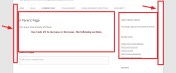
5. If you want to increase the Width of body Content Section (reducing left and right padding) use the following css code
.wrapper {
margin-left: -18px !important;
width: 1000px !important;
}
After that step..
** Increase Width Of Content Section….
IF you are willing to increase the Content Section’s width(not the sidebar) use this code
.site-content {
float: left;
width: 71.1% !important;
}
If you want to increase/decrease Sidebar Width Use the following code
.widget-area {
width: 27.04% !important;
}
*** You need to keep in Mind that you have increase Content section width and Sidebar width
in such a way that they should reside side by side..otherwise Sidebar will move down..
6. If you don’t want to show Featured Image at the top of the Single post of Twenty Twelve theme
.entry-header img.wp-post-image {
display: none;
}

7. If you want to remove the spacing between Menu item and Post Title (in Home page) use the following
*** it will also work for invidual pages
.site-content {
margin-top: 2px !important;
}
.widget-area {
margin: 2px 0 0;
}
.site-header {
padding: 1.71429rem 0 14px;
}
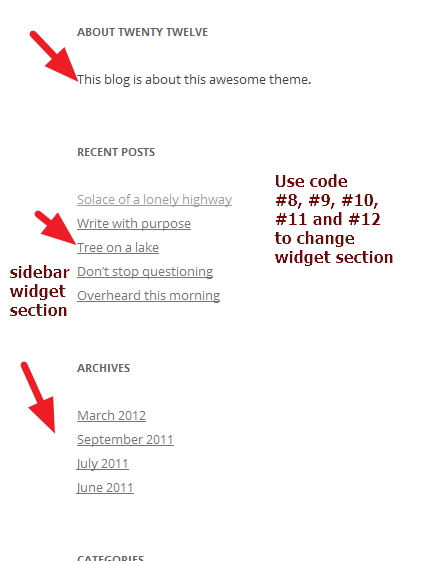
8. If you want to change Sidebar Widget Title’s font color,font size and font family of Twenty Twelve theme
.widget-area .widget h3 {
color: blue;
font-family: times New Roman;
font-size: 15px;
margin-bottom: 1.71429rem;
}
9. If you want to change Sidebar widgets link’s font color,font type and font family of Twenty Twelve theme
.widget-area .widget a {
color: #777777;
font-family: times New Roman;
font-size: 14px;
text-decoration: underline;
}
10. If you want to change Right Sidebar widget’s links hover color of theme Twenty twelve
.widget-area .widget a:hover {
color: red !important;
font-family: times New Roman;
font-size: 14px;
}
11. If you want to use Background Color in Widget title and make the Widget Title Centralize
.widget-area .widget h3 {
background-color: yellow;
color: blue;
font-family: times New Roman;
font-size: 15px;
margin-bottom: 1.71429rem;
text-align: center;
}
12. If you want to give Each WIdget block a background color you can use this
.widget-area .widget {
background: none repeat scroll 0 0 green;
}
*** in such case you may need to make your widget links or text color to be white use this if you need that..
.widget-area .widget a {
color: white;
font-family: times New Roman;
font-size: 14px;
padding-left: 10px;
text-decoration: underline;
}
Regarding Comments Section
13. If you don’t want to show Comments Section only in your pages you can use one plugins
named “No Comments on pages” which will help you to disable comments only for pages
14. If you want to Change Content Section’s font color,font family and font size of Twenty Twelve theme
.entry-content, .entry-summary {
color: black !important;
font-family: times New Roman !important;
font-size: 17px !important;
line-height: 1.71429;
}
15. If you want to change Post Title’s Font color,font size,font family of twenty twelve
.entry-header .entry-title a {
color: black;
font-family: times New Roman;
font-size: 26px;
text-decoration: none;
}
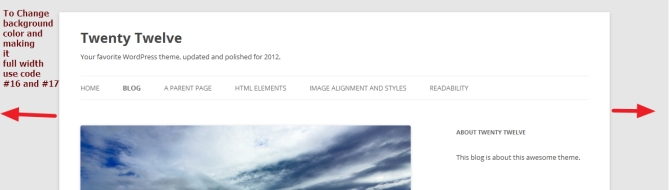
16. If you want to add Background Color and Image In Twenty Twelve Theme
body {
background-color: #E2E2E2 !important;
background-image: url(http://agrofarma.pe/wp/wp-content/uploads/2012/12/1.jpg) !important;
}
17.If you want to make ur Twenty Twelve Site Full width use this code
body .site {
max-width: 100% !important;
}
If you have any issue feel free to ask me question here in comments section

Posted by allaboutbasic
Categories: Web Development & WordPress
Tags:
Mobile Site | Full Site
Get a free blog at WordPress.com Theme: WordPress Mobile Edition by Alex King.

hi
great post!
i changed widget background color and would like to give the widgets blocks nice and rounded boarders. can you add the code for this?
thanks
LikeLike
By chen on October 23, 2012 at 9:36 pm
Hi Chen.
Can u share me Your site URL to check? i will share u the code
Om
LikeLike
By allaboutbasic on October 24, 2012 at 6:10 am
The site is still pretty empty, i just started to build it on the twenty twelve child theme.
the url is http://odedmagen.com/
LikeLike
By chen on October 24, 2012 at 8:18 am
Hi Chen…
for rounded corner widgets of twenty twelve theme try this code..
*** change the radious value as ur need.
.widget-area .widget
{
-moz-border-radius: 7px;
-webkit-border-radius: 7px;
-khtml-border-radius: 7px;
border-radius: 7px;
border: 2px solid #125C5C;
}
Regards
Om
LikeLike
By allaboutbasic on October 24, 2012 at 9:04 am
It worked perfect! thanks a lot
LikeLike
By chen on October 24, 2012 at 10:57 am
by the way, can you recommend on a plugin for comments section to look better?
(like yous?)
LikeLike
By chen on October 24, 2012 at 11:07 am
Hi Chen..
You can use Disqus comments plugins …or using css u can add some style in the current comments section…
what type of look u prefer in ur existing comments box?
let me know..i will check it
Om
LikeLike
By allaboutbasic on October 24, 2012 at 2:15 pm
great post. thanks. How can I remove some white space above the top menu? thanks.
LikeLike
By truthsaves (@truthsaves) on October 27, 2012 at 9:02 pm
Hi,
share me ur site URL to check
Om
LikeLike
By allaboutbasic on October 28, 2012 at 9:11 am
Hi Om, I can’t find any option for the footer to increase to three widgets. I can place three widgets into the widget module, but they stack up against one another as opposed to side by side. Would you mind pointing it out to me? I’d love to treat you to a cup of coffee for all of your help.
LikeLike
By Robinina on November 5, 2012 at 7:00 pm
Hi – and THANK YOU for all your posts. I am trying to modify the placement of category pages that I use to list a thumbnail and excerpt. In Twenty – eleven, I put the ollowing code in the css editor stylesheet and it worked fantastically, I just upgraded to Twenty twelve and love it, but when I try to put the following in and then save the sheet it strips out all of the parameters and I am not sure why – can you help please. Thank you
.cat-post{
02 width:100%;
03 }
04 .cat-post-list{
05 display: block;
06 margin-bottom: 20px;
07 position: relative;
08
09 }
10 .cat-post-images{
11 float:left;
12 width:140px;
13 display:block;
14 }
15
16 .cat-content{
17 width:350px;
18 float:right;
19 }
20 .cat-post-title{
21 display: block;
22 width:100%;
23 }
24 .cat-clear{
25 clear:both;
26 }
LikeLike
By richokun on November 16, 2012 at 4:29 pm
HI Richokun..
are you trying to modify ur category page in twently twelve theme so that thumbnail image will be in the left and post excerpt will be in the right..something like that? share me ur category page url too..
Regards
Prakash
LikeLike
By allaboutbasic on November 16, 2012 at 4:33 pm
Dear Om –
Yes I am trying to set it up so that the thumbnail is on the left margin and the on or two lines are aligned to the right of the picture but on the same line so it doesn’t take up more space on the page since I will be adding many – Right now it is under the pic and I cannot seem to modify the CSS to get it right – an example of a category page (I have organized it as menu items as category pages
http://www.maya-the-puppuppy-poet.com/poems-for-adults-too/
MY site is http://www.maya-the-puppuppy-poet.com
Thank you for any help you can provide.
Blessings
Rich
LikeLike
By richokun on November 17, 2012 at 5:19 pm
Hi Rich..
pls try this code
div.cat-content {
float: left;
margin-left: 13px;
}
div.cat-post-images {
float: left;
}
div.cat-post-list {
clear: both;
margin-bottom: 6px !important;
overflow: hidden;
}
paste the code either ur style.css or custom.css
and let me know it is ok or not
Kind Regards
Om
LikeLike
By allaboutbasic on November 17, 2012 at 9:13 pm
Dear Om –
THANK YOU, THANK YOU – it works perfectly. I guess the word ‘important’ is important
I am truly grateful for your generous help.
With gratitude
Rich
LikeLike
By richokun on November 17, 2012 at 9:44 pm
Pleasure Rich…
feel free to let me know if u have any other issue in future
Kind Regards
Om
LikeLike
By allaboutbasic on November 18, 2012 at 12:54 pm
I didn’t see how to change the background for the entire site. Did I miss something obvious?
LikeLike
By kelsangwangpo on December 9, 2012 at 6:30 am
Hi Kelsang..
the css i shared ..u have to use it in style.css or custom.css
Om
LikeLike
By allaboutbasic on December 9, 2012 at 3:46 pm
Dear Om – Thank you again for all your previous help.
I wanted to make my content and widget area take up the entire width of the screen page if possible. I tried the mods above for both content and widget, and this did increase both but not the area that it resides in – my site is http://www.-maya-the-puppuppy-poet.com I changed the background color so you can see the pinkish area is what I want the white area to expand to if possible – IS there anything you can suggest please?
Thank you again.
Very truly yours
Rich
LikeLike
By richokun on December 11, 2012 at 1:38 pm
HI Rich
would u mind to check this code to make whole TwentyTwelve theme full width pls
body .site {
max-width: 100% !important;
}
is that something u were asking?
let me know pls
Om
LikeLike
By allaboutbasic on December 12, 2012 at 7:15 pm
Dear Om – YES that did what I was looking to do THANKYOU – a cup of coffee is warranted and a Big thank you….
LikeLike
By richokun on December 12, 2012 at 7:40 pm
It was GREAT! I was looking for such a great tutorial for twenty twelve. thanks
LikeLike
By Adam on December 12, 2012 at 9:57 am
Using WP Twenty Twelve and….
re: 5. If you want to increase the Width of body Content Section (reducing left and right padding) use the following css code….
.wrapper {
margin-left: 130px !important;
width: 1000px !important;
}
.site-content {
float: left;
width: 71.1% !important;
}
Seems to trash the mobile rendering of the pages/posts?
LikeLike
By gordo019 on December 13, 2012 at 6:03 am
Hi Gordon…
if it is creating problem with that width value (in PX) … try to use ( %) in width value..for example width=40% or 50%
Om
LikeLike
By allaboutbasic on December 13, 2012 at 10:06 am
Thanks for the wonderful tutorial.
One question. How do I reduce the space above and below the menu bar?
LikeLike
By shirley on December 20, 2012 at 9:20 am
HI Shirley
share me your site url
Om
LikeLike
By allaboutbasic on December 20, 2012 at 12:52 pm
Fantastic info. This page helped me a lot.
There is still one thing that bugs me though, I’m trying to increase the content section’s width and reducing the sidebar width. It works fine as you described with…
.site-content {
float: left;
width: 71.1% !important;
}
However, this also reduced the content width of my Front page. I have setup my Front page to have no side bar. It used to span the full width, but now it’s only 71.1%.
Is there a way to selectively keep the front page at full width (no sidebar) and adjust the width of the rest of the pages which have sidebars?
LikeLike
By kinwin on December 20, 2012 at 1:23 pm
Hi Kinwin
would u mind to share me ur site URL pls
Om
LikeLike
By allaboutbasic on December 20, 2012 at 1:25 pm
Sure, the site is still in beta test:. http://drl.ee.ucla.edu/test/wordpress/
I did figure out a way to keep the Frontpage at full width but only change other pages. I added the following lines in my child theme’s style.css file.
.widget-area {
width: 20%;
}
.page .site-content {
float: left;
width: 77%;
}
.front-page .site-content {
float: left;
width: 100%:
}
LikeLike
By kinwin on December 20, 2012 at 9:32 pm
HI Kinwin
Nice to know u solved it…
but http://drl.ee.ucla.edu/test/wordpress/ are you not using 2012 theme there? and also..
.front-page .site-content {
float: left;
width: 100%:
}
that code u used should not work as .front-page is not there
Om
LikeLike
By allaboutbasic on December 20, 2012 at 9:43 pm
Yes, I’m using the default Twenty Twelve theme. I made a child theme, which is just one file style.css which modifies the default styles in Twenty Twelve. As far as I can tell, the code is working fine, I get to keep the full width at the Home page, but all other pages I can adjust the width of the content area relative to the sidebar area.
Regards, /Kin
LikeLike
By Kin Wong on December 20, 2012 at 9:56 pm
Nice Kin
if you have any other issue u can share me here
Om
LikeLike
By allaboutbasic on December 21, 2012 at 5:56 am
HI
MY SITE IS : http://WWW.2HIGHERPROFITS.COM
I want to move the Right side bar up flush with my logo. How can I do that?
Also, I want to change the Font Color of my Posts from Blue to Black.
Where would I place this code? Can you give me the dashboard and then clicks to make this work? This is great information.
Thank you.
Dan
LikeLike
By Dan on January 2, 2013 at 3:24 pm
Hi Dan…
to move ur Sidebar to the top..it will need customization in ur theme file…
Also..i have checked ur posts… but..the color is already black..not Blue…
would u mind to share me any page or post url to check the color issue?
And..u have to paste the code in style.css… go to “Appearance–>Editor” there u will see the style.css
Om
LikeLike
By allaboutbasic on January 2, 2013 at 6:41 pm
I’m trying to put buttons around the nav menu links, which I’ve accomplished. I want to remove the gap between the button/links though.
Can you help please?
LikeLike
By James on January 10, 2013 at 12:39 am
http://www.beardbarons.com is the url
LikeLike
By James on January 10, 2013 at 12:40 am
Hi James
sorry for the late response
to reduce the gap between ur menu buttons use this code
.main-navigation li {
margin: 0 12px 0 0 !important;
position: relative;
}
Om
LikeLike
By allaboutbasic on January 12, 2013 at 11:17 am
Can you help me remove the line started with “this entry was posted … “?
LikeLike
By admin on January 12, 2013 at 6:33 pm
Hi Admin@fagelsta
can u share me ur site url to check?
Om
LikeLike
By allaboutbasic on January 12, 2013 at 6:34 pm
I solved it myself by adding the line below in style.css. But I will probably have more wonderings come. Thanks anyway for the quick response.
footer.entry-meta {
display: none;
}
Bye the way, my url is http://mariebrunnberg.se
LikeLike
By Marie on January 13, 2013 at 9:29 am
Great …nice to see u solved it Marie..
:)
Om
LikeLike
By allaboutbasic on January 13, 2013 at 4:22 pm
Hi, can you help me please? How can I change the margin/frame color (my site: http://warcraft4beta.com)( that’s white border around the posts. And how can I change the posts background color? Thank you!
LikeLike
By Attila on January 27, 2013 at 1:25 pm
Hi Attila
to change the frame or margin color u have to change the white background color of ur site…and the have to do changes in post or page background…
regarding the post background
are u talking about this code?
.site-content article {
background: none repeat scroll 0 0 lime;
}
Om
LikeLike
By allaboutbasic on January 27, 2013 at 2:06 pm
Now I changed the post background color to black, but the “site” (the background is a picture) background (around the sidebar, posts, above the menu ) color is white :(
LikeLike
By Attila on January 27, 2013 at 2:29 pm
Hi Attila
thanks..i have checked..actually the way u r asking to do the color change will require modifcation in ur theme file to make the work easy…
only css may not be the perfect way to solve ur issue
Om
LikeLike
By allaboutbasic on January 27, 2013 at 4:44 pm
Thanks for the help! I think I leave the white. But so much thanks:) I read your post and very valuable :)
LikeLike
By Attila on January 27, 2013 at 4:55 pm
Pleasure Attila
:)
Om
LikeLike
By allaboutbasic on January 27, 2013 at 4:56 pm
Very useful post, thank you.
Question – On my main page I want to reduce the space between the posts (below the Welcome sticky post). I can’t identify the file I need to modify in the theme editor. Can you point me in the right direction for both the file that I need to edit and the padding I need to adjust? http://www.guidetrails.com
Thank you.
Greg
LikeLike
By Greg Streech on January 27, 2013 at 3:22 pm
Hi Greg
To Reduce the gap between your posts in homepage.. Pls paste the following code at the bottom of your style.css
.site-content article {
margin-bottom: 1.143rem !important;
padding-bottom: 0.714rem !important;
}
Regards
Om
LikeLike
By allaboutbasic on January 27, 2013 at 4:47 pm
Great article. How can I make the space between one widget and the next smaller – on the right sidebar of a twenty twelve theme? My site is genialesstudium.com and I’d love to have smaller spaces between (1) the widget-title and the widget and (2) between one widget and the next. Thank you!
LikeLike
By Nikolaus Cortolezis on January 28, 2013 at 1:24 am
Hi Nikolaus
thanks for ur comments
Regarding ur question
1. To Reduce Space between one widgets and the next widgets in twenty twelve theme use the following code
.widget-area .widget {
margin-bottom: 1.429rem !important;
}
2. To reduce space between widget title and widget section of Twenty twelve theme use the following css code
.widget-area .widget h3 {
margin-bottom: 0.714rem !important;
}
pls let me know it works or not
Om
LikeLike
By allaboutbasic on January 28, 2013 at 12:00 pm
Thank you very much. You resolved my problem exactly. Thanks again!!!
LikeLike
By Nikolaus Cortolezis on January 28, 2013 at 1:31 pm
Pleasure Nikolaus
:)
Om
LikeLike
By allaboutbasic on January 28, 2013 at 4:55 pm
This is such a huge help! I have a question – I want to center my top nav links, no matter what I do they won’t change! http://popandsizzle.com
LikeLike
By Rachel on February 21, 2013 at 1:06 am
Hi Rachel
thanks.
To make your Navigation menu to be centered in twnty Twelve theme
.main-navigation {
margin-left: auto;
margin-right: auto;
margin-top: 1.71429rem;
text-align: center;
width: 55% !important;
}
Regards
Om
LikeLike
By allaboutbasic on February 21, 2013 at 1:23 pm
Thank you so much! That is absolutely perfect. I have one last question (I swear!) – how do I delete that “Home” option up top? My header leads there and it seems pretty unnecessary. Thanks!
LikeLike
By theamazonian on February 21, 2013 at 5:43 pm
Hi Rachel
thanks.. to remove the “Home” Option from the navigation menu of Twenty Twelve theme use the following code
.nav-menu ul li:first-child {
display: none;
}
Regards
Om
LikeLike
By allaboutbasic on February 22, 2013 at 11:53 am
Thanks for your great post, it resolve some of my problems but I have the following questions:
1. how can I move my header image a little bit towards the top of the page?
2. I need to add a separator between the header image and the post that come after the image. How can I do that?
3. How can reduce the space between each separator and the title of post that come after the separator?
Many thanks in advance Om!
Mike
LikeLike
By windowzphone on February 26, 2013 at 5:17 am
Hi Mike
thanks for ur comments
1. To move ur Header image to the top of the page use this code
hgroup {
display: none !important;
}
2. if you are asking about top header and content section seperator would u mind to check this code pls?
.site-header {
border-bottom: 2px solid grey;
padding: 1.71429rem 0;
}
3. To Reduce Seperator and Title of Next Post of Twenty Twelve theme
.site-content article {
margin-bottom: 2.14286rem !important;
}
let mek know it is Ok or not
Om
LikeLike
By allaboutbasic on February 26, 2013 at 2:50 pm
Thank you so much Om! They worked perfectly. However, as you can notice in my website (windowzphone.com), there are separators between posts in the main page. How I can change the color of this separator ?
Also, how I can change the color and size of each post title in the post page (not in the main page)?
Is there any way to change the margins of a widget background color?
Many thanks again,
Mike
LikeLike
By windowzphone on February 27, 2013 at 12:50 am
Hi Mike
thanks…
1.) TO change the seperator color in Twenty Twelve theme use the following code
.site-content article {
border-bottom: 4px double red !important;
}
2.) To change the Post title color only in Individual or single post page ( keeping intact the main/home page post title) use the following
.single .entry-title {
color: red !important;
}
3.) if you want to use padding in your widget section of twenty twelve theme use the following code
.widget-area .widget {
padding: 12px !important;
}
Regards
Om
LikeLike
By allaboutbasic on February 27, 2013 at 1:19 pm
Sorry forgot to mention my website: http://www.windowzphone.com
LikeLike
By windowzphone on February 26, 2013 at 5:17 am
Hello, your blog is great, you cover all the possible topics about editing Twenty Twelve theme, except how to remove or hide “This entry was posted…”. If you could just help me with that too.
Thank You!
LikeLike
By jome22012 on February 27, 2013 at 6:25 am
Hi Jome
thanks for your comments
1. If you want to remove “This entry was posted…” from the footer portion of Twenty Twelve theme
footer.entry-meta {
display: none !important;
}
Regards
Om
LikeLike
By allaboutbasic on February 27, 2013 at 1:20 pm
Hi Om,
Is it possible to add separators between the title and the links as well as the links themselves in the sidebar widget “Recent Post”.
Thanks,
Mike
LikeLike
By windowzphone on February 28, 2013 at 4:25 am
HI Mike
didnt understand ur requirements would u mind to clarify pls?
Om
LikeLike
By allaboutbasic on February 28, 2013 at 2:55 pm
Sure…I have a side bar widget in my site that lists the links to my previous posts (please see http://www.windowzphone.com). I need to add a line separator between these links on this widget. also I would like to add a line separator between the title of this widget and its content.
LikeLike
By windowzphone on March 1, 2013 at 12:44 am
HI Mike
thanks…
1. To use border or line seperator between the List of recent post title in Widget section
.widget li:last-child {
border: none;
}
.widget li a {
text-decoration: none;
}
.widget li {
border-bottom: 1px solid grey;
}
2. To use line seperator or border below the widget title use the following css
h3.widget-title {
border-bottom: 1px solid grey;
}
Regards
Om
LikeLike
By allaboutbasic on March 1, 2013 at 9:16 pm
Thanks! It worked well!
LikeLike
By windowzphone on March 3, 2013 at 3:52 pm
Hi Om!
Is there a way I can center the title and description in Twenty Twelve theme? Thanks in advance.
LikeLike
By scrapisimo on March 3, 2013 at 9:43 pm
scrapisimo, this worked for me: http://wordpress.org/support/topic/how-to-centertitle-in-twenty-twelve?replies=3#post-3930353
LikeLike
By Allison on March 4, 2013 at 3:42 pm
Wow, this is amazing! Thank you!
I have one annoyance that I can’t figure out…
I would like to vary the font size in my posts but even if I mark a piece of text as Heading 1, it all comes out the same size. Here’s an example post http://www.leahwhitehorse.com/2013/03/10/new-moon-in-pisces-march-2013-waves/
The subheader ‘The Aspect Picture’ is actually marked as Header 1 but as you can see, the size is the same as everything else in the post. Any help would be much appreciated :-)
LikeLike
By Leah Whitehorse on March 10, 2013 at 10:39 pm
Hi Leah Whitehorse
thanks a lot for ur comments and sorry for the late reply…
to make ur h1 to be looked like ur post or page title (as big) pls try this
h1 {
clear: both;
color: #222222;
font-size: 26px !important;
font-weight: bold !important;
line-height: 1.5em !important;
padding-bottom: 0.3em !important;
padding-top: 15px;
}
Regards
Om
LikeLike
By allaboutbasic on March 11, 2013 at 8:26 pm
does anyone know how to change the background color in the text area of a post on the twenty twelve theme. Am trying to change this one to tan and can not find a setting. This is not the overall background area. I am talking about the white space where the text is published in the post.
LikeLike
By lewin on March 11, 2013 at 11:41 am
Hi Lewin
i think u r searching this?
article.page {
background: red;
padding: 12px;
}
Om
LikeLike
By allaboutbasic on March 11, 2013 at 8:37 pm
Hi Om,
I have another quick question if you’d be so kind! (You really are the best.) I’m trying to position my top nav FIXED at the top, with the header beneath, so that when I scroll down the top nav stays at the top.
Here’s my site: http://popandsizzle.com
And here’s an idea of what I’m looking for: http://paulina-farro.squarespace.com/
Would love any tips! (I may have double coding that’s preventing the changes I’m making… not sure, still learning!)
LikeLike
By Rachel Heine (@RachelHeine) on March 20, 2013 at 5:58 am
Hi Rachel
pls check the code below
.main-navigation {
margin-left: 119px !important;
margin-top: 1.71429rem;
position: absolute !important;
text-align: center;
top: 3px !important;
}
#masthead hgroup {
margin-top: 55px !important;
}
it will help to make ur navigation menu to go to top and the header beneath the nav…
though it may solve the issue but there is another way… for which ur header.php code may need to change
Om
LikeLike
By allaboutbasic on March 20, 2013 at 2:02 pm
i was wondering if anybody on this site knows how to remove the background, when using mobile, it seems to split my webpage in half, and use half the page to show the background. i have tried literally everything, so i am open to new ideas. :)
see it at http://filovision.dk
LikeLike
By Esben Raakjær on March 25, 2013 at 8:39 am
Hey, i was wondering if anybody know how to get rid of the background when using mobile, because it seems to split my page in half, and i have tried just about everything i know to get rid of it.
see what i’m talking about here: http://filovision.dk
Best regards, Esben Raakjær
LikeLike
By esben2112 on March 25, 2013 at 8:41 am
Please disregard this message, i found that i accidentally had a fixed width on my header. -.- made the header width 100% when under 960px and this did the trick. :)
LikeLike
By esben2112 on March 25, 2013 at 9:05 am
Hi Esben
nice to know u solved it
:)
Om
LikeLike
By allaboutbasic on March 26, 2013 at 3:25 am
Hi Om,
I have learned a lot about CSS by reading this post and playing around – thank you for sharing this information!
I’ve noticed that when I add in a tiled background image in the Twenty Twelves theme, it shows up even behind the text, which makes the text unreadable.
What would I do to make the text of my pages have just a sold creme color behind them and just the true background (outside the widest lines) have a pattern?
Thank you for any help or direction!
Melissa
LikeLike
By mjmoser007 on March 25, 2013 at 6:54 pm
Hi Melissa
for ur Content section background color of Twenty Twelve theme try this code
body .site {
background-color: #222222 !important;
}
For your Sit’s body background color of Twenty Twelve theme
body {
background-color: darkRed !important;
}
Regards
Om
LikeLike
By allaboutbasic on March 26, 2013 at 3:23 am
Thank you, Om. That worked very well! Really appreciate your time and help. Very kind.
LikeLike
By Melissa on March 26, 2013 at 6:19 pm
Hi, this is all very helpful. I am searching for a way to change the color from white to black in the content background. In twenty eleven they at least had the ‘dark’ option which gave you a nice dark gray, but there doesn’t seem to be anything built into twenty twelve. Thanks for all the other info!
-jenny
LikeLike
By jenny on March 26, 2013 at 12:12 am
Hi Jenny
to make ur site’s background color full dark in Twenty Twelve theme pls try this code
body .site {
background-color: #222222 !important;
}
Om
LikeLike
By allaboutbasic on March 26, 2013 at 3:18 am
Hi Om,
Another question here. What would I do to reduce the space between the header image and the top of the page (not including the background)? And for the footer area and the bottom of the page (again not including the background)?
I would like to reduce the space slightly for this site, particularly the space above the header, so that I can get a few more pixels of the main picture up higher. See: http://victoriafacelli.com/
Thank you!!!
Melissa
LikeLike
By Melissa Eggleston on March 27, 2013 at 12:10 pm
Hi Melissa
would u mind to check the following code pls
*** it will help to reduce your site’s Header spacing in Twenty twelve theme
.site-header {
padding: 0.714rem 0 1.71429rem !important;
}
Also
To Reduce the spacing of footer in Twenty twelve theme pls try this code
footer[role=”contentinfo”] {
margin-top: 0 !important;
padding-bottom: 0.714rem !important;
}
pls let me know if that helps or not
Om
LikeLike
By allaboutbasic on March 27, 2013 at 10:46 pm
Hi Om,
Both of those code snippets worked! Thank you again!
Gratefully,
Melissa
LikeLike
By Melissa Eggleston on March 28, 2013 at 3:00 pm
Thats great Melisa
:)
Om
LikeLike
By allaboutbasic on March 28, 2013 at 3:11 pm
Hi Om,
How do I get rid of the lines at the bottom of the text on my pages? There is already a line above the footer so it’s just extra lines. Two of them. I was looking at my css file and was getting confused trying to see which code controls this.
See the example of the double lines on this page: http://victoriafacelli.com/bed-rest-care/
Thank you for any help or direction!
Melissa
LikeLike
By Melissa Eggleston on April 1, 2013 at 2:37 pm
Hi Melissa
thanks for ur comments
To Remove the Double lines or borders at the end of articles or pages in ur TwentyTwelve theme pls try this code
.site-content article {
border-bottom: medium none !important;
}
Pls let me know it helps or not
Om
LikeLike
By allaboutbasic on April 1, 2013 at 5:39 pm
That totally worked! You know so much about CSS.
Is there anywhere online that you suggest new people go to learn CSS? Or is it best just to learn by trial and error?
Thanks so much (again),
Melissa
LikeLike
By Melissa Eggleston on April 1, 2013 at 5:47 pm
Thanks a lot Melissa
actually here i tried to help…
i dont teach it anywhere online :)
and…yes.. Trial and Error is the best way to learn it
and..if u have any other issue dont forget to let me know
Om
LikeLike
By allaboutbasic on April 1, 2013 at 5:56 pm
Om, thank you so much! Wasn’t sure where to put it at first, but figured it out and it did the trick. Thanks again.
–Jenny
LikeLike
By twosoybeans@gmail.com on April 1, 2013 at 8:39 pm
I’m building a new website in WordPress (am using Twenty twelve theme) and I’d like to hide the site title and tagline as my header image contains that information. And I want my header image to occupy that space where the site title and tagline are. I am not good with this coding stuff – is they no plugin to make this easier?
LikeLike
By simbarashe on June 21, 2013 at 7:55 pm
Hi Simbarashe
try this code at the bottom of style.css
hgroup {
display: none !important;
}
Om
LikeLike
By allaboutbasic on June 22, 2013 at 9:19 am
Hi,
I’m super new at WordPress. I have the twenty twelve theme and I’m wanting to add a google container snippet so I can use Google Tag Manager. It gives you the snippet (I’ve pasted it below) and it says: “Place it immediately after the opening tag.”
Where on earth is the tag?! I am just using the basic ‘visual’ editor, and so there is no code. So when I cut and paste the snippet, it comes up on the web page as text (http://enchantusensemble.wordpress.com) – but even using the text editor, I can’t see .
I’m just using wordpress online, I don’t have an app or anything. Any ideas? I just want to improve the way my site shows up in google :(
(function(w,d,s,l,i){w[l]=w[l]||[];w[l].push({‘gtm.start’:
new Date().getTime(),event:’gtm.js’});var f=d.getElementsByTagName(s)[0],
j=d.createElement(s),dl=l!=’dataLayer’?’&l=’+l:”;j.async=true;j.src=
‘//www.googletagmanager.com/gtm.js?id=’+i+dl;f.parentNode.insertBefore(j,f);
})(window,document,’script’,’dataLayer’,’GTM-2L9J’);
LikeLike
By janinemharris on July 13, 2013 at 5:27 am
Hi Janine
in wordpress.com you are not allowed to use google adsense
:(
Om
LikeLike
By allaboutbasic on July 13, 2013 at 5:07 pm
Can you tell me how to get rid of the shadow line at the top of the page above the header?
I have already removed the background image from the header. Thanks.
LikeLike
By rbmarketmagic on July 19, 2013 at 2:13 pm
Hi
thanks..i htink u should try this code
body .site {
margin-top: 0;
}
.main-navigation {
margin-top: 0;
}
Rearding
Om
LikeLike
By allaboutbasic on July 19, 2013 at 4:18 pm
Hi, you really are an expert… keep it up. here is my problem: My website address is http://www.simmanamike.com I want to bring down my navigation bar so that it comes under my header image. And also to remove the other ‘HOME’ that is below my header image.I am stuck…
LikeLike
By simbarashe on July 19, 2013 at 7:12 pm
Hi Simbarashe
for this u will need to modify the header.php . only css cant help
Om
LikeLike
By allaboutbasic on July 20, 2013 at 2:45 pm
Okay, thanks. How about removing the footer “Proudly powered by WordPress” and putting my own.
LikeLike
By simbarashe on July 21, 2013 at 1:47 pm
Hi Simbarashe
pls check now
.site-info {
display: none;
}
Om
LikeLike
By allaboutbasic on July 22, 2013 at 12:26 pm
Hi, i messed up my wordpress twenty twelve Theme functions. I only changed the following code:
function twentytwelve_page_menu_args( $args ) {
if ( ! isset( $args[‘show_home’] ) )
$args[‘show_home’] = true;
return $args;
}
add_filter( ‘wp_page_menu_args’, ‘twentytwelve_page_menu_args’ );
In line three I changed true to false. i wanted to delete the default “Home” tab. And now I am getting the following error message when trying to access the website:
Parse error: syntax error, unexpected ‘;’ in /home4/chayaz/public_html/wp-content/themes/twentytwelve/functions.php on line 194
Any thoughts on how I can access my website again.
LikeLike
By simbarashe on July 21, 2013 at 5:58 pm
Hi
i think u have solved the error…right?
LikeLike
By allaboutbasic on July 22, 2013 at 12:25 pm
Yes, thank you for checking up. Also I managed to remove the wordpress default footer with the code you gave me, now HOW do I put my own custom footer (like the privacy stuff).
LikeLike
By simbarashe on July 23, 2013 at 6:27 pm
Hi Simbarashe
you have to put it in footer.php
Om
LikeLike
By allaboutbasic on July 24, 2013 at 11:06 am
Hi, I am trying to get my header and nav bar to span the full width of the screen, while keeping my body/content how it is. how would i do this? Thanks!
LikeLike
By bradyonline on August 13, 2013 at 1:54 am
Hi Brady
can u share me ur site url to check pls?
Om
LikeLike
By allaboutbasic on August 13, 2013 at 1:08 pm
Simplemoneycode.com/blog
LikeLike
By bradyonline on August 13, 2013 at 1:50 pm
Brady
thanks.. mainly u will need to modify the header.php file to do this… i need to check the code as it is not css
Om
LikeLike
By allaboutbasic on August 13, 2013 at 6:25 pm
Should I give you my login info so you can look?
LikeLike
By bradyonline on August 14, 2013 at 11:40 pm
Hi Om, At the bottom of every post, I would like to remove the link for category and tags. I would also like to keep the date, but put it at the top of my posts, may be just above “replies”. Thanks a lot for your help.
LikeLike
By Blomma on August 23, 2013 at 3:08 pm
Hi Blomma
the modifications which u are asking need to modify the theme files … only css cant help for that
Om
LikeLike
By allaboutbasic on August 23, 2013 at 7:21 pm
Hi Om,
Great post!
Could you help me on this:
I’d like to put a logo next to the headertext above the menu.
Where can I adjust that?
This is the url…:
http://voedingsadviespraktijk.net/wp/
Thanks in advance…
Macpieter
Holland
LikeLike
By MacPieter on September 11, 2013 at 1:47 pm
Hi Pieter
it will need to modify the header.php
can u share me the logo url to check?
Om
LikeLike
By allaboutbasic on September 11, 2013 at 3:07 pm
I can make you user if you mail me your mailadress.
LikeLike
By MacPieter on September 11, 2013 at 4:03 pm
Hi, I just sent you $5 because your post really helped. Also my boyfriend’s name is Om. Thank you!!!!
LikeLike
By shaye nelson on September 23, 2013 at 10:47 pm
Great Shaye….. :)
if u need any help ..dont forget to let me know …….
Om
LikeLike
By allaboutbasic on September 25, 2013 at 1:52 am
Hi Om…well, I have found something you can help me with. I’m building a child theme in twenty twelve. I would like the main nav menu to stay static at the top of the page…but also responsive. Only in Fairyland? Here is an example: http://www.webhostingsecretrevealed.net/blog/wordpress-blog/how-to-create-an-infinite-scrolling-wp-site/
– only the content scrolls. When you resize the page, the menu doesn’t jump around like w/static positioning. I can use @media after a certain size, but i need it to work at least to ipad landscape. Any help would be much much appreciated!
LikeLike
By shaye on September 25, 2013 at 10:40 pm
Hi Shayen
would u mind to share me ur site url to check pls?
Om
LikeLike
By allaboutbasic on September 26, 2013 at 5:34 am
hey om, thank you for reply. i’m developing on local host. I’m using background manager, full screen backgrounds, responsive. I think that has something to do with it. I’ll try to load it on a subfolder on one of my domains and send you link. probably not til tomorrow PST. very grumpy about this! (but appreciate your help) PS, I have two Oms working on it! My boyfriend is here trying to help too. OM squared!
LikeLike
By shaye on September 26, 2013 at 6:04 am
Ok Shayen
just let me know what it will be ready
Om
LikeLike
By allaboutbasic on September 26, 2013 at 4:06 pm
Hi, love your blog and thank you for sharing your advices and tips with your readers. I was hoping you could help me with one of the issues I am having. I would like to decrease the space around the body and header to make it 960px and align with the body content (my page page http://www.beyondautosales.com/) but i used many commands but nothing seems to be working. Maybe you can give me some advice. Thanks again!
LikeLike
By Magda on October 3, 2013 at 3:51 am
HI Magda
would u mind to check this pls
body .site {
max-width: 960px !important;
padding: 0 12px !important;
width: 960px !important;
}
LikeLike
By allaboutbasic on October 3, 2013 at 1:48 pm
It worked! Thank you so much! You are THE BEST!!
LikeLike
By magpiwo on October 3, 2013 at 6:17 pm
Hello,
Wanted to ask you and was hoping you could help me out. I am trying to decrease space around We Value Your Business! on my site http://www.beyondautosales.com, i tried everything and nothinh works :(( please please help….
LikeLike
By Maggie on October 12, 2013 at 4:48 am
Hi Maggie
pls try this code
.home #primary .entry-meta, .home #primary .entry-header {
margin: 0 !important;
}
.home #primary {
margin: 0 !important;
}
.home #main {
margin-top: 0px !important;
}
.home #masthead {
padding-bottom: 0px !important;
}
.home #primary h1 {
margin: 0 !important;
margin-bottom: 13px !important;
}
Om
LikeLike
By allaboutbasic on October 12, 2013 at 5:34 am
Having great trouble. Have made a child theme for 2012. Some of my css styles are working but some are not. I have now added those styles (not working in my css file) to my header.php file and they work. These are the styles I have added to my header.php file
h1 {
color: #2079bd;
}
h3.widget-title {
color: #3F6;
}
but they do not work if I add them to my style.css file
Any help would be greatly appreciated.
angela
LikeLike
By Angela on October 14, 2013 at 11:32 pm
Hi Angela
use !important in ur css and try again pls
or
import header.php in ur child theme and use it there (if previous one not works)
Om
LikeLike
By allaboutbasic on October 15, 2013 at 7:13 am
Hi Om,
I’m running into an issue in which the content on my page is affecting my drop-down menu. Under “photos” there are 3 sub items but you can’t see the third one on the home page (it shows up on the bio page, for example). Here is the test site so you can see what I’m talking about:
http://greatfastcheap.com/wordpress/
Is there CSS I can use to make sure the menu appears in front of whatever is posted below?
Thank you for any help or direction,
Melissa
LikeLike
By Melissa Eggleston on October 24, 2013 at 1:00 pm
Hi Melissa
pls try this
.main-navigation li ul {
z-index: 2147483647 !important;
}
Om
LikeLike
By allaboutbasic on October 24, 2013 at 1:54 pm
I tried that with no luck. Any other tricks you know about? Or perhaps I need to speak to the developer of Soliloquy, who makes the slider I am using. I suspect that would be the next step.
Thank you,
M
LikeLike
By Melissa Eggleston on October 24, 2013 at 2:03 pm
Melissa
are u using any cache plugins? pls clear ur cache first
i checked ur site again..and found my code not showing
Om
LikeLike
By allaboutbasic on October 24, 2013 at 2:07 pm
It works now! I wasn’t using a cache plug in but had a code mistake. I used your code and it is working as it should now. Thank you for helping me.
LikeLike
By Melissa Eggleston on October 24, 2013 at 2:34 pm
:) i knew it Melissa
don’t forget to let me know if u have any other issues
Om
LikeLike
By allaboutbasic on October 24, 2013 at 5:17 pm
Hello Om,
I am new to web site development. I have started a blog and I would like to center the widget titles. I have used the following for my ‘Free Report”:
.widget-title, .Free Report { background: #eac359; color: #fff; display: block; font-size: 14px; margin: 0 0 1.5em; padding: .75em 0; text-align: center; text-transform: uppercase; width: 100%; }
I have a REALLY basic question. I am not sure where to actually paste this coding.
Right now I have tried pasting it in the title area and the body area of the widget and neither have worked.
Perhaps its not working because I haven’t connected my domain yet and my blog is still hosted by wordpress.com?
I have not purchased the custom design. I will move my domain from WIX to host gator once the minimum time frame is up (I bought my domain from WIX without knowing I couldn’t transfer it out immediately). Once this is done, I think I am supposed to go into host gator somewhere and change the code somehow with CSS.
If so, could you tell me the steps to changing the css stuff from within host gator, i think the file management area.
Thank you (all of this is really confusing but I have learned a lot so far and have made some real progress :)
Samantha
LikeLike
By Nurturing Resilient Children on November 5, 2013 at 6:14 am
Hi Samantha
yes..to utilize the css…u have to purchase custom design (css) from wordpress.com
though wordpress.com hosted site allows only css changes…not the major php file changes
so it depends on u what u will choose
Om
LikeLike
By allaboutbasic on November 5, 2013 at 6:42 pm
Hi Om/Samatha,
I run a purchased custom design (css) from wordpress at http://talk.ibiblestory.com. I followed good advise to copy/create/activate my twentytwelve child theme. I adding code in style.css below following allaboutbasic (# 7.) to remove spacing between Menu itme and Post Title. Spacing did not change – Nothing changed. What’s wrong with the way that I follow instruction? :-(
@import url(“../twentytwelve/style.css”);
.site-content {
margin-top: 2px !important;
}
.widget-area {
margin: 2px 0 0;
}
.site-header {
padding: 1.71429rem 0 14px;
}
Michael
LikeLike
By Michael on November 5, 2013 at 8:41 pm
Hi Michael
seems the style u added is not effecting the mail site
though it would better if i could check
but..for now…u copy header.php into ur child theme and put the code between ur code
Om
LikeLike
By allaboutbasic on November 6, 2013 at 2:50 am
Thanks Om,
When are you available to coach me via donations? #1.1 Customize header Image to css below. #1.2 Merge my Site Title .with Menu. #NEW Add twelve items using Easy Digital Download plug-in installed for my pull-down LI. Item and PP Configuration is about 1-2 hours.
Michael
LikeLike
By Michael on November 7, 2013 at 2:05 am
Hi,
I keep coming to your blog since I got many useful tips
Would like to seek your help for my problem :
How to reduce the space betwen lines / rows in my post ?
My web i.e. http://www.metrokidwear.com
Appreciate for your help.
Thanks,
Liany
LikeLike
By Metro Supplier on February 5, 2014 at 3:56 am
Hi Liany
pls try this code to reduce the space betwen lines / rows in posts
.post .entry-content p {
margin-bottom: 5px;
line-height: 25px;
}
Om
LikeLike
By allaboutbasic on February 5, 2014 at 7:52 pm
Hello Om,
Thanks a lot. Applied to my web already
And sorry, still have other question :
How to have credit card payment and paypal payment such as in your [ this ] web ?
I am using wordpress twenty twelve theme ver 3.8.1
Hope to hear again.
Liany
http://www.metrokidwear.com
LikeLike
By Metro Supplier on February 6, 2014 at 5:03 am
Hi Liany
it is donate button i added in my site….
and it is for wordpress.com selft hosted site
i followed this
Om
LikeLike
By allaboutbasic on February 6, 2014 at 10:15 pm
Thanks for the link, Om.
Unfortunately I need payment button for goods, not donation.
I hope you don’t mind if I may often visit to seek your advise later
Thanks again.
Liany —
LikeLike
By Metro Supplier on February 7, 2014 at 8:23 am
Sure Liany
just let me know if u need any help
Om
LikeLike
By allaboutbasic on February 7, 2014 at 10:22 am
Hi Om,
Like many of the other people who have found your site: I am VERY grateful that you share your CSS wisdom! I’m still in the (very) early stages of setting up my blog, but I would love to know how to put the navigation bar below my header image, and raise my header so it’s higher on the page. Is there a way to to it so it will be responsive on various screens?
Also – I’m more than happy to donate for all of your invaluable information! Do you accept paypal?
thnx again!
LikeLike
By beansanddreams on February 21, 2014 at 8:34 pm
Hi Beansanddreams
is that wordpress.com free hosted site u r using?
pls let me know
Om
LikeLike
By allaboutbasic on February 21, 2014 at 8:45 pm
Hey bud excellent work you have done. Greatly appreciate your effort.
But for some strange reason I am not able to change my css is it because I am using Child Theme?
LikeLike
By Steve on April 23, 2014 at 6:49 pm
Hi Farhan
yes.. sometimes it happens.. pls check your child theme’s css properly
Om
LikeLike
By allaboutbasic on April 24, 2014 at 2:13 pm
This is a great resource, thank you! Please could you tell me
1. how to make my menu / nav bar stay in a fixed position even when the page scrolls, and
2. how to center the footer text, where the copyright is described.
http://ourdigitalwedding.co.za/champagne/
Thank you
Michael
LikeLike
By Michael Schafer on May 30, 2014 at 6:31 am
Hi Michael
sorry i was travelling outside….
for ur issue 2
pls try this
div.site-info {
width: 24%;
display: block;
margin-left: auto !important;
margin-left: a;
margin-right: auto !important;
}
Om
LikeLike
By allaboutbasic on May 31, 2014 at 12:34 pm
Just want to say thank you for this post, it’s been incredibly helpful, you’re a genius!
LikeLike
By PinkNoam on January 9, 2015 at 1:51 pm
Testing out some WordPress themes and found your quick guide useful. Especially the code for rounded corners. Thanks
LikeLike
By Arthistory.net on March 20, 2016 at 3:20 pm
Pleasure
LikeLike
By allaboutbasic on March 20, 2016 at 3:51 pm
Superb, I have been searching for this and I think yours site should be one of most intuitive site. My site is mohanmekap.com and using this theme. thanks.
LikeLike
By Mohan Manohar Mekap on September 26, 2016 at 6:11 am
PLeasure Mohan
LikeLike
By allaboutbasic on September 26, 2016 at 7:40 am
good article it work for my website thanks
LikeLike
By Mo Abdali on January 9, 2017 at 8:38 am
Hi Om!
Thank you so much, your css has been very helpful :)
I have used css to remove the image shadows on my website because it looks bad around the png. files (with transparent backgrounds). I was wondering if there is a way to remove the image shadows from the png. files only but keep them on the other pictures?
Also I can’t seem to change the font family or font style on the block quote. I’m not sure if it is be getting over-ridden somewhere…
My website is http://www.studio8T4.com
Thank you for you help :)
LikeLike
By Rachel Weaver on February 20, 2017 at 6:08 am
HI Rachel
would u mind to share me ur page url where block quote font family u want to change please?
also
share me any of ur page url where .png and other type image shadow is showing
i will check
Om
LikeLike
By allaboutbasic on February 20, 2017 at 8:33 am
Hi Om,
There is a block quote on this post page;
http://www.studio8t4.com/steal-like-an-artist/
and some png images on this page (in the sculpture section)
http://www.studio8t4.com/artworks/
Thank you Om, much appreciated :)
LikeLike
By Rachel Weaver on February 20, 2017 at 12:36 pm
Hi Rachel
To change blockquote font style try this code
blockquote, blockquote * {
font-family: cursive !important;
font-size: 17px !important;
color: darkred !important;
font-weight: bold !important;
}
Regarding the shadow issue
*** in your mentioned page i am not seeing any shadow?
Om
LikeLike
By allaboutbasic on February 21, 2017 at 3:27 am
That works on the block quote! thank you Om I was trying to sort that for ages :)
With the image shadows, I currently have them turned off
using the following code which works;
/* REMOVE IMAGE SHADOWS */
img[class*=”align”], img[class*=”wp-image-“], #content .gallery .gallery-icon img {
border: none;
box-shadow: none;
}
It might not be possible, but I was hoping there was a way to adjust this code so that it targets the png files only? I actually like the faint shadow on the regular photos, but on a cut out png file with transparent background it shows as a rectangular box around the image so it looks silly.
*** I just realised that the image shadows do not show on any images that have been added to a gallery (with or without the coding) but this will still be an issue for any png files that are just single images.
Thanks Om
LikeLike
By Rachel Weaver on February 21, 2017 at 6:04 am
Thanks for such a helpful site! I have a lot of blank space on my site I want to get rid of. I’m using Twenty Twelve for beautybypeach.com
Mainly I want to remove the space between the top navigation menu and first content.
Also, weirdly I have a huge space above my site title, but only on the home page.
If you could help me with these 2 problems I’ll be so grateful! (I’m new at this so please be very specific). Thanks!
LikeLike
By madisonsandra on May 8, 2017 at 9:37 pm
Hi Sandra
thanks
the space between menu and content …is showing due to a blank google adds… so i prefer u remove it manually?
regarding the top space …that is also a google adds?
so..instead i use css to remove..better u remove the google code manually?
OM
LikeLike
By allaboutbasic on May 9, 2017 at 6:56 am
Thanks so much! It worked perfectly.
LikeLike
By madisonsandra on May 10, 2017 at 1:35 am
Hello, I am trying to move the featured images on top of my pages to be center aligned, but I would like to keep the text and page headers aligned to the left. I am using the Twenty Twelve theme. Is there any way I can achieve this? The site I need help with is https://sites.tufts.edu/consortiumforresearchandevaluationinartsandyouthdevelopment/
Thanks!
LikeLike
By nsirianni89 on July 31, 2017 at 4:02 pm
Thanks
just checked
i am not seeing any image at the top of header?
have you already solved it?
let me know
Om
LikeLike
By allaboutbasic on August 1, 2017 at 4:35 am
Hello. The widgets are displaying only on the home page and category pages but not in posts in twenty twelve theme. What should I do for the widgets to display inside the post as well? Example of my post https://www.duacentre.com/wazifa-for-husband-wife-problems-solution/
LikeLike
By Dua on July 7, 2018 at 3:08 pm
thanks,
just checked and found widgets are showing in sidebar ?
Om
LikeLike
By allaboutbasic on July 8, 2018 at 11:25 am
Hi I am using this theme.Is it possible to increase the size of the font under caption for the images ?Thanks in advance.
LikeLike
By philosophy through photography on October 11, 2018 at 11:06 am
Thanks, in which site you are using this theme? share me that site url please
Om
LikeLiked by 1 person
By allaboutbasic on October 11, 2018 at 11:43 am
Hi Om .You are so sweet & Amazingly fast.
https://philosophyviaphotos.wordpress.com/
LikeLiked by 1 person
By philosophy through photography on October 11, 2018 at 11:55 am
THanks,
can u share me any of your post url where u used images with caption?
also, are you using wrodpress free plan? or premium plan?
let me know
Om
LikeLike
By allaboutbasic on October 11, 2018 at 12:01 pm
Thanks again.I am using free plan now.You mean to say no scope ? I can not change the font size under caption.It looks too small.
https://philosophyviaphotos.wordpress.com/2018/10/06/pareidolia/
LikeLike
By philosophy through photography on October 11, 2018 at 12:06 pm
in free plan you cant use css code ( to resize caption font) as i know.
Om
LikeLike
By allaboutbasic on October 11, 2018 at 12:26 pm
Thank you
LikeLike
By philosophy through photography on October 11, 2018 at 12:29 pm
Thank you so much for this post. It has helped me more than all of the other tips I have looked at. I’m completely new to CSS codes and your instructions were very user friendly. Any other tips you have for this theme, I’d love to see them.
LikeLike
By A. Deal on April 18, 2019 at 12:57 am
Great info, thank you! How can we change the bullet indentation spacing? I have played with padding and line height but receive error messages when trying to flush the first level bullet to the left margin. Thank you! The original CSS code looks like this:
.entry-content ol,
.comment-content ol,
.entry-content ul,
.comment-content ul,
.mu_register ul {
margin: 0 0 24px;
margin: 0 0 1.714285714rem;
line-height: 1.714285714;
}
LikeLike
By Ms D on November 24, 2019 at 9:29 am
Would you mind to share me your site url please?
are you trying to do this in comments section?
please let me know
Regards
Om
LikeLike
By allaboutbasic on November 24, 2019 at 10:43 am
Thanks for the great article. I wonder why the additional CSS does not work for the mobile version. It changes the website but does not respond to mobile.
LikeLike
By Norman on February 5, 2020 at 10:46 pm
Hi Norman
share me your site url and the change u tried for mobile
Regards
Om
LikeLike
By allaboutbasic on February 6, 2020 at 2:26 am
If this is a repeat comment please ignore. Your generosity in sharing your knowledge and time is truly inspiring. I’m hoping there’s a simple fix to this problem, which is nothing more than the font size and line height for post entry paragraphs and for paragraphs and lists in the widgets. You can see the issue here:
rosinalippi.com/write
I have made other small changes by using the ‘extra css’ option under customization, but haven’t been able to hit on the right syntax for these font issues.
Any help you could provide would be very much appreciated. Thank you.
LikeLike
By Rosina Lippi on August 16, 2020 at 2:29 am
Hi Rosina
would you mind to check now please?
div#primary div#content div.entry-content p, div#primary div#content div.entry-content p span {
font-size: 18px !IMPORTANT;
}
let me know if it helps
Kind Regards
Om
LikeLike
By allaboutbasic on August 16, 2020 at 6:41 am
That did work, and wow, what a complicated bit of css that is. I never would have figured it out. So many thanks. Can I bother you also about text, paragraph and ul li in the widgets?
LikeLike
By Rosina Lippi on August 16, 2020 at 7:14 am
Sure Rosina
would you mind to try this please
.widget li a, .widget p {
font-size: 16px !important;
line-height: 32px !IMPORTANT;
margin-bottom: 12px !important;
}
let me know if it helps
Regards
Om
LikeLike
By allaboutbasic on August 16, 2020 at 8:16 am
Yes! Perfect. Thank you.
LikeLike
By Rosina Lippi on August 16, 2020 at 2:53 pm
I’m back with another question. For posts it’s possible to use a full page format — no sidebar. That same feature is missing from the page setup. Is it possible to add it in? Hope you are well. Your help is tremendously appreciated.
LikeLike
By Rosina Lippi on August 30, 2020 at 11:22 am
Hi Rosina
yes i am great
yes that is possible
u want all post to be full page format? if yes..share me any of your post url
Regards
Om
LikeLike
By allaboutbasic on August 30, 2020 at 1:18 pm
Hi Om– https://rosinalippi.com/write/2020/08/29/writers-crazy-all-the-time/ is an example of a post that I would rather have without a sidebar. It’s not every post, just some of them.
LikeLike
By Rosina Lippi on August 30, 2020 at 11:32 pm
Hi Rosina
based on post id ( the link u shared, that post id is 885)
so check this code
.postid-885 div#secondary {
display: none;
}
.postid-885 div#primary {
margin-left: auto !IMPORTANT;
margin-right: auto !IMPORTANT;
float: none !IMPORTANT;
}
Regards
Om
LikeLike
By allaboutbasic on August 30, 2020 at 11:51 pm
That worked. Thanks Om.
LikeLike
By Rosina Lippi on August 31, 2020 at 12:29 am
you can just change the post id ( the post you want to hide) and use the code
i have not used or checked any plugins
LikeLike
By allaboutbasic on August 31, 2020 at 12:36 am
I just switched from Twenty Ten to Twenty Twelve theme for my theme to be responsive, and now I have borders and shadows on all my images at:
How do I fix?
Second most helpful would be to understand how to shrink space between menus and page titles.
Thanks!
LikeLike
By bradenkelley on July 18, 2022 at 2:45 am
Regarding Border and shadows in images
try this code
.entry-content img, .comment-content img, .widget img, img.header-image, .author-avatar img, img.wp-post-image {
border-radius: 0px !important;
box-shadow: none !important;
}
To shrink space between menu and page title try this code
header#masthead {
padding-bottom: 0px !important;
}
let me know if that helps
Regards
Om
LikeLike
By allaboutbasic on July 18, 2022 at 4:07 pm
Thanks Om!
I threw those two at the bottom of style.css and they seem to be working!
One small thing remains on the home page at https://bradenkelley.com that it would be good to clean up, and that’s an that appears under the home page title (before the actual content of the home page starts) and I don’t see a way to easily remove it.
On my page at the link it’s right below my quote “Most organizations fail at innovation because they fail at change.”
Do you know how to remove that horizontal rule?
Thanks!
LikeLike
By bradenkelley on July 18, 2022 at 10:41 pm
please try this
.home td {
border: none !important;
}
Regards
Om
LikeLike
By allaboutbasic on July 18, 2022 at 10:59 pm
And it looks like the font size on the home page is smaller than on https://bradenkelley.com/thought-leadership/blog/ – I prefer the font size on this page. I only see one font size specified in style.css so I don’t know where to match the home page font size to the blog page font size.
Thanks for your help!
LikeLike
By bradenkelley on July 18, 2022 at 10:55 pm
Regarding Homepage font size
.home td *, .home td {
font-size: 1rem !important;
}
Regards
Om
LikeLike
By allaboutbasic on July 18, 2022 at 11:02 pm
Thanks Om!
That increased the font size on the home page.
I see one more thing I don’t have the knowledge to change as I clean up after this move, and that is at the end of a page there seems to be extra space.
If you scroll all the way to the bottom, after the social sharing buttons there is a big gap before the footer, with the copyright info.
This gap also shows up on the blog page:
https://bradenkelley.com/thought-leadership/blog/
There is a big gap between the end of blog post 1 and the title of blog post 2, etc. all the way down the page as you go from one article to the next as you scroll down.
Is there a ways to reduce this space?
Thanks!
LikeLike
By bradenkelley on July 18, 2022 at 11:15 pm
can u try this?
.site-content article {
margin-bottom: 0px !important;
border: none !important;
}
.blog .site-content article {
border-bottom: 4px double #ededed;
margin-bottom: 20px !important;
}
LikeLike
By allaboutbasic on July 18, 2022 at 11:22 pm
That worked pretty well, but it removed the HR (horizontal rule) inbetween the blog articles that was there on the blog page, and I think the HR is actually kind of nice to help people find the break between articles. Can we put that back?
Thanks Om!
LikeLike
By bradenkelley on July 18, 2022 at 11:28 pm
Replace my previous code with this
.site-content article {
margin-bottom: 0px !important;
border: none !important;
}
.blog .site-content article {
border-bottom: 4px double #ededed;
margin-bottom: 20px !important;
}
LikeLike
By allaboutbasic on July 18, 2022 at 11:35 pm
This is the same as your previous code…
LikeLike
By bradenkelley on July 18, 2022 at 11:38 pm
sorry here it is again
added a “!important” in .blog .site-content article
Replace my previous code with this
.site-content article {
margin-bottom: 0px !important;
border: none !important;
}
.blog .site-content article {
border-bottom: 4px double #ededed !important;
margin-bottom: 20px !important;
}
LikeLike
By allaboutbasic on July 18, 2022 at 11:40 pm
Okay, the new code worked perfect.
Thanks Om!
LikeLike
By bradenkelley on July 18, 2022 at 11:43 pm
And can I send you a little something on Paypal to thank you for your help?
LikeLike
By bradenkelley on July 18, 2022 at 11:29 pm
Hello Om,
Thanks for everything!
I would like to know how I could change Titles font sizes (H1, H2 and H3) for all my Website.
I tried to put this code in the Additional CSS:
h2 {
font-size:32px;
}
But, it din’t work…
However, it’s work for “paragraph” font with this similar code:
p {
font-size:16px;
}
I don’t understand…
If you could help me, I will really appreciate!
Serge
LikeLike
By sergebeaudette on January 12, 2023 at 1:56 am
Hi Serge
you need to try this
h1.entry-title,h1 {
font-size: 32px !important;
}
h2 {
font-size: 32px !important;
}
please let me know if that helps
Regards
Om
LikeLiked by 1 person
By allaboutbasic on January 12, 2023 at 9:02 am
That helps a lot Om! Thanks! Very fact and very usefull! I really appreciate!
LikeLike
By sergebeaudette on January 13, 2023 at 1:43 am
Pleasure Serge
LikeLike
By allaboutbasic on January 13, 2023 at 3:00 am
Hi there! This post is pure gold. It’s already 2023 and Twenty Twelve is still going strong, and rightfully so. Thanks for all your help with your CSS magic.
There’s one thing I’d need help with also: I’d love to see the search bar (from the widgets) placed below the menu toggle on mobile, but the only solution I found interferes with my content and/or my Google Auto Ads.
Solution found:
https://wordpress.com/forums/topic/moving-the-search-widget-to-nav-bar-or-header/#post-1259079
Got any tips on how on to fix said code?
Thanks in advance for your help and time. Much appreciated.
LikeLike
By snoop23 on April 20, 2023 at 4:23 am
Hi
would you mind to share me your site url to check please?
Regards
Om
LikeLike
By allaboutbasic on April 20, 2023 at 9:54 am
Hey! Thanks for the quick response. I actually don’t fell comfortable sharing my site publicly, but as far as I can tell, this repros for all sites using this theme and the code from the link above.
Thanks for looking into it. Much appreciated.
LikeLike
By snoop23 on April 20, 2023 at 3:47 pm
Hello allaboutbasic,
I updated to latest version of WordPress and Twenty Twelve theme so I could update to php 8.1 and I lost all of these customizations we did above. I don’t want to mess up putting them back. Can you help me?
LikeLike
By bradenkelley on April 24, 2023 at 6:47 am
Never mind. I was able to get the image borders and shadows fixed again using the code above. I’m not sure if the other modifications are still needed with the theme updates. Let me sit with it for a day and see if there are any other minor tune-ups after the update. I have some bigger problems to fix right now. THanks
LikeLike
By bradenkelley on April 24, 2023 at 7:13 am
Hi Branden
you need to check if all of your plugins etc are supporting php 8.1 or not
Regards
Om
LikeLike
By allaboutbasic on April 24, 2023 at 9:39 am
Hello Om,
Yes, I had to leave some things turned off.
The space between the menu and the page (or blog article) title is back and I don’t see code like this tip that you came before to edit:
To shrink space between menu and page title try this code
header#masthead {
padding-bottom: 0px !important;
}
So, I want to check and see if the fix is different now that I’m on WordPress 6.2 and PHP 8.1 instead of 4.9x and PHP 7.4.
Is the fix different now, or do I just put this code somewhere? And if so, what’s the best place and way to comment it so I can find it later?
Thanks,
Braden
LikeLike
By bradenkelley on April 24, 2023 at 9:37 pm
Never mind. I added to the bottom of styles and it worked.
LikeLike
By bradenkelley on April 24, 2023 at 9:46 pm
Ok great Braden
LikeLike
By allaboutbasic on April 24, 2023 at 9:51 pm
Okay, I found one thing I need to clean up.
On this page (and possibly others), I have some two column tables with an image in one column and text in the other and it doesn’t matter whether the image is in the left column or right column, but the text will always show below the image.
Is the page where I found this happening.
Best way to fix?
Thank you in advance,
Braden
LikeLike
By bradenkelley on April 24, 2023 at 9:53 pm
Hi Braden
please try this code
.entry-content td, .comment-content td {
vertical-align: middle;
}
** please check your other pages too if this code is working fine or not
Regards
Om
LikeLike
By allaboutbasic on April 24, 2023 at 10:04 pm
Thanks Om. That seems to have fixed it on this page and on a couple of other pages that I remember now as I scrolled through menu pages to make sure it didn’t break anything.
Biggest loss in this upgrade from WP4.9.20 to WP6.2 is loss of Ninja Forms (especially modal forms because I was using those to gather email addresses before giving people PDF’s of my white papers) and I had turned my 50-question innovation audit into a Ninja Form modal data gathering tool returning people’s results via email and now I’ve lost access to historical data gathered from people filling it out because I can’t turn the plug in on without bringing the site down. :-(
That’s part of why I had left my site stuck in time. Didn’t want to lose stuff like that, but hosting provider is forcing me to upgrade PHP and doing so was breaking the site.
LikeLike
By bradenkelley on April 24, 2023 at 10:26 pm
Hello!
I’ve recently published a new site using Twenty Twelve (www.goodyscumdrops.tattoo) and am having a bit of trouble customising the mobile menu. When clicked on, it becomes grey out – I’d like instead for the text to stay black and the box to turn red. Then turn back to pink once the menu is closed again. I’m having trouble targeting it with my css.
Thank you for your assistance!
LikeLike
By Rachel on March 5, 2026 at 1:41 pm
Hi Rachel
would you mind to try this css please?
button.menu-toggle.toggled-on {
background: red !important;
color: black ! IMPORTANT;
box-shadow: none !important;
}
let me know if it helps
Regards
Om
LikeLike
By allaboutbasic on March 5, 2026 at 1:54 pm
Thank you Om! That worked to change it to red when toggled on! Is there any way to make it change back to pink once closed again? At the moment it’s going grey.
LikeLike
By Rachel on March 5, 2026 at 2:02 pm
Hi Rachel
can you replace my previous code with this please then?
button.menu-toggle.toggled-on, .menu-toggle:active {
background: red !important;
color: black ! IMPORTANT;
box-shadow: none !important;
}
** i think the active state is showing grey, in this modified code i made the active state red too
please let me know if it helps
Regards
Om
LikeLike
By allaboutbasic on March 5, 2026 at 2:04 pm
Hi Om (sorry there’s no reply option to your last comment for some reason). unfortunately that one didn’t work, it’s still showing as grey
LikeLike
By Rachel on March 5, 2026 at 2:17 pm
Hi Rachel
ok, would you mind to add this code too ( keep my previous code + add this one )
.menu-toggle:hover {
background-color: red !important;
color: black !important;
}
let me know if it helps
Regards
Om
LikeLike
By allaboutbasic on March 5, 2026 at 2:21 pm
Yes! That’s done the job! Thank you very much Om (that’s been bothering me for weeks). You’re a ledgend.
LikeLike
By Rachel on March 5, 2026 at 2:24 pm
Pleasure Rachel
Regards
Om
LikeLike
By allaboutbasic on March 5, 2026 at 2:25 pm