If you’re using Shopify draft orders to send invoices manually, you might face a frustrating issue.
When customers click the invoice link, they are forced to enter extra information like delivery date or time — especially if you’re using third-party apps like Pickeasy.
This happens because those apps add checkout validation rules, which can block customers from completing their payment.
In this guide, I’ll show you a simple built-in Shopify solution to bypass those rules.
How to Bypass Checkout Rules When Sending an Invoice
You can bypass checkout rules using the following steps in shopify
- Go to your Shopify Admin Dashboard
- Open the Draft Order you want to send
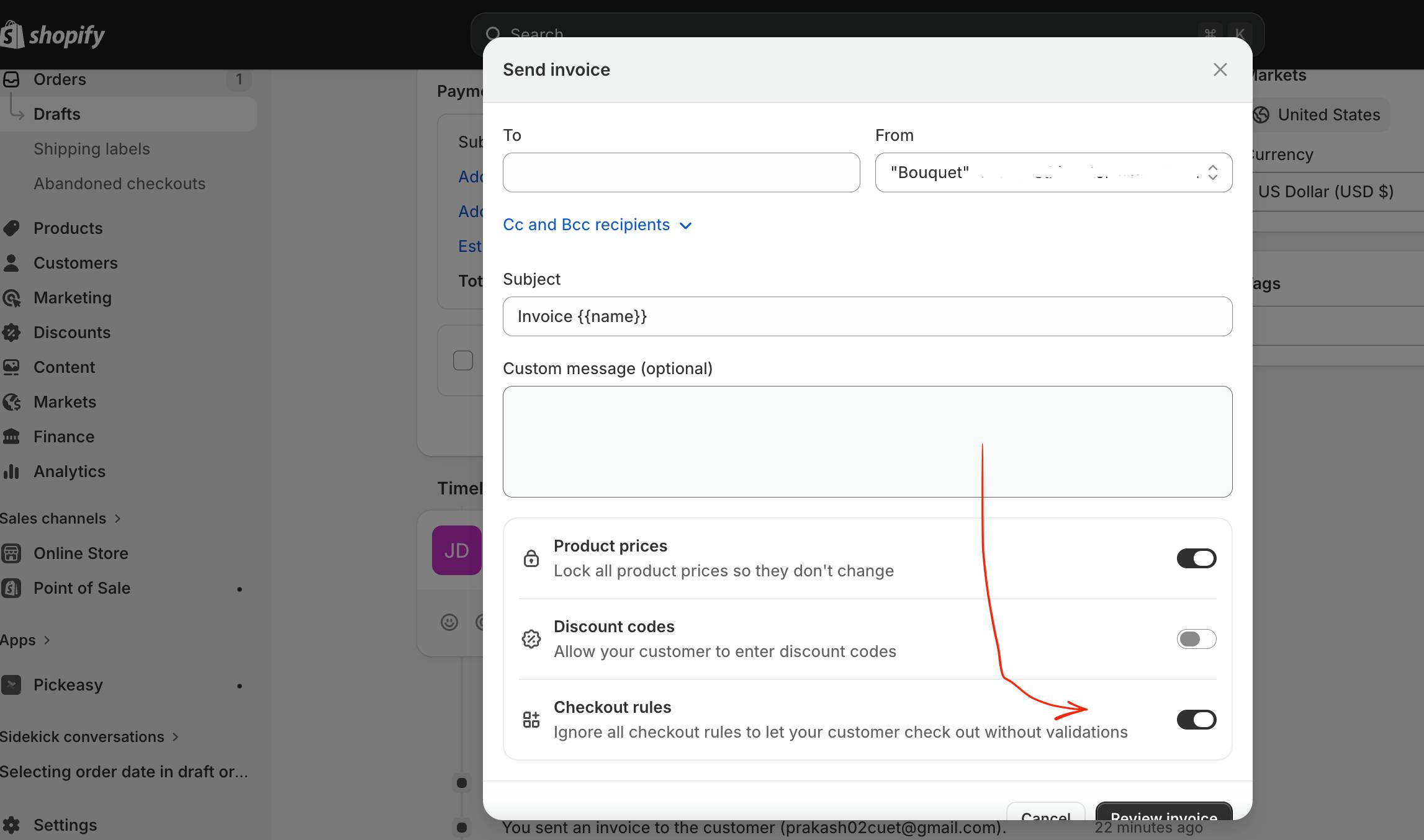
- Click on “Send Invoice”
- Scroll down in the popup window
- Find the option:
- “Checkout rules”
- Enable the toggle: ✔️ Ignore all checkout rules to let your customer check out without validations
- Click Review Invoice
Enabling the mentioned option, customer can complete payment without being blocked by any app validation rules, including Pickeasy’s date/time requirement.
FAQ
❓ Why is my Shopify invoice checkout blocked?
Because third-party apps like Pickeasy add required fields such as delivery date/time.
❓ Can I disable checkout validation rules in Shopify?
Yes, by enabling the “Ignore checkout rules” option when sending a draft invoice.
❓ Does this affect normal checkout?
No, it only applies to the invoice you send.

 All About Basic