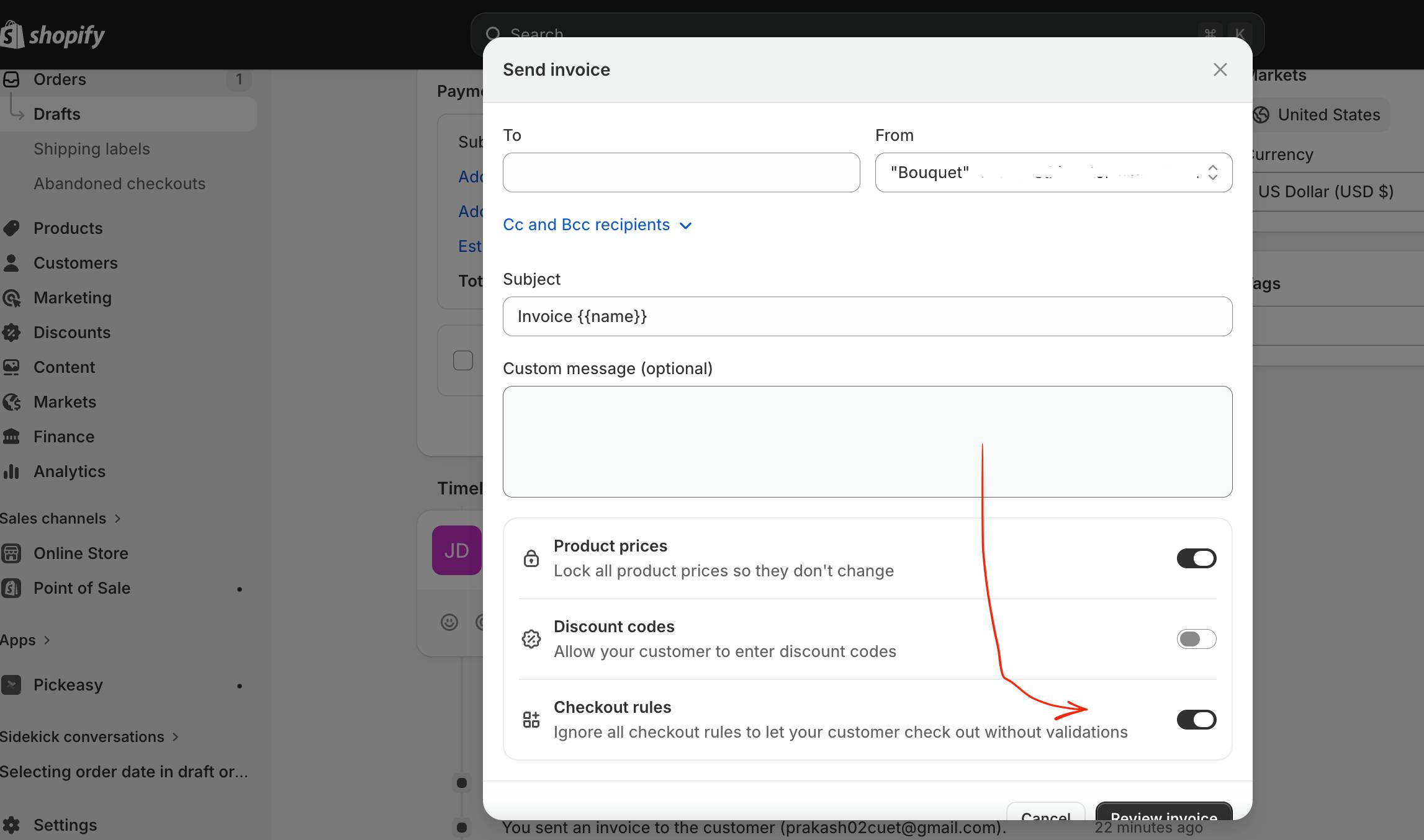
My Client was using shopify store and she faced a frustrating issue. She was trying to send order directly to customers, but when customers was trying to fill in the details and tried to pay, the checkout page was showing some Validation issue because customer is directly using checkout page without giving some information which was necessary in Cart page/ Product page.
Basically, it happens when you try to use some third party apps, here client was using Pickeasy app which was configured to ask Delivery date / time in product page.
So to avoid this scenerio and help the customer pay directly through checkout page you can follow the steps below:
- Go to your Shopify Admin Dashboard
- Open the Draft Order you want to send
- Click on “Send Invoice”
- Scroll down in the popup window
- Find the option:
- “Checkout rules”
- Enable the toggle: ✔️ Ignore all checkout rules to let your customer check out without validations
- Click Review Invoice
Enabling the mentioned option, customer can complete payment without being blocked by any app validation rules, including Pickeasy’s date/time requirement.

 All About Basic