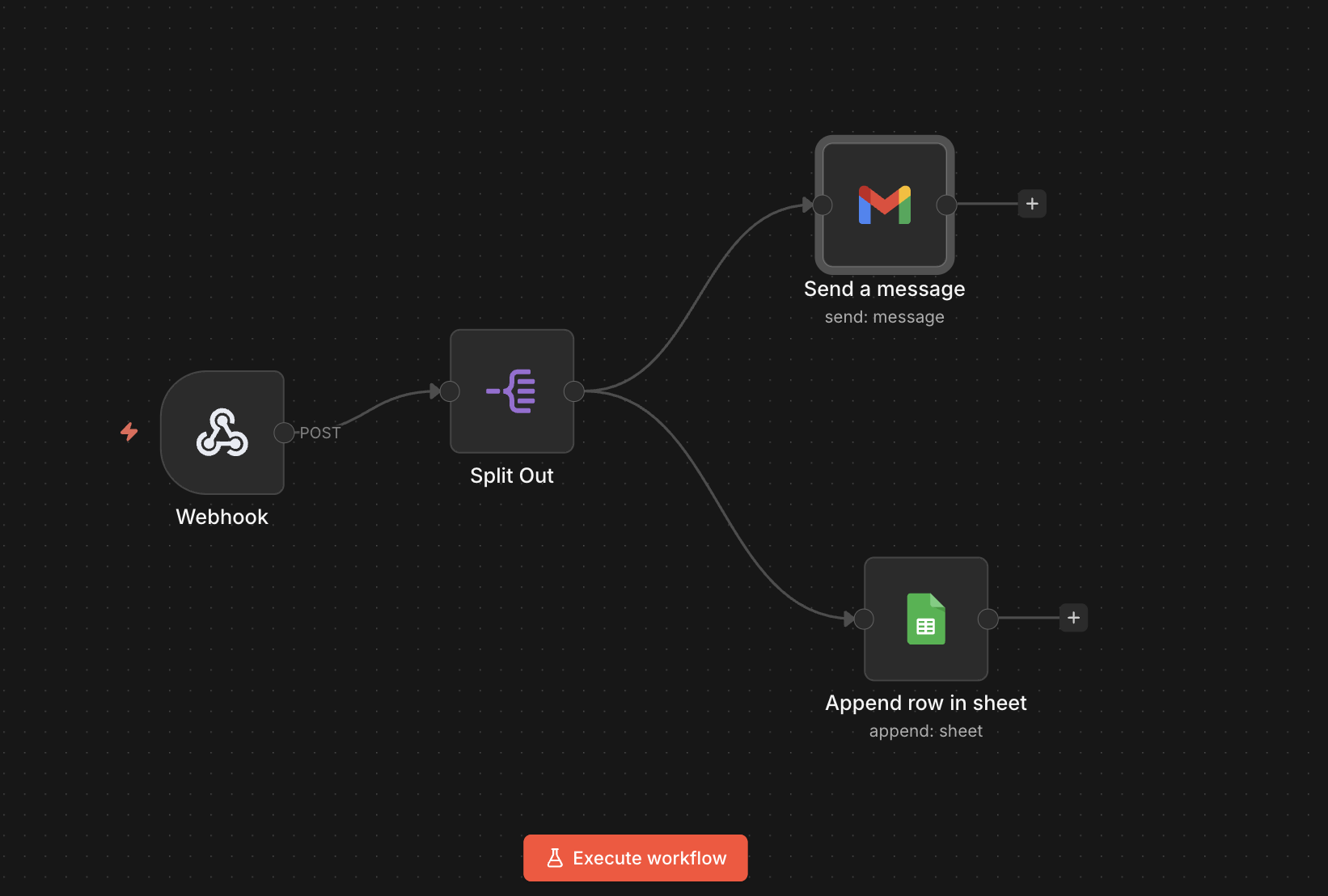
Here’s a simple automation workflow I recently built to track WooCommerce store activity and log structured data into Google Sheets — along with sending a notification to the admin.
When the order status is marked as Completed, the code will work.
I have used the following blocks
1) Webhook block — Receives structured data from the WooCommerce site
2) Split out — Separates product line items for better analysis
3) Send a Message —Sends a formatted notification to admin
4) Append row in a sheet – it will save those infos in google sheet
The code I had to use in functions.php in WordPress theme
add_action('woocommerce_order_status_completed', function($order_id) { $order = wc_get_order($order_id); if (!$order) return; $items_data = []; foreach ($order->get_items() as $item) { $product = $item->get_product(); $items_data[] = [ 'product_id' => $product ? $product->get_id() : null, 'product_name' => $item->get_name(), 'quantity' => $item->get_quantity(), 'price' => $product ? $product->get_price() : null, 'subtotal' => $item->get_subtotal(), ]; } $data = [ 'source' => 'woocommerce', 'order_id' => $order_id, 'status' => $order->get_status(), 'order_date' => $order->get_date_created() ? $order->get_date_created()->date('Y-m-d H:i:s') : '', 'total' => $order->get_total(), 'currency' => $order->get_currency(), // Customer 'customer_id' => $order->get_customer_id(), 'name' => $order->get_billing_first_name() . ' ' . $order->get_billing_last_name(), 'email' => $order->get_billing_email(), 'phone' => $order->get_billing_phone(), 'city' => $order->get_billing_city(), 'country' => $order->get_billing_country(), 'address' => $order->get_billing_address_1(), 'ip' => $order->get_customer_ip_address(), // Marketing 'payment_method'=> $order->get_payment_method_title(), 'coupon' => implode(',', $order->get_coupon_codes()), 'is_returning' => $order->get_customer_id() ? wc_get_customer_order_count($order->get_customer_id()) > 1 : false, // Products 'items' => $items_data, ]; wp_remote_post('https://n8n.example.com/webhook/woocommerce-order', [ 'method' => 'POST', 'body' => json_encode($data), 'headers' => [ 'Content-Type' => 'application/json', ], 'timeout' => 20, 'blocking' => false, ]);});/**** Add this code too if you want to mark all order as Completed automatically*****/add_action('woocommerce_thankyou', function($order_id) { if (!$order_id) return; $order = wc_get_order($order_id); $order->update_status('completed');});
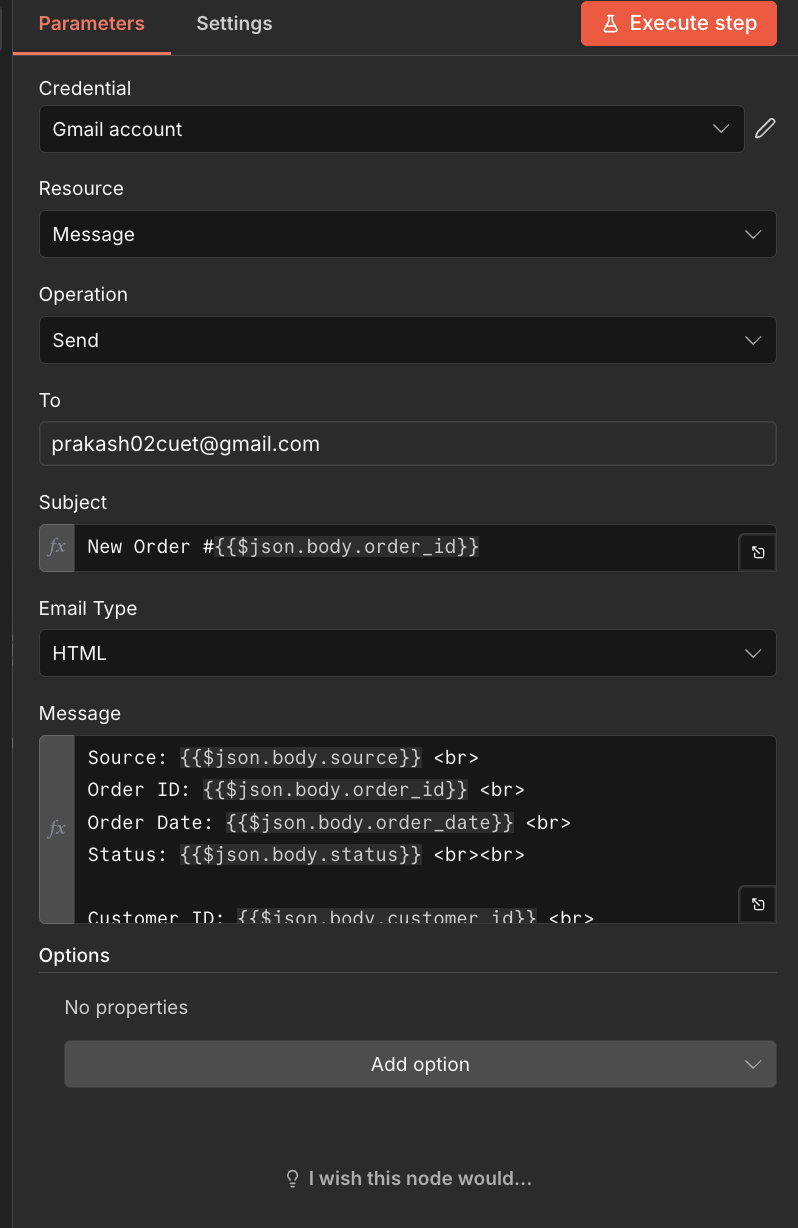
Here is the json used in message body of Send a Message
Source: {{$json.body.source}} <br>Order ID: {{$json.body.order_id}} <br>Order Date: {{$json.body.order_date}} <br>Status: {{$json.body.status}} <br><br>Customer ID: {{$json.body.customer_id}} <br>Name: {{$json.body.name}} <br>Email: {{$json.body.email}} <br>Phone: {{$json.body.phone}} <br><br>Address: {{$json.body.address}} <br>City: {{$json.body.city}} <br>Country: {{$json.body.country}} <br>IP: {{$json.body.ip}} <br><br>Total: {{$json.body.total}} <br>Currency: {{$json.body.currency}} <br>Payment Method: {{$json.body.payment_method}} <br>Coupon: {{$json.body.coupon || 'None'}} <br>Returning Customer: {{$json.body.is_returning ? 'Yes' : 'No'}} <br><br>Product Name: {{$json["body.items"].product_name}} <br>Quantity: {{$json["body.items"].quantity}} <br>Price: {{$json["body.items"].price}}<br>Subtotal: {{$json["body.items"].subtotal}}<br>
Here is the screenshot of Send a message block
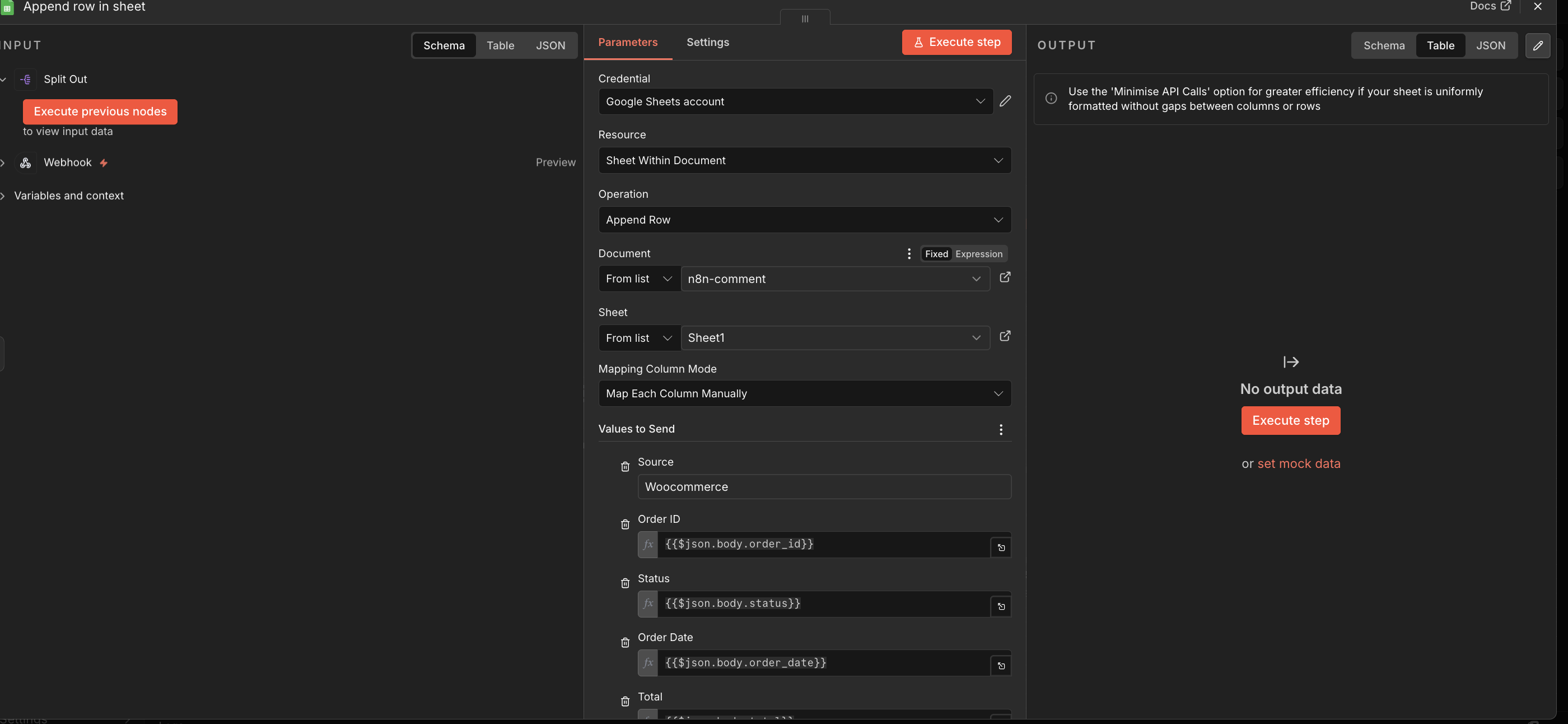
And here is the screenshot of Append row in a sheet block
Though you can improve the workflow by adding various conditions, I have just shared a basic automation to save all of the data automatically.

 All About Basic