Web Development & WordPress

The Rowling Theme by Anders Norén Modifications : Change header, footer,sidebar,colors and design

Theme Rowling modifications
Before i shared Full Width and Centralize Header in Twenty Sixteen (2016). Today i am sharing the modifications (using css) of The Rowling Theme by Anders Norén which is a new theme of wordpress.com. It is a cool theme and you can check Rowling THeme Demo. So lets start with the modifications…
1. If you want to change the Header background color of the Rowling theme by Anders Norén

.header-wrapper {
background: #452632 !important;
}

2. If you want to increase Site Title and Site description’s font color, size and font family in the Rowling theme

*** For site title use this code
.site-title {
font-size: 2.5em;
font-weight: 900;
letter-spacing: 2px;
text-shadow: 0 1px 0 #111;
text-transform: uppercase;
font-family: cursive !important;
}

*** For site Description use this code
.site-description {
color: #999;
font-family: 'Merriweather', Georgia, serif;
font-size: 17px !important;
font-style: italic;
line-height: 115%;
margin: 11px 0 0 0;
}

Continue reading “The Rowling Theme by Anders Norén Modifications : Change header, footer,sidebar,colors and design”

Web Development & WordPress

Show Different Div or HTML elements while selecting different Dropdown option : JQuery and HTML

Basically this code is for advance users who have knowledge about HTML and JQuery.
Here i am sharing you the code which you can use for showing different Div (HTML elements) while selecting different dropdown option (HTML “select” tag). If you have any question feel free to ask question in the comments section.
*** JQuery Part

	<script>
	
	jQuery(document).ready(function() {
 
	jQuery('select.form-control').change(function(){
	  var target = jQuery(this).data('target');
 	  var show = $("option:selected", this).data('show');
 	  jQuery(target).children().addClass('hide');
	  jQuery(show).removeClass('hide');
	});
	});
	</script>

Continue reading “Show Different Div or HTML elements while selecting different Dropdown option : JQuery and HTML”

Web Development & WordPress

Full Width and Centralize Header in Twenty Sixteen (2016) theme: A New Look

twenty-sixteen-theme-new-lookIf you are using Twenty Sixteen (2016) theme, and want it to give it a fully different look with a full width header where the Title and Description will be crentralize, use this modified version of the Twenty Sixteen Theme.

Click Here to Download (Modified Twenty Sixteen Theme)

Also, You can check Twenty Sixteen Theme Customization Documentation in this post.

Continue reading “Full Width and Centralize Header in Twenty Sixteen (2016) theme: A New Look”

Web Development & WordPress

Opencart issue: Changing logo while changing language flag instantly

Use the following code if u want to show different logo image in different language pages in Opencart sites.

This code Also solves / helps

1. Changing language and changing logo instantly…there is no lapses or need to refresh the page again

*** i used this code in Journal2 theme and i had to modify the following file

/public_html/catalog/view/theme/journal2/template/journal2/headers/center.nosecond.tpl

but depending on your opencart theme you may need to modify the header.tpl file

<?php if ( $lang=='ar') { ?>
  <div id="logo"><a href="<?php echo $home; ?>"><img src="/image/LOGODONEARABIC.png" title="<?php echo $name; ?>" alt="<?php echo $name; ?>" /></a>  </div>
  <?php } ?>
  <?php if ( $lang=='en' ) { ?>
  <div id="logo"><a href="<?php echo $home; ?>"><img src="<?php echo $logo; ?>" title="<?php echo $name; ?>" alt="<?php echo $name; ?>" /></a></div>
  <?php } ?>


If you have any issue feel free to ask me question here in comments section

Web Development & WordPress

Customize Premium The Linen Theme by The Theme Foundry with css. Modification of fonts,header, footer, titles and more

Today i am sharing you another premium theme modification which is The Linen Theme by The Theme Foundry. Hope you will enjoy the theme and if you have any question feel free to ask question in comments section.
Linen theme documentation of modifications

Continue reading “Customize Premium The Linen Theme by The Theme Foundry with css. Modification of fonts,header, footer, titles and more”

Web Development & WordPress

Show Current date, week, Month and Year dynamically/automatically using Javascript and HTML in HTML or WordPress sites.

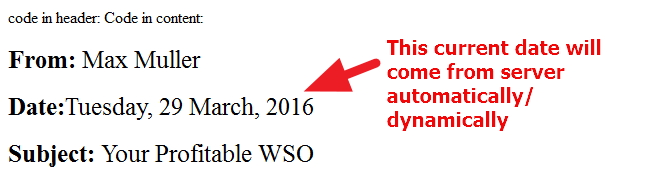
Date script ,show dateWhile developing your site, Sales funnel, landing page,Home page etc either in HTML or in WordPress, you may need to show date consists of date,week,month and year. Here i am sharing you piece of code or script (javascript and html) to show Date in your HTML or wordpress site.

So, if you want to implement the script either in HTML sales or landing pages… the first part of the code(javascript code) need to put within header html tag

<header>  ...the code will go here </header>

and the other part (“Code in Content “) will be in the place where u want to show the date.

Continue reading “Show Current date, week, Month and Year dynamically/automatically using Javascript and HTML in HTML or WordPress sites.”

Web Development & WordPress

WordPress Premium Theme The Zuki by Elmastudio. Modify Header, Footer, Slider ,Widgets font, color, border styles and more using css

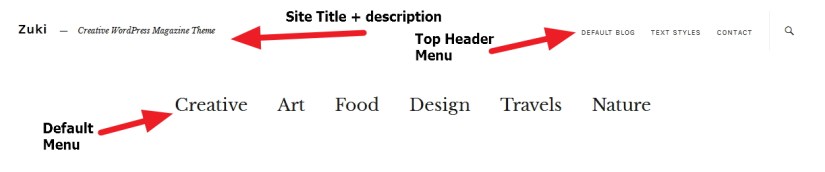
Before I shared CSS modifications of Theme Revelar by Automattic. Today I am sharing many important style or css modifications of The Zuki Theme by Elmastudio.It is a premium theme and you need to purchase it before using it. So if you are willing to purchase the theme and to modify it use the CSS code i have shared here.

Theme Zuki Header Modification

Continue reading “WordPress Premium Theme The Zuki by Elmastudio. Modify Header, Footer, Slider ,Widgets font, color, border styles and more using css”

Web Development & WordPress

Break or split large post into pages in wordpress. Show Next Page and Previous page instead of paginated numbers .

When your post in WordPress got bigger/larger it is a good idea to break the post in pages using

<!--nextpage-->

this helps your larger post to break either in paginated way like 1,2,34 …. or simply ” Previous page Next page “. Here I am sharing you to modify

<!--nextpage-->

to show “Previous Page Next Page ” instead of numbers (like 1,2,3,4…) so that when readers will click on “Next page” they will see the remaining part of the posts.

The Next Page and Previous page will be looked something like the image attached.
wordpress single post modification

Continue reading “Break or split large post into pages in wordpress. Show Next Page and Previous page instead of paginated numbers .”

Web Development & WordPress

WordPress.com Theme Revelar By Automattic Modification, change font, color, sidebar, menus, title etc using css.

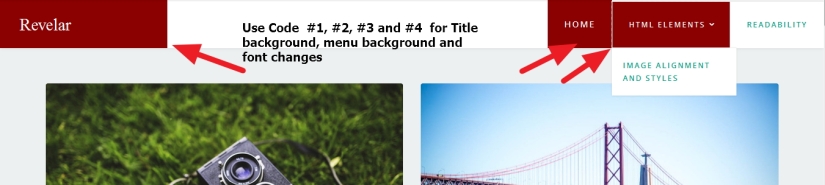
Before i shared 2016(twenty sixteen) theme modification. Today I want to share you some more modifications of the latest Theme Revelar By Automattic.Revelar is a single-column blogging theme, designed to showcase your gorgeous photography and highlight your writing, while providing an immersive experience for your visitors. If you are trying to do changes the color, styles, titles or more just copy the code i have shared here and paste it in your custom css option.
If you need any help feel free to do comments to ask questions.

Theme Revelar by automattic

Continue reading “WordPress.com Theme Revelar By Automattic Modification, change font, color, sidebar, menus, title etc using css.”

Web Development & WordPress

WordPress Twenty Sixteen (2016) theme modifications : Change Colors, titles, metas,sidebar, fonts,header,footer, menus etc using css.

Before I shared you wordpress Twenty Eleven theme, twenty Twelve theme, Twenty Thirteen theme, Twenty Fourteen Theme modifications using css. Here i am sharing edits of Twenty Sixteen theme which you can use in your site CSS to make your site different…

1. If you want to remove space from above the Site Title

#masthead {
padding-top: 0px !important;
padding-bottom: 12px !important;
}

2. Change Site title’s font color and size

.site-title a {
color: red !important;
font-family: times new roman !important;
}
.site-title {
font-size: 34px !important;
}

twenty-sixteen-theme-modification
Continue reading “WordPress Twenty Sixteen (2016) theme modifications : Change Colors, titles, metas,sidebar, fonts,header,footer, menus etc using css.”