Java Basic Problems

Java Vector Numeric value and SQL Query: How to use Numeic or integer values of a vector in SQL and also how to execute them.

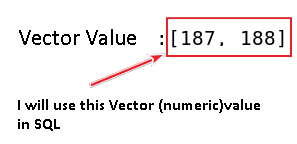
use Vector numeric or integer  value in sql using javaSometimes we may need to use the value of a vector mainly the integer or numeric value in SQL to execute a query . Suppose you have a vector named   studentAge which contains two numeric value for example: [10,12]. Now, if you want to use these two vectors in the SQL to for query execution then you have to write the query as given below.

String sql=”select student_name from student where student_age in (” + studentAge .toString().substring(1, studentAge.toString().lastIndexOf(“]”))+”) and student_class =”+student-class;

Just You have to use the following line

(” + studentAge.toString().substring(1, studentAge.toString().lastIndexOf(“]”))+”)


Continue reading “Java Vector Numeric value and SQL Query: How to use Numeic or integer values of a vector in SQL and also how to execute them.”

Java Basic Problems

Java HashMap Key Value Pair: How to show the Key Value pair data of HashMap.

hashmap key value pair data javaSometimes in java while we do coding and use HashMap we may need to check or see the values reside in Key and their corresponding Data or Values at the same time. Here I am sharing you another simple but useful technique to see the key value pair data of HashMap at a time. Just copy the code below and run it on your computer.

Continue reading “Java HashMap Key Value Pair: How to show the Key Value pair data of HashMap.”

Java Basic Problems

Java break string in into individual words: How to split a string according to space,comma, colon and more between them and then save it in an array of string.

split string into words and string manipulationToday I am sharing you another basic but important technique about string manipulation. While coding in java, sometimes we need to split or break a string into individual word according to space, commas, colon or any other character between them and then save that individual words into an array of string.

The coding is simple and you can test it according to your need. Just copy the code below and run it in your own machine. Please give comments if this solution is helpful for you.

Continue reading “Java break string in into individual words: How to split a string according to space,comma, colon and more between them and then save it in an array of string.”

Java Basic Problems

Java String Manipulation: How to search or match any given word in a string and then replace that word

search a word in a string and then replace javaHere, I am sharing you another basic technique about java where I have searched a word in a String and then replace it by another word. In this technique I have avoided case differences (avoiding upper case or lower case letter difference). From this example you will be able to know about

  1. How to search any specific word in a string
  2. 

  3. How to avoid case difference  while searching a word in a string using java
  4. How to replace any specific word ignoring case difference.


Continue reading “Java String Manipulation: How to search or match any given word in a string and then replace that word”

Java Basic Problems

Java JButton Click event and JTable: Click on the JButton and the JTable will show or appear

Here I am sharing you a simple but useful way about JButton and JTable. Sometimes in designing   software, where we are using JButton and JTable, we may need to code or design in such a way that just user will click on the JButton (by using JButton ActionListener) and the JTable will show or appear with its value. Copy the code below and run on your computer.

Continue reading “Java JButton Click event and JTable: Click on the JButton and the JTable will show or appear”

Java Basic Problems

Java JButton below the JTable: How to use and place JButton just under or beneath the JTable.

JBUtton below the JTableHere I am sharing with you another simple but important  fact related to  java JTable and JButton. If you are using JButton and JTable in your software, it may need to place your JButton just under or below the JTable. Here I have shown the way how to place JButton just beneath the JTable. Just copy the code below and run in your pc.

Here is the Code:   JButton Just Below or beneath the JTable

Continue reading “Java JButton below the JTable: How to use and place JButton just under or beneath the JTable.”

Web Development & WordPress

Theme Pilcrow by Automattic CSS Edit: How to edit the CSS style sheet to fit the size of your custom header?

Theme Pilcrow custom header by using css

Yesterday while visiting the forum I found another WordPress blogger, who was using theme Pilcrow by Automattic, faced problem to edit the CSS to use Custom header in her blog.  She tried a lot to implement and use her Custom header in the blog by using CSS but didn’t get success. While examining her CSS code I found she did a little mistake for which her favorite custom header was not appearing in her blog. Actually  the header Width and Height was  800 x 300 px, I found  that in her CSS she used  Width:800 px  but  she did mistake in the height value which she used was  Height :3px (wrong value, it should be 300px). So, if you have purchased CSS upgrade from WordPress and using Pilcrow theme and want to change the header of your theme, just use the following code: Continue reading “Theme Pilcrow by Automattic CSS Edit: How to edit the CSS style sheet to fit the size of your custom header?”

Java Basic Problems

JTable Cell Validation: How to make Cells of first Column will take Char (string)input other Cells of second column will take int (integer ) input.

Two different JTable Cell two different inputIn my last post  I shared  about how to assign two different JTextField in two different JTable Column cells. Today I am sharing with you  another important part of  JTable cell validation where I have tried to show you about how to make  first column of JTable cells take only Char or string input and also at the same time  how to make the  cells second column  take int (integer ) input from the users. To implement this validation process I have assigned two different JTextField in two different JTable Cell Column. Just Copy the following code and Run it in your pc.

Continue reading “JTable Cell Validation: How to make Cells of first Column will take Char (string)input other Cells of second column will take int (integer ) input.”

Java Basic Problems

JTable Cell Edit for validation: How to assign two Different JTextField in two different JTable Column Cells.

Two JTextField in two different Table Column cellThis post is also related to JTable cell validation, suppose our JTable has 3 columns.  First column will take String or character type input and the second column or Column 2 will take integer type input from users. So, if we want to implement this scenario in our software we can solve it by assigning or using two different JTextField  for the cells of  Column 1 and Column 2 in JTable. In our example we used textBox1 (JTextField) in Column 1, which will  validate string or char type input from users and  for Column 2  I have assigned    textBox (JTextField) to validate int type input from the users.  The given solution is just a basic you can implement it as your own way.  Just Copy the following code and run it.


Continue reading “JTable Cell Edit for validation: How to assign two Different JTextField in two different JTable Column Cells.”

Java Basic Problems

Java JTable Cell and JTextField: How to use and assign JTextField in JTable cell.

I think, to assign a JTextField in JTable cells is really important for the purpose of JTable cell validation. For many purpose in software development where we use JTable may need to use JTable cell validation  and for this validation purpose we may also need to assign and use JTextField in JTable cell. In the given Example, I have assigned and used  a JTextField  in the  Column 2  of the following JTable. Just Copy the code and Run it in your computer.

Continue reading “Java JTable Cell and JTextField: How to use and assign JTextField in JTable cell.”