The following program will show you how to show image in the table of a pdf using java and iText. It is too much easy. If you face any problem to understand please leave a reply.
** I have used NetBeans IDE 5.0 and JDK 1.4.2 –Old Version :(
** To run this Code, you have to add pgsql.jar (postgre sql driver),iText-2.1.7.jar( To Create PDF) in your classpath
The OutPut will be like this:
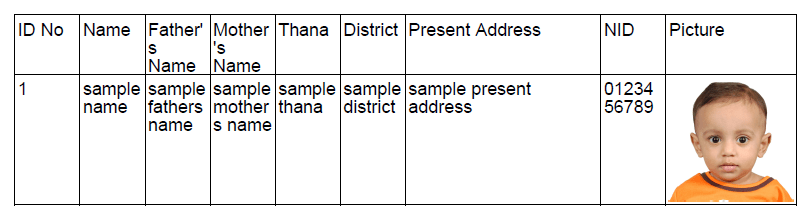
/*****************************************************/
package db2pdf;
import java.io.*;
import com.lowagie.text.*;
import com.lowagie.text.pdf.*;
import java.sql.*;
import java.util.*;
import java.io.*;
/**
*
To run this Code, you have to add pgsql.jar (postgre sql driver),iText-2.1.7.jar( To Create PDF) in your classpath
*/
public class Main {
public Main() {
}
public static void main(String[] args) {
Document doc=null;
PdfPTable table=null;
Image image=null;
try{
System.out.println(“entered”);
doc=new Document();
PdfWriter.getInstance(doc,new FileOutputStream(“C:\\Table.pdf”));
doc.open();
table=new PdfPTable(9);
table.setWidthPercentage(100);
table.setWidths(new float[] {1f, 1f, 1f, 1f,1f, 1f,3f,1f,2f});
table.addCell(“ID No”);
table.addCell(“Name”);
table.addCell(“Father’s Name”);
table.addCell(“Mother’s Name”);
table.addCell(“Thana”);
table.addCell(“District”);
table.addCell(“Present Address”);
table.addCell(“NID”);
table.addCell(“Picture”);
//doc.add(table);
// doc.close();
}
catch(Exception e){}
/*******************DB Connection Started*************************/
Connection result = null;
String DB_CONN_STRING =”jdbc:postgresql://localhost:5432/replicationdb”;
String DRIVER_CLASS_NAME = “org.postgresql.Driver”;
String USER_NAME = “XYZ”;
String PASSWORD = “line”;
try {
Class.forName(“org.postgresql.Driver”);
}
catch (ClassNotFoundException cnfe){
// log(“Check classpath. Cannot load db driver: ” + DRIVER_CLASS_NAME);
System.out.println(“Couldn’t find the driver!”);
System.out.println(“Let’s print a stack trace, and exit.”);
cnfe.printStackTrace();
System.exit(1);
}
try {
result = DriverManager.getConnection(“jdbc:postgresql://localhost/Test”, USER_NAME, PASSWORD);
}
catch (SQLException se){
//log( “Driver loaded, but cannot connect to db: ” + DB_CONN_STRING);
System.out.println(“Couldn’t connect: print out a stack trace and exit.”);
se.printStackTrace();
System.exit(1);
}
// return result;
/*******************DB Connection finished***************************/
/**************************** Query Initialization ***************/
try{
PreparedStatement ps = result.prepareStatement(“select id,name,fathername,mothername,thana,district,presentaddress,nidno,picture from worker2 “);
ResultSet rs = ps.executeQuery();
if (rs != null) {
while(rs.next()) {
table.addCell(new String(rs.getBytes(1)));
table.addCell(new String(rs.getBytes(2)));
table.addCell(new String(rs.getBytes(3)));
table.addCell(new String(rs.getBytes(4)));
table.addCell(new String(rs.getBytes(5)));
table.addCell(new String(rs.getBytes(6)));
table.addCell(new String(rs.getBytes(7)));
table.addCell(new String(rs.getBytes(8)));
image = Image.getInstance (rs.getBytes(9));
System.out.println(“Image:”+rs.getBytes(9));
table.addCell(image);
}}
doc.add(table);
//doc.add(image);
doc.close();
String file=”C:\\Table.pdf”;
Runtime.getRuntime().exec(“rundll32 url.dll,FileProtocolHandler “+file);
}
catch(Exception e){}
/**************************** Query Initialization ***************/
}
}


 All About Basic