Java Basic Problems

Java Date and Time: How to show Date and Time using DateFormat in java.

Here is an example to illustrate about how to show Date and Time using DateFormat function in java.

Code Example:

import java.text.*;

import java.util.*;

class DateFormatDemo {

public static void main(String args[]) {

Date date = new Date();

DateFormat df;

df = DateFormat.getDateInstance(DateFormat.SHORT);

System.out.println(“\n”);

System.out.println(“Short form: ” + df.format(date));

df = DateFormat.getDateInstance(DateFormat.LONG);

System.out.println(“Long form: ” + df.format(date));

System.out.println();

df = DateFormat.getTimeInstance(DateFormat.SHORT);

System.out.println(“Short form: ” + df.format(date));

df = DateFormat.getTimeInstance(DateFormat.LONG);

System.out.println(“Long form: ” + df.format(date));

}

}

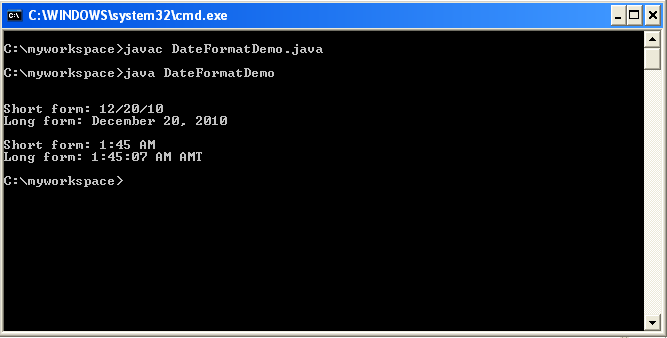
OutPut:

Date and Time java

Java Basic Problems

Java: Multiplication and Division of Float variables by defining and using static methods


In my last post I have shared about How to sort string in alphabetical order in array. 

Today I am sharing a new idea.


Static methods can be called without using the objects. They are also available for use by other classes.

In this example, I have used two float variables and passed them to another class for multiplication and division operation.

Here is the Code example:
class MathOperation

{

static float mul(float x, float y)

{

return x*y;

}

static float divide(float x, float y)

{

return x/y;

}

}

class MathApplication

{

public  static void main(String args[])

{

System.out.println(“\n”);

float a = MathOperation.mul(4.0f,5.0f);

System.out.println(“Result After Multiplication of Float Values=”+a);

float b = MathOperation.divide(a,2.0f);

System.out.println(“\n”);

System.out.println(“Result After Division of Float Values=”+b);

System.out.println(“\n”);

}

}

 OUTPUT:

multiplication and division float values java

Java Basic Problems

Java: How to sort string in alphabetical order.

In my last post I have tried to share about How to convert integer variable to object type in java.Today I will share with you about how to sort string in an array alphabetically.

Here compareTo() function is used to sort string in an alphabetical order in java.

According to compareTo() function  a string is less than another if it comes before the other in   dictionary order and a string is greater than another if it comes after the other in dictionary  

order.

If you want to ignore case differences when comparing two strings, use compareToIgnoreCase( ),

 String sorting in alphabetical order in java

Code Example:

class StringOrder

{

 static String name[]={“Chittagong”,”Dhaka”,”Rangpur”,”Sonargaon”,”Bangladesh”};

public static void main(String args[])

{

int size= name.length;

String temp=null;

System.out.println(“\n”);

for(int i=0;i<size;i++)

{

for(int j=i+1;j<size;j++)

{

if(name[j].compareTo(name[i])<0)

{

//System.out.println(“name[j]:”+name[j]+”compareTo(name[i]):< 0:”+name[i]);

temp=name[i];

name[i]=name[j];

name[j]=temp;

}}}

for(int i=0;i<size;i++)

{

System.out.println(name[i]);

}}}

Java Basic Problems

Wrapper class: Convert integer variable to object type in java.

In my last post I have shared about How to share and call a class from another class.Today I will share with you about type conversion process in java. For example: int to object conversion, float to object conversion etc.

By using the wrapper class primitive data types for example: int, float,long, char can be converted into object types.

 Here is the example

Integer AgeVal= new Integer(i);

Float  FltVal= new Float(f);

Double DblVal= new Double(d);

Long LngVal= new Long(l);

Here i,f,d,l  are primitive data types indicating integer, float, double and long data types.

Java Basic Problems

Java Class: How to call and use a class from another class?

In my last post I have discussed about Float Type variable and how to add two float type variable.

Here I will share you about how to use and call a class from another class in Java.

 use a class from another class java

Here is the example:

class Room

{

float length;

float breadth;

void getdata(float  a, float b)

{

length=a;

breadth=b;

}

}

class RoomArea

{

public static void main(String args[])

{

float area;

Room room1=new Room();

room1.getdata(14,10);

area=room1.length*room1.breadth;

System.out.println(“Area:”+area);

}

}

Java Basic Problems

Java: How to Take input of Float type variables and then add it??

In my last post I have shared about  How to add Integer numbers in Java.

Here I have shown how to add and work with float type variables in java.

In the given example I have taken two float type variable as input and then add it.

 float variable java

Code Example

import java.io.*;

class FloatDemo

{

public static void main(String args[])

{

float floatNumber=0.0f;

float floatNumber1=0.0f;

float sumOf=0.0f;

BufferedReader br=new BufferedReader(new InputStreamReader(System.in));

try{

System.out.println(“\n”);

System.out.println(“************************************”);

System.out.println(“\n”);

System.out.println(“Enter 1st Floating point input:”);

floatNumber=Float.valueOf(br.readLine()).floatValue();

System.out.println(“\n”);

System.out.println(“Enter 2nd Floating point input:”);

floatNumber1=Float.valueOf(br.readLine()).floatValue();

System.out.println(“\n”);

sumOf=floatNumber+floatNumber1;

System.out.println(“After Addition of the 2 float  number =”+sumOf);

System.out.println(“\n”);

System.out.println(“************************************”);

}

catch(Exception e)

{

Exception newEx=new Exception(“Error at:”+new java.util.Date()+””,e);

newEx.printStackTrace();

}

}

}

Java Basic Problems

Java:Check Empty String and Avoid Null Pointer Exception

In my last post I have shared about the features of  Final Class,Variables and Methods.

Today I am going to share about how to check a string is Empty or not and also how to avoid Null Pointer Exception in java which occurs due to null value of  string.

Here I have used JOptionPane showInputDialog to take String Input from the user and then I checked the String entered by the user is empty or not.

If we check the string using the method given below we will be able to avoid Null Pointer Exception.


null pointer exception java

Here is the given example:

import javax.swing.*;

public class StringDemo

{

 StringDemo()

{

String reasonMsg;

reasonMsg=JOptionPane.showInputDialog(“Pleas Enter Your Name”,””);

System.out.println(“\n”);

System.out.println(“ReasonMsg:”+reasonMsg);

try

                                                {

                                                System.out.println(“\n”);

                             if(reasonMsg.trim().toString().length()==0)

                                      {

          JOptionPane.showMessageDialog(null,”You Entered Nothing”);

                                      }

                                                 if (reasonMsg.trim().toString().length()!=0)

                                                 {   

                                                                   JOptionPane.showMessageDialog(null,”You Name is:”+reasonMsg);

          System.out.println(“Your name is :”+reasonMsg);

                                                 }  

                                                }

          catch (Exception ex) {

Exception newEx = new Exception(“Error at:”+new java.util.Date()+””,ex);

 newEx.printStackTrace();

                                                }

}

public static void main(String args[])

{

StringDemo x=new StringDemo();

}

}

Java Basic Problems

Java: Final Variables, Methods and Final Classes

In my last post I have shared about  JButton and JMenuItem ActionListener.

Here I have shared about Final Variables, Methods and Final Class.

By default all methods and variables can be overridden in subclasses.

It is possible to prevent the subclasses from overriding the members of super class; we can declare them as final using the keyword final as a modifier.

The value of a final variable  can never be changed.

Ex : final int age=45;

Making a method final ensures that the functionality defined in this method will never be altered in any way.

Ex: final void age()

{

——

}

Final Classes

It may happen that  we want to prevent a class being subclassed for security reasons or for any other reason related to our software . We can do it easily using final class.  So,  the class that cannot be subclassed is called a final class.

Ex: final class age

{

}

If we try to inherit the above class will cause an error and the compiler will not allow it. It prevents any unwanted extension to the class.

Java Basic Problems

Java : How to know JButton is Clicked or JMenuItem is Clicked??

In my last post I have shared about How to show Bangla(Bengali) in JLabel.

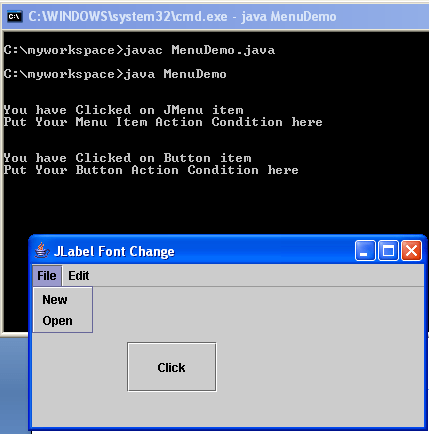
Here I am going to share you about the detection of click event on Java swing .components.

In out java programming we usually use addActionListener  to detect any type of action performed on  java components. For example we can add addActionListener on JMenuItem, JButton etc.

Here I have given how to add actionListener in an easiest way and also about how to detect which component is being clicked.

There are various ways by which you can do the same work. But I found the below procedure is the easiest one.

 OUTPUT:
java actionlistener

Code Example:

import java.awt.*;

import javax.swing.*;

import java.awt.event.*;

import java.awt.*;

public class MenuDemo extends JFrame implements ActionListener

{

JMenuBar menuBar = new JMenuBar();

JMenu menu = new JMenu(“File”);

JMenu menu1 = new JMenu(“Edit”);

JMenuItem item1 = new JMenuItem(“New”);

JMenuItem item2 = new JMenuItem(“Open”);

JButton myButton=new JButton(“Click”);

public MenuDemo()

{

setJMenuBar(menuBar);

setVisible(true);

setSize(400,200);

menuBar.add(menu);

menuBar.add(menu1);

item1.addActionListener(this);

myButton.addActionListener(this);

menu.add(item1);menu.add(item2);

JPanel panel=new JPanel();

setTitle(“JLabel Font Change”);

setDefaultCloseOperation(EXIT_ON_CLOSE);

getContentPane().add(panel);

panel.setLayout(null);

myButton.setBounds(95,55,90,50);

panel.add(myButton);

    }

 public void actionPerformed(ActionEvent e){

                   // TODO Auto-generated method stub

                   try {

                             if(e.getSource()==item1){

                             System.out.println(“\n”);

                             System.out.println(“You have Clicked on JMenu item”);

                             System.out.println(“Put Your Menu Item Action Condition here”);

                                                    }

                             else if(e.getSource()==myButton){

                             System.out.println(“\n”);

                             System.out.println(“You have Clicked on Button item”);

                             System.out.println(“Put Your Button Action Condition here”);

                                                    }

                             }

          catch(Exception exc){

    Exception newEx = new Exception(“Error at:”+new java.util.Date()+””,exc);

    newEx.printStackTrace();

   }

 }

 public static void main(String[]args)

 {

 MenuDemo ex=new MenuDemo();

 ex.setVisible(true);

 }

   }
Java Basic Problems

Java: I want to show Bangla(Bengali) in JLabel

In my last post I have discussed about How to Read a text file and search any specific word from that.

Today I will share with you another important fact in java porgramming about how to show Bangla (Bengali) font in JLabel using java.

The Font I have used here is not an Unicode font. To show Bangla I have used SuttonyMJ font.

I have a wish to share with you in another post about Unicode font in Java.

To show Bangla in JLabel is little bit tricy. Just write the Bengali word in a MSWord file and then pest it in the JLabel.

For example: JLabel label2=new JLabel(” †`Lv,  weeiY,  Rvbv”,JLabel.CENTER);

In the code you may not see the Bengali font accurately but after running the code, Java will show you the code accurately.

Check the OUTPUT:

 JLabel Bangla font java

Code Example:

import javax.swing.*;

import java.awt.*;

class labelFont extends JFrame

{

JLabel label1=new JLabel(“see,  description,  know”,JLabel.CENTER);

JLabel label2=new JLabel(” †`Lv,  weeiY,  Rvbv”,JLabel.CENTER);

JLabel label3=new JLabel(“I like Programming and I am a beginner”);

labelFont()

{

          label1.setBounds(95,00,140,40);

          label2.setBounds(95,35,140,40);

          label3.setBounds(15,200,270,40);

          Font displayFont=new Font(“Times New Roman”,Font.PLAIN,12);

    label1.setFont(displayFont);

          Font displayFont1=new Font(“SutonnyMJ”,Font.PLAIN,16);

    label2.setFont(displayFont1);

                  setSize(300,300);

                             setTitle(“JLabel Font Change”);

                             setDefaultCloseOperation(EXIT_ON_CLOSE);

                  JPanel panel=new JPanel();

            getContentPane().add(panel);

                             panel.setLayout(null);

                             panel.add(label1);

            panel.add(label2);

            panel.add(label3);

}

public static void main(String args[])

{

labelFont myFont=new labelFont();

myFont.setVisible(true);

}

}