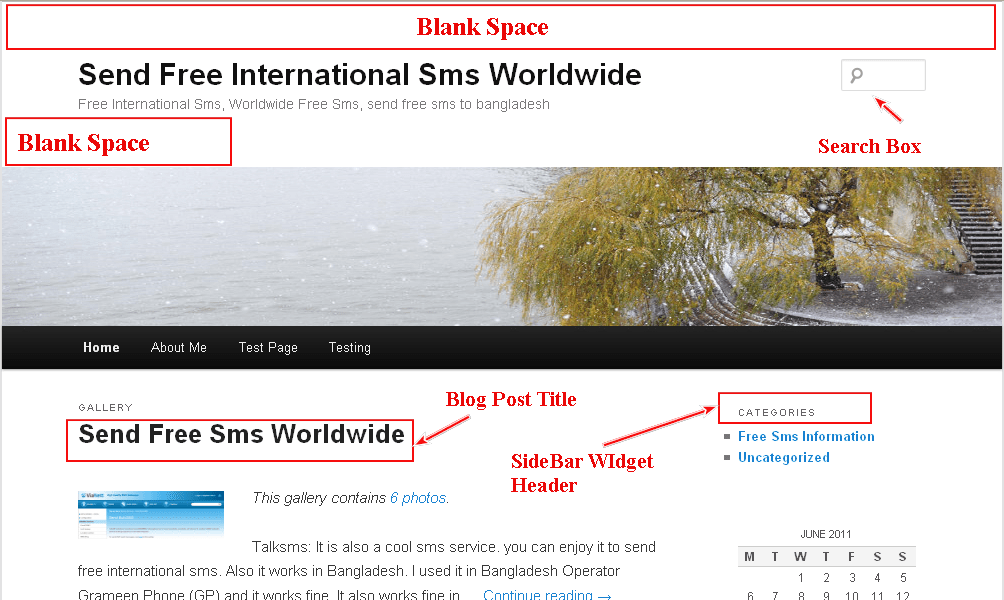
Here I have tried to show you some basic but important modification of CSS style sheet of Twenty Eleven theme recently released by wordpress.com. It is new version of Duster theme with new name.
By modifying the css of your theme you can give your Default Twenty Eleven a new look and can make it outstanding…
Just paste the code in your style sheet and try.
1. If you want to Header Site Title Font color,font size, font type of your Twenty Eleven theme
#site-title a {
color: red;
font-family: times New Roman;
font-size: 30px;
font-weight: bold;
line-height: 36px;
text-decoration: none;
}
2. If you want to change the Site Title’s mouse over (hover) font color of Twenty Eleven
#site-title a:hover, #site-title a:focus, #site-title a:active {
color: #1982D1;
}
3. If you want to remove the Blank space from the upper side of the Site Title
#site-title {
margin-right: 270px;
padding-bottom: 0;
padding-left: 0;
padding-right: 0;
padding-top: 1.65625em;
}
4. If you want to remove the Blank space just from the footer side of Site Title of Twenty Eleven
#site-description {
color: #7A7A7A;
font-size: 14px;
margin-bottom: 1.65625em;
margin-left: 0;
margin-right: 270px;
margin-top: 0;
}
5. If you want to change the Site Description’s font color, font size and font family of theme twenty eleven
#site-description {
color: blue;
font-family: tahoma;
font-size: 14px;
margin-bottom: 1.65625em;
margin-left: 0;
margin-right: 270px;
margin-top: 0;
}
6. If you want to change the Height of Header Image of twenty eleven
#branding img {
height: 100px;
margin-bottom: -7px;
width: 100%;
}
7. If you don’t want to show the search from the top
#branding #searchform {
display: none;
position: absolute;
right: 7.6%;
text-align: right;
top: 3.8em;
}
8. If you want to change the background color of navigation Menu in Twenty Eleven theme
#access {
background-image: -moz-linear-gradient(#252525, red);
}
9. If you want to change the Post Title’s font color, font type and font size (In Homepage)
.entry-title, .entry-title a {
color: red;
font-family: tahoma;
font-size: 1.2em;
text-decoration: none;
}
// for individual blog post Try this one
.singular .entry-title {
color: #000000;
font-size: 36px;
font-weight: bold;
line-height: 48px;
}
10. If you want to change Blog Post Titl’e Hover font color
.entry-title a:hover, .entry-title a:focus, .entry-title a:active {
color: #1982D1;
}
11. If you don’t want to show “Posted On” or Blog Post date (entry meta)
It will also help you to hide the Footer side entry meta.
.entry-meta {
clear: both;
color: #666666;
display: none;
font-size: 12px;
line-height: 18px;
}
12. If you want to change blog Posts font color, size and font type.
.entry-content p {
font-family: times New Roman;
color: red;
font-size: 1.1em;
}
13. If you want to change Right SideBar widget Title’s font color, size and font type
.widget-title {
color: black;
font-family: times New Roman;
font-size: 18px;
font-weight: bold;
letter-spacing: 0.1em;
line-height: 2.6em;
text-transform: uppercase;
}
14. If you want to change right side bar widget’s Links color, font size,font type of Twenty Eleven
.widget a {
color: black;
font-family: times New Roman;
font-size: 14px;
font-weight: bold;
text-decoration: none;
}
15. If you want to add additional widget titles colored background in Theme twenty eleven
.widget-title {
background-color: gold;
color: black;
font-family: times New Roman;
font-size: 18px;
font-weight: bold;
letter-spacing: 0.1em;
line-height: 2.6em;
padding-left: 37px;
text-transform: uppercase;
}
16. If you want to change or Increase the width of Right Sidebar
#primary {
float: left;
margin-bottom: 0;
margin-left: 0;
margin-right: -26.4%;
margin-top: 0;
width: 90%;
}
#secondary {
float: right;
margin-right: 7.6%;
width: 24.8%;
}
17.If you dont want to show or dont want your user to comments in your blog
#comments {
display: none;
}
18.If you want to change the comments font color,size and font type
.comment-content p {
color: red;
font-family: times New Roman;
font-size: 16px;
}
19. If you want to change the font color of Navigation menu
#access a {
color: red;
display: block;
line-height: 3.333em;
padding-bottom: 0;
padding-left: 1.2125em;
padding-right: 1.2125em;
padding-top: 0;
text-decoration: none;
}
20. If you want to change the font size,font type of Comments Author Name and Date
.comment-meta {
font-size: 16px;
line-height: 2.2em;
}
21. If you don’t want to show footer side Tag in twenty eleven
.entry-meta {
clear: both;
color: #666666;
display: none;
font-size: 12px;
line-height: 18px;
}
22. If you want to change the body background color of twenty eleven
body {
background-color: red;
}
23. If you want to change HomePage Blog Posts summary background color
#page {
background-color: yellow;
}
24. If you want to change blog post Title’s Background color of Twenty Eleven
.entry-title, .entry-title a {
background-color: gray;
color: #222222;
text-decoration: none;
}
25. If you dont want to show Comments Bubble (Number of image) in the right side of Post Title
.entry-header .comments-link a {
display: none;
}
26.If you only want to change HomePage Blog Post’s Background Color
#content {
background-color: gold;
margin-bottom: 0;
margin-left: 7.6%;
margin-right: 34%;
margin-top: 0;
width: 58.4%;
}
27. If you want to remove the complete Header portion ( Site Title, Site Description and search box)
#branding hgroup {
display: none;
margin: 0 7.6%;
}
28. If you want to change the space between the Navigation Menu Of theme Twenty Eleven try the following CSS
#access a {
color: black;
display: block;
font-size: 14px;
line-height: 3.333em;
padding: 0 0.6em;
text-decoration: none;
}
29. If you want to reduce the padding between my pictures and text Of theme Twenty Eleven try the following CSS
p {
margin-bottom: 1.625em;
}
img.alignleft, img.alignright, img.aligncenter {
margin-bottom: 0;
}
30. If you want to align your blog post, site title and Navigation menu left aligned in Twenty Eleven THeme try the following CSS
#branding hgroup {
margin: 0 0.6%;
}
#access div {
margin: 0 0.6%;
}
#content {
margin: 0 34% 0 0.6%;
width: 58.4%;
}
31. If you want to add a border in the right side of blog post content in Twenty Eleven THeme try the following CSS
#content {
border-right: 1px dotted;
margin: 0 34% 0 0.6%;
padding-right: 11px;
width: 61.4%;
}
32. If you don’t want to show the bullet in the link of rightbar of Twenty Eleven THeme try the following CSS
.widget ul li {
color: #777777;
font-size: 13px;
list-style: none outside none;
}
33. If you want to show border after the widgets of rightbar of Twenty Eleven THeme try the following CSS
.widget {
border-bottom: 1px dotted grey;
clear: both;
padding: 15px 0 20px;
}
34. If you want to change the hover color of the Navigation Menu of Twenty Eleven THeme try the following CSS
Note : change the color code as your choice.and paste the code at the bottom of style.css of your main (parent theme)
#access li:hover > a,
#access a:focus {
background: #f9f9f9; /* Show a solid color for older browsers */
background: -moz-linear-gradient(#f9f9f9, #e5e5e5);
background: -o-linear-gradient(#f9f9f9, #e5e5e5);
background: -webkit-gradient(linear, 0% 0%, 0% 100%, from(#f9f9f9), to(#e5e5e5)); /* Older webkit syntax */
background: -webkit-linear-gradient(#f9f9f9, #e5e5e5);
color: #373737;
}

As a newbie, I have questions. Do these alterations require an upgrade to “Custom Design”? If not, just where do I find the style sheet code and where do I paste the altering code? (SO, not a geek. But expert at desktop publishing, so if I could find the location of the style sheet I think I might be able to figure it out.) THANKS AGAIN.
As you are using wordpress.com self hosted free blog you have to purchase/ upgrade custom design…there you will get custom css… and you have to paste your code in custom css….
Hi,
I’m having two problems, which I hope you can help with.
One: How do I use the CSS custom design to turn the twenty eleven theme from a variable width to a fixed width layout?
Two: Is there anyway to alter the spacing (or padding?) between the menu bar and the page title? If you go to my blog: http://carvingnature.wordpress.com/ you’ll see that there is a large gap between the menu and the “Hello” which I would ideally like to halve in size.
Many many thanks in advance.
Hi,
To change the width of twenty eleven theme using custom design you have to manipulate and use the CSS.
and
To change the gapping or spacing between the menu bar and page title you can try this code.
.singular.page .hentry {
padding-bottom: 0;
padding-left: 0;
padding-right: 0;
padding-top: 0.5em;
}
Please let me know this code works for you or not..
Regards
I have tried to change the nav menu color and nothing happens. I copy paste and enter the new color code, and nothing happens. Can you please tell me what i am doing wrong?
Hi Lou….
Would you mind to share your website address?
http://youfrontandcenter.com/
Hi Lou…
Are you searchig for Navigation menu’s Background Color then try this code
#access {
-moz-box-shadow: 0 1px 2px rgba(0, 0, 0, 0.4);
background: -moz-linear-gradient(#252525, red) repeat scroll 0 0 transparent;
clear: both;
display: block;
float: left;
margin: 0 auto 6px;
width: 100%;
}
Thanks, what parts of the code do I need to change? I tired the hex and nothing happened. Is there another part i need to adjust, it just stays black
Hi Lou
You have to change the “Red” (color name) to hex or specific color name
background: -moz-linear-gradient(#252525, red) repeat scroll 0 0 transparent;
Great site! I’m hoping you can help with this one as I’ve been staring at my CSS for a while and haven’t figured it out. On my blog, I’m trying to reduce the padding between my pictures and text. For example, when I insert a picture while editing my post, I want the words to be twice as close to the picture as it currently is. I’ve tried playing around with padding and margins, but I haven’t found the right one yet! Any help is appreciated. Thanks, and you are now bookmarked!
Hi,
To reduce the space below the pictures/images try the following code….. ( you can change the value for better adjustment.)
p {
margin-bottom: 0.1em;
}
img.alignleft, img.alignright, img.aligncenter {
margin-bottom: 0;
}
Please Let me know it works for you or not.
beautiful! it works! ended up with the follwing:
p {
margin-bottom: 1.625em;
}
img.alignleft, img.alignright, img.aligncenter {
margin-bottom: 0;
}
thanks a ton!
Thats Great Erin….
Feel free to comment if you need any help..
Om, I applied this CSS, and indeed it did bring text underneath pics closer, as desired. However, it also seems to have reduced the spacing between paragraphs of text-only sections of all my posts. Is there a fix that will retain the current reduced spacing of text underneath pics, but will allow me to increase the spacing between paragraphs, please?
Cheers
Ross
Hi Allaboutbasic,
I still can’t get the nav bar/menu to change. I can get the font to to change though. The color i want it is #21005F. I have change just “red” the hex code both. Tried other colors. Nothing changes the bar color. If I delete the “0 0” in “repeat scroll 0 0 transparent;” the bar becomes transparent.
Also is there a way to not make the page stretch but keep a static size?
Hi Lou….try this code to change the color of Nav Menu background.. Pls let me know it works for you or not.
/*******************For Twenty Eleven Nav menu Background color *****************************/
#access {
background: none repeat scroll 0 50% #21005F;
clear: both;
display: block;
float: left;
margin: 0 auto 6px;
width: 100%;
}
/************* Theme Twenty Eleven Navigation Menu font color *****************/
#access a {
color: white;
display: block;
font-size: 16px;
line-height: 3.333em;
padding: 0 1.2125em;
text-decoration: none;
}
Worked, Thank u so much for the help and being really fast
Hi Lou…
Great… Feel free to comments if you need further help.
Can you suggest any reasons why it still wont work? My nav color is not changing at all, nothing i do is helping, I added the code stated above below all the stylesheet code…
Any ideas? the website is method2creative.com
Hi Max,
Your full menu font color becomes white… What changes you did, or which code u used?
pls let me know..
Regards
Om
Thanks for responding so fast, much appreciated, i woke up this morning and everything changed, its working! I’m using firefox (with history disabled) as my preview browser, and chrome as my building browser, chrome seems to hold some kind of cache, and i don’t want to disable it, I’ve got way to many cookies and history stored. I’ll continue going about it this way and see what happens,
Although, I seemed to have broken the spacing between the navigation text, which code is it that adjusts that?
Thanks again!
Hi Max,
You can try the following code..
#access li {
padding: 12px;
}
Pls let me know it is ok or not..
Regards
Om
I just added the code, nothing got updated. It seems I’m having quite the issue of the website updating every once in a while, its not consistant, I just tried a bunch of things and nothing is being updated again. Is there a reason for this?
Thanks again for the quick reply!
-M
Hi Max,
are you using twenty eleven child theme?
pls let me know..
Regards
Om
Hmmm, not sure, where can I find whether its a child theme…
Hi Max,
just check your style.css… it should be written there.. at the top..
Regards
Om
Ill take a look, I did figure out how to delete the cache on chrome Shift+ALT+Delete… now I see all the changes that I’m making… wonderful…
Thanks again,
-M
Hi Max,
Nice to know u have done it..
:)
Om
Hello again Om!
Where do i specify whether one page has 1 column and another has 2 columns… I’ve been putzin with trying to get it for quite a while now! ;)
-m
Hi Max,
Sorry for my late reply..
you can do it by creating page template..
One Template with one sidebar or column
Another (2nd) template with two sidebar or column..
It is easy to prepare..
Regards
Om
Under what template is the ‘Default Template’ under? I can find all the others e.g. One column, no sidebar Page Template. But I can’t seem to find the Default..
-M
Hi Max,
i think the default template generally indicates the page.php for the pages…
Regards
Om
Hey Om,
I trying to removing the huge spage before the content, could you let me know how that done? Thanks again!
-M
Hi Max,
WOuld u mind to try the following code and let me know it is Ok or not?
.singular.page .hentry {
padding-top: 0.5em;
}
Regards
Om
Hey Om,
Unfortunately nothing happened when i copied that code into the stylesheet.
Any other ideas? :D
-M
Hi Max,
are you using child theme?
if yes..can u paste the code at the bottom of parent’s style.css?
Regards
Om
Hey Om,
Im still trying to figure out how to adjust the top margin of my #page so that the white line below the navigation bar isn`t so far down, just a heads up, not using a child theme.
http://www.method2creative.com
Thanks man!
-M
Hi Max,
I have checked ur css, you have the following css code which is causing the gap below the navigation menu..
.singular.page .hentry {
padding-top: 5em;
}
reduce the padding-top value and it will solve ur problem..
:)
Pls let me know, if i cant reply today..i will must reply tomorrow..
Om
Om your a damn genius! It was right under my nose the whole time, that totally worked.
(My apologies for getting back to you so late, its been busy on this side)
I’m running out of questions, the website almost doing what i need it for. I just added child pages to my ‘Work’ tab tho, and they are appearing way up in the header image.. thus, they aren’t clickable because of their distance from the nav bar, any ideas?
http://www.method2creative.com
Thanks in advance!
-M
Hi Max,
would u mind to try the following code and let me know it works for u or not?
** If it works.. i think u should by me coffee :)
#access ul ul {
-moz-box-shadow: 0 3px 3px rgba(0, 0, 0, 0.2);
display: none;
float: left;
left: auto;
margin-bottom: 0;
margin-left: 0;
margin-right: 0;
margin-top: 0;
position: absolute;
top: 21.7em;
width: 188px;
z-index: 99999;
}
#access ul ul a {
width: 188px;
}
Regards
Om
It worked! I’m going to revise the code you gave me so i understand what it is you did…
Starbucks or Tim hortons??!!
Nice to Know it works Max..
Pls check the code works with others menus or not..
:)
Regards
Om
Hey Om,
Do you think we can help me out on the page:
http://www.method2creative.com/contact/
Im using the easy columns plugin, but can seem to center the content on the page, I know Im asking you to dive into a plugin, but I didn’t know if there was some code I could put somewhere to adjust that?
Thanks in advance!
M
Hi Max
You want that column to be in the center of the page?
Regards
Om
Hey Om,
There’s two columns, but i would like the first one to start closer to the center… so that both columns are moved to right… If im making sense..
M
Hi Max,
check the following code
.page-id-23 .hentry {
margin-left: 211px;
margin-right: -169px;
}
Om
Where do i check that code? I’m unfamiliar with how to check that? How do i check for page-id-23?
M
Hi Max,
Just paste the code at the bottom of your style sheet and check it works or not.. and let me know..
Regards
Om
Na, didn’t work…
Any other ideas?
-M
Wait.
I am checking..
Om
Max,
Are you using Child theme?
let me know.
Om
Nope, no child theme..
Hi Max,
but, i didnt see my code in ur site..
whiere u have pasted the code?
pls check u have missed any dot or u have paste the code correctly..
Om
Hey Om,
Its right at the bottom of my css stylesheet.
I even put a header on the code:
/*making the two columns in contacts centered…
——————————————————*/
.page-id-23 .hentry {
margin-left: 211px; margin-right: -169px;
}
Hi Max,
Pls remove the header from above the code.. and try again..
it should work
Om
Hey Om
removed the header code, still no luck… I have faith we’ll figure it out:)
-M
Wait Checking
Om
Max
Pls try this
#post-23 {
margin-left: 178px;
margin-right: -61px;
}
Om
Nope! I swear this will all be worth it when its over!
-M
I’ve got another one for you. I tried to remove the blank space above my header image. Here is what I’m currently using in my stylesheet.
#title a:link,#title a:visited {
display:block;
height:100%;
overflow:auto;
font-size:48px;
text-align:left;
vertical-align:middle;
}
#access {
background:0;
-webkit-box-shadow:rgba(255,255,255,0.4) 0 1px 2px;
-moz-box-shadow:rgba(0,0,0,0.4) 0 1px 2px;
box-shadow:rgba(0,0,0,0.4) 0 1px 2px;
clear:both;
display:block;
float:left;
width:100%;
margin:0 auto 6px;
}
HI Erin..
Nice to see you again…and..thanks to visit my blog and your comments…
Would you mind to Try the following code and let me know it works for you or Not?
#site-description {
color: #7A7A7A;
font-size: 14px;
margin-bottom: 0;
margin-left: 0;
margin-right: 270px;
margin-top: 0;
}
Regards
Om
Just tried it and unfortunately it didn’t work. Is their a natural padding on the header image or maybe the search bar is still leaving some padding?
If you go to my site, you can see what it looks like now. It’s blank space is approximately half the size of when I use your code you just sent versus when I take the entire #site-description out.
Any other clues?
Hi Erin..
Sorry for the late in Reply.. due to internet problem your site was not loading properly in my side..
Would you mind to try the following code and let me know it works for you or not..
#site-title {
margin-right: 270px;
padding: 0;
}
Regards
Om
Hi Om.
I’m working on resolving a similar issue and tried both methods you recommended to Erin. But neither worked for me. I’m simply trying to basically raise the whole site up by removing the blank space above the header, but cannot figure out how to do it. here’s my site: http://housedevil-streetangel.com/ Thanks very much!
Hi Fivel,
*** If you want to remove the white space where “Search Box” is located try the following code..
#branding hgroup {
display: none;
margin: 0 7.6%;
}
#branding #searchform {
display: none;
position: absolute;
right: 7.6%;
text-align: right;
top: 3.8em;
}
Pls let me know it is Ok or not..
Regards
Om
Well, it worked perfectly in one sense, but now the search box disappeared. I was hoping for more of a compromise. Would like to have a search box on top but not so much room on the top of the page.
Thanks!
Hi Fivel
Try the following code, it will return back to ur search bar
#branding #searchform {
display: block;
margin-bottom: 14px;
position: absolute;
right: 7.6%;
text-align: right;
top: 0.8em;
}
Pls let me know it is Ok or not..
Regards
Om
Hi There!
I have a blog header that is 931×621 pixels. Obviously it doesn’t fit to the 1000×288 limit of Twenty Eleven. Is there a CSS code that will allow me to put up my custom header?
You’re help would be greatly appreciated!!
Thanks!
HI,
What is your website URL? would you mind to share it?
https://allymumm.wordpress.com/
Its a work in progress..and the header isn’t the one I plan to use! Do you need to see the header I want to use also?
Yes…It would better you use that header which you told me in your last comment…
Regards
I know that! But the question is how, the size doesn’t meet regulations therefore I’m seeking advice on how to be able to change the css/use it! Do you have any advice?
Let me check it….I need to activate the Duster theme in my testing site…
Give me some time…
Ok! Thanks so much! If you need to see the header I plan to use, I can email it to you!
Hi Om! You’ve been so helpful. Just two more questions:
How do I remove the grey bar above my header?
And how do I change the font in my navigation menu?
Thank you SO much!
Hi Ally…
To remove the Grey line above of your Header Image try the following code
#branding {
border-top: medium none;
padding-bottom: 10px;
position: relative;
z-index: 2;
}
To change font of your navigation Menu try the following code
#access a {
color: red;
display: block;
font-family: times New Roman;
font-size: 15px;
line-height: 38px;
padding: 0 10px;
text-decoration: none;
}
Pls let me know it works or not…
They work! Thank you thank you! One last question, is there a way to put the search in the navigation bar?
You have definitely helped me with CSS, I really appreciate it! A lot!
Hi Ally…..
Not sure ( as i have not tested in other browsers) you can try the following code
and pls let me know it works for you or not (pls check it in other browsers)
#branding #searchform {
background-color: white;
display: block;
margin-top: 235px;
position: absolute;
right: 7.6%;
text-align: right;
top: 3.8em;
}
Regards
Om
It worked! Had to change the text align from 3.8 to 2.8 but other than that, perfect!
Thanks again!
Great Ally….
Let me know if you have any problem….
Regards
Om
For some reason though, it works but when I make the window larger or smaller the search box moves out of the nav menu.. is there a way to stop this?
Ally…in my firefox this problem is not occuring…which browser you are usiing?
Would you mind to try this following code and let me know?
#branding #searchform {
background-color: white;
display: block;
margin-left: auto;
margin-right: auto;
margin-top: 238px;
position: absolute;
right: 7.6%;
text-align: right;
top: 3.8em;
}
Hi,
Could you please let me know exactly where I put the above code for removing the grey bar. I am trying to do it, but don’t know where to paste this code (even after reading your whole thread).
Thanks for helping!
Hi Graeme
Paste the following code at the bottom of your style.css or custom.css
#branding {
border-top: none;
}
Regards
Om
Can anyone tell me how to undo the automatic alphabetical ordering of the hover pages menu that says “Home”, “About Me”, etc? I’d like to order my pages in a row manually rather than automatically by the letter the page titles begin with.
Thank you!
Hi Faaria…
I think you better use Custom Menu to arrange the Pages in navigation menu bar Manually…
Regards
Om
Hi Om,
Thank you so much for your response! Would you be able to give me more detail about how to do that? I have upgraded to CSS editing, but am not sure what to change in the code to make this happen.
Thank you again,
Faaria
Hi Faaria.,.
Sorry for the late in reply….
You can try from Appearance–>Menu…. Then Create a Menu… and then… Select Categories or pages from the left side which you want to show.. Hope it will work..
Regards
Om
It worked perfectly – thanks, Om!
Best,
Faaria
Thats Great Faaria…
Cheers…
Regards
Om
Hi Om,
How would I change the space between the menu items and what I mean is the space between “Home”, “About Me”, “Test Page”, “Testing” etc
Regards,
Cyril
HI Cyril….
To change the space about the Menu Items try the following code
#access a {
color: black;
display: block;
font-size: 14px;
line-height: 3.333em;
padding: 0 0.6em;
text-decoration: none;
}
Hi Om, that’s excellent. Works perfectly. Many thanks!
Thats Great…
:)
Hi,
How would I add a thin vertical line between the sidebar and the content as well as a horizontal line between each of the widgets on the sidebar? (Currently, I am using the layout with the sidebar on the right.)
Thank you!
Hi,
Would you mind to share me your website address so that I can check?
Regards
Om
I cannot share the address publicly (as the site is unfinished and for a friend) but would gladly email it to you.
Thank you for your help and for communicating with me via email!
Wow, your blog has been so incredibly helpful. I have a question for you:
I would like for the navigation bar, site title and blog posts all to be aligned on the left. Is there any way to do this? Here’s a link to my site in case you’re needing it: alexandrajean.com
Hi,
I think you are searching for this.. Please let me know it works or not…
/***** To align your blog post, site title and Navigation menu left aligned in Twenty Eleven THeme **************/
#access div {
margin-bottom: 0;
margin-left: 0.6%;
margin-right: 7.6%;
margin-top: 0;
}
#branding hgroup {
margin-bottom: 0;
margin-left: 0.6%;
margin-right: 7.6%;
margin-top: 0;
}
#content {
margin-bottom: 0;
margin-left: 0.6%;
margin-right: 34%;
margin-top: 0;
width: 58.4%;
}
Regards
Om
This worked perfectly! Thank you so much for your help.
your information has been very helpful. Can I add a Link menu to the navigation bar? thank you Aimee
Hi Aimee..
Yes..you can add link menu using Custom Menu…
Regards
Om
Hi Om, what I’m trying to do now is this: on a just the 1st page, I want to remove as much space as possible between the menu navigation bar and when the content on my page starts.
How can I make this happen?
Regards,
Cyril
Hi Cyril…
would you mind to share your website (which is protected now) so that I can see it? without seeing your site I can’t answer perfectly…
Regards
Om
Hi Om,
It’s http://www.christianperformancecoaching.com
So on just the “What is CKM” page for instance I’d like to get rid of the space between the bottom of the menu and the “What is Christian Kingdom Mindset?” title.
Thanks,
Cyril
Hi Cyril
Try this following code and let me know it works or not
#main {
clear: both;
padding: 0 0 0;
}
.singular.page .hentry {
padding: 0;
}
Regards
Om
Hi Om,
That worked, but it did if for every page and I only want to do on on a single page.
Cyril
Hi Cyril…
I have modified the code….try this and let me know it works or not…
#post-468 {
padding: 0;
}
#post-468 .entry-title {
padding: 0;
}
Regards
Om
Hi Om,
No that didn’t work. Everything reverted to the way it was before. What does #post-468 related to and where did you get that identifier from. Just so you know, they are all pages and not posts. I don’t know if that makes any difference.
Cyril
Hi Cyril
Where have u pasted the code? Is my code still in your css?
Hi Om,
The code is still in my CSS but it’s on a dev server which has an identical site which was refreshed today. I can’t really play around with the live site as it’s waiting to be reviewed right now.
I changed the permalink settings to numeric to get the post_id for each page. The page on the the dev server I’m using for the page I want to alter is
http://localhost/xkmtest_site/wp-admin/post.php?post=374&action=edit
Is that any help. I’ll understand if you say it’s too tricky to work with code you can’t be sure of.
Cyril
Hi Cyril
No..that code will not work in your localhost server as the post id will not be the same…and permalink change will not help u….
My code will work when u will paste it in the Live hosting server , i.e in your live wordpress style sheet..
Regards
Om
Hi Om,
I’ve put the code on the live site and it works as you said. Thank you very much for that.
How do I get the post_id for the page I need to alter should I need to do it for another page?
Regards,
Cyril
Hi Cyril..
I know it should work..
Its easy to get the post_id, you will get it from “View Page Source” of your browser.
Regards
Om
Hi,
I think..In your main site http://thebitgen.com/ you already changed the headers and others….
Regards
Om
I am trying to decrease the space between the navigation bar and the beginning of the content. I noticed the following code provided in an earlier post above, but I find that there still is more of a gap than I’d like:
#main {
clear: both;
padding: 0 0 0;
}
Any other code to further decrease it?
Thanks,
Steve
Hi Steve
Sorry for the late in reply…as it was midnight when you commented me…
Also…
Try the following code..
.singular.page .hentry {
padding-bottom: 0;
padding-left: 0;
padding-right: 0;
padding-top: 0.5em;
}
Regards
Om
Hi Om,
Thanks for the quick reply! I appreciate your helpfulness.
Best wishes,
Steve
Hi Steve..
Did the code works or not?
Regards
Om
Hi Om,
It eliminated the gap completely. It also affected the layout of the footer in an odd way. Any middle ground (smaller gap, still preserving the format of the title within the text area, not influencing the footer)?
Best wishes,
Steve
Hi Steve..
Thanks for your reply…
Would you mind to paste the code in your style sheet (at the bottom of style.css ) so that i can check?
REgards
Om
Hi Om,
I’m glad that you explained that it should be at the bottom of style.css. I pasted it there and now the format is perfect! I put it in the wrong place at first underneath
#main {
clear: both;
padding: 0 0 0;
Thanks for the follow-up and clarification.
Best wishes,
Steve
Great Steve…
Feel free to contact me if you need any help.
Regards
Om
Hi Om,
I have a different question for you. On my site, I wanted to have pages labelled using their slugs and was able to designate this successfully on the permalinks settings using the structure of /%pageslug% However, this messes up the URLs for blog posts. Any suggestions about how to keep the desired names for the pages, but have the blog postings work properly?
Best wishes,
Steve
Hi Steve…
Would you mind to try the following
/%category%/%postname%/
or
/%category%/%pageslug%/
Please let me know it works for you or not..
Regards
Om
Hi Om,
You’re amazing! The first one worked perfectly. My only remaining challenge is to move the site’s blog to a designated page. Any quick advice for that?
Best wishes,
Steve
Hi Steve
You can do one thing…..
Show the Blog Category in the Navigation Menu using Custom Menu…
Please let me know it works for you or not..
Regards
Om
The latest advice worked perfectly as well!
Many thanks,
Steve
Hi there Om,
thanks for a fantastic page, it is a great help! One question though…
I removed all titles from my pages by writing {display:none;} at
/* Headings */
h1,h2,h3,h4,h5,h6 {
clear: both;
}
This stopped all page titles but I want to keep my blog titles…. How would I keep these…?
Many thanks!
Jay
Hi Jay..
Thanks for your comments
Would you mind to share me your website address for check?
Regards
Om
Apologies Om, I thought I had included the site address.
Here it is: http://0197f98.netsolhost.com/Jay/
Many thanks!
HI Jay…..
I have checked your site…
Would you mind to clear me the problem again?
You dont want to show “Page Title” but.. want to show “Post Title” is it?
If yes..then you have to modify your php file to achieve this.
Regards
Om
Ah I see, I am using a child theme that only contains Style.css. Would the child theme facility still work with other such files?
It would be great if you could advise me which file I would need to copy across and what the code needs to achieve getting rid of “Page Title” but keeping “Post Title”. Many thanks for your help, I’ll send a little contribution your way!
Jay
Hi Jay…
Sorry for the late in reply..just returned home…
Umm..as you are using child theme….i think you may need to modify the page.php or single.php (not sure as i dont have the theme installed in my pc) Just you have to add html tag div to make the page different then post page and then implement CSS to remove the Title
Regards
Om
Hi Om, thanks again!
Would I make the page.php/single.php file part of my child theme and change it there or change the parent file? Could you advise me on how to use the div tag?
I’m afraid I’m at work at the moment and wont be available for another 4 or 5 hours. It isn’t urgent though so there is no rush and doesnt need to be sorted today. Email communication would be fine but it depends on what you prefer!
Ok Jay..
No Problem….
Try to add me when you will be free..
after 4-5 hours it will be midnight here…
Tomorrow will be fine..
Regards
Om
I think we may have the time-difference problem every day really… Maybe it can work over email? Feel free to email me at music@jay-harris.co.uk
Thanks for your reply Jay…..
Hello Om,
I got so much help from your article now I have few more questions and need your help.
Firstly, I want to remove the gray area displayed around my blog http://newaboutindia.com if possible or either decrease the size of that gray area.
Secondly, I want to increase the width of search bar.
And moreover I want to display one google advertisement in the header so where I have to put that google code so that it will be displayed in right side of the header.
And when I open any article then it is opened but not aligned properly. Can I align all to left.
Yogesh
http://newaboutindia.com
Hi Yogesh..
If I understand your requirement perfectly…then try the following codes
/*********** To reduce the grey bar space from the top ********************/
#page {
margin: 0 auto;
max-width: 1000px;
}
body {
padding-top: 5px;
}
/*********** To Increase the width of Search Form **************/
#branding #s {
float: right;
width: 127px;
}
/************ To make your Individual post/page left align ***************/
.singular #content, .left-sidebar.singular #content {
margin: 0 0.6%;
position: relative;
width: auto;
}
#comments {
float: left;
width: 68.9%;
}
#respond {
-moz-border-radius: 3px 3px 3px 3px;
background: none repeat scroll 0 0 #DDDDDD;
border: 1px solid #D3D3D3;
float: left;
margin: 0 auto 0.625em;
padding: 1.625em;
position: relative;
width: 68.9%;
}
One more thing I request to tell that I want to show thumbnails on my home page to each excerpt post. How can I do that.
Regards,
Yogesh
Also need Php modifications..
Regards
Om.
To move the header text onto the header image (I find this ugly, but couldn’t see a more elegant way)
/* this stuff moves the image up */
#access, #branding a img:first-child {
top: -190px;
position: relative;
}
/* this stuff keeps text on top */
#branding hgroup { top: +50px; position:relative; z-index: +1;}
/* this stuff changes text size for header, depresses description */
/* and adds shadow so text legible whatever background (within reason) */
#site-title span a {font-size: 55px;}
#site-description {font-size: 25px;}
#site-title a, #site-description {color: #fff; text-shadow: #003 1px 1px 5px;}
/* Colours the search form and keeps it on top */
#searchform {background-color: #ddd; z-index: +10;}
#main {top: -185px; position: relative; z-index: +20;}
Downside is that if the description (for example) is switched off, the things no longer line up. The z-index is to keep things clickable. Also, on load, things get pushed around. As I say, inelegant, but….
I did have the header image with rounded corners and no white bar above, but I got rid of that in testing as the grey menu bar also got rounded (there is no class selector on the header image).
Hi Murk..
I am afraid…would you mind to clear me your problem?
Regards
Om
Thanks Om
It all worked except my individual posts left alligned. By the way it will be ok but I want one more help from you that I want to display one google add at the right side of the title newaboutindia.com, can I do that also.
Thanks a lot
Yogesh
http://newaboutindia.com
Hi Yogesh..
To display google add it needs to modify the php file …So, without checking i can’t help you for this….
Regards
Om
ok thanks a lot for gr8 help.
Yogesh
Good day. First I want to thank you for posting these css tips. I have managed to resolve a few of my own issues but if its not too much trouble, I have a couple issues I am stuck with.
1: I uploaded some images for the banner, then decided against them so deleted them from the uploaded images folder and although they no longer show up in the “Header” editing admin page, their buttons still do so now that I added new images to flip randomly, I also get blank headers. How can I completely remove any sign of previous header images uploaded but deleted?
2: Any way to get rid of the “Featured” text on the home page for a sticky post?
3: How can I reduce the spacing below the “” links to the post text? There is a huge white-space until the post text begins.
4: For home page posts, each post title has a horizontal line above and below the title. Is there any way to reduce the spacing between those lines and the title text?
5: This is my main problem. Tables with an image get messed up. Each post begins with a small 3 column table with the left-most cells all merged for the image. But the text/table gets shifted below the image in the post, although it looks fine in the editor?
I know I am asking alot, and you are likely very busy. But any help you can provide would be wonderful and I would certainly “buy you a coffee” many!
Hi Johnny….
THanks for your comments…
Let me check your problems…
Would you mind to share me your website address so that i can check your problems?
Regards
Om
Oops! What a dummy, sorry about that. It’s here.
http://www.philosopherscafe.ca
I have no managed to fix the table and a few other issues. All that is remaining now are these issues/questions. And thanks again for offering to help!
1: Spacing above/below the “Continue Reading —>” text
2: Spacing below the Navigation bar and a post title, shown here
http://www.philosopherscafe.ca/2011/07/philosophy-of-religion-and-the-problem-of-evil-why-would-a-benevolent-deity-allow-evil-to-exist/
3: The spacing between a post title (home page) and the horizontal line above/below the text, as shown here.
Om, here’s an odd question…
Is there an easy way to swap the position of the header image and the title text in Twenty Eleven? I’d love to have the header image on top and the title underneath (and better yet, if I could have the blog description/tagline on the same line as the blog title…)
Thank you so much for your input. (And for the record, my website is http://killitwithfire.org).
Theme sent. Thank you, sir!
Hi Spinch….
Give me time..I have got your theme….
I will reply you asap..
Regards
Om
Fantastic. Thank you!
very nice but I miss something.. how do I replace the site title and description for a logo?
Hi Bird
Would you mind to share me your website address?
Regards
Om
sure, http://www.bankrasbadjes.nl
Hi Bird
Try the following code to replace your Header Title with Logo
**If you don’t want to show description just remove it from “Settings –>General” ..but dont remove the Site Title text
#site-title {
background-image: url(“http://freesmsinfo.files.wordpress.com/2011/06/cedross.png”);
background-repeat: no-repeat;
margin-right: 184px;
padding: 3.65625em 0 0;
}
#site-title a {
color: transparent;
font-size: 30px;
font-weight: bold;
line-height: 36px;
text-decoration: none;
}
Hi allaboutbasic,
first of all thx for helpiong me out here. I’ve tried the code but it does not work. The title is gone when I use that code and when I move my mouse over the title it appears but there is no image visible. I’ve just upgrated twenty eleven to version 1.2 and wordpress to 3.2.1 NL_nl. what should I do now? :(
thx in advance!
Hi Bird..
Have u pasted the code at the bottom of your style.css?
Please paste the code again and let me check the problem..
Please inform me when u again pasted the code..
Regards
Om
ok pasted..
please note: the logo I want to use is 100px width, 110px high located @ http://www.bankrasbadjes.nl/logo.jpg
Hi Bird
The Code you pasted there was an error in the URL
Here is the code… paste the code as same as below
#site-title {
background-image: url(“http://www.bankrasbadjes.nl/logo.jpg”);
background-repeat: no-repeat;
margin-right: 184px;
padding: 3.65625em 0 0;
}
FOr Mouse Over Site Title
go to line 456 of your style.css and find out the following
#site-title a:hover, #site-title a:focus, #site-title a:active {
color: #1982D1;
}
now make the color “transparent” instead of “#1982D1”
If you have any problem pls let me know..
Regards
Om
I did everything exactly the way you said but still it wont work, sorry for the trouble mate but I can’t figure it out myself :( do you want a admin account or have any good tips further for me?
thx all fixed now thx to skype support by you, great work thx mate! :D
Hi Bird…
Thanks for your coffee too…it was really cool…
Om
That’s the biggest one lol
I have removed the H1 which appears between the top menu and the pages content. There still remains to be a large blank space between the menu and content though, and I can’t figure out how to remove or reduce it.
Any help much appreciated, I am working just by editing style.css or the php files directly.
Hi Tom…
Would you mind to share your website address so that i can check?
Regards
Om
Have emailed you it om :)
Got your Mail TOm :)
Give me some time…
Regards
Om
Hi Tom
Try the following code
.singular.page .hentry {
padding: 0.5em 0 0;
}
Please let me know it works for you or not
Regards
Om
Thanks very much, it has made it a bit better. How do I make it even less of a gap though? I have tried playing about adding more or less to the 0.5em, but I can’t get the gap any smaller…
Hi Tom….
also try this following code
#main {
clear: both;
padding-bottom: 0;
padding-left: 0;
padding-right: 0;
padding-top: 0;
}
and let me know it works for you or not..
Regards
Om
Thats it, yes!
Thank you so much Om! You are great, and your blog is super! :)
NIce to hear tom….
**********let me buys a coffee ****************** :)
haha..
Enjoy the coffee Om! :)
Great..
Thanks for the Coffee Tom…. :)
I also tried this in my style.css for a child theme importing 2011, but it did not make a difference to the spacing below the navigation bar and the post titles.
.singular.page .hentry {
padding: 0.5em 0 0;
}
#main {
clear: both;
padding-bottom: 0;
padding-left: 0;
Hi Johnny….
try the following css code…. paste the code at the bottom of your style.css and let me know it works for you or not…
/************** To Reduce the upper and lower gap of Continue Reading ***********/
.entry-content p {
margin-bottom: 8px;
}
#_mcePaste {
margin-top: -18px;
margin-bottom: -16px;
}
/********** To Reduce the space between Nav menu and Post Title ********************/
#content nav {
clear: both;
overflow: hidden;
padding: 0;
}
/********** Spacing between Post Title and the Horizontal Line in Home page **************/
.hentry, .no-results {
border-bottom: 1px solid #DDDDDD;
margin: 0 0 0.625em;
padding: 0 0 1.625em;
position: relative;
}
.entry-content, .entry-summary {
padding: 0.625em 0 0;
}
Regards
Om
Fantastic Post!
How about how to remove the border around images in posts or pages?
I learned more about WordPress themes in the past 2 hours than in the past 2 years…lol
Thank you
Hi Dave…
Don’t mind..i didn’t see any border around your website bcrestaurant.org…
Also, you are not using twenty eleven theme…
Regards
Om
Sorry, not that page… here is a demo of an image on 2011 http://eltacowhiterock.bcrestaurant.mobi/dailydeal/
How would you remove border and spacing?
Thanks
Hi Dave…
Would you mind to try the following codes and let me know it works for you or not?
/******************Put this code at the bottom of dark.css (/wp-content/themes/twentyeleven/colors/dark.css)**************/
img[class*=”wp-image-“], #content .gallery .gallery-icon img {
border:none;
}
/************put these codes at the bottom of your style.css *************
.entry-content {
padding: 0px;
}
#main {
clear: both;
padding-bottom: 0;
padding-left: 0;
padding-right: 0;
padding-top: 0.625em;
}
Regards
Om
Hi Om
Sorry but that one didn’t work. I am using a child theme so I added the code to my child css and dark.css in the main theme. I them tried adding a color folder with dark.css in it to the child theme…neither worked.
Any other ideas WordPress Wizard? :-)
Hi OM
I have too many themes I was working on at once so I was trying it on the wrong one lol. It worked perfectly, Thank You!
Thats Great Dave…
Cheers..
:)
Om
Hi, thank you so much for taking time to write this css modification info! I would like to have my logo ‘centered’… But it seems like there is a box at the right side were the search box used to be in, that is messing it up. Do you know how i can remove it?
Thank you
Linda Johansson
Hi Linda….
Please give me your website address for checking..
Regards
Om
http://creafash.com/dailypic/
Thank you so much for taking your time.
Hi Linda
Try the following code
#site-title img {
display: block;
height: 71px;
margin-bottom: 15px !important;
margin-left: auto !important;
margin-right: auto !important;
margin-top: 5px !important;
padding-left: 214px;
width: 261px;
}
It will make your Logo Centered..
Please let me know it works for you or not..
Regards
Om
Thank you again, but it didn’t work just made the logo much much bigger… :(
Thanks for your personal Help.
Nice To Help Linda..
And thanks for your coffee…it was tasty.. :)
Awesome article. Helped me a lot (since I’m illiterate in css/php).
Hi Daniel..
Thanks for your comments.. feel free to comments your problems
Regards
Om
Thanks, this was helpful!
thanks for your comments Wachgellen
Regards
Om
Sorry om, I am pestering you again with a further problem…!
I can’t get the ‘Leave a reply’ comment box to dissapear go away, I have tried doing this via the discussion checkbox in the admin backend, but still it remains, is there some code I can change for this?
Many Thanks in advance!
Tom
Hi Tom…
If you want to delete / hide Leave a Reply only from “Pages” then use a plugin “No comments on pages”. it will delete/hide comments section Only from “Pages” not from “Posts”…..
I think you are searching for this type of plugins..
Please let me know..
Regards
Om
Thanks kindly “allaboutbasic” that worked! Any chance you know how to get rid of the “Featured” text about the sticky post on the home page?
Hi Johnny
Try the following code and let me know it works for you or not… ( don’t forget about the coffee :) )
.entry-header .entry-format {
color: #666666;
display: none;
font-size: 10px;
font-weight: 500;
letter-spacing: 0.1em;
line-height: 2.6em;
position: absolute;
text-transform: uppercase;
top: -5px;
}
Regards
Om
FABULOUS Om! That did the trick! Thank you again for all your help, you have been incredible and solved nearly all my css issues. My cards are full right now but I will send you something when I have some room :)
Thanks again and have a great day!
Thats Great Johnny.. :)
Waitin for your coffee.. haha..
Let me know if you have any problem.
Regards
Om
Thank you so much for this guide. Its been a huge help for a WordPress neewbie.
Are you able to help with getting featured images to show as post thumbnails? I’m having a world of trouble getting it to work in this site http://www.rachaellynch.com.au/blog/
Thanks.
Hi Matt….
I think you will get plugins to show featured image as Post Thumbnails…. have u got any?
Regards
Om
Hi Allaboutbasic,
I’ve tried both Thumbnail For Excerpts & SuperSlider-Excerpt. TwentyEleven seems to prevent both from working. No idea as to why or how.
Hi, Matt…
Sorry..No Idea about it.. :(
**If I get any..I will inform you..
Regards
Om
Thanks so much Om! :)
Hi,
Thanks for this awesome guide!!
Could you please help me customize the comments and leave a reply-form?
I’d like to:
– narrow the space between the name, email, website and comment boxes in the leave a reply-form
– translate all the original text included in the comments area and leave a reply-form into another language
I can’t publish the site name here but can send it by email if necessary!
Thank you SO MUCH in advance!
hello, how can I expand the widget right sidebar to 300px ?
Hi Eddie..
Try the following code and let me know it works for you or not..
#secondary {
float: right;
margin-right: 2.6%;
width: 23.8%;
}
Rrgards
Om
Thank you for your wonderful help! I’ve changed navigation bar font, size, and made it black on white (instead of the default white on black). How can I now:
a) Eliminate the grey line below the navigation bar?
b) When the mouse moves over menu items, the items are in a gray box. I’d rather change the font color when mousing over a menu item.
c) Center the navigation menu?
d) Increase the spacing between items on the navigation menu?
Thank you!
Hi Scharf
Would you mind to share me your website address for checking?
Regards
Om
My development site is http://moxis2.com/wp/
Hi Scharf
Would you mind to try the following CSS codes and let me know it works for you or not ? :)
To Eliminate the grey line below the navigation bar
#access {
-moz-box-shadow: none;
}
/****** On Mouse Over not to change the Background Color but to change the Text Color****************/
#access li:hover > a, #access ul ul :hover > a, #access a:focus {
background: none;
color: red;
}
/********* TO make the Navigation Menu Center ***********/
#access ul {
font-size: 13px;
list-style-image: none;
list-style-position: outside;
list-style-type: none;
margin-bottom: 0;
margin-left: 6.8125em;
margin-right: 0;
margin-top: 0;
padding-left: 0;
width: 900px;
}
/********** To increase the spacing between Navigation Menu Items ****************/
#access a {
color: black;
display: block;
font-family: times New Roman;
font-size: 18px;
line-height: 38px;
padding-bottom: 0;
padding-left: 31px;
padding-right: 31px;
padding-top: 0;
text-decoration: none;
}
***Don’t forget to buy me a coffee if all of them works.. :)
Regards
Om
All worked excellently — thank you.
I have a question that is probably a general CSS question. There are a lot of definitions in style.css that set a background color. Is there a way I can create my own color name (e.g., my-color #060708) and then use “my-color” in all the places that set a background color? Then if I want to change the color (and I’m sure I will), I would have to do it in only one place. That would let me make the page more seamless with less work.
Sorry, I am not using Skype on this machine. I did some Google searches for css constants and discovered they don’t exist natively and the work-arounds have consequences. I’ll just pass on this question for now.
Hi Scharf…
Yes right.. CSS doesn’t provide that functionality…
IF you are happy..let me buy a coffee.. :)
Regards
Hi,
Any ideas how to add a border to the left and right of the entire page? Similar to if the whole thing were contained it a wrapper…it doesn’t seem to be though…
Hi Scott..
Would you mind to share me your website URL?
Regards
Om
Hi,
No problem it’s http://www.realepicurean.com/
Hi Scott
I think you are searching for this code
#page
{
border:6px solid #666666;
}
Please Let me know it works for you or not..
Regards
Om
Hi,
Is it possible to add a drop shadow in a whole page?
Hi Cirex
Would you mind to share me some example to understand the whole thing clearly?
Regards
Om
Hi,
I’d like to make my header a flash header. Is it possible to get it in there as a work around in the twenty eleven theme?? my account is a wordpress.com
http://www.lawrencegreen.com.au
Umm..yes.I think u can add it just by modifying the php files..
Regards
Om
can you give me any examples?? ….do i need to host the .swf file somewhere else and add some code in custom CSS ?? im really a newbie on this stuff. thanks heaps!
Hi,
Don’t mind..are you using wordpress.com self hosted site?
If yes then i think you can’t do the changes…
Regards
Om
My web site isn’t up yet; I’m still setting it up.
The postings start with this:
By Joe on 05/5/2011
And I want to have them read like this, with categories and the number of comments.
By Joe on 05/5/2011 in cat1, cat2 with 2 Comments
Is that possible?
Thanks
Ken..
Yes.. it is possible but need to modify the php files and checking(which file to modify)…
Regards
Om
OK, now I have the site online and you can check it here:
kennethworthy.net
I’m still looking to get rid of the comment bubble (method posted above didn’t work), and to give a more complete posting line like this:
By Joe on 05/5/2011 in cat1, cat2 with 2 Comments
I’ve found the solution to remove the comment bubble:
/* Get rid of comment bubble. */
.entry-header .comments-link {display: none;}
And, to remove the “Proudly powered…” (Actually, I wouldn’t mind just removing the Proudly.)
/* Remove the “Proudly powered by WordPress” */
#site-generator {display: none;}
Put those in the style.css of your child theme.
I still need help with the “By Joe…” at the beginning of posts.
thanks,
Ken
Wondering why I keep receiving e-mails from postings here. How to turn it off??
:(
Dont know Kenneth…
Here is a stupid question. I have been trying to figure out for about two hours now how to get rid of the white space above and below the title on public page every page using the 2011 stock template. This page is the closest I have found to help. Now for that stupid question…. Which of the 110 files that end in .css do I need to modify?
Hi Lenfarneth
Would you mind to share me your website URL to check?
Regards
Om
Ken, thanks, this was one of the items I wanted to change today, you just saved me hour or two searching. Mucho appreciated mate.
Cheers
Great Bryan…, :)
If you are happy let me buy a coffee…
Regards
Om
Hi,
When my website is viewed on iPhone browser the search bar overlaps the header title and “each word” in the menu breaks into its own row.
I already installed the wp-touch pluging, but I wanted to have the “normal” version look clean for those who don’t like to use the mobile version.
Any toughts?
http://www.missionsbox.org
…..about 3 hours later…
Finally, check out this link for a really easy solution.
http://wordpress.org/support/topic/turning-off-mobile-support-for-twenty-eleven
HI,
Thanks for your kind information.. :)
Regards
Om
Hello, I would like to know if there is a way to add widgets to the “post” pages. The only navigation available on those pages are the “previous” and “next” links.
Thanks
PS. Your site is very helpful, and I will buy you a coffee.
Hi Beverly..
I think you are asking for “Pagination” in wordpress….for example “Page : 1,2,3,4,” such pagination in the footer side… am i right?
If yes…. then have you tried WordPress Pagination Plugins?
Regards
Om
Hi there, can you tell me where should i adjust so that my top height fit fully to top screen.
zerohentai.com
Thanks for your help
Hi,
You need to modify your php files for this…
Regards
Om
hi I would really appreciate some help I have a gap between the header image and navigation in IE but not firefox
http://www.annas.hcprojects.co.uk
Thank-you for an excellent forum :-)
HI Anna…..
I checked your site in IE and Firefox but there is no gap between Header Image and Navigation Menus in your site….
Would you mind to clear me the problem?
Regards
Om
thank-you – must have had gremlins, it looks fine on mine now too, ty for looking for me and sorry for wasting your time :-)
Hi Anna…
Its Ok..not Problem.. Just let me know if you have any problem to your wordpress site.
Regards
Om
It would be very grateful if you could help – when you hover over a menu item the hover area is really big I would like it to be the same height as the menu bar. If you have time some advice would be great. Thank-you again for an excellent forum.
Hi Anna,
WOuld you mind to try this code
#access a {
color: #EEEEEE;
display: block;
line-height: 3.333em;
margin-top: 8px;
padding-bottom: 0;
padding-left: 1.2125em;
padding-right: 1.2125em;
padding-top: 0;
text-decoration: none;
}
Please let me know it is Ok for you or not..
Regards
Om
Hello, ty for getting back to me :-) the code soes work although looks a little different in ie9 a massive improvement though ty :-)
Hi Anna…
Nice to hear that my codes works for you…..
Is there any way i could do any thesis or project under your direct supervision :)
Regards
Om
Hi! Thank you for all of your info and editing help already listed here.
I do have a question that I would love some help with. (I am just starting my site and have no actual posts yet). http://foreverfashionablylate.com/2011/07/14/hello-world/
I have been trying to edit the size and entire look of the comment form but I cannot find where to do so. It is too huge and ugly and I would love a very simple form, like the original wordpress default. (Just plain black and white, no huge space between lines, but with the comment box listed before the reader’s information).
I have been trying to find where to even start editing this and it is very confusing. I cannot find the comment form information anywhere in the parent theme’s comments.php or functions.php.
Do you have any idea how to do this?
I’d really appreciate any help! Thank you!!
Victoria
Hi Victoria…
I think you are searching for this
#respond p {
line-height: 14px;
margin-bottom: -17px;
margin-left: 0;
margin-right: 0;
margin-top: 0;
}
paste the code at the bottom of style.css (Appearance–>Editor) and let me know it works for you or not..
Regards
Om
Hi Om!
Thanks for your quick response. Unfortunately nothing changed when I added this to the bottom of my child theme style sheet… any suggestions?
Thanks again!
Om, the white post area is no longer an issue. Please disregard this second question. I now only need to know about the nav button hover colour, if you would be so kind.
Cheers!
Ross
Hi Ross..
Sorry for the late in reply as u commented me in my midnight time :) …
One question..are u using Child theme of twenty eleven?
Regards
Om
Hi Ross…
Try the following code . (paste this code at the bottom of your style.css ) if you are using child theme then paste this code at the bottom of your parent theme’s style.css bottom.
**** You have to change the color code as your wish.. :) Please let me know it works for you or not.
#access li:hover > a,
#access a:focus {
background: #f9f9f9; /* Show a solid color for older browsers */
background: -moz-linear-gradient(#f9f9f9, #333333);
background: -o-linear-gradient(#f9f9f9, #e5e5e5);
background: -webkit-gradient(linear, 0% 0%, 0% 100%, from(#f9f9f9), to(#333333)); /* Older webkit syntax */
background: -webkit-linear-gradient(#f9f9f9, #333333);
color: #373737;
}
Regards
Om
Hi Om
How dare you be asleep at midnight instead of sitting permanently at your screen to help ignoramuses like me within minutes of posting! :)
Yes – I am using a child theme, and yes, your solution worked! Thank you!
Just a couple of questions, though, please. I’m not sure how to change the colour properly, because I don’t know what pats of the code refer to gradient colour and what to just making a plain hover colour. I messed around blindly and changed the code as follows:
#access li:hover > a,
#access a:focus {
background: #FF8C00; /* Show a solid color for older browsers */
background: -moz-linear-gradient(#f9f9f9, ##FF8C00);
background: -o-linear-gradient(#f9f9f9, ##FF8C00);
background: -webkit-gradient(linear, 0% 0%, 0% 100%, from(#f9f9f9), to(#333333)); /* Older webkit syntax */
background: -webkit-linear-gradient(#f9f9f9, #333333);
color: #373737;
}
Seems to have worked OK to make a plain orange hover colour, but have I messed anything up with my random changes!??
My other question: Is it possible to make this change to only the style sheet of the child theme, rather than interfering with the parent theme? I thought the point of having a child theme was to leave the parent in its original state as a solid reference in case I stuff something up badly with the child theme, and to ensure customisations are not affected if the parent theme is upgraded or changed in the future?
Cheers!
Ross
HI Ross….
this code will help you to achieve gradient effect……
*** FIrst color code is Starting Color (Gradient Start)
*** Second color code is the End Color (Where Gradient will end)
So, if you want to show your color Whitish orage Gradient.. Just select white color for the first code..and orange color for the second code..
:)
Regards
Om
Ross….
Don’t worry about you will mess something or not…. that are simple css….
But if you afraid…then take backup of your working style.css and do the necessary changes……
MoreOver… I am here :) no need to be worried..
Regards
Om
Haha – good to know you’re always there, Om. I suppose we can allow you to sleep a little in between answering our queries.
Just one thing: is it necessary to modify the parent CSS if I want to make changes to a child theme? Could I just make the additions you recommend to the child theme CSS and leave the parent theme CSS unchanged?
Cheers!
Ross
Om,
Just to let u know, I took the code off my parent style sheet and pasted it into my child theme style sheet – and it worked! Thanks again.
Cheers
Ross
Hi Ross…
WOuld you mind to try the following code seperately and check which one suits you?
.entry-content p {
margin-bottom: 10px;
}
.entry-content br {
margin-top: 5px;
}
Please let me know they works for you or not..
Regards
Om
Om, I’m not sure what the following code refers to. Is this related to my question up the page about the css code reducing spacing of text under paras also affecting para spacing in text-only sections?
.entry-content p {
margin-bottom: 10px;
}
.entry-content br {
margin-top: 5px;
}
If so, whatever the problem was with para spacing seems to have sorted itself out – dunno why or how, but it does! And the spacing of text under pics is also as I want it.
But maybe the above 2 code entries refer to something else? (As you can see, I do not understand CSS at all).
Could u pls clarify?
Cheers
Ross
HI Ross…
Bot of the code I have given will increase the gap between the paragraph…but will not effect the text at the bottom of the images.
You can increase the values which i have used to meet your need.
You can use both or any of them depending your requirements…
Please let me know if you have any problem in understanding..
:)
Regards
Om
Hi I found it. Thanks this page is great. I am testing here http://lenfarneth.com/blogs/mg/ final deployment will be here http://floriblog.com/ Btw is there a way I can replace the wp search box in the header with my google adsearch?
Hi Lenfarneth..
Yes..you can replace…. i think if you go to header.php there you have to do the canges…but..if u dont have the basic of php and html it may breaks ur layout.
So take backup first…
Regards
Om
Hi I found it! The website is http://floriblog.com/ Now is there a way I can modify the size of the space above the title box area? Also how can I replace the wordpress search box with my google box. Many thanks. Coffee is brewing right now ;-)
Hello again. Hopefully you got the “coffee” payment I just sent. Anyway, I have just started another site with the 2011 theme and all the same customization’s you helped me with before. Seems like I have two issues right now and thought you might be able to help.
1: On the first site (www.philosopherscafe.ca), I had to find some table css code to clean up the table entries I use on the posts. They look fine except in Chrome where the images are squished up against the text. This does not happen under IE or FF. The table code I used in the style.css is below.
2: On the new site (www.strata101.ca), the menu links to two pages I created (Resources & Contact Us), do not show up when I go to any posting? They do remain in place if I go to other pages. If I switch back to the stock 2011 theme it works fine so this made me think its something in the customized style.css. My customization’s are long now so I wont post them all unless you need to see them all.
Thanks kindly for any help you can provide. :)
/* Tables */
table {
padding: 0;
margin: 2px 15px 12px 15px;
border: 0;
}
table caption {
color: #444;
background: #ddd;
padding: 5px 8px;
font-family: arial, tahoma, verdana, helvetica, sans-serif;
font-size: 17px;
line-height: 10px;
text-align: left;
font-weight: bold;
border-bottom: 1px solid #fff;
}
table thead tr th, table tr th {
text-align: left;
padding: 2px 4px;
color: #777;
background: #e7e7e7;
}
table tbody tr td, table tr td {
padding: 3px 4px;
color: #666;
font-family: arial, tahoma, verdana, helvetica, sans-serif;
font-size: 14px;
line-height: 15px;
vertical-align: middle;
border-bottom: 1px solid #e7e7e7;
}
table tfoot tr td {
color: #888;
font-size: 11px;
padding: 2px 4px;
}
.singular.page .hentry {
padding: 0.5em 0 0;
}
#main {
clear: both;
padding-bottom: 0;
padding-left: 0;
padding-right: 0;
padding-top: 0;
}
HI Johnny….
Great…I got the coffee payment :) thanks again……
For your first problem…if i understood right..u r asking for this
.entry-content td, .comment-content td {
padding-right: 35px;
}
I am downloading chrome right now..I will check it more to get better idea about your problem..
Problem 2 :
When i go to any of your post or page the menu items Resources & Contact Us remains in their place ..i didn’t get any problem…
Umm.. would u mind to clear me the problem ?
Thanks kindly allaboutbasic! Your suggestion for problem #1 worked and now the site looks ok in Chrome as well. Tables are lined up fine.
Looks like problem #2 was a mistake. Forgot about WP Cache running and so its fine now. All the links to pages show up properly.
Thanks again for all your help! Great job!
ps: I am not getting notices when I check the box to be notified of updates. Might be stuck in one of the three server-based spam tools I use. :)
Hi Johnny…..
Nice to know my solution works for your…..
Please let me know if you have any problem :)
Regards
Om
Hi,
Also a noob/dumb query here. Im trying to integrate my blog into my site and i think i’ve come close. i cant seem to make the backgrounds transparent :(
I’ve tried your suggestions up top (also by changing the colors to something like bright red so i can see changes) but no luck.
any tips?
http://www.stuffraymakes.com/rayblogs/
Hi Ray…
Try the following code and let me know it works or not (paste it at the bottom of style.css)
#content {
background: none repeat scroll 0 0 transparent;
color: #333333;
display: inline;
float: left;
height: auto;
margin-top: 0;
padding-bottom: 100px;
width: 960px;
}
Regards
Om
Hi again Om,
I added the code but it still looks the same :(
Hey Om,
Thanks very much again for the help. Just another quick question, which section of the css modifies the space between each posts/entries on the page? I just noticed the blog entry titles of the previous post are too close to the top entry.
http://www.stuffraymakes.com/rayblogs/
Hi Ray….
TO give space between each post try this following css at the bottom of style.css
article {
margin-bottom: 23px;
}
let me know it works for you or not.
Regards
Om
Hi Om,
Thanks for the reply. I’ve tried the code and it didnt work. maybe something is getting in the way again?
Hi Ray..
Where you pasted the code? have u pasted it correctly at the bottom of style.css?
Regards
Om
Hello Om!
Hope you enjoyed the coffee…
Hi Luiz….
Yes… thanks a lot for the coffee… :)
Regards
Om
Thank you very much for your kind info. This article help me alot to modify this theme.
Thats Really Great :)
Thanks for visiting my blog..
Regards
Om
Great blog and very helpful indeed. I have one goal at the moment, to change the font and size of the Header on the top left. It’s my personal blog (evolving) and I would like to use a Hand written type font. Do i need to create a child theme? And, if i need to change style.css, where in the file do i put the mods. I have installed a couple new fonts that i like. The site is http://www.bryanmillhouse.com
Hi Bryan…
Paste the following code at the bottom of style.css (“Appearance–>Editor) and let me know it works for you or not.
#site-title a {
color: #111111;
font-family: Georgia,”Times New Roman”,Times,serif;
font-size: 26px;
font-style: italic;
font-weight: bold;
line-height: 36px;
text-decoration: none;
}
Regards
Om
Yep! worked great. Ok, so now, i’d like to use a handwritten font, i installed a plugin that allows font upload, but when i used the plugin, it changes all the H1, H2, H3 etc, thats not what i want. So should i replace the “times new roman” with the name of preferred font, and, where do i find that exact name.
Hi Bryan..
Yes..you can try…. and let me know it works for u or not..
REgards
Om
Hi Om
Yeh, i pasted it at the bottom of style.css (i tested it with and without # in front of ‘article’)
Hi Ray..
Paste the code again (without # ) and let me know..
REgards
Om
Hi Om
Tried it too and it didnt work :(
Come Online Ray..let me check
ok im online :)
great work and awesome help! thanks for everything Om
:) Thanks Ray…
Hi, I’m already using some of your cunning code in a twentyeleven child theme. I don’t know if you know how to solve this annoying little problem. With a child theme, my menus don’t show in IE7. They show in Chrome and Firefox. For now I’ve had to duplicate them in the sidebar but I want the navigation bar just to run along the top below the header.
url: http://www.theborrowdalestory.co.uk/
alanpmcd
Hi Alan…
WHy your site is not loading? anything wrong?
would you mind to check it please?
Regards
Om
Coffee purchased mate, and i encourage all who get some of your great (fast) help, do the same ! nice work Om.
Cheers
THanks Bryan. :)
Hiya Om. Life got in the way and I haven’t been able to get back to customising my blog. Got a little break now…so if you wouldn’t mind… :)
This query will be easier to understand if you see my site:
http://theboomtownrap.perthpunk.com/wordpress/
I want to relocate the Tweet button next to the Facebook items, and to the right, rather than above as is currently the case. I want to do this at both the top and bottom of my posts. Is this achievable with CSS, please?
Cheers
Ross
Hi Ross…
WOuld you mind to try the following code and let me know it works for you or not?
div.tweetthis {
float: right;
margin-right: 51px;;
}
Regards
Om
Always so polite, Om! :) And YES, your CSS worked. Thank you! You’re a gentleman and a CSS star!
I think the tweet button is fine where it is, but if I wanted to move it left, closer to the Facebook stuff, how would I change the CSS? I tried changing the 51px to various different values, but only succeeded in moving the button further to the right, or up to the next line where it was before.
I’m not on Skype, by the way. I was, but couldn’t get the sound to work, so uninstalled it.
Cheers
Ross
HI Ross…
I checked it…..
it will need to check the plugins file(facebook like plugins) to give space the twitter button close to facebook.
Regards
Om
HI Ross…
sorry… Discard my previous response..i think i got the solution..please try this and let me know it works for you or not…..
.fb_edge_widget_with_comment {
position: relative;
width: 317px;
}
div.tweetthis {
float: right;
margin-right: 184px;
}
Regards
Om
Hi Om. Yep – your new code was spot on, as usual. I think I like the Tweet button better like that, immediately adjacent to the FB stuff. Thanks yet again!
Where are you, by the way – if you don’t mind me asking?
Cheers
Ross
Hi Ross….
NIce to hear that my code work…are you asking me where i am from ?
Regards
Om
Om, I’ve just noticed the Tweet button seems to interfere with the first line of posts that begin with text. eg: http://theboomtownrap.perthpunk.com/wordpress/112/why-has-the-nanny-state-forsaken-our-jocks/
You’ll see in that example post that after ‘news.com’ the line ends and the next word ‘today’ continues on the next line down.
Is there any modification to the CSS that will stop this happening, please, but without altering the position of the Tweet button?
BTW, I’ve been to Bangladesh. Spent 3 days in Dhaka – but that was a long time ago now. I remember having some fantastic small-grain rice at a Chinese restaurant there. Some of the tasiest rice I’ve ever had. I don’t think I’ve come across such small grains anywhere else – and certainly not as beautiful in flavour.
Cheers
Ross
Hi Ross..
Just finished checking the problem…Yes..one iframe in the facebook plugins is overlapping the tweet button which makes the tweet button stop working…
I need to check the files of that facebook plugins to make the tweet button works and also need to check your contnets of that post where there lines goes down.
Regards
Om
Hi Ross…Here is a solution to make the tweet buttons working…
Please let me know it works for you or not.
div.tweetthis {
float: right;
margin-right: 184px;
position: relative;
z-index: 1000;
}
Hi again Om! Just tried your modified code and the Tweet button is now working again – thanks!
However, as per my example link above, the interruption to the text on the first line of any post beginning with text only is still an issue. You don’t notice it with posts like the movie reviews, where an embedded youtube trailer is at the beginning of the post. If this is a time-consuming or annoying problem to resolve from your point of view, no worries – just leave it. You’ve already helped me enormously.
Cheers!
Ross
Hi Ross…
Got the solution for your “Interruption to the text on the first line of post” Try the following code and let me know it works for you or not…
and yes..if you want u can buy me a coffee.. :)
div.tweetthis {
float: right;
height: 15px;
margin-right: 184px;
position: relative;
z-index: 1000;
}
Regards
Om
Thanks Om – it worked! Just bought you a coffee (paypal user name = screendraft).
Thanks for all your help!
Cheers
Ross
Hi Ross…
:) yes..got it..thanks..
Regards
Om
Which of your post? I have only my post in my admin area…
Regards
Means..you want me to remove all of your previous comments?
Regards
Dear Om,
I can change the height of the banner through the header CSS available through wordpress
but my banner becomes distorted. It seems that twenty eleven needs to upload the header in the dimensions of 288px x 1000 px.
If I was using a solid block of color there would be no issue of changing the height–but since my header has text, there seems to be no way to change the height. I have tried creating many banners, cropping in wordpress and then changing the height in css–but nothing seems to be working. Is there anything else I can try, short of creating a child theme?
the url is
http://consultingresourcesny.wordpress.com/
Many Thanks,
Kathryn
Hi Kweinstein..
Is your site password protected? would u mind to open it for my better understanding?
Regards
Om
it’s open now
thanks
kathryn
Hi Kathryn..
what is the actual size of your banner? would u mind to share me the link of your actual banner?
Regards
Om
I’ve just placed a header in the desired size (1000 x 188 px)
Twenty eleven forces me to crop the image
i’ve put the original file on the front page of the site
Hi Kathryn…
give me some time and let me check it if i get any solution or not…do you have skype?
Regards
Om
HI Kathryn
Try the following code…. If this code works…let me buy a coffee :) let me know it works for u or not..
#branding a img {
display: none;
}
#branding hgroup {
background-image: url(“http://consultingresourcesny.files.wordpress.com/2011/07/banner181.png”);
height: 188px;
margin: 0;
width: 1000px;
}
Regards
Om
I appreciate your site and have found a few of the tips very useful, therefore, I have already made a donation so you can buy a cup of coffee or two. Since you seem so knowledgeable on wordpress and the theme twenty eleven, I would like to throw a couple of questions out to you and see if you can steer me in the right direction. If so, I’ll make another donation and maybe dinner, this time.
First I’m working on a develepmental site. you can reference the test site at http://www.tonymizzell.com. I have two issues that I need help with and it’s kind of over my head. I’m developing a couple or three or four microsites for a pool company and they will all be similar in nature with the exception of some content and geographical information changing out on each site, so I would like to build it off of one theme and use the widgets, etc, to drive content from the database for the localization information.
#1 I would like my widgets to be styled similar to this site: http://www.irmopoolcompany.com.
#2 I would like to be able to add a phone number widget with the city in the top right hand side of the header like in the above mentioned site as well.
I think twenty eleven is the perfect theme to build these off of. I’m not an experienced coder or web development guy; however I can get myself around the files and change css files, etc. I’ve been fighting with styling for a couple of days and can change the widget style but when I change one they all change.
I’ve also tried styling directly in the widget and have had a little success there, but mostly I would like to create several clean widgets that I don’t have to style each time I build a new page for this company.
Thanks for any advice.
Regards,
Tony
HI Tony..
Thanks for your donation :)
Would you mind to try the following code ( take backup of your previous style.css first) and let me know it is going ok or not..
#secondary {
background-color: #F8F8F8;
float: right;
padding-left: 13px;
padding-right: 11px;
width: 24%;
}
#primary {
float: left;
margin: 0 -26.4% 0 0;
width: 98%;
}
#custom-contact-forms-3 {
background-color: #F0EED7;
padding-right: 10px;
}
#text-3 {
border: 1px solid lightgrey;
padding: 5px;
}
.widget-title {
color: black;
font-size: 13px;
font-weight: bold;
letter-spacing: 0.1em;
line-height: 2.6em;
padding: 3px;
text-transform: uppercase;
}
Regards
Om
Maybe I’m missing it, but is there any way to get the sidebar from the front page to appear on all posts? Would love some help there. I’m a novice with this CSS stuff :-/
HI Chris…
CHeck the demo here…
http://2011.everythingregarding.com/?p=1
are you asking for this type of side bar in every single post page?
Regards
Om
I have a LOT of white space between posts. How do I remove that?
Your above post was a HUGE help. Thank you!
~V~
HI Virginia
Would you mind to share me your website URL.?
Regards
Om
Gee after getting all sorts of great help here with the customizations to the 2011 Theme, my site just suddenly got all messed up and I had to revert back to the stock 2011 theme. I didnt make any new changes to the customized child theme, and nothing shows in the Apache error logs so I am not sure where to start looking for the problem. But the link below is to a screenshot of what the site looks like with the child/theme off 2011 with the previous customizations. Below the screenshot url is the contents of my style.css if that helps.
Messed up css:
http://www.johnnystork.ca/content/files/Capture.jpg
My styles.css:
/*
Theme Name: Twenty Eleven Child
Description: Child theme for the Twenty Eleven theme
Author: Johnny Stork
Template: twentyeleven
*/
@import url(“../twentyeleven/style.css”);
/*
@import url(http://fonts.googleapis.com/css?family=Jura:600|Michroma);
*/
/* Johnny Edits */
/* Header title and fonts */
#site-title a {
color: blue;
font-family: tahoma;
/*font-family: ‘Michroma’, sans-serif;*/
font-size: 30px;
font-weight: bold;
line-height: 36px;
text-decoration: none;
}
/* Header Spacing */
#site-title {
margin-right: 270px;
padding-bottom: 0;
padding-left: 0;
padding-right: 0;
padding-top: 1.65625em;
}
/* Header Spacing – Remove spaces above/below and Posted Date/Author */
/*
.entry-meta {
clear: both;
color: blue;
display: none;
font-size: 12px;
line-height: 18px;
}
*/
/* Post titles */
.singular .entry-title {
color: red;
font-family: tahoma;
/*font-family: ‘Jura’, sans-serif;*/
font-size: 1.2em;
line-height: 24px;
}
/* Post titles – Home Page */
.entry-title, .entry-title a {
color: red;
font-family: tahoma;
/*font-family: ‘Jura’, sans-serif;*/
font-size: 1.1em;
line-height: 24px;
}
/* Site description under title */
#site-description {
color: red;
font-family: tahoma;
font-size: 14px;
margin-bottom: 1.65625em;
margin-left: 0;
margin-right: 150px;
margin-top: 0;
}
/* Left align post content */
.singular #content, .left-sidebar.singular #content {
margin: 0 0.6%;
position: relative;
width: auto;
}
#comments {
float: left;
width: 68.9%;
}
#respond {
-moz-border-radius: 3px 3px 3px 3px;
background: none repeat scroll 0 0 #DDDDDD;
border: 1px solid #D3D3D3;
float: left;
margin: 0 auto 0.625em;
padding: 1.625em;
position: relative;
width: 68.9%;
}
/* Reduce spacing below navigation bar and post text */
#content nav {
clear: both;
overflow: hidden;
padding: 0 0 1.625em;
}
.singular.page .hentry {
padding-bottom: 0;
padding-left: 0;
padding-right: 0;
padding-top: 0;
margin-top: -15px;
}
.singular .hentry {
border-bottom: medium none;
padding: 0;
position: relative;
margin-top: -0px;
}
#main {
border-top-color: #EEEEEE;
border-top-style: solid;
border-top-width: 3px;
clear: both;
padding-bottom: 0;
padding-left: 0;
padding-right: 0;
padding-top: 0;
}
/* Tables */
table {
padding: 0;
margin: 2px 15px 12px 15px;
border: 0;
}
table caption {
color: #444;
background: #ddd;
padding: 5px 8px;
font-family: arial, tahoma, verdana, helvetica, sans-serif;
font-size: 17px;
line-height: 10px;
text-align: left;
font-weight: bold;
border-bottom: 1px solid #fff;
}
table thead tr th, table tr th {
text-align: left;
padding: 2px 4px;
color: #777;
background: #e7e7e7;
}
table tbody tr td, table tr td {
padding: 3px 4px;
color: #666;
font-family: arial, tahoma, verdana, helvetica, sans-serif;
font-size: 14px;
line-height: 15px;
vertical-align: middle;
border-bottom: 1px solid #e7e7e7;
}
table tfoot tr td {
color: #888;
font-size: 11px;
padding: 2px 4px;
}
.singular.page .hentry {
padding: 0.5em 0 0;
}
#main {
clear: both;
padding-bottom: 0;
padding-left: 0;
padding-right: 0;
padding-top: 0;
}
/************** To Reduce the upper and lower gap of Continue Reading ***********/
.entry-content p {
margin-bottom: 8px;
}
#_mcePaste {
margin-top: -18px;
margin-bottom: -16px;
}
/********** To Reduce the space between Nav menu and Post Title ********************/
#content nav {
clear: both;
overflow: hidden;
padding: 0;
}
/********** Spacing between Post Title and the Horizontal Line in Home page **************/
.hentry, .no-results {
border-bottom: 1px solid #DDDDDD;
margin: 0 0 0.625em;
padding: 0 0 1.625em;
position: relative;
}
.entry-content, .entry-summary {
padding: 0.625em 0 0;
}
/********** Remove “Featured” in Home page **************/
.entry-header .entry-format {
color: #666666;
display: none;
font-size: 10px;
font-weight: 500;
letter-spacing: 0.1em;
line-height: 2.6em;
position: absolute;
text-transform: uppercase;
top: -5px;
}
HI Johnny
How are you?
Johnny would you mind to share me the link of your site so that i can check it?
Regards
Om
Oops, Thats twice now I did that.
http://www.stratazen.ca
But I had to revert back to the stock 2011 theme so it looks fine now. But as soon as I switch to the child theme with the css above, the site looks like to screenshot in the previous message.
Hi Johnny,
Good Morning(my side)
Just checked your comments… yes.. your site Looks OK now…. Please let me know when you faced the problem.. :)
Regards
Om
Actually it is NOT working ok. You must have missed the part where I said I had to revert BACK to the default 2011 theme in order to get the site up. Under IE and FF, the site looks like this:
http://www.johnnystork.ca/content/files/Capture.jpg
But with Chrome, it seems to be fine. Since the site does not load properly with FF or IE now, I have to keep the default 2011 theme up until I can determine the problem.
Any suggestions?
I think I might have found the problem. It looks like the line which loads the style.css from the original 2011 theme, is not working?
@import url(“../twentyeleven/style.css”)
So what I did for now, temporarily, is to revert to the stock 2011 theme, make a copy of the default style.css and then add all the css from the child theme at the bottom. So the site is looking ok now, and when I have a chance I will go back and see why that import line is not loading the style.css.
I am sure you are busy, so I wont bother you with this unless I find I still cant figure out why the style.css is not loading. Thanks again for all your help. :)
ps: Still not getting notifications on updates to the comments here, so I will check my multiple spam boxes/filters. :)
Hi Johnny..
Yes..Let us know the reason why it was not loading….
Also… I am using wordpress.com free hosting site…not sure why you are not getting email notification… may be it is problem of wordpress.com
:(
Regards
Om
hello
Anybody knows how to change footer and add my pages at the buttom like contact us, private policy etc… Also how to add copy right 2011.
thank you
Izabela
Hi Izabela..
would you mind to share your website URL to check?
Regards
Om
Hello, first thank you very much for the post.
I change the background of the blog because the theme options will allow you to switch between black and white only. I want this background (white or black) to be transparent because i want see the background-image.
I tried put on the tag #page{ opacity:0.7; } but this change put all page transparent.
I tried put on the tag #page{background-color: rgba(0,0,0,0.7); } but this option does nothing.
Excuse my English but I am Spanish. Thanks
HI,
To make your background transparent try the following code and let me know it works for you or not..
#page {
background: none repeat scroll 0 0 transparent;
}
#primary {
background: none repeat scroll 0 0 rgba(0, 0, 0, 0.7);
float: left;
margin: 0 -26.4% 0 0;
width: 100%;
}
Regards
Om
Thanks for the reply but the changes did not effect…
I can not think of anything more.
Any ideas?
Thanks.
HI,
Where have u pasted the code i have provided to you? I didn’t see my codes in your site…
Please let me know..
Regards
Om
Sorry, remove it because it did not work.
Already put the code, but you can see that the primary has turned gray and I want to set transparent…
if you want I can show you the effect you want by putting in the tag #page { opacuty:0.7;} but this option put the image, the comments and the entries transparents and I do not want that.
You can see the code that you gave me… thanks.
Hi,
Just paste this code at the bottom of style.css
#primary {
background: none repeat scroll 0 0 rgba(255, 255, 255, 0.7);
float: left;
margin: 0 -26.4% 0 0;
width: 100%;
}
Also : paste the below code at the bottom of style.css again..
#page {
background: none repeat scroll 0 0 transparent;
}
Please let me know it works or not..
Regards
Om
Thank you very much, now works.
I do not understand why did not work the same code in the upper tag “page” and “primary” and down the same code work perfect.
Thank you very much.
HI…
Nice to know the code works….
If you are happy..let me buy a coffee…. :)
Regards
Om
Hi
Was wondering how to reduce the space beneath “Continue Reading” on the front page of the Twenty Eleven theme
Thanks, Henry Swanson
HI Henry..
Paste the following code and let me know it works for your or not :)
.hentry, .no-results {
border-bottom: 1px solid #DDDDDD;
margin: 0 0 1.625em;
padding: 0 0 0;
position: relative;
}
div.entry-content p {
margin-bottom: .5em;
}
Regards
Prakash
Excellent! Thanks for all your help.
Welcome Henry…
If you have any problem..let me know..
:)
Regards
Om
Wow. Thank you for taking your time and posting all of this great facts. One quick question, how do I center my menus for twenty eleven?
HI there…
Would you mind to share me your website address?
Regards
Om
Yeah the site is http://www.peaceofmebracelets.com I want to move the menus to the middle of the page instead of being indented to the left. Thanks =)
HI,
Would you mind to paste the following code at the bottom of style.css and let me know it works for you or not?
#access ul {
font-size: 13px;
list-style-image: none;
list-style-position: outside;
list-style-type: none;
margin-bottom: 0;
margin-left: 18.8125em;
margin-right: 0;
margin-top: 0;
padding-left: 0;
}
Regards
Om
That worked just fine. You’re brilliant! Thanks a ton. =)
Hello,
Thanks so much for the lovely post: its been very helpful. Please I still don’t know how to show blog categories in my navigation menu. I know you told someone about it in the comments but I’m still confused as to how to do this exactly. Is there a CSS code I need to paste? Or is it something I can alter through in the “appearance” tab of my dashboard? Thanks for the help.
Sorry, I forgot to add: I want the blog categories to show in the Horizontal Navigation menu, where the home and about pages are. Thanks
Hi
Just try from “Appearance–>Menu” . there you will get the options to add categories ,pages and others..
Regards
Om
Hi again, hope you can help! Am (still) trying to
1. Remove the grey bar immediately *below* the black nav bar
2. Round the corners where “Blog at WordPress is (just like they are at the top), and
3. Reduce the padding between the nav bar and individual post titles (nothing so far seems to work, grrrr ;-)
http://alienfiction.com/2011/08/17/twenty-eleven-wordpress-theme-css/
Thanks, Henry
Hi Henry..
** I didnt get any grey bar immediately below the black nav bar.. can u send me an image (screenshot ) for this?
For the footer side Rounded corner try the following code (pls check it in different browsers)
#site-generator {
-moz-border-radius:.5em;
-webkit-border-radius:.5em;
border-radius:.5em;
}
To Reduce the padding try the following
.singular .hentry {
border-bottom: medium none;
padding: 0 0 0;
position: relative;
}
Pls let me know they works for you or not..
Regards
Prakash
Hello allaboutbasic!
Could you please tell me how can I make a line above and an other below the header picture of the Twenty Eleven like is in the following site?
http://mitosoc.org/blogs/diagnosis/
THANKS in advance.
Jesus
Hi Jesus..
Share me your site address…
Regards
Om
I’d like to change the width of my right sidebar but I want it to be smaller instead of larger. How do I adjust the float? Thank you for this by the way. Excellent information here and easy to follow.
HI Selma..
paste the following code (you need to modify the width and margin as your choice) and let me know it is ok for you or not..
#secondary {
float: right;
margin-right: 7.6%;
width: 17.8%;
}
Regards
Om
thank you. i will try it. Also, I saw the code for adding a border between the main section and right sidebar, but instead of a dotted line.. how do I make it the same as the border that surrounds the entire page? same color and style.
Hi Selma
Would you mind to try this code and let me know it is Ok for you or not?
#secondary {
border-left: 3px solid #1e1e1e;
float: right;
margin-right: 5%;
padding-left: 12px;
width: 17.8%;
}
** Just change the border color (#1e1e1e) with your preferred color.
Regards
Om
Hi om,
Hope all is well! Its me again!
I am having another small problem with WordPress, I have emailed you the info hoping you may be able to help?
All the best,
Tom
Hi Tom..
After a long time.. How are u?
Yes..mail me the details…i will try my level best to mail u back asap.
Regards
Om
Thanks for the help again Om, another coffee coming your way!!! :)
HI Tom..
thanks a lot. for your coffee :)
Regards
Om
Hi Om,
Appreciate your help with the image size.. the original I upload is of size 650 px width, but it get streched/squeezed in twenty eleven, the size differs based on screen size. How to maintain the image size fixed at max (650px width) regardless of the screen size.
Thanks in advance.
HI Niza…
Just visited your site. Paste the following code at the bottom of style.css and i hope it will solve your problem
#content {
margin-bottom: 0;
margin-left: 3.6%;
margin-right: 34%;
margin-top: 0;
width: 70%;
}
Pls let me know it works for you or not
Regards
Om
Hi Om,
I’ve tried that but it doesn’t work. I’ve tried playing around with the margin and the width %, but the image width is fixed at 644px.
HI Niza..
Sorry for the late as i was busy yesterday…
Your right sidebar is squeezed…have u changed something?
Regards
Om
Hello,
Firstly, thank you for all the very generous and helpful information! I ran a search to try and find a way to remove the search bar from the menu and your codes here were the only ones that worked.
I notice on my site that even though the search box is gone, the menu categories are still aligned the same way they were before, as if the search box area is still “full”. Is there a way to make the categories align to fill the whole menu, and fill the area to the right where the search box used to be?
Here’s my site: http://itsahousewifelife.com
Thank you for any help!
Andria
Hi Andria
Thanks for your comments. WOuld you mind to paste the following code at the bottom of style.css and let me know it works for you or not?
#branding .only-search + #access div {
padding-right: 0;
}
#access div {
margin: 0 2.6%;
}
Regards
Om
Marvelous! Worked perfectly.
Again, thank you a million times over for your help!
Really Great Andria..
Let me know if you have any problem
Regards
Om
Hello. How do I add images in the navigation bar so visitors will not see the navigation bar text? I am not sure where to add the image link???
#access {
background: #222; /* Show a solid color for older browsers */
background: -moz-linear-gradient(#252525, #0a0a0a);
background: -o-linear-gradient(#252525, #0a0a0a);
background: -webkit-gradient(linear, 0% 0%, 0% 100%, from(#252525), to
(#0a0a0a)); /* older webkit syntax */
background: -webkit-linear-gradient(#252525, #0a0a0a);
-webkit-box-shadow: rgba(0, 0, 0, 0.4) 0px 1px 2px;
-moz-box-shadow: rgba(0, 0, 0, 0.4) 0px 1px 2px;
box-shadow: rgba(0, 0, 0, 0.4) 0px 1px 2px;
clear: both;
display: block;
float: left;
margin: 0 auto 6px;
width: 100%;
Thanks for your advanced help.
Hi Samuel
WOuld you mind to share me your website URL to check?
ALso..do you want to remove ur navigation bar or just want to replace it with image?
Regards
Om
Sure, my url is http://omgiatest.com
I want to keep the navigation bar and the links, but replace the links with images.
Also I am willing to remove the navigation bar, which every is easier to maintain.
Thanks for the quick response!!!
Hi Lee…
If you want different menu with different link then it needs some more modifications for each menu item
but..you can try the following for check
#access .current_page_item > a, #access .current_page_ancestor > a {
background-image: url(“http://allaboutbasic.files.wordpress.com/2011/07/roger.png”);
color: transparent;
font-weight: bold;
}
Regards
Om
@allaboutbasic
Thanks for your help. I found a solution.
http://digitalraindrops.net/2011/08/twenty-eleven-social-icons-in-navigation/
The article really helped. The only issue now is I need to adjust the navigation size.
HI Samuel
Try the following codes… i found the link you shared , they added social icons in navigation bar but u didn’t add anything..not sure how that post helped you..
I think the following code may help you to resize your navigation bar
.nav-twitter, #access .nav-twitter:hover > a, #access .nav-twitter a:focus {
background: url(“images/twitter.png”) no-repeat scroll 0 0 transparent;
height: 75px;
padding: 0;
}
#access a {
display: block;
line-height: 5.333em;
padding: 0 1.2125em 0 5.2125em;
text-decoration: none;
}
Please let me know it is Ok for you or not..
Regards
Om
Hello!!! Yes It did work. I was able to make it all happen. Check it out!
But I am sure you have helped a lot of people with this neat little trick!
Hi Lee..
Let me know if you need any help..
regards
Om
Unbelievably helpful blog. I have 2 requests:
1. To remove the small little smiley face at the bottom of the page.
2. To remove the footer where it says theme: Twenty Eleven Blog at WordPress.com
including the grey colour box its in and the thin grey line above the box
Thanks
HI,
Good Morning…Would you mind to share me your website URL for checking?
Regards
Om
blog.abovebelowcreative.com
Thanks
HI,
To remove the smily face try the following code..
img#wpstats {
display: none;
margin: 0 auto 1.625em;
}
To remove the footer where “Blog at wordpress.com” written
.wf-active #site-generator {
display: none;
font-size: 14px;
}
Please let me know it is Ok for you or not..
Regards
Om
I would also like to remove the black navigation bar completely.
Any help will be greatly appreciated
Hi
To remove the black navigation bar completely from twenty eleven theme
#access {
display: none;
}
REgards
Om
Yes that code worked perfectly! Thanks a million.
The last thing left is the navigation bar. Any ideas?
Also instead of removing the footer entirely, what about just changing it
to all white?
There also seems to be a gap on the top of my header. Any ideas for this?
Really appreciate this. Fantastic blog!
HI,
To make the footer (which is not showing now) background white. but it will not help u remove the “Blog at wordpress.com” . You have to modify the php file to remove this
.wf-active #site-generator {
background-color: white;
display: block;
font-size: 14px;
}
About the gap..
This gap is showing due to the image “Blog” you used in your site(its background is white).. the image is 1000px wide and 288px height..
you can try this. ( if it is not suitable. you may need to modify the php file again)
#branding img {
height: 215px;
margin-bottom: -7px;
width: 100%;
}
about Navigation bar..
What help you need for this?
Regards
Om
Awesome. everything is perfect the way it is. Thank you. I think my last post was sent at the same time as your reply. Sorry about the confusion.
Thanks again
HI,
wc
let me know if you have any question regarding wordpress and css..
Om
hello im fairly new to this can you please check my website i have just upgraded to css and made some adjustments using your code from above. i would like to know if it is possible to have the wording
Howie & Organ Engineering Pty Ltd ABN 27 097 035 473
fixed in the middle down the bottom of the web page?
thanks
the link for my site is http://howieorgan.wordpress.com/
HI, you want “Howie & Organ Engineering Pty Ltd ABN 27 097 035 473” at the footer section where “Theme: Twenty Eleven | Blog at WordPress.com. ” is located??? pls let me know..
Regards
Om
Yes Please
Hi,
It is not possible as you are using wordpress.com free blog, because wordpress.com does not allow the user to modify the php file…
Regards
Om
is it possible to appear just above that or it cannot go there at all?
Have you tried with Footer side WIdgets?
Thanks i just added it with the widget
can i make it centre to the screen though?
HI,
Paste the following code at the bottom of style.css
#text-2 .widget-title {
text-align: center;
font-size: 1.3em;
}
let me know it works for you or not
Regards
Om
worked thanks :)
Hi,
Thats great… Let me know if you have any css/wordpress related problem….
and if you are happy let me buy a coffee.. :)
Regards
Om
How do I switch the widget area from the left to the right on the showcase page? Tell me how that coffee taste as well!?!
HI Lee…
Sorry…i didn’t understand your requirements..would you mind to clear?
About coffee
I didn’t get any coffee from you… :( so, how to taste?
Regards
Om
Ah..Don’t mind Lee..Yes..I got it..sorry..just checked it.. :)
Om
I would like to move the sidebar from the left to the right side of the page on my home page. http://omgiatest.com
And It came from slee@wim about 5 minutes ago. You do a great job for all of us so I have to make sure you keep up the great work!
HI Lee..
Yes..i got it :) thanks a lot..
And.. yes you can move that sidebar from Left to right..would u mind to try the following code and let me know it is OK or not ?
.page-template-showcase-php #main .widget-area {
float: right;
margin: 0 1.15% 0 0;
width: 22.15%;
}
.page-template-showcase-php section.recent-posts {
float: left;
margin: 0 0 0 1%;
width: 69%;
}
Thanks again
Regards
Om
Works great!!! Thanks Enjoy that coffee!
thanks Lee :)
Om
Hey. I would like to remove both archives and meta from the sidebar. Is that possible? I’m a completely newbie.
HI Chris…
Share me your website address…
Om
sorry. its’s http://christian.irmer.com/
i also want to remove “posted on”, “posted i”n and “prodly presented by…” but that might be problems i’m able to solve myself after some hours of work. just “wrote” and installed my first child theme, thats my experience in programming ;)
I took the “custom archives” from widgets in appearance and now the sidebar is empty. after… hours of trying to figure out how to remove archives and remove site admin and log out by changing functions.php and categories.php. ;) The rest i found out about quite soon.
yeah!
HI Chris..
sorry for the late to reply you..was busy with some house hold work :( …
If you need any help just let me know..
Good night for now… :)
Om
11:30 pm here and you had a perfect solution for what I needed to get rid of a comment bubble. Enjoy the Coffee on me, I am going to bed.
Thanks,
Bill
Hi Bill…
Thanks man.. :) got your coffee…
Om
Wonder if you might be able to help. I’ve tried most of everything you have mentioned so far. How do I remove the blank line between the menu and the text in http://www.rdschumacher dot com?
HI,
paste the following code at the bottom of style.css
.singular.page .hentry {
padding: 2.5em 0 0;
}
Regards
Om
Wow, that worked! Thank you!!
If this is out of line, no worries, but I would like to add a menu right justified to the right of site title with text only links (no menu bar) on the twenty-eleven theme. Thoughts?
In any case, hope you enjoy the coffee and thank you again.
Hi,
thanks for the coffee :) i got it….
and yes..you can add menu ( Text link) to the right side of the site title… Just you need to add the text link in the header.php file… but it will need some css and html knowledge.
and if you want to do it..please take backup of your header.php file before doing any modification…
If you need any help let me know..i will answer you in the morning.. Good night for now.
thanks again for your Coffee.. :)
Regards
Om
Hello! Thanks so much for these wonderful resources. I have a little challenge on my blog though. I installed a plugin to insert facebook like buttons and tweet button to each post. If you go to my sit at http://www.miccheck12.com, u’ll see the buttons on top each post in the home page. Know anyway I can reduce the gap between the two buttons by bringing the tweet button closer to the facebook button?
Thanks
HI Tunde…
just checked your site… without checking the files of your plugins it is tough to reduce this gap.
Om
So u suggest I leave it that way or find another plugin right?
Hi Tunde,
yes, you can try other plugins…though there is a solution for your present problem but you need to check your plugins file for this…
Regards
Om
Ok. I don’t mind checking the plugin files
hi,
where i can found the author comment in css
to make a change
many thanks
HI,
would you mind to clear me your problem again?
regards
Om
an other question,
can i add ip address under the date on comments
name
date – time
ip adress
thanks a lot
HI Joe..
I think you can add.. though i don’t know the code which shows the ip address..if you provide me the code, i will try and will let u know..
Om
I’d like to do three things:
1. Make the image extend beyond the border and into the menu bar and into the title header area (the wing tips of the planes would overlap the menu bar at the bottom and the header area at the top) and have the feel of popping out of the site. I can create the image(s) in photoshop with a drop shadow for extending beyond the boundaries of the image. I need help with the php, css, html and such to complete the effect. The site is rdschumacher dot com. (I’d still like the site to work well on mobile devices as it does today).
2. I’d like an example showing four text links to the right side of the site title and right justify the links within the header. I have no problem editing the header.php, css and html files but I may need some help in understanding what’s going on.
3. Lastly and I know this is a stretch, but I’d like to learn and would you share some of your favorite resources?
Thank you again for all your help.
Hi Bob,
I need to check your requirements….Would you mind to provide me the images ? I will check them in my hosting and will let you know..
Regards
Om
Dumb question i know, but the reply box below does not allow me to upload images. Would you like me to send via email and if so, please provide address…
Hi Om,
here is the code to get the ip
()
many thanks
Hi guys!
I want my header image to go through the menu bar which I have customized to be transparent this way:
background: -moz-opacity: 0.75; opacity:0.75;
So the goal is to make the menu overlap the header image.
btw, I’m using the 2011 wordpress theme.
HI Kristian
Your site is not showing..would you mind to check it?
Regards
Om
Oh, sorry. I am working on a simple html site to redirect to my school portfolio. Until it’s up and running go to: kristianmaar.dk/portfolio. Nothing there yet since I’m tweaking the css before I add any content.
Ok, just let me know when you will finish it..
Regards
Om
Ok… But I was kind of asking for help in order to finish my site. Letting you know when it’s done won’t get me further if you don’t mind me saying :)
Kristian…
what problem are facing now? would you mind to clear?
Om
I want the header image to be taller and span to the bottom of the menu bar. Sorry for my unclear posts :)
Hi Kristian
If you want to change width and height of your header image of twenty Eleven theme you can do this from the functions.php. Just check the following lines….
define( ‘HEADER_IMAGE_WIDTH’, apply_filters( ‘twentyeleven_header_image_width’, 1000 ) );
define( ‘HEADER_IMAGE_HEIGHT’, apply_filters( ‘twentyeleven_header_image_height’, 288 ) );
Please let me know it is Ok or not.
Regards
Om
I changed the values and now I’m allowed to upload images of the specified dimensions, but a larger image just pushes the menu further down :(
HI Kristian,
Yes…. Image height may push your menu bar down. would you mind to clear me your requirements again?
Regards
Om
The menu bar must overlap the header image. I already made the menu bar transparent, now I want the header image to be visible through the menu bar.
HI Kristian,
Sorry for the late response. Just returned home…Would you mind to try the following code and let me know it is OK for you or not?
#access {
-moz-box-shadow: 0 1px 2px rgba(0, 0, 0, 0.4);
background: -moz-linear-gradient(#252525, #0A0A0A) repeat scroll 0 0 transparent;
clear: both;
display: block;
float: left;
margin: -40px auto 6px;
opacity: 0.75;
width: 100%;
z-index: 1000;
}
#branding img {
height: 270px;
margin-bottom: -7px;
width: 100%;
z-index: 1;
}
Regards
Om
Hey,
i would like the clickable thumbnails on pages showing small version of the original, uncropped image. on this page for example: http://christian.irmer.com/?page_id=166
is there a way to do so?
Hi Chris,
I think it depends on the plugins you are using… you need to check it..
Regards
Om
sprry, found it in the settings. i expect everything to be a challenging change of codes in some php.files.
thanks
Cool…. :)
Wow.. It works perfectly! You’re a css magician :-D
thats Great…. :)
Kristian, just let me know if you need any help..
Om
A couple of things:
1. Where do I rename the “home” button?
2. Posts are showing on every page I create, can I make them page specific?
Hi Kristian
For 1. You can use Custom menu for the top navigation bar. There you will be able to rename the Home
For 2. Are you using any plugins for “Recent Posts” ? or something like that? normally posts doesn’t show with page…..
regards
Om
Hi Om,
How do I get an image as background instead of the default #e2e2e2 color?
from style.css:
/* =Global
———————————————– */
body, input, textarea {
color: #373737;
font: 15px “Helvetica Neue”, Helvetica, Arial, sans-serif;
font-weight: 300;
line-height: 1.625;
}
body {
background: #e2e2e2;
}
I want a patern image to repeat behind the background image that I defined in the wp cms.
Thanks!
HI Kristian,
sorry for the late again..just returned home..
just checked your site… u already changed your site’s body background…
what help i can do for you? pls let me know.. :)
Regards
Om
I found the piece of code that fetches the blue comment-bubble.png for comments – I didn’t want it to show so I pasted a display:none in the section.
However, the background image I created (a 50×50 gray dot) won’t show. I want it to repeat vertically and horizontally but I can’t figure out which code to use.
Here’s the code I’m using right now:
}
body {
background: #eee url(images/bg-rep.png) repeat;
}
Kristian..
are u using http://www.kristianmaar.dk/portfolio or other site?
Om
Yep, it’s http://www.kristianmaar.dk/portfolio/ :)
Still a sketch – I know :)
Kristian,
the image,http://www.kristianmaar.dk/portfolio/wp-content/uploads/2011/09/bg.png, you used for background is 1200×800. it is not 50×50. do you want it to use as background?
regards
Om
The 1200×800 is the one I uploaded in the wordpress cms. The body background code is under “Global” in the .css and that’s the one I’m trying to change so it’s an image and not the #eee color.
The image I’m testing with is this:
http://www.kristianmaar.dk/portfolio/wp-content/themes/twentyeleven/images/bg-rep.png
Kristian,
pls check the following code
body {
background-attachment: scroll;
background-image: url(“http://www.kristianmaar.dk/portfolio/wp-content/themes/twentyeleven/images/bg-rep.png”);
background-position: center top;
background-repeat: repeat;
}
and let me know it is the one you were searching for or not..
Regards
Om
Still not working :(
Hi Kristian,
Remove the following code from your style sheet
background-image: url(“http://www.kristianmaar.dk/portfolio/wp-content/uploads/2011/09/bg.png”);
and paste the following code at the bottom of your style sheet
body {
background-attachment: scroll;
background-image: url(“http://www.kristianmaar.dk/portfolio/wp-content/themes/twentyeleven/images/bg-rep.png”);
background-position: center top;
background-repeat: repeat;
}
Regards
Om
Nope, still nothing. Just a white background, which I think is default if the code doesn’t work.
Hi Kristian
you used another image as background…… if you want to use that grey ball as background replace the present image url with that one……
regards
Om
I changed that in the wordpress cms. It’s still two different images. It’s the body background I can’t get to work. :(
will do when I get home at about 1 pm (GMT+2)
Ok Kristian..
no problem… just add me..let me see how i can help you..
:)
Regards
Om
Hi Om,
I’m just about done with the final layout, but I just encountered a small error:
I can’t find the right place to change the body background color of the page.
Can you help?
Hi Kristian,
just check your “Appearance–>Editor” then style.css. i added the code at the bottom of the style sheet.
Regards
Om
hi Om,
the Ip adress is perfect,
i am waiting for code….
you are the best
I am not using any plugins at all.
Sorry Om i dont use skype i dont have it
you can send it by email it’s ok for me….
thanks Om,
i make it already thanks again
one question have this theme an slideshow ?????
Hi Joe,
sorry for the late in reply.. Umm..there is a default slide show feature which wordpress.com allows..not sure for the wordpress installed in own hosting…
and, thats great you already have solved it. as it is a php file thats why i could not paste it in the comments box.
but if you need it..pls let me know.. i will mail back to you..
Regards
Om
Hi Om,
every thing is ok….
but pls. have a look in my trial web: http://www.bencatania46.altervista.org
i put on slideshow in home page but the buble of comment goes up.
how to adjust it
thanks
Hi Joe,
sorry for the late in reply, yesterday i was too busy with some house hold work :(
Joe, would you mind to try the following code and let me know it is Ok for you or not..
#content {
margin-top: 0;
padding-right: 11px;
width: 63.4%;
}
Regards
Om
Om, scuse me but i have an other issue:
i want to make in home page alternate color for the posts with border
the same alternate color in comments with number
thanks a lot
Hi Joe,
means, the post which are showing in home page will have border and some background color?
is my understading Ok?
Regards
Om
[i’m using the Twenty Eleven theme]
hiy there AAB :-)
i’ll *definitely* paypal you a coffee AND muffin if you can show me how to split my title text on to two lines – nicely!
for example, my title currently displays like this:
“my travels through europe, america, asia and new
zealand”
this wrapping looks unprofessional, and, ‘UGLY’!
i’d like it to display with more balance, like this:
“my travels through europe, america,
asia and new zealand”
i’ve had a look around in the header.php file but can’t see a ‘nice’ way to add a line break
REALLY LOOKING FORWARD TO YOUR HELP – I’M SURE YOU’LL REALLY ENJOY THE COFFEE +++ AFTERWARDS!
many thanks in advance
sarah
Hi Sarah,
sorry for the late in reply.. was busy yesterday. :(
would you mind to share me your site address so that i can check?
pls let me know..
Regards
Om
Hi Om – me again! I see you’ve continued to be busy on this now epic thread. Hope you’re enjoying many well-deserved coffees!
Just a quick query this time. I viewed my blog site on my netbook today, which has only a 10 inch screen. It looked fine on IE, but when viewed on FF the Title and Site Description were far too large, extending over the post title below! The site looks fine on a 17 inch and 22 inch screen – this too large title/description problem only occurs on FF on a 10 inch screen.
Is there any CSS that can correct this, please?
I haven’t got Chrome or any other browsers installed. I suppose I should install Chrome at least and check that the site looks OK in that.
Cheers!
Ross
Sent, Om.
Cheers and thanks!
Ross
hello!Om thank You for this website and your help. Please help me with website
http://www.wdlengineering.com/
How to exchange a title for logo? @ http://www.wdlengineering.com/logo.jpg
I did what you said :
#site-title {
background-image: url(“http://www.wdlengineering.com/logo.jpg”);
background-repeat: no-repeat;
margin-right: 184px;
padding: 3.65625em 0 0;
}
#site-title a {
color: transparent;
font-size: 30px;
font-weight: bold;
line-height: 36px;
text-decoration: none;
}
and title is transparent but cant see the logo?
any ideas?
is it possible to have a big headline “WDL your gateway to steel” just beside logo?
many thanks in advance
Pit
Om Thank You
I strongly recommend Om he knows what he is doing ;)
Coffee on the way
Pit
Hi, It looks like you found a way to change the title for a logo on this theme, can you please post it up so that I can see it too? I have exact same issue as Pit, title is disappearing, and appears on hover, with no image.
Thanks
HI Armo,
Yes, I helped Pit personally as i did some modifications on the php files…
Pls check the followings…
/*********************** Here is the Style.css portion **************************/

#branding img {

    height: auto;

    margin-bottom: -7px;

    width: auto;

}

div#logo {

    float: left;

    width: auto;

}

div#ttl {

    float: right;

    width: 665px;

}

#branding hgroup {

    margin: 0;

}

#site-description {

    color: #7A7A7A;

    font-size: 14px;

    margin: 0 70px 0.65625em 0;

}

#site-title {

    font-family: georgia;

    font-size: 3em;

    margin-right: 201px;

    padding: 0.3em 0 0;

}
/*****************************Header.php body portion ***************************/
[sourcecode language="html"]
<body <?php body_class(); ?>>
<div id="page" class="hfeed">
<header id="branding" role="banner">
<hgroup>
<div id="logo">
<a href="http://www.wdlengineering.com/"><img src="http://www.wdlengineering.com/wp-content/uploads/2011/09/wdl-logo.png" /></a>
</div><div id="ttl">
<h1 id="site-title"><?php bloginfo( 'name' ); ?></h1>
<h2 id="site-description"><?php bloginfo( 'description' ); ?></h2></div>
</hgroup>
<?php
// Check to see if the header image has been removed
$header_image = get_header_image();
if ( ! empty( $header_image ) ) :
?>
<a href="<?php echo esc_url( home_url( '/' ) ); ?>">
<?php
// The header image
// Check if this is a post or page, if it has a thumbnail, and if it's a big one
if ( is_singular() &&
has_post_thumbnail( $post->ID ) &&
( /* $src, $width, $height */ $image = wp_get_attachment_image_src( get_post_thumbnail_id( $post->ID ), array( HEADER_IMAGE_WIDTH, HEADER_IMAGE_WIDTH ) ) ) &&
$image[1] >= HEADER_IMAGE_WIDTH ) :
// Houston, we have a new header image!
echo get_the_post_thumbnail( $post->ID, 'post-thumbnail' );
else : ?>
<img src="<?php header_image(); ?>" width="<?php echo HEADER_IMAGE_WIDTH; ?>" height="<?php echo HEADER_IMAGE_HEIGHT; ?>" alt="" />
<?php endif; // end check for featured image or standard header ?>
</a>
<?php endif; // end check for removed header image ?>
<?php
// Has the text been hidden?
if ( 'blank' == get_header_textcolor() ) :
?>
<div class="only-search<?php if ( ! empty( $header_image ) ) : ?> with-image<?php endif; ?>">
<?php get_search_form(); ?>
</div>
<?php
else :
?>
<?php get_search_form(); ?>
<?php endif; ?>
<nav id="access" role="navigation">
<h3 class="assistive-text"><?php _e( 'Main menu', 'twentyeleven' ); ?></h3>
<?php /* Allow screen readers / text browsers to skip the navigation menu and get right to the good stuff. */ ?>
<div class="skip-link"><a class="assistive-text" href="#content" title="<?php esc_attr_e( 'Skip to primary content', 'twentyeleven' ); ?>"><?php _e( 'Skip to primary content', 'twentyeleven' ); ?></a></div>
<div class="skip-link"><a class="assistive-text" href="#secondary" title="<?php esc_attr_e( 'Skip to secondary content', 'twentyeleven' ); ?>"><?php _e( 'Skip to secondary content', 'twentyeleven' ); ?></a></div>
<?php /* Our navigation menu. If one isn't filled out, wp_nav_menu falls back to wp_page_menu. The menu assiged to the primary position is the one used. If none is assigned, the menu with the lowest ID is used. */ ?>
<?php wp_nav_menu( array( 'theme_location' => 'primary' ) ); ?>
</nav><!-- #access -->
</header><!-- #branding -->
<div id="main">
[/sourcecode]
Regards
Om
I like to remove the blank space above the header image, approx. 20 oder 30 pixel. (Site title is removed). I tried to use:
#site-title {
margin-right: 270px;
padding-bottom: 0;
padding-left: 0;
padding-right: 0;
padding-top: 1.65625em;
}
but it didn’t work. Any idea? domain: zahnarzt-struemp.de
—
thanks in advance
HI Micheal..
would u mind to share me your website address?
Regards
Om
THANK YOU SO MUCH for sharing this!! you made my week and WP so much easier!
Hi Jim..
Thanks a lot for your comments..
Om
Excuse me sir, I wanna know if there any way to click on ” header image ” and will be transfered to the other link? also plz teach how to change to header image size? thank you so much really appreciate it.
i’d glad to hear your answer,
really appreciated it
Hi Scorpio,
yes it is possible. you can do it by modifying your header.php.
Please let me know if you get my point or not..
Regards
Om
Hello Om,
I guess that I am stuck. So far everything worked well with your theme, but I do not get a logo into place. I studied your advice e.g. for Pit which you gave here in the forum, but the logo is not fitting very well. It is very large and centered. I could not figure out to fix the dimensions of the logo so that it will keep its orignal size and will not be streached. Any idea or hint?
Thanx a lot in advanced.
Best wishes Howard
You might want to include this little piece of code to get rid of the horizontal table rules:
#content table, #content tr td {border:none;}
In addition to child themes, I’ve been using “My Custom CSS” plugin for minor tweaks and works like a charm!
Hi Om,
thank you for your great blog and help. I was wondering if you could help me out with something.
In my header there seems to be a line… I cant find it in the header.php and was wondering if you knew a way to switch it off.
Thank a million in advance!
Seb
(URL is http://www.offshorekenniscentrum.nl/wordpress/)
Hi Sebastiaan,
Would u mind to clear me the problem? What text u want to show in your header?
Om
Okay, OM. I am back again.
I need to know how to change all of my text color to white bold. Not just white, but bold white.
The only way I know how is to put tags on my posts and that is causing problems.
Thanks for your help.
Hi Selma,
Good morning…
Umm.. u added font widget to change the text to white bold?
what plugins ur used?
Om
I figured it out! just added font weight attribute.
No, I copied your code to change text color and just added the weight attribute to make it bold.
And.. no, I am not Selma Blair. Just a reallllly big fan of hers. my blog is a tribute to her and her work.
Hi,
Nice to know my code works…. :)
Om
I do have another question. Is there a code to make ALL of the post titles larger? Not just the homepage. I see where you also added code for individual posts. But combined, will it work on the entire blog?
Hi,
It should work in every post.. would u mind to check it and let me know??
Regards
Om
Om
I asked last week about replacing the title with a logo image, i pasted the style and css code but I’m getting parse errors. I am realyl struggling now, If I buy you a coffee will you be able to take a look at this for me ?:)
Thanks
hi, i am a newbie.
i want to keep the nav bar names the same but for example when i click through to home i want to be able to have a different tittle besides home. can i hide this or change this?
cannot find where?
i am doing the site via word press.org hosted by go daddy.
also is there a way to have the images assigned to individual specific pages rather than randomly rotating?
help?
is it better to change via dream weaver or on the site?
i already messed up once and had to relaunch word press via go daddy because i could not fix the code i messed up.
thanks for any advice.
Bonnie
here’s the simple site:
monabanzer.com
Hi Bonnie,
THanks for your comments…
The question you asked for navigation bar related….. i need to check it… i will inform you about it..
About Image..
yes..you can add images in specific page (Page–>Add New then check there is an Media symbol to add image/media)
Om
Hi… i mean in the header image not on the pages… can i set the header image to be a different image for each new page. since they are rotating or just set as one image. i cannot find where to change this.
bonnie
Understood Bonnie….
Let me check it….. i will try to inform u .
Om
Hi Bonnie,
In Twenty Eleven Theme , The Image which you will select as Featured Image will be shown in the Header……u can try it..
Om
Hi Om,
First of all thanks so much for sharing your knowledge. That’s very nice of you. I was able to tweak the Twenty-Eleven theme to make it the way I want it thanks to your tips.
I just have a question. I tried and read all the comments to see if there was something related but couldn’t find anything. I have a image uploaded as a background but it doesn’t scroll down. Is there a way I can fix this? Here is my blog, if you want to take a look and see what I mean.
http://house36.wordpress.com
Thanks in advance!
HI,
Sorry for the late reply….
would u mind to try the following code and let me know it solves your background image scrolling problem or not?
body {
background-image: url(“http://house36.files.wordpress.com/2011/09/huge-bgkd1.jpg”);
background-position: center top;
background-repeat: repeat-y;
}
Om
Thanks for the prompt reply. I tried the code but it’s not working. When I pasted it into my stylesheet the backgroung dissapear. Am I suppose to change the image url? Is that my image url? I don’t know how to get the image url. Any ideas?
Thanks!
Hi,
have you pasted my code at the bottom of style.css?
pls let me know..
Om
Hi House36,
have you pasted my code at the bottom of style.css?
pls let me know..
Om
Good day sirs,
I just wanted to add a mini note that I added
background-image: url(‘imageLink’) !important;
in the
{body
tag in the styles.css sheet and it worked like a dream. So thanks a million for being awesome and posting this.
Hi Nasser,
Pls share me your website link..
and do u want to add the image as ur site’s body background?
pls let me know..
Om
Yes, I did.
Hi House36,
would u mind to share me the style sheet in a text file?
Om
Thanks so much for all of this information.
I bought you a cup of coffee – enjoy!
:)
Thanks a lot Johnlyn….
Om
HI!
I think I am having a basic understanding problem here and cant figure it out.
After installing a 2011 child theme I deleted ALL posts and pages, so I can start with my content from scratch. I dont think this was a good idea. My new pages do fine. But I want one page (navigation link) to be the blog, the other ones static.
I have marked one static page as my frontpage in settings/reading.
but now I dont know hoe to add the posts to my menu anymore… played around a bit and simply added the category of the posts to the menu, but it doesnt seem to work as the formatting is off when I click on the menu link.
Can you help? Thanks in advance.
Rebekka
Hi Rebekka,
Yes..you can add a link called “Blog” to show the latest blog post …but for this, you need a blog template to show this…
Regards
Om
A blog template? :(
Maybe I should rather start from scratch, is there a “reset” in WordPress?
Hi Rebekka,
are u using wordpress.com or wordpress.org hosting?
let me know..
Om
Or,
You can do another thing..
Just create a Menu called “blog” and add all the blog (post) category as submenu in it..
Om
Im using wordpress.org , local installation with bitnami on my Mac
Then, you will be able to use Blog Template..
Regards
Om
If I add the category to my menu, it pretty much does what I want. If I click on the menu it shows all the posts of the category (obviously). Only the formatting if different, all the posts are pushed towards the very left of the box. When I click on “Reply” of a post to see the replies, the formatting then is ok and the text is moved more to the right.
I dont quite understand….
what is a blog template? Can I select that somewhere ?
Hi Rebekka,
Yes.. you have to select “Blog Template” from the template selection (right side of the new page editor).
I could help u to create one..but.. i will not be available for 2 days as i need to go to capital city for a viva voce…
Just keep in contact…
Om
Hi!
Just a quick update on my problem.
It appears that the issue was with Safari, not wordpress or any of the templates.
I host locally. Some views of the blog didnt appear properly on Safari, eg the first page of a blog post would be all pushed to the very left. This problem did not appear in Firefox or google chrome. And it also didnt appear on other public wordpress blogs in Safari.
I reinstalled Safari with the latest version and the problem diappeared.
I couldnt really find a logical explanaton fot this, but maybe this helps others who come accross the same problem.
Hi,
Different browser and their corresponding versions renders websites differently..
thats why u faced this problem
Om
Hi! I have another question, I promise it will be the last one before finishing my website! It is almost done.
Okay so the website is http://www.ilanserruya.com ; as you can see, inside the “video” and “desing” section i put some buttons that sends us to another pages (each page is for each different work)… the problem is that the only way that i found for each of theses pages not to appear at the navigation bar was to set them as “drafts” and no one (except for me) can actually look at the content of these pages, thats why no one can actually see anything after clicking in these buttons.
Is there any way to create these extra pages or deleting them from the navigation bar? Because with the buttons i dont want to have the same options twice… Do i make myself clear?
Thanks!!!! :-)
Hi Ilan,
sorry for my late reply as i was outside of my city for 2 days.
Yes… you can create pages without showing them in Navigation bar by using Custom Menus from “Appearance–>Menu”
pls let me know it is ok or not..
Om
Yeah im trying but i dont really understand how to create the page from there.. can you explain me how to create it step by step?… thanks
Hey, I’m back again! You are so helpful and I truly appreciate it. I have a new problem. I am trying to find a way to paste the DMCA code into my footer area in order to activate it. I have registered my blog at DMCA and I’m trying to figure out how to insert the copy and paste thingy so that I can activate it. I’ve asked DMCA how to do it on wordpress.com instead of org and they don’t seem to know. If you have any idea how to do this I would greatly appreciate it! thanks.
Hi Selma (i forgot ur actual name),
sorry for my late response as i was not available for last 2 days..
Umm..would u mind to clear me the problem again? i didnt understand ur problem..
pls let me know..
Regards
Om
I am having trouble pasting the badge code for DMCA in my footer area. It shows up, and you can click on it but it doesn’t link properly to the DMCA site. I know this doesn’t really have anything to do with CSS but was wondering if you knew a way I could copy and paste it properly using a different widget maybe. DMCA works easily with wordpress.org and I’m trying to figure out how it’s used in .com thought maybe you might know where I could add the code for it to work right. thanks.
Hi Selma,
Are you talking about “Protected | DMCA” ?
I have clicked on it and the page which is opening is showing error..
but..i dont think it is css related issue ….have u checked the link which u used in?
pls let me know..
Om
Hi, So happy to find this site. Boy do I need help!. I have no idea what I am doing. I am a Stampin Up Demonstrator and trying to set up a Blog. I have wordpress twentyeleven child theme. I have my Banner on there. That is it ! This is my site: http://donnastampsandsews.com
. trying to change color of the menu/navigation bar along with everything else. I would like 3 columns. Is that possible. There are thousands of demos out there that have great blogs. I need help. Please, Please Help!
Donna
Hi Donna,
Good Morning..sorry for the late in reply..
Would u mind to share me ur requirements one by one?
Regards
Om
Good Morning OM,
Hoping it will be, I am a newbie, what kind of requirements do you mean. Sorry But I have been working on this for days and all day and night and getting brain dead and frustrated. I appreciate you getting back to me , now I feel optimistic .
Donna
Hi,
when I am looking for the code in the style.css I search for the “change” beginning and I encounter many of them – then I need to figure out where exactly I need to change, for example going to #26 on your post I search for “#content {” and there are 9 of them in the CSS – so I am not sure which one to change…
It would really help if you point to the section – for example – in /* =Responsive Structure – look for ” #content {” and then change it to …
Hi Esther,
would u mind to share me your problem one by one?
regards
Om
This site is awesome! I was just able to change all kinds of border issues I was having, and to customize my header, which is just the way I want it!
The only thing I couldn’t figure out was this: is there a way to add some HTML (it’s a banner ad) to the header. I want it to be below the site name and site description, but above the navigation/page menu. Do you know how to do that? Here’s my site: http://www.ournourishingroots.com/
How do I modify my header.php? I can see it on my dashboard under my child theme, but the only thing on the Theme Functions (functions.php) is this: <?php and the rest is blank. Is there a way to just add the HTML there?
Hi Kemille,
Umm..no..u need to modify the header.php of your parents theme… and need add html code there.
Om
Oh ok, I’m new to all of this, so thank you for helping. What do add to the parent theme on the php sheet? I have the HTML for the banner ad, but I’m assuming I need to specify where it goes somehow.
Okay, I have found the header.php on the parent. I have the HTML as well. Where do I put it?
Hi Kmille,
Let me check ur site again..hold on..
Om
Hi Kmille,
You have to put your html code just beneath to the end of hgroup tag in header.php..
Regards
Om
That worked! I found it :) Thanks! The only thing is that now it’s sitting right on top of the navigation menu with no border/space. Any thoughts on that?
Also, do I need to change anything on the CSS stylesheet now?
Hi Kmille
for the spacing above and bottom of the image you have added paste the following code at the bottom of style.css
#branding img {
height: auto;
margin-bottom: 4px;
width: 100%;
}
hgroup a img {
margin-top: 4px;
}
Regards
Om
Wow, that’s perfect. Thank you so much. I am going to try next to ad some HTML code to put a smaller ad after each individual post, between the content and the comments. Now that I know the general way to do this, I think my only question is this: where would that HTML code go on the php side? Single post? Thx
Hi Kmille,
it may be either single.php or post.php …
going to bed… bye for now…
Om
It’s single.php, I found that. Just not sure where to put the HTML. Thanks for all your help though, I don’t want to keep you up. I appreciate it! Can I get a bit more help from you later? Thanks!
Okay, I experimented and put it after the and before the and it worked, but is way on the left. I’m assuming that I need to change the borders/centering on the CSS stylesheet now, but I’ll have to wait until you are able to write back to do that part I think. Thanks in advance!
Hi,
Thank you for this great site! Quick question, how easy would it be to change the color of titles for each category?
For example, the title of category A will be blue, category B will be green, and so on…
Hi Jad,
Thanks for your comments..
Pls share me your website address…
Om
Apologies, should have replied here —-
Hi Om,
My website is:
floatingjad.com
Thank you,
Jad
Hi Jad,
Just checked ur site..
would u mind to tell which category u r talking about?
Hi Om,
I would like to have each category heading to be a different color. For example, the headers for each post in the category “thoughtz” to be in green. The category “bookz”, the header for each post in “bookz” to be purple, and so forth…
What do you think? Is this possible?
Thank you,
Jad
Hi Jad,
If you want to make ur post titles(which u mentioned as “header”) under each category to be different color, it is possible, but need to check and may need to add some manual coding in both of ur php files and style sheet..
Regards
Om
Hi Om,
How much would it cost for someone like you to create the code for me?
Hi Om,
Is this something you can do if I pay you?
Thank you,
Jad
Hi Om,
My website is:
floatingjad.com
Thank you,
Jad
Hi,
I’m having problems changing the size for the footer widget. I want to have #first widget bigger than the others. I don’t know how to override this code
}
#supplementary.three .widget-area {
float: left;
margin-right: 3.7%;
width: 30.85%;
}
When I tried to use this
}
#first{
width :50%;
}
This is not working =(…..can you help me with this plz
Hi Jen,
Would u mind to share me your website URL to check?
Regards
Om
Hi,
thank you for sharing your knowledge. I just “play” a bit with the twenty eleven. Basically it is a great theme. But some things are not so great… try to fix and personalize it a bit. I guess your article will help me.
Cheers
Gordon
Hi Gordon..
thanks for your comments…Just let me know if you need any personalization or css tweaks
Regards
Om
HI there,
I have added a banner ad in the hgroup section, but now it’s stretched to fit the full width of the header, and I’d rather it be the size it’s meant to be. Can you tell me if that’s something I can fix? I know I’ve read other people talking about fitting pictures, etc. into this header and sizing issues. Thanks!
Here’s the site as it is now: http://ournourishingroots.com
Hi Kmille
Sorry for my late reply.. pls try the following code and let me know it is Ok or not..
#branding img {
height: auto;
margin-bottom: 4px;
width: auto;
}
Regards
Om
Thank you so much, that was just the ticket! I appreciate all you’ve helped me with this week. I’m so happy with how it looks!
Hi kmille,
Nice to know it works..
:)
Good night for now..
Regards
Om
Hi Om,
I have two questions:
1 – Is there an easy way to have a different header image show up on each individual page? ie. a “Home” image on the “Home” page, an “About” image for the “About” page, etc?
2 – Can i make the site stretch 100% vertically? If not, can the page be aligned to the top so there is no white space above the header?
Thank you so much in advance! And thanks for such a great site and the generosity of your knowledge! :)
Hi Bethdawn,
In twenty eleven, i think, the featured image which u will select for a page will be shown in that page header section . You can try this..
For question 2.
I didnt understand your requirements..would u mind to clear me?
regards
Om
Hi I have copied and pasted some the code for removing the search box and put it at the bottom of the style sheet and updated it but the search box is still on the post, I am not sure why it has not updated. When I put in new code does it always go at the bottom of the style sheet, I am not sure where to put it and wonder if this is the problem.
Thanks
Caroline
oh its ok its gone now, does it take a while to update? Anyway, I still wanted to check, do you put all the new code at the bottom of the page?
Thanks
Caroline
Hi Caroline..
Sometimes , due to hosting server and some plugins for example “Wp super cache” it takes time to propagate the changes….
I am sorry for the late reply… pls let me know if u have any issue..
regards
Om
Thanks great help! Today I tried to have a clickable image (facebook.gif) on the right side of the header (twentyeleven). So far they say one has to enter the pic url in header.php and style.css.
Something like,
And css, something like:
.logo-gif a
{
position: absolute;
z-index:0;
top: 13px;
left: 5px;
width: 200px;
height: 54px;
background-image: url(‘http://yoururl/wp-content/themes/twentyeleven/images/facebook.gif’);
}
Only problem, so far cant get it working. Thanks for any suggestion!
HI Lenny,
would u mind to share me ur website URL?
Regards
Om
Hi OM thanks for your reply
I used the below to make the header narrower and it works but I now want to make it sit to the right so I added the bit at the end but it has not worked, any suggestions
#branding img {
height: 100px;
margin-bottom: -7px;
width: 75%;
align img: right;
}
Thanks for your help this site is fab, I will make sure I donate :-)
Hi Caroine..
:)
wouldl u mind to share me your site address to check?
and.. your donation will be appreciated.. :)
Regards
Om
its http://www.every-day-matters.org.uk/ its only half built at the mo but i want the bird to sit on the right, but it aligns to the left
thanks
caro
HI Caroline,
Good morning..
would u mind to paste the following code and let me know it is ok or not
** For better result you may need to modify/edit your image
#branding img {
float: right;
height: 100px;
margin-bottom: 0;
width: 75%;
}
Regards
Om
thanks Om thats fab just what I wanted,
I also wanted to know how to change the whole colour of the nav bar, which i think is is different from just the background colour (?)
also is it possible to get the site title and site description to float ovet the header image?
Many thanks I have donated something for a coffee and hopefully cake as well, not sure what things cost in the US!
Caroline
Hi Caroline..
thanks a lot for the Coffee and Cake :)
would u mind to share me your site address so that i can check it?
Regards
Om
Its
http://www.every-day-matters.org.uk/
thanks
Caroline
Hi Caroline,
Would u mind to check the following code to change the whole navigation bar background color of twenty eleven theme?
*** use your color code in place of “green” i used in the code below… first “green” is starting color 2nd “green” is ending color
#access {
-moz-box-shadow: 0 1px 2px rgba(0, 0, 0, 0.4);
background: -moz-linear-gradient(green, green) repeat scroll 0 0 transparent;
clear: both;
display: block;
float: left;
margin: 0 auto 6px;
width: 100%;
}
Regards
Om
thanks nav bar is good now, I ‘ll try the header.
Caroline
Your 2nd Problem “To float the Site Title and Description over the image ”
yes.. to do it.. at first remove the image u used and paste the code at the bottom of your style sheet
#branding hgroup {
background: url(“http://www.every-day-matters.org.uk/wp-content/uploads/2011/10/cropped-one-bird4.jpg”) repeat scroll 0 0 transparent;
margin: 0 7.6%;
}
after that let me know..i will give you the rest of the code..
Om
Thanks I’ve done that, image is gone, what happens next…..?
Caroline
HI Caroline,
the actual code should be the following
#branding hgroup {
background: url(“http://www.every-day-matters.org.uk/wp-content/uploads/2011/10/cropped-one-bird4.jpg”) repeat scroll 0 0 transparent;
height: 280px;
margin: 0 4.6%;
width: auto;
}
*** Problem is the image u r using is high enough so, it is taking spaces (height)
so, if you change the image height to reasonable portion then it would be good i think,
regards
Om
thanks Om thats just what I wanted I changed the height and it works just fine, thanks for your help.
Caroline
:)
thats Great Caroline….
thanks again for ur coffee..
Om
I’m trying to completely hide the main menu & search bar (in Twenty Eleven). Any idea how to go about doing that?
HI Jeff,
If you want to hide the Main Menu from the Twenty Eleven theme then you can try the following css code at the bottom of style sheet.
div#access {
display: none;
}
Pls let me know it works for your or not..
Regards
Om
Hi me again!
Below my post I want it to show the actual box to put comments in but it doesnt…can you tell me how to get it to show up?
Thanks
Caroline
http://www.every-day-matters.org.uk
Hi Caroline,
You want to show Comments in the Home Page?
Let me know..
Regards
Om
yes and have the box there to be filled in.
Caroline
Hi Caroline,
let me get some clear idea… check the comments box in that page..
http://www.every-day-matters.org.uk/?p=1
you want that comments box in home page? dont mind..i am asking same question 2 times to get clear idea.
Regards
Om
yes thats right, when I log in as admin I can see it but when I go straight to the site its not there …I want a box below the post so that a reader can type a comment straight into it…
I think actually the box is showing up on my second page not on my blog page, does that help?
Caroline
Hi Caroline,
Would u mind to share me the link of 2nd page?
Om
its http://www.every-day-matters.org.uk/?page_id=2
Hi Caroline,
Understood,
If it is individual Page..then it will show comments box at the bottom…but it will not show in the Home Page….
I read somewhere I would have to add some code to the page.php is that right? Although I tried adding some code
and nothing happened
Hi Caroline..
Right..u have to add some code in the php file..thats why i told you i need to check…
** it should not be page.php. I will be index.php which u may need to modify to show comments at the bottom of Page in twenty eleven theme..
Regards
Om
I put this in the index page but didn’t work
any ideas ?
Do you need to check it still?
Hi Caroline..
yes..i need to check..without checking i cant say anything..
Ok thanks I added you in skype
Hi.
I would, at first, to thank you by your work that helped me so much with all tips.
Help me with avatar/role.
I would like to SHOW with my avatar(photo) members its ROLES to appreas at comments section.
And to show to whos members is online and offline.
Its possible?
Hi Henrique Campos..
Have you tried gravatar.com?
And from Settings you have to select Gravatar image to show as comments thumbnails..
Regards
Om
Can I suggest to visit http://www.borgyborgy.net It offers some free 1000×288 pixel size headers, to customize default TwentyEleven theme. All images are taken by me and provided under a Creative Commons 3.0 License.
Hi Ale,
Thanks for your nice sharing..
Regards
Om
Hi Om,
I posted a comment asking for help a couple of weeks ago but I didnt have the required CSS upgrade to properly modify my css style sheet.
This time, I have it all set up and I just need to find the right codes to make the changes I want. Please, if you can help me work this out I will let you buy many coffees since I’m willing to pay a web designer if I can’t figure this out alone.
So, here it is: http://www.3neoneone.com
This is what I want to do:
1. Change the menu bar from grey to black so the home page is entirely black.
2. Move the links on the menu bar so they align on the left.
3. I want the Home page to be black, the About Us page to be black. However, I want to make the Blog page and The Collection page white.
3. On the blog page, I want to reduce the padding between widgets, especially in the category cloud.
4. I want to align all the posts to the left.
5. I want to change the fonts on the Widget Titles, color and size too.
6. I want to make the link for the home page all capital letters: HOME instead of Home.
Thanks a lot!
HI Mee,
Good Morning..
Let me check your problems..I am informing u with the solutions..
Regards
Om
Hi Mee,
Here is the solutions…
1. To change the Menu Bar color from Grey To Black in Twenty Eleven theme try the following code..
#access {
background: -moz-linear-gradient(#000000, #000000) repeat scroll 0 0 black;
border-bottom: 1px solid #000000;
}
2. If you want to move the Navigation bar of Twenty Eleven theme to align left try the following code
#access div {
margin: 0 0.6%;
}
3. If you want to reduce the spacing/padding between tag clouds try the following code
div.tagcloud a {
line-height: 24px;
}
4, If you want to align all post to the left and to increase the Post Width of your blog post of Twenty Eleven theme try the following code
#content {
margin: 0 34% 0 2.6%;
width: 64.4%;
}
5. If you want to widget title’s color, font size, font family try to paste the code at the bottom of dark.css of the following location
http://www.3neoneone.com/wp-content/themes/twentyeleven/colors/dark.css
.widget-title {
color: red;
font-family: tahoma;
font-size: 15px;
}
6. Umm…there is no “Home” i got…would u mind to clear me the problem…
*** Pls let me know if you need any help
Regards
Om
Hi Om,
Thanks a lot for your help. Only steps 1,2,3 and 5 worked.
What about changing the page colors? I need to change the color of just the blog page and the collection page to white… do you know what code I should use?
Thanks again!
I made several modifications, it’s exactly what I wanted. The last thing I need is:
1. To create a 3 column content, with one sidebar on the left and one on the right.
what’s the code for that?
and last,
2. To change the background color of the just the blog page to white.
is that possible? or do i need to create a different template for this page?
thanks!
Hi Mee,
Yes,
For problem 1 you will need to modify your php file lil bit ….
I have shared you my skype.. try to add me there..
Regards
Om
Hi.
I would like to change the color of one single Item in the navigation-bar. Can you please tell me: how can I do this?
Thank you ever so much!
Jonathan
HI Jonathan,
Would u mind to share me your site address and the change you need again?
regards
OM
Hi OM,
the adress is: debattiergesellschaft.de/wordpress
I would like to change the color of the item “MDM 2012”. It shall be in some way highlighted in difference to the other items in the black navigation bar.
Thank you for your advice,
Jonathan
Hi Jonathan,
That “MDM 2012” is a menu item…
Do you want to change the font color of that “MDM 2012” ? or the background color ?
Pls let me know..
Regards
Om
Hi OM,
sorry for expressing me so unclear. I would like to know how to change both the background color and the font color.
Thank you for your patience!
Jonathan
Hi Jonathan,
To change only background color of “MDM 2012”
li.page-item-654 {
background: red;
}
and to change the font color try the followinng..
#access .page-item-654 a {
color: black;
}
both of these is only for that individaul menu “MDM 2012”
Pls let me know it is Ok or not..
Regards
Om
Hi OM,
thank you for your advice – I tried only the background color and that works fine. Now I have decided not to change the font color. So thank you again for your help!
Jonathan
Hello – I am having a Twenty-Eleven problem and scouring the web for help. Hope I can find some clues here! It seems when I add images into a post they overlap out of the containing content div.
This is a link to a sample post so you can see what is happening… thank you!
http://www.style-me.ca/2011/11/test-post/ (this post is with comments enabled)
http://www.style-me.ca/2011/11/test-post-2/ (without comments enabled)
HI Hillary Harris
Would u mind to try the following code at the bottom of style.css
.singular .entry-header, .singular .entry-content, .singular footer.entry-meta, .singular #comments-title {
margin: 0 auto;
overflow: hidden;
width: 88%;
}
Pls let me know it is ok or not
regards
Om
Thank you for the code – didn’t work though. It actually cropped the top 3/4 of the title when clicked through to the post. Incidentally, the images also do this in the category page showing all posts http://www.style-me.ca/category/style_journal/
Hi Hillary,
Would u mind to tell where u have pasted the code i have shared before?
Also.. the test post link u have shared is not available now..
Pls let me know..
Regards
Om
I’d taken it out – I’ve just put it back in at the end of the style sheet.
Here is the link to the list of blog entries http://www.style-me.ca/category/style_journal/ where you can see how the images overflow.
Here are links to the 2 test posts:
http://www.style-me.ca/2011/11/test-post/ (this post is with comments enabled)
http://www.style-me.ca/2011/11/test-post-2/ (without comments enabled)
My mistake… I’d changed the post dates so they wouldn’t be the first posts visitors see (The site is live for my client)
The links should be:
http://www.style-me.ca/2011/03/test-post/ (this post is with comments enabled)
http://www.style-me.ca/2011/03/test-post-2/ (without comments enabled)
Hi Hillary,
I found the problem is solved… the images are not overlapping with comments section now..
regards
Om
The images don’t overlap on the single posts however the titles are cropped right off at the top.
Also, the list of all posts on the category page still show images overlapping…
so still not resolved.
Hi Hillary
To Solve the overlapping problem in http://www.style-me.ca/category/style_journal/ — paste the following css code at the bottom of style.css
.hentry, .no-results {
border-bottom: 1px solid #DDDDDD;
margin: 0 0 1.625em;
overflow: hidden;
padding: 0 0 1.625em;
position: relative;
}
*** For single post Title problem : paste the following code at the bottom of style sheet
.singular .entry-title {
color: #4C2701;
font-family: ‘Fontdinerdotcom’;
font-size: 40px;
line-height: 38px;
margin-top: 0;
}
Hi there!
Do you want a cup of coffee? :) Well…
I have (soon) a page with only one column. I wonder if it is possible to put the archive in my menu? I know I can use widget but then I must have two columns or put the archive in the footer.
Hi Maria,
I can help you to add a 2nd column or sidebar in your page
:)
Regards
Om
Hi Om,
Thank you for the blog article and all the helpful info!
I wanted to know if there is a way to change the menu color.
Also, all the pages names that I want to display on the menu bar don’t fit in one line;
however, I deleted the search box from the menu and there is an empty space there is there a way to fit it on one line and use that space?
my site: http://hebrew.shmulikshmuel.com/
Thanks!!!!!!!!!!
Tali
HI Tali,
To make the menus in a single line try the following
/***** It will go at the bottom of rtl.css ***********/
#branding .only-search + #access div {
padding-left: 0;
padding-right: 0;
}
/********** It will go at the bottom of style.css ***************/
#access div {
margin: 0 3.6%;
}
If you want to change the menu color try the following code….. Just change the color value
#access {
-moz-box-shadow: 0 1px 2px rgba(0, 0, 0, 0.4);
background: -moz-linear-gradient(#252525, #0A0A0A) repeat scroll 0 0 transparent;
clear: none;
display: block;
float: left;
margin: 0 auto 6px;
width: 100%;
}
Regards
Om
Thank you Om! I manage to fit it all in one line :)
I can’t however change the color. I placed the code in the style.css, is that the right place?
also, which # do I change? the first or second, or both (#252525, #0A0A0A) ?
Thanks!!!!
Hi Tali,
Good Morning
the first color is the starting color and the 2nd color is the ending color .
So, If you want gradient color, then you can use different starting and ending color..
but, if you dont want gradient and prefer single color then place ur preferred color in both starting and ending place
Regards
Om
Thank you Om!
The code for changing the menu color didn’t work out for me.
Any idea?
Thanks again!
Tali
Hi Tali,
Just visited your site…
I found you already have changed your menu color to Bluish background..
what color you want to change in menu?
Would u mind to clarify?
*** it is late here..i will reply u back in my morning..
Regards
Om
Hi Om,
I would like the menu to be blue. I didn’t see any changes after I placed the code so I deleted it. I now put the code again and I still see the menu in black.
my site: http://hebrew.shmulikshmuel.com
Thanks again for all your help!!!
Tali
Hi Tali,
In which browser you are showing menu as black? from my side in firefox it is showing blue..
Pls let me know..
Regards
OM
That is too wird…I looked at 2 different computers in both crome and explorer and its seems black. I don’t have firefox. Is there a way to fix it so it will be seen in crome and explorer?
Thanks,
Tali
HI Tali,
Sorry for my late…
In which browser it is showing black?
Pls let me know..
Regards
Om
Hi Om,
In both chrome and explorer.
Thanks!
Hi Tali,
sorry man.i was busy enough to reply.. is ur problem solved? if not pls share me ur site address again.
and.. feel free to let me know if u have any questions
Om
Is there a way to add a favicon in this theme?
HI Jennifer,
would u mind to share me ur website url?
regards
Om
Actually, i figured it out. Now I am looking to figure out how to make the transparent background work in Internet Explorer.
http://thebestbelt.com
Looks like I figured that out too. Hope you didn’t dig too far into it
Hi Jennifer…
Sorry for the late..would u mind to share us the CSS part you used for both IE and Firefox to make the Background Transparent?
pls share us the CSS code
Regards
Om
Hmm, don’t know where the conversation went, but you requested that I share my solution to the transparent background.Here’s what I had to edit on my stylesheet. It is a child theme of TwentyEleven. My site is TheBestBelt.com. These changes were necessary to make the background of the content and header area transparent so that you could see the logo in the background. I hope this is helpful to your readers.
/* This is in the =Reset default browser CSS. Based on work by Eric Meyer: http://meyerweb.com/eric/tools/css/reset/index.html */
body
background-color: none;
line-height: 1;
}
/* This is in the =Global section */
body {
background-color: /*rgba(255, 255, 255, 0.1)*/ transparent;
background: rgba(255, 255, 255, 0.5);
}
#page {
background-color: /*rgba(255, 255, 255, 0.1)*/ transparent;
background: rgba(255, 255, 255, 0.5);
}
/* I changed this under the /* =Header section. This was necessary to make the area above the header image have a semi-transparent background in Internet Explorer. It was not necessary for Firefox or Chrome.*/
#branding {
border-top: 2px solid #bbb;
padding-bottom: 10px;
position: relative;
z-index: 2;
background: transparent;
filter:progid:DXImageTransform.Microsoft.gradient(startColorstr=#90FFFFFF,endColorstr=#90FFFFFF);
zoom: 1;
/* And in the =Menu section */
#access {
float: left;
width: 100%;
height: 40px;
color: #000;
background-color: rgba(0, 0, 0, 1);
filter:progid:DXImageTransform.Microsoft.gradient(startColorstr=#000000,endColorstr=#000000);
zoom: 1;
Thanks a lot Jennifer..
:)
Regards
Om
Hi there. I am a total beginner just starting up my private blog. So I have a question for you: Although I tried your solution I somehow can’t manage to change the color or size of the blog post titles in my twentyten theme. Do I have to put the code simply at the bottom of my style.css? I tried this and so far no change. I hope, you can help me! Thanks!
I just added an affiliate ad for a friend’s real food blog on my sidebar, but it is squashed because the sidebar isn’t wide enough. Is there a way to allow just the ad itself to stretch wider than the sidebar, or do I have to widen everything in the sidebar? Thanks! http://www.ournourishingroots.com
Hi Kmille,
Good Morning..
Just visited your site..
Would u mind to clarify which advertise you are talking about and what do u want to do?
Your requirements is not clear enough to me..
Regards
Om
It’s the one that says “Avoiding Grains? Grain Free Meal Plans”. I just put the html code into a text widget, added it, and it’s a bit squished due to the sidebar width. I’m not sure if I can tweak it for that ad only (leaving everything else in the sidebar the way it is)?
Hi Kmille,
Pls try the followings..
*** Try the following code to widen only that advertise image..
#text-8 a img {
max-height: 250px;
max-width: 250px;
}
/****** Additional code ********/
** the following code will help u to widen the sidebar and the advertise also
#primary {
float: left;
margin-bottom: 0;
margin-left: 0;
margin-right: 0.4%;
margin-top: 0;
width: 68%;
}
#content {
float: left;
margin-bottom: 0;
margin-left: 7.6%;
margin-right: 0;
margin-top: 0;
width: 90%;
}
#secondary {
float: right;
margin-right: 12px;
width: 29%;
}
Let me know it is ok or not
Regards
Om
Thank you so much, that worked like a charm and looks just the way I wanted it. (I used the code to just widen the single ad)
Nice to know it helped you Kmille
:)
Regards
Om
Hi Om,
I have 2 more questions. hope you don’t mind…
Is there a way to delete the blog post title from all the pages but not from the blog?
Also, do you know how I can center the widget titles?
Thanks!!!!!
Have a great day :)
Tali
Hi Tali,
Good Morning..
Would u mind to clear me the problem again?
From which page (pls provide link) you want to remove blog post title
and from which page u want to keep it?
Regards
Om
Good Morning Om,
Thank you for the quick reply!
I have a lot of pages on my site and I would like to remove the titles from all of them. The only thing is that I still use one of my pages as a blog and I would like to leave the title- for the posts. So my question is – is there a way to remove the title from the pages and not from the posts?
Hope that was a better explanation :)
Tali
Hi Tali,
Yes.. If you want to remove the Page’s Title (not the Post title) it is also possible…but..for this i need to check ur Theme file to implement..
Regards
Om
Ok, not sure what you need exactly. how can we do that?
Hello
I am making a directory website with wordpress
-but I can’t find how to delete the space between the news widget and the border,
-I try to decrease the font size in css because article titles and tags in categories are big but nothing work
-And my third problem is that the colors and size of my subcategories are ugly and big in the left column, I tried to change css but nothing work
Thank you
Hi Sousou,
Would u mind to provide me your website URL?
Pls let me know..
Regards
Om
hostinbeirut.com
Hi Sousou,
To reduce the space between news and its border, you need to increase the width of iframe which u used to show the news…
Also, there is lots of Html “br” tags / spaces which u have entered manually i think..
Regards
Om
Why is my post deleted?
HI Bernard,
Sorry. tiny url is not allowed here…
Regards
Om
Dear Allaboutbasic.com, how can I change the footer text in a Twenty Eleven 1.2 theme?
Thank you very much in advance.
Erik
I read in footer.php:
<a href="” title=”” rel=”generator”>
Hi Erik,
would u mind to share me ur site address?
Regards
Om
Dear OM and other visitors, in the meantime I have found out how to change the footer in the Twenty Eleven theme, you can find the solution at http://wordpress.org/support/topic/twenty-eleven-footer-1.
Have a nice day all!
Hi Erik,
thanks a lot..
sorry man, i am late to reply you …
pls let me know if u need any further solutions…
**** If you have any question regarding footer link or any other question..feel free to do comments
Regards
Om
That’s allright, Om! you are doing a great job here so do not feel sorry. Right now I have temporarily set the old frontpage website back, while working on the new WordPress site with the Twenty Eleven theme. Your suggestions here are great, I will most certainly take a look here now and then. (please remove my other reply with the carillon-gravatar, this is another site I am working on. Thank you, Erik)
Hi Erik,
Good Morning..
Ok…just let me know if u need any modifications…
Regards
Om
i’m a beginner in wordpress and i try to use twenty eleven theme .I would like to create a template in order to avoid to load the header picture on each page and use my own header instead but i don’t know how to do that.
Is it possible to associate to the template a new header , CSS , …. files ? how to do that
Any advices ?
Thanks and regards
Hi Filliot,
would u mind to share me ur site URL to check?
if you are using your own domain and hosting then you have several options
*** In twenty eleven theme the fetaured image shows in the Header section..pls check it ..so if you use your own header image in the featured image section for the page then it may solve ur problem..
*** Custom fields can also be used to show your own header image but it will need some theme files (php files) modification..
but..better u try first the first option which i have mentioned.
:)
Pls let me know if u face any problem..
Regards
Om
Hi Om
Thank for your answer.
Sorry I’m studying wordpress in local mode in order to create a bicycle travel blog .
I didn’t publish anything for the moment but as soon as i’ll have something coherent i won’t forget to share it.
In fact what i would like to do is :
– Use the default page to welcome people
– create my own page model or template in order to include a Nextgen album .
This page will include :
a basic design such as a title , a small header without picture but a banner , the same navbar as the one used in the welcome page ,no sidebar , a footer.
I’ve the following questions :
– Wich files are mandatory to define the new model ?
– Do i’ve to create new header.PHP, Style file …etc
– Is it possible to copy ,rename and modify the twentyeleven files according the answer to my first question <>
Reading the wordpress codex i saw that is it possible to create a page model from a copy of the page.PHP .So i made a copy of the page.PHP , renamed it and modify the code as mentioned in the codex in order to define a blank page. I can see its name in the page attributes and i’m able to create a blank page .
From this point i need your advices to progress. Just let me know how to do to go ahead
Sorry to disturb you .If this comment is out of scope of this forum please don’t hesitate , just let me know
Thanks and best regards
Hi,
Thanks for your great tutorial.
Maybe you can help me. How I can use the header of this theme in html file to in the header of my site.
The test blog are here
http://www.fotogenicos.net/blog
And I want use the header in my site here:
http/www.fotogenicos.net
the script only accept the header if are in html.
Thanks and sorry the poor english
Hi Fer,
would u mind to clarify which header you want to use?
pls let me know
Om
Hi,
Thaks for your fast reply.
I want use the header from blog in my site.
I tried in this test site
http://www.fotogenicos.net/teste
But the design don’t works very well.
thanks,
Hi Fer,
Please paste the following code at the bottom of http://fotogenicos.net/blog/wp-content/themes/twentyeleven/style2.css
#branding {
position: inherit;
}
Pls let me know it is Ok or not..
Regards
Om
Hi,
Past the code in style2.css, but don’t works. :(
thanks
HI Fer,
I have not seen my code at the style2.css. where you have pasted the code i have given?
You can do another thing
in that style2.css find out the following code and delete position :relative and save it again
#branding {
border-top: 2px solid #bbb;
padding-bottom: 10px;
position: relative; //delete this position:relative
z-index: 2;
}
Regards
Om
Hi,
I put the first code at the end of style2.css file
#branding {
position: inherit;
}
and now delete
position: relative; //delete this position:relative
but not works. :(
thanks
Regards
Hi Fer,
pls check the link http://fotogenicos.net/blog/wp-content/themes/twentyeleven/style2.css
and search #branding . you will see my code is not there…..
better you use ur ftp software to go to that location where style2.css is located… donwload the css file…paste the code at the bottom of that style2.css and upload it again..
:)
Om
Strange… :\
I download the css file from the server anh it’s ok… the changes are there.
See this print screen
http://fotogenicos.net/stock/fer/style2.jpg
Thanks a lot
Hi Fer,
Ok, pls try by deleting the position:relative from the #branding and delete my code also from the bottom..
Regards
Om
Hi,
I delete the position:relative at first time.
I think now works! Change the width of the site to 100% is not perfect but works.
what you think…
thanks
HI Fer,
Good Morning..
:)
It should work..
Om
Hi! Thanks for the great help! It was very usefull!
But…. i’m stuck at one thing!
I am editing the Twentyeleven theme with my child theme.
I have installed a plug-in wich make’s my header to an image slider. I want to enlarge the height of the header. In above instructions you told me to add this to my child theme :
#branding img {
height: 100px;
margin-bottom: -7px;
width: 100%;
}
I’ve done that and just like you said, the header height change’s into the height I wanted.
But there is one problem. In the header i’ve changed the site title to an image.
So when I add the code for changing the height of the header, the image i’ve pasted in the site title change size to.
Is there any solution?
Sorry for my bad English, I’m a Dutch student so my English isn’t that good!
Remco
Hi Remco
Pls share me your site url to check..
Regards
Om
Hi,
Well… I can’t… I’m using MAMP to create my site and save it locally :)
Can I post a Printscreen of the site so you can see?
Remco
Hi Remco,
Sorry bro.. i need to check it from ur live site.. printscreen will not help me..
Om
Hi,
Grrrrr! What a pitty… Do you have any idea what I can do so the code doesn’t effect my image in the site title?
Anyway thank you very much for responding this quick!! :)
Remco
Bro..
how to say without any checking :(
Cant u upload it any test wordpress installation in ur hosting?
** i am going home now… will reply u from home .
Regards
Om
Well the problem is, i’m doing this for my neighbour and she doesn’t have a site YET.
I guess I have to find an other way to edit it. Anyway thanks allot for trying to help! :)
You do greay things here! :)
Remco!
Thanks a lot Remco bro..
let me know if u need any help..
Regards
Om
Hi Om,
First of all thanks for this post. The codes are fantastic, they helped me a lot.
Can I bother you with just a little question? I’d like to remove the page tittles from the pages I’ve created, but when I delete them, they’ll disappear from the navigation menu as well.
Can you give me the code that will just remove them from the body of the page?
Thanks a lot! And have a cup of coffee on me. Best,
Hi Denyse,
would u mind to try the following code?
.singular .entry-title {
display: none;
}
the code above will help u to remove the page title from the pages….
Also,
I think u r using twenty eleven child theme, so better paste my code at the bottom of parent theme’s style.css
Please let me know it is Ok or not
Regards
Om
Thank you OM. It worked. ^_^
I guess I lied, because I have another question; how to rearrange the tabs in the menu, to whatever I like? Right now, they’re alphabetical. I’ve tried simply going to the menus option on the dashboard, but it didn’t do anything.
I appreciate your time,
Cheers,
D
Hi Denyse,
Check the image link i have shared
http://allaboutbasic.files.wordpress.com/2011/11/menus.png
pls let me know if you have any question
:)
thanks for the coffee :)
Regards
Om
Is the page title actually being removed or hidden?
I would prefer to have the page title remove too, but I’m concerned about how that will affect my website’s SEO. If it doesn’t affect the SEO of my website, then I’d rather it not be there.
I do have another question: How can I center the page title? The default is align left.
Thanks for all your help!
HI MyBuddyOnMaui
would u mind to share me your site address?
Regards
Om
http://traditionalanniversarygiftsbyyear.com/
Thanks for your time, Om!
HI MyBuddyOnMaui
To make the “Site Title” and “Site Description” of twenty eleven theme centered
pls try the following code..
#site-title {
margin-right: 0;
padding-bottom: 0;
padding-left: 0;
padding-right: 0;
padding-top: 1.65625em;
text-align: center;
}
#site-description {
margin-right: 0;
text-align: center;
}
Pls let me know it is Ok or not..
Om
My apologize. I may not have been clear with my question. I like the site title and description just as it is. I want to center the page title.
Thanks again, Om!
Hi MyBuddyOnMaui
sorry for the mistake
would u mind to try the following code
.entry-title, .entry-title a {
padding-left: 20px;
text-align: center;
}
Pls let me know it is ok or not..
:)
Regards
Om
Whoah! That was fast! We must be on opposite ends of the planet. It’s almost 8pm here.
Anyway, that code was perfect! Certainly did the trick for me.
I’ve searched all over for help, but I find myself coming back here again and again because you are always available. Plus, your content is always fresh as you continue to help people with new problems that arise.
Take care and aloha!
Hi MyBuddyOnMaui
Yes..i always try to reply asap… but recently days are going busy..
pls let me know if u have any issues..
Om
Forgot to give my site url: hylinelandscape.com
cheers
Thanks Om. It worked I swear I’ve clicked “save” but I guess I didn’t.
You’re welcome! I definitely deserve the coffee, and many more. I hope everyone that keeps bugging you with questions (shamelessly, like me) feel the same way.
I’ve add your code to my css to change the color of the menu bar,
#access {
background-image: -moz-linear-gradient(#42210b, #8cc63f);
}
It looks fine on firefox, but it’s still black on safari and windows. Do you know what’s going on?
Cheers,
Denyse
Good Morning Denyse,
Actually not all browser till support gradient effect.
so, for that browsers which doesnot support gradient, you have to add
background :yourcolor code; to show solid color
so the code will be something like the following
#access li:hover > a,
#access a:focus {
background: #f9f9f9; /* Show a solid color for older browsers */
background: -moz-linear-gradient(#f9f9f9, #e5e5e5);
background: -o-linear-gradient(#f9f9f9, #e5e5e5);
background: -webkit-gradient(linear, 0% 0%, 0% 100%, from(#f9f9f9), to(#e5e5e5)); /* Older webkit syntax */
background: -webkit-linear-gradient(#f9f9f9, #e5e5e5);
color: #373737;
}
Pls let me know u got the point or not..
Regards
Om
Hello
Reading the CSS of twentyeleven theme in order to try the point 3 “remove the blankspace from the upper side of the site title” i saw that there is already in the header part the following code :
/* =Header
———————————————– */
#branding {
border-top: 2px solid #bbb;
padding-bottom: 10px;
position: relative;
z-index: 2;
}
#site-title {
margin-right: 270px;
padding: 3.65625em 0 0;
}
#site-title a {
color: #111;
……..
Could you let me know
– if the code for #site-title { must be removed
– where to introduce the code given in point 3
thank and best regards
Hi Guy Filliot…
the code i have shared here, you have to paste it at the bottom of style.css
Pls let me know you are using child theme or original theme.
Regards
Om
Hi Om
Thanks for your reply
I’m working with the style CSS file of twentyeleven theme in local mode under easyphp.
I paste the code as you said and it works fine.
Is it possible to create an other header file in order to use it in a new page ? I would like use a header in the home page and a different one in the others pages
I’m looking for a tuto describing this kind of function under wordpress. Any idea ?
Best regards
Hi Guy Filliot..
Yes..it is possible.. you need to create a page template to achieve this..
Creating page template is easy… I can help u for this..
Regards
Om
I’d like to create a child theme that has a left and right sidebar with middle content, modifying the fewest files (hopefully just index, functions, and style). Any suggestions? I can’t find a good tutorial that does it that actually works. Thanks.
Hi Goofydg1
actually i work directly on main theme..not child theme….
Regards
Om
Ok. Well, if you were going to modify the main theme, what suggestions would you have? Thanks.
Hi Goofydg1,
If you want to add Right/ left extra sidebar, then you need to add a piece of php code to add a widget section in the function.php file..then you need to put another php code to introduce that widget section in your Home/post/page section.. you can give that widget section the left/right sidebar look by using some css.
Regards
Om
Thanks, I have used a lot of your code and it works great. However, I am having the hardest time trying to figure out to expand my right sidebar! Ahhh! This is what I would ideally like to do:
Have a right sidebar = 310px
Content area = 620 px
And an entire page area = 950 px (which I’ve achieved)
I cannot seem to do this. Every time I input these px amounts in #content and #secondary it pushes my right sidebar widgets below the first post.
Thanks so much!!
Hi Ryan,
would u mind to share me your website address to check ur requirements?
Om
Hi Om
Context : EasyPHP + WordPress 3.2.1
I succed to create a template page but for the moment its content is a copy of page.php but without right sidebar .I’m doing that for training purpose.
I’ve a question : How to change the horizontal position of this page title only, (right or left)?
i don’t want to modify the twentyeleven home page.
Thanks and best regards
Hi Guy Filliot,
Have u uploaded the template live?
Regards
Om
Hi Om
Context : EasyPHP + WordPress 3.2.1+ Twentyeleven theme
I’ve created a new template page in local mode as following :
– create a new file in twentyeleven theme content
– rename it as template-album
-add on the top of this new file the following code
– copy after this code the following code for test purpose.In fact a copy of page.php in wich i delete the line .
So its content is :
-Save the file
-Open the dashboard and create a new page with no parent but using the template previously created: album
– The page is well displayed without comment
So for my knowlege i would like to know how to move the page title more on the left or more on the right.To resume be able to put the title in any horizontal position.Of course all pages created from this template will reuse the same position. To do that i’ve to modify the css file but i don’t know where.
I saw in your tutorial how to change the height between the menu bar and the title .I try it and it works.
Thanks a lot for your help and reactivity
best regards
Hi Guy Filliot..
Nice to know the code which i have shared here helped u..
also thanks to u to share your ideas here.
:)
Om
Hi Om
I would like to know how to change the horizontal position of the page title in my template page created as described in my previous comment.
What i would like to do is to be able to set the title position more on the left or in the center .
Thanks and Br
Hi Guy Filliot,
Pls try that code
.entry-title, .entry-title a {
text-align: right; //change it to left,center or right
}
** it will effect ur whole site’s title.. but if you want to change only your template page..then need to do some other small modification.
Regards
Om
Hi Om
Thank for the answer
I’m really interested to learn how to apply modifications into my own template instead of the whole site .
Is it possible if you have time to give me more details or at least the principles of such modifications
Thanks and regards
Can you help me replace my header image? I want to put this one that is 1000px160px. (http://www.marzacdesign.com/wp-content/uploads/2011/12/Marzac_Header11.jpg), but it is too small and the editor keeps trying to crop the image. I tried some code you suggested to other users in this blog and I have been able to make the header space smaller, but I cannot get the image to appear.
Thanks!
Hi Zac,
is http://www.marzacdesign.com/ ur site? where u want to implement it?
pls let me know..
Om
Yes that is the site. I am looking to place that image as the header image.
Hi Zac,
Go to “Appearance–>Editor”
then go to function.php
from the function.php search “288” ( two hundred and eighty eight) which is the default height set for the header image…
change that 288 into your header image height number.
and upload the image from your Header image option..
:)
regards
Om
Very nice! How about the blank space above the header. Can I remove that?
Never mind, I did it by adding a “top-margin” tag with a negative number in the #branding img code.
Hi Zac,
Good Morning..
Nice to know you have done it..
:)
REgards
Om
One more issue.
I have set the menu opacity to 0.75 and this effects the drop down menu items that hover over the content area, making it hard to read the drop down menu text. Can I make the drop down menu more readable? I tried to insert opacity: 1.00; code inside the style sheet, but it did not work.
Hi Zac,
Good Morning..
sorry bro.i need to check this css change from ur dashboard..
Om
Hello-
I’m trying to reduce the space between my images & my texts in my posts. I see the code you posted above:
p {
margin-bottom: 1.625em;
}
img.alignleft, img.alignright, img.aligncenter {
margin-bottom: 0;
}
But I don’t know where to put it!? I am so bad at code… but I’m trying to learn. Here is my site- http://blog.patinavie.com/ .
Thank you so much for your help!
Hi Haylee..
You need to paste the code at the bottom of style.css..
Just go to Appearance–>Editor then in the right side you will see style.css (bottom side)..
paste the code at the bottom of style.css and save it..
:)
Om
Thank you! I added it in… but it didn’t change the space??
For example on my most recent post… the top image is of some clear glasses & directly below it it says “Neglected Silver is Always our Preference”. I would like that caption to be directly under my first image. Is that possible??
Any help you give is greatly appreciated… thank you so much!!!!
HI Haylee.
sorry for my late..
Pls check the following code
.MsoNormal a > br {
display: none;
}
i think you are using child theme, try to paste the code at the bottom of child sheet style sheet, if it doesn’t work..try it by pasting it parent theme’s style sheet..
Pls let me know.. if i cant reply u today..i will reply u tomorrow..
Om
Hi Om,
Thank you SO much for your help, you’re the best. It worked!!!
Om- one more thing. The space between the top image and text is great… but can I modify the space between the bottom of the text to the top of the next image?
Example on my recent post… my last line in my first text paragraph is “more REAL.” and then there is an image directly underneath it. Can I make that space larger? Thank you!
Hi
sorry for the late reply..
Umm..i could be done.. but, ur according to ur present content arrangement i am not getting any better solution for it..
:(
Om
That is fine… I appreciate your reply & all of your help!!!
Hi Haylee,
Ok, if you need any other help let me know..
Om
I need some serious help. First I changed the width of my sidebar and body and now the side bar on single posts is on the bottom. Second, my website looks horrible on mobile devices since I changed all the width and sizes. Can you please help? Thank you so much!!!
by the way my website is austincouponing.com. Thanks!
Hi Melissa,
Would u mind to check the following css code and let me know it is Ok or not ?
.single-post #primary {
width: 90%;
}
**** FOr mobile device i used one plugins which will detect mobile device and give ur theme a new look which u can selecet from dashboard..i will inform u about the plugins..
*** if i cant reply u now..i will must reply u tomorrow..just let me know it works or not..
Hi Om,
Thanks for of all your help. I wanted to ask how you increase the font size of items in the Navigation Menu that drop down when you hover over an item in the menu (I have a custom menu with nested items).
Thanks!
Abe
Hi Abraar Karan,
would u mind to share me your site URL?
Regards
Om
Hi Om,
http://www.abraarkaran.com is the current URL.
There is something wrong the the menu now as well- the items in the navigation show up as double?
Thanks Om,
Abraar
Hi Abraar,
Sorry for the delayed reponse..
Would u mind to try the following code
#access ul ul a {
font-size: 18px !important;
}
it will increase the font size of the submenu item.
Pls let me know it is Ok or not..
Om
Hi Om,
Sorry, I didn’t see that you had responded but I already figured out how to change the size of the text in the menu (same as your code and it worked). I wanted to ask if there is a way to add a border to the Header Image? Also, I have a new widget (Subscribe2) and wanted to know how to increase the size of the text that displays asking people to subscribe. My website URL is swasthyamundial.com.
Thanks Om,
Ab
HI Abrar
Here is the following code
/********* To add border around your header image ************/
#branding img {
border: 3px solid red;
height: auto;
margin-bottom: -7px;
width: 100%;
}
/******** to change your font size in subcribe widget ***********/
.subscribe2 {
font-family: times New Roman;
font-size: 17px;
}
Regards
Om
Hi Om,
Thanks- the border around the header is there but the subscribe2 widget did not change? Any idea why?
Best,
Ab
Hi Abrar Karan…
Paste my given code just at the next line of the following @ import “../twentyeleven/style.css”;
Pls let me know it is Ok or not..
*** I will reply u back tomorrow morning
Om
Hi Om ,
As usual, it worked now! I keep discovering new issues as I just moved from wordpress.com to .org….in this post: http://swasthyamundial.com/2011/10/healthcare-guaranteed-2/#more-234
notice how the bullet pointed text is much smaller- how do I fix that?
Also, on all of the posts, at the bottom where the comments start, why is the text so tiny which labels who wrote the comment and when it was written? How do I increase the font size on this? As well as the title above where the comments start that says ” X thoughts on “Post Title”
Thanks again- coffee coming soon
Ab
Hi Abrar Karan
/***** to change List pointed text in twenty eleven theme’s font style *****/
li {
font-family: ‘PT Serif’,arial,serif;
font-size: 1.23em;
margin-bottom: 16px;
text-align: justify;
}
Umm..would u mind to share me ur site link where comments are showing? i will then give you the css code to resize the font..
*** It is late here now.. i will reply u back tomorrow morning..
and.. Coffee is highly appreciable as it is a tonic for motivation
:)
Om
http://swasthyamundial.com/2011/12/america-land-of-the-slaves/
The font “2 thoughts on “America: Land of the Slaves” is tiny as is the font that shows who posted a comment and when.
Ab
Hi Abrar Karan,
Would u mind to check the forllowing css for that Comments title problem?
h2#comments-title {
font-size: 1.3em;
}
pls let me know it is Ok or not?
Regards
Om
Hi Om,
That worked except the text that says “Ashish on December 5, 2011 at 10:07 pm said:” is still tiny.
Ab
HI Abrar Karan,
Yes..that is the Comments Author Vcard
Pls try the following code
div.comment-author {
font-size: 1.3em;
}
Regards
Om
Also, any idea how to ensure that the last menu item that is clicked stays highlighted while you are on that page?
Thanks Om!
Hi Abrar
About Visited Page’s Menus background color
pls check the code
#access li a:visited {
background: red;
}
Not sure..but..pls let me know it is what you are looking for or not.
Regards
Om
Hi Om,
It did not work. If you click on “About” in the navigation menu, it becomes bold afterwards. I want to make this happen for all menu items..
Ab
Hi Abrar
would u mind to try the following code and let me know it is something u are wanted?
#access ul li.current-menu-item a {
font-weight: bold;
}
Regards
Om
Hi Om,
That did work- thanks my friend. I added in a line to separate the widgets from the post content but I cannot figure out how to move the line over to the right so that it is just next to the widgets. Also, how can i then increase the width of the content so that it is wider and ends just at that line? Lastly, can I remove that line from individual posts? It looks out of place because I don’t have widgets on my individual posts.
Thanks!
A
Hi Abrar bro..
sorry for the late… pls check the following code
/****** For individual Post’s border remove and content wide **********/
.single .entry-content {
width: 831px;
text-align: justify;
border: none;
}
.single #content {
border: none;
}
/***** Your category/archive page where widgets available ***/
.archive #content {
margin-right: 0px;
width: 746px;
}
Pls let me know they are Ok or not..i will reply u back tomorrow morning..
Om
Hi Om,
The code did remove the line on the individual post pages but on the home page, I wanted to shift the border (the vertical line) over to the right so that it is directly left of the widget. I wanted to also increase the width of the content on the home page.
Best
Ab
Hi Om man,
The home page is still not fixed actually- I wanted to move the vertical line over to the right so that it is right next to the widgets and also wanted to increase the width of the posts on the home page. Thanks man, been travelling, haven’t forgot about the coffee
Ab
Hi Abrar,
sorry…was busy last 2 days..
pls share me your site address again..
i will send u the code …
good night for now..
as i reply comments from my dashboard, it becomes problematic to check the previous comments to track back..
pls share me again
:)
Om
the url is http://www.swasthyamundial.com
Thanks
Ab
HI Abrar..
/*** For home page to widen your content section**/
div#content {
margin-right: 0px;
width: 88%;
padding-right: 24px;
}
Pls let me know it is Ok or not.. and share me here
sorry for the late bro..going busy these days..
Om
Hi Om bro,
It worked! I have just have one last thing now: on the post http://swasthyamundial.com/2011/12/america-land-of-the-slaves/
for example, on the top how do I change the font size of “Posted on December 5, 2011” and the text that says “Previous”
Also, on the bottom of my home page, the font that says “Previous” to see older posts, I want to increase the font size of that too.
Thanks
Ab
Hi Abrar,
For the “Next and Previous” pls check the following code
#content nav a {
font-size: 17px;
font-weight: bold;
line-height: 2.2em;
}
And for the posted on try the followings
.singular .entry-header .entry-meta {
font-size: 19px;
left: 0;
position: absolute;
top: 0;
}
Pls let me know if they are ok or not..
:)
Om
It worked Om! Thanks man
Ab
Thank you so much! It worked! Now how can I change the margin of the single post to match the main posts? It looks kinda weird. Could you recommend any plugins for the mobile issues?
Thanks!
Also, is there a way to add a border to both the body and the sidebar?
It used to look good on all mobile devices but since I change the margins it looks offset, I am thinking of a mobile version also but is there anything I can change on the css to make it look normal again?
Thanks!
HI Melissa,
Just checked ur home page.. not sure how u used the css.. i think u have wrongly use Margin in ur home page..
Om
Hi Melissa,
would u mind to check the following code?
.single-post div#content {
margin-left: 2px;
}
Also, i didnt see my code in ur site…not sure how u said it is worked…
Om
I couldn’t find the same code to change it so I changed this part:
/* Singular */
.singular #primary {
margin: 0 0 0 -35.4%;
width: 90%;
It worked! I hope I didn’t mess something else up!
Also I can’t find the code above either :/
Could it be this one?
}
.singular #content,
.left-sidebar.singular #content {
margin: 0 7.6% 0 38%;
position: relative;
width: 70.4%;
Hi Melissa,
Actually i am not clear what u tried to do by changing the content section’s margin…
Your home page’s content section and sidebar margin didnt seem ok to me
Om
How can I fix that?
It just seemed a little crunched up, and I am concerned about the way it looks on the mobile. How do you think I messed up the margin?
Is there a way to delete the grey line on top of the top white space in the Twentyeleven theme that appears when you use a white background.
How to change the font color of the footer in Twentyeleven theme?
Thanks for the help.
Hi Erik,
Which site u r working on right now?
share me the site URL
Om
Hi Om,
It is http://www.tandartspraktijkschilham.nl/ i am working on right now. Temporarily switched off the maintenance mode so you can take a look.
Thanks again!!
Hi Erik,
To remove the top grey line at the top pls use the following code
#branding {
border-top: medium none;
}
Also,
if you want to change your current footer text use the following code
#site-generator a {
color: #555555;
font-family: times New Roman;
font-weight: bold;
}
Regards
Om
Actually…is there a way to remove the page title completely from About, Find Us & Photos? Also Can I move the content up closet to the header on those pages? I do want to keep the Post Title on the main entry page though…thanks!
Hi Krystina, pls check this first and let me know it is working or not..then i will give u the code for the others..
/****** For about page **********/
.page-id-10 .entry-header {
display: none;
}
Regards
Om
mhhhh… not working. Maybe because I am editing in child theme?
Oh…it worked, I think it just took a while to update- thank you!
I still can’t get rid of that gray line on the top. I tried : to remove gray line:
#branding {
border-top: medium none;
}
thank you!
Good Morning Krystina,
Would u mind to try the following code and let me know it is worked or not?
#branding {
border:none;
}
Regards
Om
wowowow – this post helped me a LOT after I finally decided to use 2011 on some of my sites…
Just one thing: several modifications seem to have zero effect on the latest version (1.3) of Twenty Eleven.
Esp. making the sidebar bigger seems to need different code now. Content in the sidebar is squeezed together and the sidebar itself does not change at all…
would love to see some updated code samples.
Thanks a bunch!
Hi Martin,
thanks for the info…
Pls let me know if you have have any question of any theme’s css or any other question..
I will try my level best..
Om
thanks! some of the problems came from the MozTools “Twenty Eleven Theme Extensions” plugin, looks like they have to update it to work with the new version. Digging through everything with Firebug now, but at least the sidebar content is readable again… *lol*
HI Martin..
:)
thats cool…pls share here if you have something new ..
Regards
Om
no…still there. I am editing in child theme, maybe this is why?
Hi Krystina,
paste the code next line of the following ” @ import ”
@ import url( “../twentyeleven/style.css” );
Code is
#branding {
border: medium none;
}
Pls let me know if u have any confustion..
Om
Is there a way to make the photo on the entry page bigger? large is small (the size thats on the size now) and full size is to huge. thank you!
Hi Krystina,
you can check this code for your homepage image width and height
.home img {
height: 600px;
max-width: 557px;
}
*** check by changing width and height..
Om
Hi Om
Context : EasyPHP + WordPress 3.2.1+ Twentyeleven theme
Sorry i was out of home since the last posts so i’m back .
I follow your advice and i’m learning CSS in order to understand your software update .
I found in WordPress codex get header description how to assign an image according the page id:. The code is as following:
Multi headers
Different header for different pages.
I presume that this code must be introduced in Header.PHP but i don’t know where
Any suggestion ?
Thanks and best regards
Hi Guy Filliot..
Good Morning..
Different page different header image is possible in twenty eleven theme…
Have you tried by uploading ur header image in featured image section of that page?
featured image of the page/post should show in the place of header image..
Pls let me know it is Ok or not..
there is other solution also..
Om
thank you…it’s working, it’s just all smooshed over to the right now. Can I bring it to the left a bit?
Good Morning Krystina,
Are u talking about the logo to move to the left?
pls let me know..
Om
Hi Om,
Can you tell me why my menu bar looks the way I intended on Firefox, but it doesn’t on Safari or Explorer?
I’ve used the code you sent me to remove the gradient which I thought was the problem, but not the color or the width of the menu tabs haven’t been updated. (it works fine on my end) The site in question is hylinelandscape.com
Many thanks.
Good Morning Denyse
would u mind to try the following code and let me know it works or not
#access {
background:#8CC63F;
}
Regards
Om
It worked OM. Many thanks
:)
Let me know if you need any help Denyse..
Om
Hello! I have some white text on my header that I would like to be changed…. I tried to change every color that I could find in my CSS but it is not changing. Could you help me??
Hi Haylee.
Good Morning..
would u mind to tell which white color u r referencing? can u show me a screenshot (image)?
**share me the image url here
Om
Hi Om… One more question.
The top menu is now much larger than I wanted. I did not want a double menu… I didn’t think I had too many pages (contact us is showing up below my about us catagory). Do you have any tips on how to fix that?!
Hi Haylee.
you menu seems Ok from Firefox, Contact Us menu is just beside “About Us”
which browser you are using?
Regards
Om
Hi Om… I’m not sure how to attach a url link to my screenshot.. sorry. It is the MENU (Where is says Home, Shop, What We Do, Categories, About Us, Contact)
Hi Haylee…
So, you want to change your menu color?
If yes..pls check the code..
#access .menu li a {
color: blue;
}
REgards
Om
Hi Om,
I want to change the FONT color on my menu bar. The black background color of my menu is fine… but I don’t like the white text. Thank you & Sorry for the confusion!
HI Haylee..
I already have shared u the code in the last comments….
Have u checked that???
Also, you can try these
#access ul li.current_page_item > a, #access ul li.current-menu-ancestor > a, #access ul li.current-menu-item > a, #access ul li.current-menu-parent > a {
color: red;
}
#access a, #access2 a, #access .menu li a, #access2 .menu li a {
color:red;
}
Regards
Om
Hi everybody,
Thanks a lot for your nice advices to improve the theme.
I would like to ask your help:
How can I delete the “Tagged” (and all list of keywords) from posts in “Post page” but to leave “Tagged” in “Single post”?
Best regards.
Thanks in advance.
Hi valeri,
would u mind to try the following code and let me know it is what u wanted or not..
.home .entry-meta {
display: none;
}
** it will remove “Tagged” from home page.. but your single post page will remain intact..
:)
Regards
Om
Thanks a lot Om.
All is perfect.
One question: Will this elimnation of “Tagged” keywords from Home page affect on my site SEO ranking process from Search Engines?
Best regards,
Valeri
Hi Valeri,
though various seo gurus says it will effect SEO.. but i think Post title is the main which google loves most…
Regards
Om
Hi Om,
I wrote you few days ago that your code to eliminate Tagged from posts of Home page works perfect.
But now Tagged appeared again in the posts of Home page.
I use my Child Twenty Eleven.
I re-installed original Twenty Eleven.
May be the question is in updating original Twenty Eleven to 1.3?
Thank you,
Valeri
Hi Valeri,
just checked your site.. i didnt see any tags in the home page.. have u used that code again?
have u fixed it?
Pls let me know..
Om
Hi,
Please have a look at my site http://www.quiterightphoto.nl
I use TwentyEleven and wp3.3
I want the opening page just to display a centered slide-show, using nggallery.
It is now a post, but i don’t want ‘posted on’, ‘posted in | leve reply’ displayed.
My site is not a blog, just a regular website.
Also I, want to display contactinfo, disclaimer, copyrightand, and site navigation displayed in the footer.
Hi Jan,
Just checked ur site..
but.. i didnt see any “Posted ON” which u mentioned in the front page..
Also..
For footer side menu.. footer side widget section can help.. pls check ur footer side have widget section to show footer menu or not…otherwise i will help u to install one to show footer menu..
Om
Thanks very much!
One more question:
– how to remove or reduce the space on the opening post (‘Welkom’)
– how do I center the slideshow horziontally on the post?
HI Jan,
Pls check the code
Upper space of Welkom
.home #main {
padding: 0;
}
lower space of Welkom
.home .entry-content,.home .entry-summary {
padding-top: 0;
}
/***** To move ur gallery slideshow center *****/
Pls check the following code.
Paste the code at the bottom of nggallery.css which u will get in the location below
http://www.quiterightphoto.nl/wp-content/plugins/nextgen-gallery/css/nggallery.css
.ngg-slideshow {
margin-left: auto;
margin-right: auto;
overflow: hidden;
position: relative;
}
Regards
Om
Hi Om,
I can’t find in style.css:
Upper space of Welkom
.home #main {
padding: 0;
}
lower space of Welkom
.home .entry-content,.home .entry-summary {
padding-top: 0;
}
and:
Why is space above and below of title of pages ‘Events’, ‘Portretten’, lager than on page ‘Cultuur’?
The layout of the page ‘Cultuur’ is what I want.
Thanks!
Hi Jan,
:)
Just paste my code at the bottom of style.css and save it …
if it works..then i will give u the code for other pages..
Regards
Om
Hi Om, Any ideas as to why my new standard format post won’t show the sidebar widgets? I recently upgraded to twentyeleven 1.3.
sure thank you for responding…I think I might have really messed things up.
Hi Krystina,
No.. send me the theme (zip file) .. ur parent theme and child theme..both..
** :) i have got ur mail..
Om
Hi Om,
I am working on http://www.tandartspraktijkschilham.nl/ and tried to change in the Twenty Eleven theme the black color of the menu -bar into blue (#004A71) and it works fine in Firefox but in IE and Chrome the menu bar still appears in black. I use this code in the css file style.css:
#access {
background: #222; /* Show a solid color for older browsers */
background: -moz-linear-gradient(#004A71, #0a0a0a);
background: -o-linear-gradient(#252525, #0a0a0a);
background: -webkit-gradient(linear, 0% 0%, 0% 100%, from(#252525), to(#0a0a0a)); /* older webkit syntax */
background: -webkit-linear-gradient(#252525, #0a0a0a);
-webkit-box-shadow: rgba(0, 0, 0, 0.4) 0px 1px 2px;
-moz-box-shadow: rgba(0, 0, 0, 0.4) 0px 1px 2px;
box-shadow: rgba(0, 0, 0, 0.4) 0px 1px 2px;
clear: both;
display: block;
float: left;
margin: 0 auto 6px;
width: 100%;
}
Can you please help me? Thank you again!
Hi Erik,
in that code change the color value of background: #222; /* Show a solid color for older browsers */
and it will work..
Om
Great! It works. Thanks again,
With your earlier help I changed the font color of the page titles into #004A71, but that does not work on the home page. I used this code in style.css:
.singular .entry-title {
color: #004A71;
font-size: 36px;
font-weight: bold;
line-height: 48px;
}
How can I change the title on the homepage?
Hi Erik..
would u mind to try the following code to make ur home page title’s color change
.home .entry-title {
color: #004A71;
}
Regards
Om
That works fine!! I have made a donation (takes 4-5 days to arrive) and invite everyone here to do the same. Have a nice weekend!
Thanks to help me by giving coffee :) .
I appreciate it as it is highly motivative..
Regards
Om
Hi Om,
One more question (just quoting Columbo….).
How can I place the search box a bit higher? Now that I removed some blank space there, the search box does not appear as it should be. See for yoourself at http://www.tandartspraktijkschilham.nl
Current code is
.one-column #branding #searchform {
right: 40px;
top: 4em;
HI Erik,
if you want to move your site’s search box bit higher in twenty eleven theme ..pls try the following code..
#branding #searchform {
position: absolute;
right: 7.6%;
text-align: right;
top: 53px;
}
change the value of “top” attribute.. i hope it will work…
Good Night for now..
:)
Pls let me know if u have any question..
Thanks again..
Regards
Om
Hi om,
Thanks, but it did not change the position. Could there be another solution?
For now I put back the old code so I have the original code available for the time being.
Erik
HI Erik,
the code should work..
#branding #searchform {
position: absolute;
right: 7.6%;
text-align: right;
top: 1.8em; //or top:20px;
}
change the value of top: 1.8em or 20-30px (i.e either u have to choose “em” or “px”)
Pls let me know it is ok or not..
Om
Hi All:
I’ve read thru this blog and need to ask a very basic question – how do you change the home page header – http://www.ipbcop.org/
Hi Richard,
You can do it from either using css or Appearance–>Header or using featured image in your pages..
Pls let me know if u have any question…
good night for now..
Om
Thanks for quick reply – and please go to sleep!! :-) – when you can, I wasn’t specific, I am trying to update/change the home page header text – I can turn it on/off, but it seems I can not alter it for some odd reason…thnx (sorry for such a basic question)
Hi Richard,
Good Morning..
Pls let me know what changes u need one by one..let me see how i can help u..
:)
Om
I have tracked down to where you have the Header.php
<a href="” title=”” rel=”home”>
So it appears as if you are calling on ‘name’ from someplace I can not trace…thnx again!!!
Thanks so much for all of your help! I just have one question. I have completed my sight design and while doing some cross browser checking, I found that the new header image size along with the new page width size, the header overflows to the right while viewing the site with a screen resolution setting of 1024 x 768 or 800 x 600 instead of shrinking the sizes. The nav menu also drops the page links to a second row. Is there any way to fix these issues?
I would greatly appreciate your help!
Hi PatMatt69
Would u mind to share me your site URL to check?
Let me see how i can help u :)
Regards
Om
Hi Om,
I replied but it must not have sent.
Heres a link to the wordpress portion of the site
http://www.allaboutparkinglots.com/about-us
Thanks so much for your help!!
Dear
I am using WP-Twenty Eleven Theme for my website http://careergraphy.com. I want to remove the page title being displayed in all the pages. How can I do it? Expecting you reply.
Hi Ravi,
would u mind to check the following code and let me know it is ok or not
.page .entry-title {
display: none;
}
Regards
Om
Dear
My code in the css file looks like this
.page-title {
color: #666;
font-size: 10px;
font-weight: 500;
letter-spacing: 0.1em;
line-height: 2.6em;
margin: 0 0 2.6em;
text-transform: uppercase;
}
.page-title a {
font-size: 12px;
font-weight: bold;
letter-spacing: 0;
text-transform: none;
}
.hentry,
.no-results {
border-bottom: 1px solid #ddd;
margin: 0 0 1.625em;
padding: 0 0 1.625em;
position: relative;
}
.hentry:last-child,
.no-results {
border-bottom: none;
}
.blog .sticky .entry-header .entry-meta {
clip: rect(1px 1px 1px 1px); /* IE6, IE7 */
clip: rect(1px, 1px, 1px, 1px);
position: absolute !important;
}
.entry-title,
.entry-header .entry-meta {
padding-right: 76px;
}
.entry-title {
clear: both;
color: #222;
font-size: 26px;
font-weight: bold;
line-height: 1.5em;
padding-bottom: .3em;
padding-top: 15px;
}
.entry-title,
.entry-title a {
color: #222;
text-decoration: none;
}
.entry-title a:hover,
.entry-title a:focus,
.entry-title a:active {
color: #1982d1;
}
and where to hide the page tile, like home, about us, blog, etc.
Expecting your reply
RAVI N.J.L.
Hi Ravi,
what you need is to paste the following code at the bottom your css style codes which u shared ..
.page .entry-title {
display: none;
}
Regards
Om
Dear OM,
Thanks for the help. It is working fine.
Nice to know Ravi,
Pls let me know if you have any query..
Regards
Om
how to delete posted on date from my homepage post(i have only one post)?i use 2011 child theme.my website is http://www.kutchtheheaven.info/
HI Ritesh,
Pls paste the following code at the bottom of your style.css (2011 child theme)
.entry-meta {
display: none;
}
@allaboutbasic
i tred to do that but i dont want “leave a reply” to go from a home post.It will be good if you can help me on that!
HI Ritesh
got it.. pls try the following code..
div.entry-meta {
display: none;
}
footer.entry-meta {
display: block;
}
Pls let me know it is Ok or not..’
Om
Hi Om,
Hope you had a good weekend. Here I am again with a question about the Twenty Eleven theme. I would like to remove some blank space between the navigation bar and the page titles so it looks more like the blank space between the title Home and the navigation bar on the homepage (see http://www.tandartspraktijkschilham.nl)
What code do I have to change in the style.css?
Thank you again for your great help.
Hi Erik,
:)
thanks..
would u mind to check the following code and let me know it is Ok or not?
.home #main {
padding-top: 0px;
}
Pls let me know..it is late here.. i will reply u back tomorrow morning
Om
Eri,
this code is for home page.. if you want to remove from other pages try with
.singular.page .hentry {
padding: 0;
}
Pls let me know it is Ok or not
Om
It works fine with
.singular.page .hentry {
padding: 0;
}
Thank you again! I wish you a lot of coffee and a Merry Xmas.
Yes.. the 2nd code is the one to solve ur issue..
:)
Marry Xmas to you also..
Om
Hi Om:
Sorry to bug – so specifically, on the “home” page there is a place to edit the “header” which allows for image changes and the ability to turn on/off “display text” – in my specific case, the txt I would like to edit is “IP Best Current Operational Practices (BCOP), just another wordpress site” and for the life of me can not figure out how to edit that – see: http://208.113.248.69/
Any help is greatly appreciated
rd
Hi Richard D
:)
Dont worry.. i am here.. and will help u my knowledge best
For your site title (top text) pls check the following code
#site-title a {
color: #111111;
font-family: georgia;
font-size: 30px;
font-style: italic;
font-variant: normal;
font-weight: bold;
line-height: 36px;
text-decoration: none;
}
For that small site description pls check the following code
#site-description {
color: #7A7A7A;
font-family: times New Roman;
font-size: 20px;
font-weight: bold;
margin: 0 270px 3.65625em 0;
}
**** If you have any specific stylish font choice you can let me know.. i have a plugins which will help u to upload your own font and to use it in ur site..
Good Night for now.. i will reply u back tomorrow…
Om
Hi Om:
Me again – found the above in the “style.css”, however, I am still not able to change the actual text – see: http://www.ipbcop.org/ – I’d like to change the text itself but can not see how to do so – is it locked in another file somewhere – should I just delete and start over? Seems like something easy to do, but I am just not finding it…:-(
Any help greatly apprecaited
rd
Hi Richard D
You need to paste my code at the bottom of style.css, you only need to modify the color code,font size etc according to your choice..
Here i am sharing u the code again…just paste them both at the bottom of style.css
#site-title a {
color: #111111;
font-family: georgia;
font-size: 30px;
font-style: italic;
font-variant: normal;
font-weight: bold;
line-height: 36px;
text-decoration: none;
}
For that small site description pls check the following code
#site-description {
color: #7A7A7A;
font-family: times New Roman;
font-size: 20px;
font-weight: bold;
margin: 0 270px 3.65625em 0;
}
Regards
Om
Hi Om:
thanks again for showing me how to change “style” – I guess I am not being clear and will try one more time (sorry to keep asking) – I am trying to change the TEXT in the header – for example, my current title is “IP BEST CURRENT OPERATIONAL PRACTICES” – I’d like to change that to “ANOTHER HEADER TITLE” – is it possible to change the main page title text or once that is set, you can not change it?
thanks again for all your help
rd
@Om
thanks it worked!
Hi Ritesh,
Nice to know..
Let me know if u have any problem..
Om
@Om
yes i have one more query.If you see my blog http://www.kutchtheheaven.info.I have curved borders at the top & for that i made the following changes.
#page {
margin: 1.5em auto;
max-width: 1050px;
border-top: 25px;
-webkit-border-radius: 25px;
-moz-border-radius: 25px;
-o-border-radius: 25px;
border-radius: 25px;
border-bottom: 25px;
-webkit-border-radius: 25px;
-moz-border-radius: 25px;
-o-border-radius: 25px;
border-radius: 25px;
}
I tried to copy the same code in border-bottom as you can see but its not working.I want the same curved borders in bottom also.How to do that?
HI Ritesh
Pls try the following code for the Rounded corner of footer side…though it is not wise to use code for the rounded corner as most of the browser mainly the old one doesnot support it..it would better if u use image…
but try it first.. and let me know it is ok or not..
#site-generator {
margin-left: auto;
margin-right: auto;
width: 239px;
}
#colophon {
margin: 1.5em auto;
max-width: 1050px;
border-top: 25px;
-webkit-border-radius: 25px;
-moz-border-radius: 25px;
-o-border-radius: 25px;
border-radius: 25px;
border-bottom: 25px;
-webkit-border-radius: 25px;
-moz-border-radius: 25px;
-o-border-radius: 25px;
border-radius: 25px;
}
Regards
Om
Hi Om,
Please have a look at my nearly finished site http://www.quiterightphoto.nl
How do I remove the lines “————–” which appear above the footers on every plage?
The line separatting the footer from the page can remain, but I want to remove the extra line above that one. How to do it?
Best wishes, Jan
Hi Jan De Boer,
Would u mind to try the following code?
.hentry {
border:none;
}
Pls let me know it is ok or not..
Regards
Om
Thanks Om,
It worked!
Jan
Nice Jan,
Let me know if you need any help..
Regards
Om
@Om thanks for the help!
Hi,
I am bowled over with your help on this site. You are a star!
I have a question:
On the Twenty Eleven theme, I am trying to reduce the amount of padding or margin on the left and right of the content. Just like Ravi’s website – http://careergraphy.com/ There seems a lot of white space either side of the page’s content and I really want to reduce this space so I can have more area for my pages.
I think it has something to do with .entry-content but please don’t take that as correct!
Thanks in advance,
Jowelboy
Hi Jowelboy
In Ravi’s site he made the content aligned centered and he used full page with no sidebar layout…
You want your whole content in the page to be spreaded over the page?
Pls let me know..and.. pls share me your URL..
Regards
Om
Hi Om, my website is http://hedjam.co.uk/
Thanks again
Hi Jowelboy
Your requirements is not clear to me..
have u checked my last comment to u?
Om
Hi Om,
Sorry I’m not very clear about my problem!
Like Ravi I too am not using a sidebar. However there’s a lot of white space left and right of the content of the page and I would like to reduce the space so I can get more content on the page.
The parallel I can draw is from MS Word and changing the page margins from 2.4cm to 1cm so you can get more content on each page.
I have taken a screen shot to indicate what I need to do – its on the home page of my site http://www.hedjam.co.uk
Hope this makes sense!
Thanks Om
Hi Jowelboy
I think you are searching for the following code.would u mind to try the following and let me know it is ok or not?
.singular div#content {
margin: 0;
width: auto;
}
.singular div.entry-content {
width: auto;
margin-left: 12px;
margin-right: 12px;
text-align: justify;
}
Regards
Om
That worked a treat. Thanks very much Om.
Have a great Christmas
Nice to know Jowelboy..
:)
Om
Thanks Jowelboy and Prakash
I too have changed the width and reduced the blank space.
Wishes.
RAVI.N.J.L.
Hi Om,
I commented about this before but its now reverted back to the original problem .
In my posts- I would like there to be NO spacing between the image & the text. I put in the following code:
*{margin-bottom: 0 !important; margin-top: 0!important}
It is working for my first images in my post… but the other 3-4 images & text are all oddly spaced.
(Example- My post, second image & text “Why is blue so good? “)
Thank you!
Hailey
Hi Haylee,
Just checked your site..
problem is you are using inline style for the contents and you are not maintaining the uniqueness between the working image+text and non working image+text
try to use the same format and inline css of the working image+text to all ..and it will solve the issue..
Om
Hi Om,
Thank you so much for your reply… I’m sorry I’m replying to you so late! I’m not sure I’m understanding what you are saying… could you possibly explain a little further?
Thank you so much! You are the best!
Hi Haylee..
Good Morning..
Would u mind to clarify me your problem again?
Om
Hi Om,
I want any text in my posts to be directly under my pictures… no spacing. I commented on this issue before and put in the code you suggested- *{margin-bottom: 0 !important; margin-top: 0!important} and it worked.
NOW all of a sudden there is spacing between my text&pictures again.
Thanks,
hailey
Hi Haylee..
I think you are giving space when u r writing the post in your site..
just check there should not be any blank space between your image and the next line…
Regards
Om
Hi Om,
Thank you… but I am not! I am copying & pasting the post information from my original post… where there are no spaces. I’m not sure what’s going on.
Thanks!
Hailey
Good Morning Haylee.
Umm.. without checking ur posts from dashboard i cant say anything..
Om
hi Om,
i want the facebook like box on my home page of blog for which i have used 2011 child theme & i want the box to be on right sidebar and also i want it to look exactly the way you have on this page i.e. a box with profile pictues too.So, tell me the steps to do so as i havnt yet started posting anything on the sidebar.
Hi Ritesh,
sorry for the late….was busy whole day..
Umm if you want to add facebook like box you need to add the code supplied by facebook and then u have to add it in ur sidebar text widget..
Om
@Om thanks bt the width of the right sidebar is little small to fit 292px.How can i change that?
also after text widget applied on the right side bar i cant change the fonts with your point no 14 mentioned above..
.widget a {
color: black;
font-family: times New Roman;
font-size: 14px;
font-weight: bold;
text-decoration: none;
}
Please help !
Hi Ritesh bro..
sorry for the late…was busy enough yesterday..
Just checked ur site..why it is not opening… any problem to ur hsoting?
pls let me know..
Om
@ Om point no.14 is not working!..plz also help me with the width issue of right side bar.how can i make it large so that facebook like box of width 292px fits into it.
Hi Ritesh,
Pls try the code which will help u to make your right sidebar 300px wide so that u can use facebook in your twenty eleven theme..
Pls let me know it is ok or not.
#primary {
float: left;
margin: 0 -29.4% 0 0;
width: 100%;
}
#secondary {
float: left;
margin-right: 0.6%;
width: 300px;
}
Regards
Om
@Om its not working!…chk out my site here http://www.kutchtheheaven.info/
Hi Ritesh,
i didnt see my codes there..have u pasted my code correctly?
pls let me know
Om
@Om someone told me to reduce the primay width also to 90%…you may check now, i have changed the code & it is also not working!
@Om sorry i have deleted them bt they aren’t working.I have already tried that.
@Om finally its working..i logged out n logged in again…problem solved…your code was the best..i havnt even change the primary width…thanx once again!
Hi Ritesh bro..
:)
Nice to know it worked..
sorry for the late again.. going busy these days..
If you have any problem feel free to share here
Om
Dear OM
I would like to add a combo box or list box in a page. The user can select a choice from the box which will be redirected to another page. How can I do it.
RAVI. N.J.L.
HI Ravi,
sorry for the late..was busy whole day..
pls check the link..i think this may help u..
http://allaboutbasic.com/2011/04/20/wordpress-web-development-tricks-how-to-add-drop-down-combo-box-type-category-list-box-just-below-the-header-imageheader-navigation-menus-in-your-blog-or-websites/
Regards
Om
Dear Prakash
I tried but I could not get the desired results. If you look at my site http://careergraphy.com, I have page called career and courses, where in I want to list the names of all the States in India at a List box or Combo box.
The box is to be displayed in a separate page. Can you help me?
Wishes,
RAVI.N.J.L.
Hi RAVI.N.J.L.
Umm..will the states be Category wise?
Pls let me know..
Om
The combo box or list box will have the names of the states and it can be categorised. Can you help me?
HI RAVI.NJ.L.
sorry for my late..
I think i can help you…not sure..but i will check it first..
but..if you use combo box in menu section..will it look good?
though my designing sense is poor..
Om
Thanks Dear Om Phakash,
I want the combo box / list box in a page, for my upcoming pages also. Moreover in the menu, I feel it will be congested.
Expecting your reply.
RAVI.N.J.L.
Hi RAVI.NJ.L.
In Menu, if you use combo box it may not looks good..but..i think, u can use it in sidebar..
Regards
Om
Hi Om,
Could you give me advice how to put in the Twenty Eleven theme a picture or a color as a background on (1) my homepage and (2) on the single pages?
Thanks for giving such a great help, I don’t understand how you would even manage to find time for a coffee ;-)
(extra info: I want to add this background to the textarea/-body not to the whole page, thanks!!)
Hi Om,
Could you give me advice how to put in the Twenty Eleven theme a picture or a color as a background on (1) my homepage and (2) on the single pages?
Thanks for giving such a great help, I don’t understand how you would even manage to find time for a coffee ;-)
Umm.i thought u want to use the background to whole page.. so i didnt understand where u want to use..would u mind to clarify?
Om
Hi Erik,
sorry for being late..was busy last days
yes..it is possible to use different background for homepage and single page
do u have the images for both?
Pls let me know..
Om
Hi Om.
I want to use some background behind the texts on the homepage and the texts at the other pages @ http://www.tandartspraktijkschilham.nl .
Thanks Om!!
Hi Erik
check this first pls..
This will help you to give different color background for the content section in your home page and in other page
/**FOr home page ***/
.home #content {
background-color: yellow;
}
/***For other pages ***/
.page #content {
background-color: pink;
}
Regards
Om
and..
:)
dont think all of my commentor are giving me coffee..
Om
Hi Om,
Thanks again! And what code would u advice if I want to put a picture behind the content sections?
Erik
Hi Erik,
isntead of background-color, use background-image:url(“image url”);
Regards
Om
Hi Om,
It did not work yet, I used this code for my homepage:
.home #content {
background-image:url(achtergrondblauwgeel-groot.jpg);
}
and this for my pages:
.page #content {
background-image:url(achtergrondblauwgeel-groot.jpg);
}
It keeps blank, can I do something else and where do I have to place the code in style.css, should it be put on a particular place in the sheet?
Thanks as always!
Hi Erik,
your image url is wrong..
pls use full url…and check..
let me know if u face any problem.
Om
Hi Om, a very Happy New Year!!
Thanks for all your help last year.
Adjusting the image as a background works fine now in IE and Chrome, but not in Firefox. In firefox the background is not visible. Can I do something about that?
Dear Om,
The problem I mentioned with the non-visibility of the background-image when browsing with Firefox is resolved bu updating Firefox itself.
Yes, I have started thinking myself ;-)
Best wishes,
Erik
Good Morning Erik,
actually, updating the browser version to solve the background visibility issue is not the perfect solution i think…the user who is using that version…may not see ur site’s background..
If you have any issue pls let me know..
:)
Om
Lots of good info – but quick question. I am trying to put in the code for #3 and #4 on your list (am trying to remove the blank space above the header and below the footer), but I cannot figure out exactly where to put the code in. I admit I am a novice, but I have entered code to make a number of other changes like removing the search bar and comment bubbles, but can you tell me exactly where in the style.css I should insert the code? (around what line, or which code is above or below it? etc.)
Would be grateful for any help – thanks!
Hi DC,
Sorry man, was busy all day long..
would u mind to share me your site URL to check?
Om
@Om i have this weird problem on my homepage post.I am not able to insert an image into post.I have used [gallery] code for it & also though i have selected large size it is not showing.I can not see the visual of my post in edit section.It is disabled after i installed 3.3 WP.I want the current image to be large & not thumbnail.Please help on this & after that i have few more problems.I hope you don mind…:)
Hi Ritesh..
Ok, i will check the issue from home..now leaving office..
:)
Om
@Om…i am just replacing wp-includes folder lets see if it works out ?…by tht time can you just tell me how can i add contact form at the footer?
Hi Ritesh..
to add contact form in the footer you can use footer side widget section.. if twenty eleven doesnot provide footer widget then u can install footer widget by modifying some php code..
Om
Also,
In your hoempage image thumbnnail is showing under some gallery…
I think u should check the gallery settings..
Om
@Om its solved!
@Om how i can i disable comments in my contact us page in the footer of http://www.kutchtheheaven.info/
Hi Ritesh,
Actually, You can use “No Comments on Pages” to solve the issue..
it will remove comments section from all your pages..
you can use it..
Om
Hi Om:
Just added you on Skype – mine is rhdonaldson (fyi) – thnx
Hi Richard D
I have accepted :)
Om
I am attempting to change the post formatting to include a rounded edge border and background color. Can you point me in the right direction? I don’t want the title of the post to be in the box just the text and images… url: http://www.ferrousflowers.com
Thanks in advance
Hi Michael..
Yes..it is possible..
what you need is to create rounded corner image (for top and bottom portion) with the same width of the post.. then just need to add them in the post section
Om
Hi Om,
I thought there was a way to do this with CSS. I’ve seen other themes that highlight the post area with a different color background and rounded corners.
Hi Michael,
Yes.. using css it is also possible.. but i mentioned image because, not all browsers treat the rounded corner’s css same way..so your site may not look same in different browsers thats the main problem…
:)
Regards
Om
Michael..
Pls let me know which background color (with rounded corner) you prefer for post area..
let me see i can solve it for u or not..
share me the color ( color code) and where u implement that changes..
Regards
Om
Om,
I would like to use #e4e6e3 for the background color… I don’t want the post title in the box.
Thank you for any help
Hi Michael
Pls check this code first then check ur pages and let me know it is Ok or not
.entry-content, .entry-summary {
-moz-border-radius: 14px 14px 14px 14px;
background: none repeat scroll 0 0 #E4E6E3;
padding: 1.625em 0 12px;
}
Regards
Om
How do you replace the title text with a image?
Hi Host
would u mind to share me your website address?
Regards
Om
Hi Om,
How do I individually change the font size for H1, H2 etc for the content of pages?
I have added this to the css:
.entry-content h1,
.comment-content h1, {
font-size: 150%;
}
But it’s had no effect. the website is http://www.hedjam.co.uk
Thanks Om for being so helpful.
Hi Jowelboy
Just visited your site…
you have used a comma (,) after .entry-content h1 remove that comma and use font-size:2em, or 23px . Hope it should work..
Om
How stupid of me! I should be more careful how I use copy & paste
Cheers!
Hi Jowelboy
it doesn’t matter at all.. i was also in the same position which u have faced regarding spelling mistake.
:)
Thanks for the coffee…
Om
Hi Om, secondary question!
when I resize my browser window the header image gets squashed and out of proportion.
Can I force it to stay the same size and simply lose the right hand and bottom part of the picture?
Kind of like a crop? – http://www.hedjam.co.uk
Thanks again
Hi Jowelboy
current condition of your site when your browser is resized is Ok… it is better for smaller devices like cell phones,pda etc.
Om
Hi,
I’d like to right align the elements in my navigation bar like on this page:
http://www.eyeditty.com/gallery/peru/gallery-peru.htm (not in wordpress)
My wordpress page currently looks like this:
http://www.eyeditty.com/blog/
I tried increasing the left margin of the #access div but then the nav bar wraps instead of moving all the way to the right.
Any ideas? Thanks so much for this great resource!!
Jason
Hi Jason..
would u mind to try the following code
#branding .only-search + #access div {
padding-right: 12px;
}
#access ul {
float: right;
}
Pls let me know it is ok or not..
Om
Perfect thanks so much! Happy New year!
Happy New Year Jason..
:)
If you have any issue…let me know..
Om
Hi there,
Thanks for all your help – I’ve used this page alot. I am having 2 issues:
I cannot for the life of me change the color of the navigation menu (the black menu on my blog). I changed all the recommendations up above but nothing is making it change. I’d like it color: ffffcc
Also, there is a little gray bar at the very top of my blog, above my header image.. I can’t find anyone else having this issue or how to get rid of it.
Thanks in advance if you can help!
Hi Pamela
Good Morning…
NIce to know my page helped you..
pls check the following code for your http://www.meowzas.com/ site…
*** TO remove the little gray bar at the very top of your blog pls paste the following code at the bottom of your style.css
#branding {
border-top: none;
}
*** About Navigation menu background color
I found you already have changed it..right?
Pls let me know
Om
Hi Om,
It seems to be a issue with Chrome… in Chrome the gray bar at the very top is still there and the menu background is still black. Is there anything that can be fixed in Chrome to get these working?
Thanks!
Hi Pamela..
Pls try the following code..paste it also at the bottom of ur style sheet ..
#access {
background: #FFFFCC;
}
pls let me know..
Om
I was able to remove the gray bar in Chrome, but I still can’t get the navigation menu to change colors in Chrome (cleared cache multiple times).
Hi Pamela,
Yes.. grey lines problem in chrome was cache problem..but.that navigation menu color is not cache problem.. chrome, i think, was not able to read the previous background color code which u used to show the navigation menu background color.. pls use the following
#access {
background: #FFFFCC;
}
Regards
Om
That worked!
But now my navigation menu bar doesn’t equal the same width as my header: http://www.meowzas.com/ – see how it extends out on the right?
Hi Pamela..
pls try this code..
#access {
width: 98%;
}
Om
You’re the best – thank you!!
Hi Pamela..
Nice to know my code helps you..
:)
if you have any more issue let me know..
Om
You are the best, I might be back.. in the mean time, buying you a coffee. :)
Thanks a lot Pamela..
waiting for ur coffee :)
let me know if u have any issue..
Om
got ur coffee..thanks Pamela..
:)
Om
enjoy!
Hi Om,
I am trying to fit a list of sponsors down the side of a scrolling gallery, but the list insists on going underneath.
I am using this in the css:
.entry-content h6,
.comment-content h6 {
font-size: 70%; line-height:1.1em; display:block;
}
Please can you help! the website is http://www.yorkshirep2p.org
Thanks
Hi Jowelboy
sorry for the late..
Umm..sorry i didnt understand your requirements..
would you mind to share me a screen shot indicating the change you need? or describe me again?
Regards
Om
Hi Om,
Sorry for the confusion. After posting I had a mess around with the page and discovered if I added a *all the sponsors list * then I managed to have the list showing alongside the scrolling gallery. (previously it was underneath the gallery).
HOWEVER, in adding this, IE8 browsers lost the white background and the formatting screwed up. So I changed the float:left to float:right and it seems to be fixed.
As you can see I’ve a lot to learn and I’m missing lots of knowledge of css!
Hi Jowelboy
:)
Ok.. just let me know if u have any other fix need
Om
Hi friend (again)!,
I wanted to know if it was possible to make the width overall more wide. For example: http://www.meowzas.com – I wish the main section where I do the actual blog entries was more wide so I could load larger images. Is this possible? Right now I can’t post images larger than 500px. Thanks again for any response!
I would love if the width of my main section of the page could be 700px in width – right now it’s closer to 500px. Thanks! :)
Hi Pamela..
Would u mind to check the following code is ok or not
#secondary {
float: right;
margin-right: 4.6%;
width: 18.8%;
}
#content {
margin-bottom: 0;
margin-left: 4.6%;
margin-right: 0;
margin-top: 0;
width: 700px;
}
Pls let me know..
Om
That worked great!
Can you help me with this – I’m trying to remove the bullet point boxes that appear in my navigation menu – the little boxes before each word…? Thanks!!
HI Pamela
Pls try the following code..
.menu li {
list-style: none;
}
Let me know it is ok or not..
Om
Hi, Om
I want to check the total visitors on my site since it was live.How can i check that?
Hi Ritesh..
You can use some widgets as i used in my site…
but..from the begining it is not possible if u are using any widget..
Om
Hi Om,
Can I ask you one more question? I want to use a variable header at http://www.tandartspraktijkschilham.nl and downloaded the plugin ‘Header slidewhow’. What should I do to replace the standard header by this new header in the Twent Eleven Theme?
Thanks again.
Hi Om,
Yes, I want to replace the Header image with the Header slideshow, you can see what the problem is yourself at http://www.tandartspraktijkschilham.nl, the Header slideshow appears on top of the website.
Thanx!
Erik
Hi Erik,
I need to check it from ur dashboard…
without checking cant say anything..
Om
Does this help: http://www.tandartspraktijkschilham.nl/header-slideshow-wordpress.jpg?
Hi Erik..
does the slider provides any php code which u need to put in the header theme file? or it takes that header space automatically?
let me know..
Om
Hi Om,
The slider does not provide any php code to be put in the header theme file? It takes that header space automatically.
Thanx!!
Hi Erik..
sorry.. i think i cant help u
Om
That’s allright, Om, I will ask the creator of the Header Slide Show for a solution and will post it here for you and your visitors.
Thanks and have a great weekend!
That would be awesome Erik…
Recently i worked for one my friend +client to solve different page different header image for twenty eleven theme…
Pls share us the plugins name which u used and the solution they provide..
Regards
Om
Hello first of all i wanna thank you for this website.
I want to do the “28. If you want to change the space between the Navigation Menu Of theme Twenty Eleven try the following CSS” but i don’t know where to paste the code, would be very nice of you to help me out, Thanks.
Hi Gabriel Baghdo
To do this you have to paste the code at the bottom of style.css .. just go to “Appearance–>Editor” and you will get style.css there..
Om
Hi Om
Firstly great column – you have saved me a lot of time and a lot of fiddling.
I do have a question that you don’t appear to have answered – this box is headed ‘Leave a Reply’ but surely it is a New Comment? How do I change that text on my site so that it reads ‘Leave a Comment’.I am using the twentyeleven theme and will be using a child theme when I get finished playing.
Have a coffee by way of thanks…..in advance and for all your past work
Hi Chris R
Thanks a lot for the coffee… :)
to solve your comments title issue, go to “Appearance–>Editor” then “comments.php”.
Then find out the following line
[sourcecode language=””] <?php comment_form();?>[/sourcecode]
and Replace it with the following line..
[sourcecode language=””]<?php comment_form(array(‘title_reply’=>’Leave a Comments’));?>[/sourcecode]
Pls let me know it is Ok or not..
regards
Om
Om
Excellent OM – worked a treat. How would I apply that in a child theme? And just a thought for everyone else – look at your reply on the website not in the notification email!!
Hi Chris R
would u mind to try the following
Copy the “comments.php” from your parent’s theme to your child theme…
then do the changes in that copied comments.php file..
i didnt check it..would u mind to check it and let me know?
Om
Hi Om
I will try that later when I have set the final site and the child theme and then let you know how I get on.
Thanks again.
HI Chris R
sure..just let me know.. i also want to see it..
Om
Hi Om,
Can you please tell me how to replace on twentyeleven theme menu, the ‘Home’ for the Blog’s name?
Thanks
Ahrale
Hi Ahrale..
If you are using “Appearance–>Menu” then you can esily edit the menu’s Text from there..
Om
Thanks Om
I was looking for complicated solutions when there are simple ones :)
Ahrale
Hi again Om,
I did it, but it does not support the dropdown menu :(
Any other idea?
Thanks
Ahrale
Hi Ahrale..
which theme you are using..and for which site u r working?
Pls let me know..
Om
Hi Om,
As I said, I’m using the twentyeleven theme. It’s Hebrew one
The main page is the one on the right side of the menu..
http://otzmabtnua.com
Thanks
Ahrale
I want to change default font type for Post to type verdana, site is still loading cambria font.
Can some one help ?
Hi Fabio..
which site you are working now?
Pls let me know..
Om
Hello Om, again
Another little issue you may be able to help me with. Is there any way to colour the background to the widgets? Some themes have widgets with a contrasting colour (which makes them stand out more) but twentyeleven goes for transparent. I can see the transparent line but changing it to a colour doesn’t seem to change anything.
Hi Chris R
Umm..would u mind to share me ur site URL where u r working?
ALso..which color you prefer for widget background?
pls let me know..
Om
Hi Om
The site is at http://cghr.co.uk/cilycwmsite/ – a work in progress, we will rebuild it at http://www.cilycwm.com when we are ready to go live.
The background colour for the widgets (recent comments, new articles etc) could be the same as the background to the site – #ede2ba
Hi Chris R
Umm..would u mind to check this..
#secondary {
background-color: #EDE2BA;
float: right;
margin-right: 3.6%;
padding-left: 3px;
width: 21.8%;
}
.widget ul {
font-size: 15px;
margin: 0;
padding-left: 14px;
}
Pls let me know it is something u r asking for or not..
Om
Thanks Om – you are genius……
That was what I wanted – I can play with colours now.
Thanks again.
Hi Chris R
thanks..
let me know if u have any issue..
Om
I use worpress with twentyeleven theme and I ve installed nivo slider.
The problem is when I look my blog on smartphone (iPhone), I can’t see the entire header (branding img) from nivo image slider.
I would like to adjust the image in width 100% to install a sledeshow and see the entire image on my smarphone.
I set already the css about without result
Do you have an idea or do you know a good slideshow compatible with twenty eleven WP theme easy to install
the web site where I have installed nivo slider
http://www.afp-formation,.fr/
Thanks to help
Hi camikat
The image showing in the slider already have 100% width …
is it showing ok in ur smartphone now?
pls let me know..
Om
Hi
How to add a fade effect in the navigation menu? i use the Twenty Eleven Theme Extensions (by MozTools).
Hi Filippo Cobelli
would u mind to give me any hints what type of fade effects you are asking for?
Om
hi my problem is my homepage http://danradcliffe.tk/ show index of/ wordpress and when you press the wrdpess ou can goto my site is there anyway to fix it
Hi danfansgroupofficial
sorry for the late..
would u mind to share me ur problem with site name one by one?
Actually i reply from my wordpress dashboard, so it is tough for me to track back ur previous message from dashboard..
pls share me ur problem and site name one by one again..
Om
Hi there
You’re blog has been huuuuuugely helpful, but I’m a little frustrated because I can’t get something to work. I want to change the color of the site description, not the site title. I have been messing around in the css, but the color won’t change. What am I doing wrong?
Hi Anne,
good morning..
just visited ur site..
and found the header image and the site width is messed up
and.. i didnt see the site description..are u not using it?
pls let me know
Om
Did I do something to the side width? Cause I am not aware of it. I had to mess around to be able to add a logo image next to the site title. That wasn’t easy. So I googled around and copy pasted someone’s else’s solution which I added to the CSS. The site description is the Advies | PR | etc stuff under the Tesselschade Communicatie. I entered it on the frontend of the wp cms under settings. Thanks for your help by the way!
Hi Anne,
to change ur site Description color paste the following code at the bottom of style.css
h2#site-description {
color: #999999 !important;
}
Om
Many, many thanks! It worked! You’re a genius! I just bought you a coffee ;-).
Hi Anne…
cool…thanks for the coffee
:)
Om
I am panicking now. I think I need you’re help again. The site description is no longer the color I gave it using your code and all the other adjustments I made to the CSS so it would accept placing a logo next to the site title and description are somehow overridden. The code I added to the CSS is still there. I added this:
#branding img.logo-image { width: 100px; }
img.logo-image { float: left; clear: none; margin-top:20px; padding-bottom: 20px;}
#site-title { float: left; clear: none; margin-left: 2%; padding-top: 30px; margin-right: 0; width: 80%; }
#site-description { color: #999999; float: left; clear: none; margin-left: 2%; margin-right: 0; width: 80%; }
h2#site-description { color: #999999 !important; }
And this to the header section so it would show the logo:
I have been experimenting with a mobile plugin, could that have messed it up? WP just seems to ignore the code I added. I am so frustrated right now because it took me hours to fit that logo in.
Good Morning Anne,
So you want..
1. to place the logo right to the Site Title and Site Description
2. Color your site Description again?
am i right?
Pls let me know..
Om
Yes! But wp won’t let you do this. It stretches the logo to the width of the page. So i added all the stuff to prevent it from doing that. I am probably being punished for not creating a child theme. That seemed such a hassle :'(.
Hi Anne,
let me see..
I am checking
Hi Anne,
Check the following code..
#branding img.logo-image {
float: right;
width: auto;
}
h2#site-description {
color: blue !important;
}
Om
I have been a tiny bit stupid. I cleared the browser cache and everything was fine again. I still added your bit of code though and the logo has a better resolution now, so it was useful again. Thanks for your help again!
Thanks a lot Anne,
Pls let me know if u have any other issues..
Om
Hi Om,
Can you give me advice how to use a fixed header on the homepage and have different varying ones on the other pages at http://www.tandartspraktijkschilham.nl?
Thanks for your time and efforts again.
Erik
Good Morning Erik..
Yes.. once i worked this different page different header image for one of my client..it is possible and need theme file modification..
Om
Also..
You can try by selecting Featured Image for different page which may be seen in the header image..
Om
Hi Om,
I installed the plugin WP Display Header and it works fine. It adds a feature in the Dashboard that allows you to choose a fixed header or a random header.
Thanx for your reply and keep up the good work here!
Erik
Hi Erik,
thats Cool..
does the plugins support different page and post with different header image?
pls let me know..
Om
Yes, you can select for each page which header picture to appear. Or you can select the option that let the available pictures appear at random on the page. Great and simple plugin without the need to change codes.
Hi ! I am working on a localhost. I didn’t upload the webpage yet. I am simply trying to change the background color of the template, plus make other changes. I am using the style.css file. Unfortunately, none of the changes happen. Is there something overriding the changes ?? Could you tell me step by step what shall I do? Thanks !!
/* =Global
———————————————– */
body, input, textarea {
color: #373737;
font: 15px “Helvetica Neue”, Helvetica, Arial, sans-serif;
font-weight: 300;
line-height: 1.625;
}
body {
background: #0FC;
}
#page {
background: #fff;
}
Hi Beata
umm..sorry..without checking it from live i cant help u..
Om
Hi, enjoying your post! Would you be kind enough to have a look at my page at http://so-me-york.co.uk/ (Child theme based on twenty eleven) and suggest a way to change the footer colour to match the bars at the top and bottom of the header?
There is also a thin black border at the top and bottom of the header that I would like to remove.
Any help appreciated!
Hi Mark,
Umm..just checked ur site..
have u done any theme file modifications?
your footer side html codes seems not ok
Om
Thanks for getting back to me, not aware that I had made any changes except to replace “Proudly powered…” with other text. I have deleted the custom footer.php file so site should be using the parent themes now?
Thanks
Hi Mark,
Good Morning..
it seems you the way u deleted was not perfect..
better u back up ur footer.php again and let me know…
Om
Hi There,
One day I was on my new website and it was fine, then two days later the margins are all crazy. my site is http://www.beautifulworldwithjcov.com/ and it seem to only be messing up my homepage. Any assistance would be greatly appreciated…you seem to be a genius!
Hi JCov
Good morning..
i visited ur site..and it is ok.
is it showing messed up till from ur side?
Pls let me know..
Om
So it seems a bit better margin wise. I cut and pasted the original css I had from before. But now the Archive tabs and everything below it are show up UNDER my posts instead of right along side of it. If it’s not looking messed up to you maybe I need to view it from another computer and if not reinstall the widgets? Thanks for looking.
Hi JCov..
Oh yes..sorry i missed the actual looking.. yes..the sidebar is below the post…
Pls try the following code and let me know it solves ur problem or not
#primary {
float: left;
margin: 0 12px 0 0;
width: 70%;
}
#content {
margin: 0 0 0 7.6%;
width: 80%;
}
regards
Om
Since I’m now nervous about making a mistake do I just add
#primary {
float: left;
margin: 0 12px 0 0;
width: 70%;
}
#content {
margin: 0 0 0 7.6%;
width: 80%;
}
Or should I cut and paste it over something that’s already in my editor?
Don’t you think I’m going to take all this generous help and not buy you coffee!!
Hi JCov..
just paste the code at the bottom of style.css
Om
Restored!!!! I owe you, thank you. One little teeny tiny nitpicky question. On my Facebook Like Box Widget the last row of names doesn’t show. I’ve tried to make it height taller, but that doesn’t work. Any suggestions? If not, no worries you’ve helped me a great deal!
Good Morning JCov..
have you tried by increasing the height of the iframe/code you used for Facebook Like box?
pls let me know..
Om
I did change the length…but it never shows the names, I have gotten it almost perfect so I’m too scared to play with it anymore. I have another question now (seems like there’s always something.) Now that I have my Gravitar picture, MY picture comes up but my commenters pictures do not show up (I guess because they don’t have Gravitar) is there anything I can do about that, or is that just a fluke. Due to spam I now erased my other comments and only have one remaining so you may not be able to tell at this point.
Hi JCov,
Umm…i think u r right..the user needs gravatar image to show in the comments section..
If you have any other issue..pls let me know..
Om
I have a new question about the “pin it” button I have added for Pinterest via a Pin It On Pinterest plugin. It works fine except for the fact that it’s at the end of each post, and not only past the content, but past the Link Within thumbnails I have installed! No one will use it if it’s there. You can see what I mean here: http://www.ournourishingroots.com/real-food-101-how-to-make-chicken-stock/
Can you show me how to get it worked into to the code so that the Pin It button shows up at the top of the post?
Hi K,
you want to show the Pin it button at the top where facebook and twitter button is showing?
pls let me know
Om
Yes. As the plugin works now it’s at the bottom, and I want it to be up at the top of each post with the twitter and FB buttons.
(The only other option is to take the plugin out and add the vertical pin it button to each individual post (what a pain!), like I did here: http://www.ournourishingroots.com/real-food-101-how-to-make-shellfish-stock/, but even then, it’s on the wrong side! So if you could also tell me how to move that button to the left side, I would be grateful. Someone at Pinterest really needs to make a Pin it button plugin!)
Hi K,
Good Morning.
In ur this page http://www.ournourishingroots.com/real-food-101-how-to-make-shellfish-stock/ you have placed the pin it button manually?
It is on the left side now..so which button u want to put in left? (facebook and twitter?)
pls let me know..
Om
So sorry, I meant to move the Pin It button to the right, so that it is with the Twitter and FB buttons on the right. I can’t decide between the two not-so-great options with the Pin Button. I like the manually inserted one better, because it’s stacked and it would fit with the Twitter and FB buttons if you know how to help me get it on the right side.
But then they have a plugin which is easier to use but doesn’t put the button in the right place at all. Is there any way to play with the plugin, or will that break it? (It’s the one that is at the end of the content.)
Here is the code that I used for the manually inserted vertical Pin It button at the top of my content (that is on the left and I want to be moved to the right):
Pin It
Hey Om,
Its been a while…. but i just noticed an odd issue with my footer…
On the HOME and CONTACT page the footer works, each word is a button. On the other pages they don’t work….
Would you happen to have any ideas on why this is happening?
http://www.method2creative.com
Thanks in advance,
Max
Hi Max
Good Morning
Would u mind to try the following code
footer.entry-meta {
display: none;
}
Regards
Om
wow this has been so helpful thank you so much for posting and sharing this information!
:)
Hi Lee..
Hello Om,
I have just started learning WordPress. This advise has been a lot of help, but I have a problem that I have not seen before in your advise. I hate to bother you if you have said it before.
I can not get rid of the search bar in my menu. I put your code in to get rid of the search at the top and somehow it ended up in the menu.
Also, I have done everything I can find to get reCAPTCHA and Jax Contact form to work on my contact page and nothing works.
Sincerely Need Your Help.
Thank You,
Cheryl
HI Cheryl Harper
To remove ur search box from the menu pls try the following..
div.only-search {
display: none;
}
You will get re-Captcha from wordpress plugins gallery as i know..
Om
Thank You Om,
The Search box disappeared but the contact page is still pushed to the second row on the menu bar. Is there any way to get the contact button on the same row as the home button?
It already looks so much better,
Cheryl
Hi Cheryl Harper
thanks for the coffee :)
To make the whole menu in a single row pls try the following code
#branding .only-search + #access div {
padding-right: 132px;
padding-top: 3px;
}
and let me know this helps u or not
Om
It worked beautifully Om,
You are a magician. I learned how to do wordpress from lynda.com and you would have been such a much better teacher.
Sincerely – Thank You,
Cheryl
Hi Cheryl..
no problem..
if you have any issue in future..pls share here..
Om
Also, I would like to make my body color transparent, or just go away. Can that happen?
Best To You,
Cheryl
clinicallyprovenhealth.com
Hi Cheryl Harper
Pls try this code
#page {
background: none repeat scroll 0 0 transparent;
}
pls let me know is this something u wanted or not..
Om
This worked perfectly. I thank you so very much.
The information on this whole page has made me feel more confident in working on wordpress websites.
Your Coffee is on it’s way!
Cheryl
Hi,
I’m trying to replace the heading on my category pages with an image. I placed the images in my twentyeleven child theme and then inserted the following code on header.php which is also in my child theme but it’s not working. Can you help?
the url is http://www.designact.com/blog
Hi,
Just visited ur page at designact
i didnt understand ur problem..would u mind to clarify me again pls?
Om
Hi Om,
Can you tell me how to change the navigation menu background to transparent?
Thanks.
Cat
Hi Cat,
pls share me ur site address..
Om
Help! please. for some reason my custom footer disappeared with site disclaimer etc. and now only has the wordpress logo. I tried to adjust amount of posts to display but that didn’t change anything. My footer widget is still showing in dashboard. Weird.
SBStyle
wow..
what a large page load time ur front page is taking… really problematic to check..
:(
Om
At last ur side loaded…somehow ur footer widget area got disappeared due to ur mu-plugins..
Om
How do I fix that? Should I reduce number of posts per page? How do I speed up the load time for my front page? It wasn’t always that way. Just noticed it this week.
They implemented an “infinite scroll” on twenty eleven! which means the front page is a never ending page. that’s why it took forever to load. So many people are complaining about the change. I cannot believe they made this mandatory and not an option for us. I did however find someone that posted code for those of us with custom ccs. I am able to block the infinite scroll. My only problem now is to get my footer back. It’s only displayed on my very last page which is buried in a year’s worth of posts. I was wondering if you could help me with code to put it back on every page? please. Right now it’s showing the standard wordpress logo and smiley face on the bottom and not recognizing my custom footer.
thanks so much. I will definitely buy you a coffee after this one. I’m so upset how they ruined the design.
Hi,
BEtter u do one thing.. allow 5 posts to show on home page..
Also. when uploading image in the wordpress..try to decrease the size (in kilobyte) of the images using photoshop.. that whill help to increase/improve the site load time.
Om
Hey Om,
I didn’t see my last post, so I figured I’d resend it, the code that you told me to added to my style.css is already there… right at the bottom, anything else you can suggest?
Thanks again,
Btw, I bought you two coffees ;) Been meaning to do it, kept on forgetting..
Hi Max,
would u mind to clarify ur problem again?
Om
Hi Om,
I sent you some coffee funds. = )
I’m still waiting to hear if you have code that will bring my footer back to each page? I’ve overrode the infinite scroll with code, but need code to bring my footer back to each page.
Would appreciate your help. Thanks.
Hi,
i think i missed ur comments.. would u mind to clarify me ur problem again?
**would u mind to tell ur name pls?
Om
Can you please tell me how to make the navbar background transparent? http://www.designact.com/blog. Just paid into your coffee fund.
Thanks.
Cat
Hi Cat,
would u mind to check the following code
#access {
-moz-box-shadow: none;
background: none repeat scroll 0 0 transparent;
clear: both;
color: black;
display: block;
float: left;
margin: 0 auto 6px;
width: 100%;
}
:)
thanks for the coffee..
pls let me know it is ok or not..
Om
Hi Om,
It didn’t work. I pasted it at the very bottom. Should it go somewhere else and should I delete anything before pasting your code?
Thanks.
Cat
Hi Om,
I also tried to change the font color on the navigation bar using the code from 19 above and it didn’t work: I placed it under ………………………navigation menu………………………… in style.css (child theme).
#access a {
color: red;
display: block;
line-height: 3.333em;
padding-bottom: 0;
padding-left: 1.2125em;
padding-right: 1.2125em;
padding-top: 0;
text-decoration: none;
}
http://www.designact.com/blog
Thanks.
Cat
Hi Cat,
If you are using Child theme, then paste the code i have given to u after (below of) the @ import () in child theme’s style sheet.
Om
Thanks Om – that works except there is a small border on the sides and bottom. How do I get rid of it?
Can I center the links of the navbar or right align them?
Can you tell me how to replace text on links or categories with images?
Thanks.
Cat
HI Cat,
would u mind to tell which border u r referencing to? is this dashed border in the right side of the content section?
or the dashed border at the bottom of widget section?
ANd..
yes..u can use links or categories with image…u need to use text widget with some manual html coding for that..
Om
Hi Om,
After removing the background of the navbar, a border remained. You can see it on the left and right sides and the bottom of the navbar. http://www.designact.com/blog
Thanks.
Cat
Hi Om,
Just one more thing, regarding the navigation menu, can I change the hover to underline or bold? I did change the background color of the hover to the same color (white) as the page so now I need a different hover effect for the font.
http://www.designact.com/bold
Thanks again.
Cat
HI Cat,
for the navigation menu hover effect pls try the code
#access li:hover > a, #access a:focus {
background: none repeat scroll 0 0 #FFFFFF;
color: #373737;
text-decoration: underline;
font-weight: bold;
}
Om
Hi Om,
This works. Thanks a lot.
Cat
Hi Om,
Sofar I’ve been able to
1.insert images into sidebar,
2.change hover effect on navigation menu and
3.make navbar background transparent (exception of side and bottom borders of navbar)
Now, can you help to:
1.replace the heading on my category pages with an image. Would I insert code into header.php which is in my child theme?
2.center or right align links in navbar
3.remove navbar borders on sides and bottom of navbar.
Thanks Om. http://www.designact.com/blog
cat
Hi Cat,
pls share me the followings.
1. share me ur Category page link to check
2. I didnt see any border in the navbar.. which border u r referencing ?
Om
First off I just want to say Thank you so much for taking the time to figure so many things out! Your site has been a life saver!
I hope this is an easy question:
You know where you type in for page/post. The font color default is white and I need it to be black. The page/post header is correct (black). I’ve been trying to hunt this down for a while. Any advise or tips would be a big help! Thank you in advance.
HI Nathen..
would u mind to share me ur site url pls?
Om
I would like to but I do not have persimmon to do so yet (per the person I’m helping)
The area I’m talking about is when you add a new page – The Page Name shows up black but the area below where can can either put your content in “Visual or HTML” that is the area that: The text here show up white when you type – in order for it to be black you have to change it after you type or before you start typing.
Hi Nathen….
umm..without checking i cant help
:(
Om
I would send a screen picture – it’s in the admin area of the site so it’s hard to explain.
Hey – I extremely admire the lengthy work you have put into this blog. Actually, my son and I have also been writing a site about tropical fruits. Your site’s design has been a great guide for our own site. Keep up the great content! Looking forward to reading more posts from you! We just added this site to my favorites. :)
Thanks Lesa…
Om
Hi Om,
Firstly, sincerely appreciate all of your help that I’ve read about so far!
I’m having major issues with my site (www.thekosherhome.com).
I finally got the header in the right spot (would probably prefer it flush to the top, but it’s fine as is!)
But, below that my navigation/menu bar is all out of wack!
1. Somehow, I had my dropdown menu working earlier (just on “MEAT” and “JEWISH HOLIDAYS” to start) and now they’ve dissapeared. All of the pages are set in the Dashboard -> Pages. For e.g. Under the MEAT catergory I have chicken, beef, veal, turkey etc etc
2. I can’t get rid of the “Home” word (I want mine in all caps, “Home” was the default)
3. I want the Nav bar to be white (not a gradient) and my text to be #666666 (dark grey)
4. I need all of the menu/page items on one line.
5. I can’t seem to get rid of the grey search above the nav (I just want a search on the right under the header)
Any guidance would be helpful. I was playing with the CSS and things got all messed up on me! I’ve turned grey in just a few hours ;)
Shelley.
HI Shelly..
Here is the code needed for your menu bar…
paste that code at the bottom of ur style.css
#access {
background: none repeat scroll 0 0 white !important;
}
#branding .only-search + #access div {
padding-right: 0;
}
#access div {
margin: 0 0.6%;
}
#access a {
color: black;
}
#branding .with-image #searchform {
display: none;
}
Om
Also…
to remove the first Home menu item use this code
div.menu ul li:first-child {
display: none;
}
Om
Hi Om –
Thanks so much for all your help. My site is http://www.thekosherhome.com
I’m still having issues:
1. my dropdown menus have still disappeared (should be under MEAT: chicken, beef, veal, duck etc) each a sub-category.
2. on each sub-page, the search bar has dropped off.
Many thanks for the speedy reply.
Shelley.
Hi –
How do I eliminate the extra white space below my footer background image? I know it has something to do with the padding, but when I reduce padding, the text goes up.
http://www.westsideaces.com
#site-generator {
background: url(http://westsideaces.com/wp-content/uploads/2012/02/aces_footer.png)top center no-repeat;
border-top: none;
font-size: 12px;
padding: 110px;
line-height: 2.2em;
height: 150px;
text-align: center;
}
Thanks!
Hi jh
try this code
#site-generator {
height: 50px;
}
Regards
Om
Awesome! Thanks OM.
Great tutorial and coding advice! However, I’m having no results with centering the header image at: http://www.9publishingco.com/
please advise, thanks!
HI MannyStudios.com
try this code by pasting it in ur style sheet…
#branding img {
display: block;
height: 148px;
margin: 10px auto !important;
text-align: center;
width: 552px;
}
Om
Sweet! It works, definitely gonna promote your site (you have a twitter acct?) for tricks and tweaks ;)
Thanks :)
Om
Hi Om,
Great blog – here. Thanks for all of your effort. I have yet more questions on “excessive white spaces” and a text color. First – here is my website: http://www.mjrumberger.com.
1) How do I remove/control the white space between the Page Title and the start of the text.
2) Within the Text area, how do I control the spacing between paragraphs;
3) In the footer, excessive white space
and finally
4) color of the text for the site map in the footer (I am using the Dropdown Menu widget – perhaps there is an easier way or another widget that allows me to put in a horizontal site map??)
Thanks,
Mike
Hi Mike…
Would u mind to try the following code…
1. To reduce the white space between the Page title and start of Text
.entry-content, .entry-summary {
padding: 12px 0 0;
}
2. Margin between Paragraph
div.entry-content p {
margin-bottom: 13px;
}
3. Footer excessive white space
#supplementary {
padding: 0 7.6% 1.63em;
}
.singular.page .hentry {
margin-bottom: 8px;
}
Umm..sorry..i didnt understand ur fourth problem..would u mind to clarify?
Om
Thanks Om;
1 – worked fine – I changed to 8px
2 – could not find any div.entry …. in my Style.css file so could not implement this suggestion. Is there another location or file where I can reduce spacing between paragraphs??
3 – first have of change (#supplementary ….) seemed to do the trick. The second part increased the padding between the menu and page title, so I removed. Don’t work about this.
4 – if you look at my page, you will see that the site map, or horizontal list of pages is the color blue. How can I make these black? Alternately, is there another way or plugin to achieve a horizontal listing of pages (site map) along the bottom of each page?
Thanks,
Mike
HI Mike..
umm would u mind to try code for 2nd problem i gave? just paste the code i have given at the bottom of ur style.css
Also.. the following code (2nd part code) of ur footer space problem — i used 8 px as it was more before..i reduced it to 8px
.singular.page .hentry {
margin-bottom: 8px;
}
so…better u implement all the code i gave and check again pls
Om
Hi I need your help,
How do I put a personalized logo beside my title.
My webpage is http://southpacificengagement.com
Thank you in advance.
Luksan
Hi Om,
OK, the paragraph spacing is fixed – very good, thanks! This was my biggest issue.
As for the footer spacing, the .singular.page .hentry …. code did not seem to do anything whether placed at the bottom of the CSS file, or to replace the entry of the existing .singular.page .hentry …. code near the bottom of the file. However as I mentioned previously, the first part of the code for item 3 seemed to do the trick for the most part – the footer spacing seems better than before – at least the lower and upper spacing in the footer are now equal.
Thanks for all of your help.
Mike
HI Mike..
you didnt use the footer code i gave .. but it should work….
.singular.page .hentry {
margin-bottom: 8px;
}
there are some code remains which i could give after checking the code u implemented in ur site.. ..
Regards
Om
http://southpacificengagement.files.wordpress.com/2012/03/sail-boat-256.png
This logo I would like to add beside my site title.
How it work please let me know.
HI Luksan..
pls try this and check it works in all browser the same or not..
#branding hgroup {
background-image: url(“http://southpacificengagement.files.wordpress.com/2012/03/sail-boat-256.png”);
background-position: left center;
background-repeat: no-repeat;
height: 276px;
margin: 4px 7.6% 0 0;
}
.wf-active #site-title {
padding-left: 254px;
width: 500px;
}
#site-description {
color: #7A7A7A;
font-size: 14px;
margin: 0 270px 3.65625em 0;
padding-left: 253px;
width: 900px;
}
Regards
Om
Also..try to make the logo smaller..
Om
sorry I am a newbie. I don’t know where to put this in custom design. can you tell me more please.
In custom design option check there is Custom CSS..
paste the code there
Om
Hi OM
Just got my image logo with my site title. [wish it can move around my page]
feeling so embarrassment lately from my dummies answers and questions.
I feel appreciated for your kind patience and time. I am thinking about to buy you a coffee too. May be I have more question to ask. Let me think.
Hi Luksan..
yes..i also saw the logo is showing..
** it would better to use small logo
Regards
Om
hello OM
from you advice, I resized a logo to smaller but it is still far from my site text. I tried to change number but it seems it get more worse.
thank you
one more…please
the space from head image is too low. how can I move it a bit more closer to site title. tks
HI Luksan..
pls try the following code…
#branding hgroup {
background-image: url(“http://southpacificengagement.files.wordpress.com/2012/03/sailing-boat-128.png”);
background-position: left center;
background-repeat: no-repeat;
height: 133px;
margin: 4px 7.6% 0 0;
}
.wf-active #site-title {
padding-left: 119px;
width: 500px;
}
#site-description {
color: #7A7A7A;
font-size: 14px;
margin: 0 270px 3.65625em 0;
padding-left: 124px;
width: 900px;
}
#page {
margin: 8px auto 2em;
max-width: 1000px;
}
Regards
Om
Thank you for al these tips & trics…
I would very much like it to be possible to show a stickypost without the word ‘featured’ above is, as well would i like to be able to hide the titlebar and the footerbar of the stickypost…
Thanks anyway!
i’ve added a logo above my header but i’m doing something wrong, i don’t know what…… i don’t succed in making te space between my name and the logo smaller… any tips?
Hi, Melody..
sorry i am not clear ur problem..would u mind to clarify?
Om
If you will take a look at http://melodymusic.weblog.nl you will see that there is a space between my name and the logo…. i would like it to be the same size as the space between my logo and my header. The space above my name is okay, might be smaller but not larger.
(sorry, i’m dutch. hopefully my english is good enough)
HI Melody..
umm.. it seems u have used an image above the navigation menu (header image i think) which is not showing…
and..it seems the way u r describing ur site ..ur site is not looking that way in my browser.. can u share me any screenshot (image) ?
Om
Wow, you are quick, thank you!
(i use Google Chrome mostly and Mozilla Firefox)
The screenshot can be viewed at: http://img850.imageshack.us/img850/3586/om1003.jpg
I have 3 questions….
1) i would like the first image to be placed higher, the white space above that image could be half as high as it is now
2) the grey border beneath my menu… i would like to not see it…
3) how can i add letter-spacing in the title (my name)
Thanks very much!
Hi Melody..
the image u shared..ur site is not looking the same from my side…pls see the screenshot below..
http://allaboutbasic.files.wordpress.com/2012/03/melody.png
this is how ur site is looking from my side…
anything wrong going?
Om
Eh no….
Weblog.nl recently had to migrate…so the caching is very very slow….
If one has an account at Weblog.nl one can see changes and additions immediatly while logged on, but not when not logged in, in that case it takes some time for new things to show… sorry about that. My printscreen is how it looks…
I’ve taken some codes from you wich you gave to another person who wanted to put a logo above the header. It all works fine… except the things i mentioned earlier…
( i hope i’ve explaned it in such a way that you understand, like i mentioned earlier, my english is not my native language)
Hi Melody..
Umm.. actually..without seeing ur actualy site i cant help u by giving code..
I understand… i’m sorry, i have no influence on the timelaps of caching at Weblog.nl ;-(
HI Melody..
no problem..when the cache problem is fixed just let me know..i will check it again and help you…
just inform me here in this comments section and i will try my level best to reply u back asap..
Om
I don’t know if you can see my blog in the right way now… but in the meantime i’ve succeeded in solving problem 1 & 3…
Moving on in my search to solve problem 2 ;;-)
‘problem’ 2 solved as well ;-)
HI Melody..
thats cool..
:)
Om
Hi there, I am trying to remove the white padding above my custom header.
Can anyone please help me?
Here is the site
growforever.wordpress.com
Ty for any help you can provide.
HI Oxymoronn
pls try the following code
#branding hgroup {
display: none;
}
Om
You rock! Thanks alot
Cool it is indeed ;-)
One question (at this moment) remains…
If one uses ‘sticky post’ in theme Twenty Eleven…. the titlebar and the footerbar is visible… is t possible to add some code wich makes both bars invisible?
Hi Melody..
yes..i think possible.. just share me the link and let me see..
Om
I ‘ve placed one for you to see…. (if you don;t see it right now, please try again in a couple of hours, due to the caching… i might be invisible to you at this moment because this posting is places a minute ago)
http://melodymusic.weblog.nl/bericht/2803/
The things i want to be invisible are :
1) the word : featured
2) the entry-title bar
3) the entry-footer bar
4) the sharebuttons
I truly hope you can make that work as well!
Hi Melody..
ur link is not visible perfectly from my side..
:(
Om
I know…sorry ;-( sometimes it takes some time for it to get visible as it should…
How about now? Since some time has passed …. http://melodymusic.weblog.nl/bericht/2803/
HI Melody..
not sure..from my side… some frog image is showing (ur site is not showing fade)
anything wrong?
pls let me know..
Om
a frog-mage? Might be that the site of imageshack is down, i’ve hosted my backgroundimage there….
I’m sorry…. Weblog.nl is not running perfectly at this moment….
Are u able to see my stickypost? http://melodymusic.weblog.nl/bericht/2803/
not perfectly Melody…
:(
I’m so sorry!
I’ve hosted a printscreen in my photobucket :
http://i1096.photobucket.com/albums/g327/KOBASFOTOS/allaboutbasic.jpg
The items in the red border… i would prefer for those items to be invisible
1) word featured
2) title bar
3) footer bar and share-buttons
Hopefully my printscreen will be enough for you
Dear Om,
I have two questions on my website. It’s password protected — can I send you the website address and password via Skype?
Thanks,
trompette
done :)
Hi, OM.
I’m using Twenty Eleven Child Theme. I removed the search box with your instructions, but now the drop down menu under Portfolio doesn’t let me click on it. Can you help? http://www.jaimeluckey.com
Also, is it possible to move the vertical line to the right of the widget a little to the left?
Thanks!
HI Jamie..
just checked ur site.. i found Portfolio menu item is clickable…
also…. which vertical line u r referrig? would u mind to share me the page link pls?
Om
Great site, allaboutbasic. I’m having trouble though with this theme. I’m using Custom Design the change the color of my Page Titles in theme Twenty Eleven. Let me know what I need to do.
You want that coffee with cream and sugar?
Hi Fromgen2gen..
:) nice … with cream and sugan..
here is ur answer..
to change the page title color..pls try this
.entry-title, .entry-title a {
color: red;
}
paste this code in ur custom css (if ur r using wordpress.com free blog site)
pls let me know it is ok or not..
Om
Yes, that worked for the home page which I believe is technically a post, however, when I click through my preview, the other page titles remain black. Will they change after I activate or is there another code to add as well?
Hi fromgen2gen..
if u use the code i gave u previously (u have to save it first) ..it will be available for all…
Om
I saved it. However it did not change the other pages. Anything else I can try?
Hi,
got it.. sorry.. pls try this code
.singular .entry-title {
color: red;
}
pls let me know it is ok or not..
Om
Want more cream and sugar in your coffee? Enjoy. Thank you.
thanks… :)
Om
Donation through PayPal on its way to you, as gratitude for this site, your help and your patience!
Hi Melody..
Good Morning..
umm..sorry. i need the live site to help u properly as i need to check the source code…
image cant help me for this case
and..thanks for the donation.. :)
Om
You’re welcome, i hope you enjoy the coffee ;-)
The sourcecode of a stickypost, isn;t that always the same in theme Twenty Eleven?
By now it should be available i presume
HI Melody..
till ur site is not viewing properly from my site..
if u dont mind..why u dont use hostgator or ur own hosting?
Om
I’ve started blogging at Weblog.nl in april 2003, in june 2005 i was asked to become a moderator at the Forum of Web-log.nl, in 2008 i was ‘promoted’ to admin of that forum…. in july 2010 i became an employe of Web-log.nl In oct. 2010 TypePad announced wanting to quit Web-log.nl-softwaredeliverance. In aug. 2011 Web-log.nl started a migration from TypePad-base to WordPress-base to prevent 400.000 blogs from getting lost for good.
So…Weblog.nl is my place to be and stay ;-)
Wow Melody…
thats really cool..i do appreciate it… and…dont worry..i will help u my level best…
Om
thank you!
If i could use a stickey post without the mentioned items, i would be very happY
Now… a stickey post is a mess, wich i don’t like/want on my blog, have you seen it ?
HI there, me again…. is there a code wich makes gravatar-images round in stead of square?
Last question can be ignored….i’ve fount a solution ;-)
Hi MElody..
:(
till i cant help u as ur site is not Ok from my side..
Om
Would you be so kind to e-mail me a printscreen and some explanation of what you see, so i can mention it to the developpers at Weblog.nl
I’d also like to know in wich browser you see my blog…
Hi Melody..
ur site is Ok from my side now.. pls share me ur problem one by one..
Om
That nice to know! ;-)
All i want at this moment is to adjust the sticky post to my wishes….
So…. i want some parts of it to be invisible
1) the image in the entry-title
2) the entry-title bar
3) the entry-footer bar
4) the share-buttons under the enty-footer-bar
thats all at this moment…. as soon i have new wishes i know where to find you again ;-)
By the way, how’s the coffee there where you are?
HI Melody.
try the following codes
*** to remove the “featured”
.entry-header .entry-format {
display: none;
}
***To remove the image in the title bar…
.entry-title {
background: none no-repeat scroll left center transparent;
}
** to hide the share buttons..
.share-section {
display: none;
}
Regards
Om
Sorry, it changes nothing, …..
HI Melody..
where u used my code?
There is a css-page in my blog in wich i can paste css-codes….
if it is not working there, i place it in een widget with above it and beneath it….
Both options didn’t work… there was no change at all…..
Hi there again Om, with
.entry-header .entry-format {
display: none;
}
the word ‘featured’ above the sticky-post has disappeared —> great!
still want to create the same for :
title-bar & footer-bar & sharebuttons….
(only!!! at sticky post)
Another wish came to mind….. in the menu, beneath my header, there are links. is it possible to place an image before each link and if so, how do i achieve that???
HI Melody..
U have to paste the code in the following files
http://melodymusic.weblog.nl/files/sanoma_custom.css
http://melodymusic.weblog.nl/wp-content/themes/twentyeleven/style.css
would u mind to clarify.. i didnt understand what u mean by “footer bar” and “Title Bar”
Om
‘HI Melody..
U have to paste the code in the following files
http://melodymusic.weblog.nl/files/sanoma_custom.css
http://melodymusic.weblog.nl/wp-content/themes/twentyeleven/style.css
would u mind to clarify.. i didnt understand what u mean by “footer bar” and “Title Bar”
Om
Hi again
I trust, the css-page wich is in my blog is http://melodymusic.weblog.nl/files/sanoma_custom.css
Because i use a blog from http://www.weblog.nl i do not have acces to http://melodymusic.weblog.nl/wp-content/themes/twentyeleven/style.css
So if i understand you correctly, my wishes concerning changes in the sticky post can’t be realised? ;(
To clarify… hopefully i can make clear what i mean
The stickeyPost, like any other entry-post, has an entry-title-space and a footer-space… (in the footer space you can see under each entry text simular to ‘Geplaatst in Korte Verhalen | PLAATS EEN REACTIE’ beneath that is another space wich contains buttons werewith i can share my postings on social media…
My wish is to make those things invisible…. but only in the StickeyPost, not in other entries…
i’ve invited you in my Skype
Hi,
I’m using the twenty eleven theme on my blog and I has customized it a little bit, but not all works for me.
I want to get images bigger. I had made the header bigger (up to 1000px) which works fine.
But I also want to get photos in posts bigger. I has updated some photos in articles which are originally 1000px wide but they get automatically cropped to 900px. Why?
I has found when I change:
.widget img {
max-width: 100%;
to:
.widget img {
max-width: 150%;
the images did not get cropped and appears als 1000px-images. But the problem is, that the images starts an the left side with the text. But I want get that the images “overlapped” the normal content area of my blog. I has try to fix this by using “margin…” commands, but when I do this, all images are moving to the left, even if I want to center them (maybe because it’s a portait photo…)
Summary:
The Images on my blog should be 1000px, but the “normal” content-area for text etc should be smaller (800px or so).
I would be really happy if somebody can help me.
Thanks and greetings from Germany
paul
Hi Paul…
just visited ur site and i didnt see the Text in the left side of the image.. is that something u have fixed already?
pls let me know..
Om
Hi OM,
I haven’t resolved the issue.
I has found another line which maybe can resolve my issue.
When i change
.one-column #content {
margin: 0 7.6%;
width: auto;
to:
.one-column #content {
margin: 0 0;
width: auto;
the images get 1000px – this is it what I want, but the text get also bigger.
Now I need only a code which makes the space for the text small as before (maybe 700px or something)
I hope my description is okay, my english is not the best.
Kind regards and many thanks,
paul
Hi Paul…
if i understand correctly…
you want to show ur images 1000px in ur blog posts…but u want the text of ur post should remain under 700px.
if it is what u want…then the content/text in 700px will be left aligned and they may not look good with that larger image..
pls let me know what u think.
Om
Hi Om,
Yes… I have found some other blogs like http://knuspermagier.de/ – there you see what I want… Wide images but smaller text… :)
Thanks
HI Paul..
pls try the code first
div.entry-content p img {
width: auto;
height: auto;
margin-left: -107px;
}
div.entry-content p {
margin-left: auto;
margin-right: auto;
width: 720px;
}
Also..pls check this code is Ok for all of ur pages..
Om
Hi Om!
Okay this code looks better, but not perfect. I have added it into the style.css (but I has used margin-left -127px to moved at near the header)
But some issue persists, images which are smaller then 1000px (like images in portait-mode) are moved to the left side. But I want that all images appear in center.
The text looks also good, but headlines from posts and meta-data (like “posted on…”) are not moved. How can I fix that?
Thanks a lot,
Paul
Hi Paul..
for that image which are small in width…you have to do some small manipulation (make them center) while uploading them in post…
Om
Hi Om!
thanks for the reply.
I have checked the last posts. Images which have a width are all centered as before. So it seems that margin-left: -107px; overrides the position from images in articles.
Do you have an idea how I can fix this?
Thanks again,
paul
Hi Paul..
have u tried to make the image of smaller width centered from image upload section?
Hi OM,
yes I Have tried this.
I have also created a new testpost, uploaded an image with an smaller whidth and make them centered in the upload section. But the image remains on the left side and get not centered. Same when I edit a old post.
Paul
Hi Paul…
for the image which u want to show in the center (small width images) …for that images try to use a class.. for example
img src=”ur image url” class=”aligncenter”
use class=”aligncenter” in the img html tag..and let me know i will give u the css code..
Om
Hi OM,
i’m not sure if I understand you correctly,
I has uploaded a new image with a width from 418px.
I has made is centered directly in the uploadmanager, then I’ve published the post the and image appears on the left side.
I has checked the advanced settings of the image which looks like this: http://dl.dropbox.com/u/8476600/Bildschirmfoto%202012-03-20%20um%2021.06.06.png
You see there aligncenter, but the image appears still on the left side.
In my style.css file is see in the section /* Alignment */ :
.alignleft {
display: inline;
float: left;
margin-right: 1.625em;
}
.alignright {
display: inline;
float: right;
margin-left: 1.625em;
}
.aligncenter {
clear: both;
display: block;
margin-left: auto;
margin-right: auto;
Do I need to enter here additional CSS Code?
Thanks a lot,
Paul
This by far the best resource I’ve found on Twenty Eleven and CSS. Congratulations!
Having said the above, maybe you can help me with this. I love round corners; everywhere. How can I modify my child theme so I can accomplish that for the page, titles, posts, etc? Any guidance is appreciated. Thanks!!
Hi Roberto Nieves…
for rounded corner u can use CSS..but using css for rounded corner is problematic as it is not supported by all browsers similarly… so better u use rounded corner image and use it..
Om
Hi Om,
Its my pleasure to make your acquaintance on this wonderful site. Congrats and keep it going!
My site URL is paperwalk.in. I have managed to do a few things successfully following the wordpress forums.
Unfortunately it has slipped my memory on what was needed to take out the white space above the header from this twenty eleven theme site.
I will putting up another site and would like to do the same for my new site as well.
Can you please update/guide me on the same.
Many thanks,
Navin
Hi Navin.
pls try the following code
#page {
margin: 0 auto;
max-width: 1000px;
}
Om
Thanks for the response.
Om, I am not sure if I was able to ask you clearly, I want to take out white area above my header which includes the website title, the search box and have the little white space as u can see from my site.
This i would like to do from a fresh twenty eleven theme for my new site not from the existing site. (paperwalk.in is fine )
Thanks,
Navin
Hi Navin..
the solution i gave yesterday is based on paperwalk..
i need to check ur new twenty eleven theme site to give u any solution..
Om
Hello, I would like to accomplish three things. One is I would like to keep the papyrus font in my header title bar, but I would like to change the font for the text in all my pages to Verdana. Two is I would like to take out the white space above my menu bar. And three is I would like to figure out a way to keep my menu headings as static, not clickable, and just have drop down menu links to my pages. For Example: I would like to have About in the menu bar as just a heading, and then bio, intention, and testimonials as the clickable links. Is this possible with pages? I spent a lot of time trying to figure out the custom menu options on my Theme which is Twenty Eleven. I am working in the Child Theme. I’m creating this site as a mobile device friendly site. Please go step by step, as I am new to this. Thank you for being a resource!!
Hi Jeannie
Would u mind to share me ur site URL pls?
Om
Hi Om,
My url is http://m.tarotreadingsbyjeannie.com I’ve figured out how to create the static menu headings (in custom menus, go to custom links, add a # where it says URL and then in the label box type in the heading name for your menu ie About, or Classes, then hit the add to menu button and then it shows up to the right. You can them drag and drop them in whatever order you like. The linked pages or sub menus get pulled a bit to the right to indicate they are sub menu items.) Still unanswered is how to set the papyrus font in my header title for every page, and set Verdana as my body text. And is there a way to set my font stack from serif to non serif…for example papyrus, verdana, arial, non serif; I notice a lot of places in the style sheet that mention fonts for different devices I believe. I’m using the twenty eleven chlld theme. Is there a way to remove the search box too?
Hi Om,
Thank you for all your amazing help…. I have two questions:
1: Menu – link colour: How do i make the hover box colour stay active when I am on that page? ie. On the 2011 template the menu is black and the rollover box is light grey, how do i make it stay light grey to indicate that is the page i am on? (on my site, to make it stay darker green)
2: Menu – width: My menu is 1000px wide, and i only have five links on it (5 pages) but for some reason, they won’t all fit on one line ~ there looks to be lots of space, but the 5th link creates a new line, making the menu bar on two lines instead of one, with empty space on the right. How can i fix that?
This is my site link: http://www.jfassociates.ca/jfa/
Thank you so much in advance for any help you can offer…….
Hi Bethdawn..
is this the site http://www.jfassociates.ca/jfa/ where u want the change?
pls let me know..
Om
Yes :)
Oh – and i mean the site is only 950 or 890px wide (oops! ~ i’m not in front of it right now…….)
HI bethdawn
the way u moved the menu from the top to the bottom of the header image is not a good way…
so..to make them centered it would better if u do the correction first…
if u r using ur own domain and hosting then u need to modify ur header.php to give the menu space below the header image..
Om
Hi Bethdawn..
i think u need the following code
li.current_page_item a {
font-weight: normal !important;
}
li.current_page_item {
background-color: #789a1c;
}
#branding .only-search + #access div {
padding-right: 11px !important;
}
Pls let me know it is ok or not..
Om
That is awesome ~ i posted that code at the bottom of my style.css and it looks perfect now! Is that a total fix? I need to check other browsers to be sure?
I am embarrassed to say i have no clue as to what that code even means but i sure am glad it worked!!!
Now to figure out how to buy you a coffee :)
Thank you!
Thanks a lot for the coffee :)
Om
Om,
Great article with a lot of good resources for changing CSS. I need help. I was messing around in the CSS and must have messed something up along the way as the white box that houses all of the blog content suddenly stops mid page instead of following all the way down to the bottom. Can you please help me fix it? Can I send you the website link via email as it’s still a dev site?? Thanks!
Dear Om, you are a helpful and polite person! I am building a microsite to go into another site. I want to match the site titles. My site : http://www.outerregion.hackinghistory.ca. The main site : http://www.outerregion.ca. Could I please ask if you know how to code this? There is one thing I do not like about the main site site title though – where the two RRs meet is fuzzy.
Thank you in advance =)
Hi Gen..
umm..sorry i didnt understand ur problem..
would u mind to clarify ur problem one after one?
Om
Dear Om, It is Gen again….I should say that I like my font-size and my line height the way they are…I would like to make a mini version of their main title (and wow them with how I did it!!!!). Same red and white, same font. No fuzzy!!! I hope I am not asking too much.
Great article … I’ve got a problem. I have followed all the suggestions to remove that darn bubble from 2011 theme with no success.
.entry-header .comments-link a {
display: none;
}
I’ve added this to the style.css file and nothing changes.
Help please.
http://elegantvideos.net/k2k3/ — bubble issues on this page
Hi Misty,
if u r using child theme then use the code at the bottom of @import (not at the bottom of style sheet) and save it..
Om
Hi Om,
this is my site http://www.kutchtheheaven.info/
& i want to change the hover color of that small button which appears right next to my homepage post title, which is used to comment on it (a small square). How to do that?what do i change in my 2011 child theme style sheet?
thanks in advance!
Hi Rocky45
pls try this code to change that hover background color of comments bubble..but it would better u use an image instead of background color
.comments-link a:hover {
background-color: yellow !important;
}
Om
Hi Om,
where exactly to change this but?
HI Ritesh(rocky45)…
have u pasted my code at the bottom of ur style.css?
Pls let me know..
Om
Hi Om,
thanks for d reply.
i am changing line no 1044 with the above code.but still i am not able to change the color which i want.it is showing the same.
Hi Om,
It’s me again. The last time I managed to sort out the issue on my own, but this time, I’m floundering.
Two Questions:
1) I can’t seem to reduce the space between the post titles and the navigation bar (on the singular page entries – the home page works fine). I know several people have asked this question and you’ve provided several solutions, but none work for me. I was wondering if you had any other solutions.
2) How do you unwrap the singular entry titles?
I am not using a child theme.
The site is http://www.tubetheque.com
I’m also not on skype :(
Thanks so much!
Alexandra
Hi Alexandra..
pls try the following code to reduce the space between menu and page title..
.singular div#content {
margin: 12px 4em 4em;
}
.singular .hentry {
border-bottom: medium none;
padding: 1.88em 0 0;
position: relative;
}
Would u mind to clarify what u mean by Unwrap the Sinngular entry titles?
Om
It worked!!! You are the best!
Okay, so what I mean by “Singular Entry Titles” is…if you look at the titles I have for each post (on the single page entries) they’re weirdly off centre and if the title is longer than the permitted character length for the title field it wraps around (see “Game of Thrones: The North Remembers” – http://tubetheque.com/2012/04/07/power-is-power-game-of-thrones-episode-11-the-north-remembers/?csspreview=true).
I guess I want to know how to align the single page post titles with the content (on the left) and increase the field size of the single page post titles.
Coffee and muffin money are on their way!
Thanks again!!
Hi ALexandra..
I think u want this..
.singular #content, .left-sidebar.singular #content {
margin: 0 1.6%;
position: relative;
width: auto;
}
.singular .entry-header, .singular .entry-content, .singular footer.entry-meta, .singular #comments-title {
margin: 0 auto;
width: 93.9%;
}
Regards
Om
Thanks, Om!! That worked perfectly – though I made a tiny tweak (increased the 93.9% to 98%). Amazing!! Thank you so much!
Okay, I PROMISE this is the last question…
How do you increase the field size of Titles in general? For example, on my homepage, some of the titles are too long for the exiting title field, and they start to wrap and look ugly.
Thanks again!
Please enjoy multiple coffees on me :)
HI Alexandra..
i think u r searching this
.entry-title a {
width: 100%;
}
thanks for the coffee..
:)
Om
Unfortunately, it didn’t work – see my home page, the post entitled “Game of Thrones: The North Remembers” (http://tubetheque.com). Perhaps it has something to do with the margins? …I’m not sure.
Any other suggestions you could kindly offer?
Thnks!
Hi Alexandra
not sure u pasted the code correctly or not..i didnt see my modification in ur site
Ok..pls try it again
.entry-title, .entry-title a {
width: 100% !important;
}
Om
It worked that time! I guess writing:
“.entry-title, .entry-title” (twice – instead of the just once) made the difference.
Thanks again!!!
Hi
I left a comment yesterday about date format.
I couldn’t reply using the email link from the wordpress.com email so I’m writing again and sorry about lack of info… is it Mac/safari bug?
Well, the website that I am working is http://www.shininagaki.com/v4
I am trying to developing twenty eleven chile theme but I’m new to wordpress coding.
I want to achieve the date format like the website below,
http://www.ericmmartin.com/blog/
I want to have a date on the left side of the entry-title.
Thank you in advance!
Hi Shinn..
JUst checked ur requirements..
yes it can be done..but for this some sort of theme modification(php theme file) and css modification is needed…
Regards
Om
Hi Om,
Would you be able to let me know how?
I successfully done with Kubrik theme before but not sure how on new Twenty Eleven theme.
Twenty Eleven theme got so much complex and not sure what to do now.
Thank you again.
-Shinn
Hi Shinn..
if u have the idea to modify the php file (as u have done in kuberic theme) it needs the same procedure (specially which theme file u need to change) to follow..
but..due to theme variation u may need to apply different css code..
Om
My URL is paperwalk.in
I am unable to align the width of my pictures on my gallery page, as u can see the first and the second picture have a different margin on the side.
In the rest of pages in the site, the home page and the store page its all working fine, no idea why i am not able to do it on the gallery page.
Can you please help, thanks for your inputs in advance,
Regards,
Navin
Hi Navin..
pls share me ur gallery page link/URL..
Om
Hi Om,
Kubrik theme only required to change the CSS file as far as I remember.
I was wondering if you could let me know what to do on the Twenty Eleven theme as it only has this code only and I’m stuck as I really don’t understand these codes.
Please help me.
Thank you again.
-Shinn
Hi Shinn..
it will need to modify the theme file..
and without checking it to implement it will be tough to give u the correct code..
:(
Om
Hi Om,
i have removed the comment bubble.You may check it here http://www.kutchtheheaven.info/
& thanks for your replys.You doing a great job here.
Great article dude.
If you want to change the background color of navigation Menu in Twenty Eleven theme. It doesn’t work. http://www.selenagomezone.com
I was wondering if you could help me out with the other way
Hi Selena..
would u mind to try this pls?
#access {
background: -moz-linear-gradient(#252525, red) repeat scroll 0 0 transparent;
box-shadow: 0 1px 2px rgba(0, 0, 0, 0.4);
clear: both;
display: block;
float: left;
margin: 0 auto 6px;
position: absolute;
top: 0;
width: 100%;
}
paste the code at the bottom of style.css
Om
Hi Om,
It’s me again :)
I was looking through the comments and I’m not sure if there was a question or answer to the following issue:
Now that I have a good chunk of content on my blog, I want to be able to separate out the different posts by categories. I have categorized all the different posts accordingly (e.g., reviews of Mad Men episodes are under the category “Mad Men”; reviews of Game of Thrones episodes are under the category “Game of Thrones”, etc.). What I can’t seem to do is make my categories the separate headings on my navigation bar. That way, people can just click on the navigation bar header “Game of Thrones” and read those posts only. I was reading somewhere that you can make it so that the categories you’ve created are actually shown on the navigation bar, but I can’t seem to figure out how to do it.
Can you please help me?
My blog is http://tubetheque.com
Thanks so much!!
Alexandra
Hi Alexandra..
Umm.. would u mind to clarify me the problem again? sorry i didnt get it..
Om
Hi Om,
Sorry for not being clear. Let me try again:
As it looks now, the only “tab” I have on my navigation bar/menu is “Home”. I would like to add “Mad Men”, “Game of Thrones”, and other shows to the navigation bar. However, I want to be able to have specific posts go on each of these difference pages (or categories), so it’s better organized. I can’t seem to figure out how to do that. I’m not sure if it’s because of the Twenty Eleven theme. Some other forums out there seem to be able to provide solutions to other themes, but it doesn’t work for 2011. Do you think you’re able to help?
Thanks again!!
Hi Alexandra
i think u should check Appearance–>Menu and then “Custom Link” to achieve ur requirements
Om
Sorry Om, I’m not sure that works. It’s asking me to put a URL in…
I’m an idiot – although it wasn’t “Custom Link” that I had to use it was “Custom Menu”. Whoa. I’m dumb. It was staring me in the face the whole time.
Thanks for your help!
Hi Alexandra.
:)
Ok.. if u have any other issue let me know..i will do my level best to help u..
Om
Thanks Om!
You’re too kind as always. Okay, so now I do need your help (yet again).
I am using a static page as my “home” page and would like to have my side bar widgets show on this static page.
Any help you can provide would be much appreciated.
Alexandra
Om, ignore my last message. I just figured it out. Geez. I’m sorry to be so annoying. Over and out.
Hi ALexan
No problem..just let me know if you have any issue..
Om
Hi Om,
Your site and advice have been very helpful for development of my website so far. However after trying some of the advice given above regarding drop-down menus, mine is not working properly (www.mjrumberger.com), under Examples/Applications. There is a VERY large space between the Navigation bar and the drop-down menu item. What is going on here? I would like my drop-down items to be listed immediately below my Navigation bar when I hover over it.
Any help would be appreciated – thanks.
Mike
HI Mike..
thanks for ur comments..
pls try the following code…
#access ul ul {
box-shadow: 0 3px 3px rgba(0, 0, 0, 0.2);
display: none;
float: left;
left: auto;
margin: 0;
position: absolute;
top: 2.99em;
width: 188px;
z-index: 99999;
}
pls let me know it works for u or not..
Om
Hi Om,
Unfortunately this did not work – I left it in so you can see, but the first (and so far only) item in my drop down menu under Example/Applications is still waaaay down on my page. Any other suggestions?
Mike
All is working now Om. Thanks for all your help. Coffee is on the way! Enjoy!
Until next time ……..
Mike
Thanks a lot Mike…
:)
Om
Dear Om,
How can I place in the Twenty Eleven theme the menu bar vertical in a left column instead of the horizontal menu bar. Thanks again!
Hi Omnia…
umm..sorry.. currently i cant help for the vertical menu..
:(
Om
Dear Om,
Do you know how to make in the Twenty Eleven thema the whitespace between the menu-header en the footer a bit transparant so you can see the background behind the text?
Thank you so much for your help.
Hello!
This page has been so helpful in getting my website all squared away and looking sharp.
http://www.velocipedemusic.com
I took away the extra space between the nav bar and the page title. However, on the front page, I dont have a header and do have a right column. i was wondering if there is a way to add space to just the right column so it all lines up vertically. could you please help me?
Thanks!
Baron
HI Baron.
to add Vertical border in the sidebar try this code
#secondary {
border-left: 1px solid #DDDDDD;
float: right;
margin-right: 4.6%;
padding-left: 22px;
width: 18.8%;
}
Om
Hi allaboutbasic,
I would like to thank you very much for this wonderfully helpful post. I don’t know CSS, but using the guide in this post, I have been able to change the look of my wordpress.com blog/site very close to what I want — http://indranilsinharoy.com
Thank you.
[P.S. How do you want to have your coffee?]
Hi Indranil..
nice to know my posts helped u …
Regarding coffee
paypal is accepted.
Om
Hi Om,
Coffee is on you way :-)
Thank you.
Thanks Indranil dada….
:)
coffee peyechi..
Om
Hi Om,
I was just wondering if you can help me with something. The problem that I have is with the way the slideshow is presented (carousel). Currently, the background is dimmed but it is not dimmed quite enough for my taste and I think that it causes distraction when when looking at photographs in the slide show. Probably you will get a better sense of I am saying if you have a look at http://indranilsinharoy.com/photography/gallery-landscape/#jp-carousel-520 . Do you think I can do anything with the CSS (I have opted for upgraded CSS account) to make it better? Thank you very much. Regards.
Hello Indranil da..
i think it would be wise if u use larger image (in width and height..but keep the file size small using photoshop) instead of making the background more deem…
Om
Hi Om,
Sorry for the late response (Other things were keeping me very busy the last few days). I thought about the solution you have proposed. I think it is certainly one solution to the problem. However, I am not sure if I really want to put a bigger image at this point.
Thanks a lot,
Indranil.
Hi Indranil da..
umm..without that i am not seeing any solution right now as i dont have access to ur dashboard….
Om
The standard width of the theme is 1000px…what I want to do is to stretch both the menu bar and header image to be 1400px but the rest of the site to stay in the middle at 1000px…Exactly as with the image at the top of this postAny help on this???
Hi Jacques..
yes u can do it..but for this u have to modify ur theme file (header.php) …
Om
Hi Om, can you help me to make the thin grey line that separates posts thicker? I’d like to make more distinction between posts. Thanks.
Hi,
Share me ur site URL to check…
Om
http://hiphopinenglish.com/category/lyrics/ – thanks!
Hi,
pls check this…
.hentry, .no-results {
border-bottom: 7px solid #DDDDDD;
}
is that something u wanted?
let me know pls
Om
Lou,
Great post. I like 2011 for it’s mobile support but need to tweak some of the clumsy stuff out. This resource is great! Thanks for sharing.
Om,
I followed prior posts to answer the questions below without luck:
1. How do I center my top header text above the image?
2. How do I remove the footer section “proudly powered by WordPress” ?
Thanks!
Jon
Hi Jon
** to make your Site Title aligned centered..
#site-title {
text-align: center;
width: auto;
}
** to remove the “Proudly power by wordpress ”
div#site-generator a {
display: none;
}
Regards
Om
One more:
3. How do I reduce the space between the bottom of my menu and the title of my page?
http://www.aneternalimpact.com
thanks!
Jon
Hi Jon..
To reduce the space between Navigation menu and Post title in ur twenty eleven theme
.singular.page .hentry {
padding: 12px 0 0;
}
#main {
clear: both;
padding: 12px 0 0;
}
Let me know they are ok or not..
Om
Thanks again!
Is there a way to have a line above and below each menu item that “frames” it, like you see in the Chateau theme? Then it stays “lit up” when you are on that particular page or parent menu?
Jon
HI Jon..
share me any link as a hints…
Om
Om,
I mocked up: http://aneternalimpact.wordpress.com/test-2/ This is from Chateau.
Note when you either Test 1 or Test 2 is selected, it changes color and the page menu selected has a line above and below to let the viewer know where they are.
Thanks!
Jon
Hi Jon….
not sure.. u can try this
#access {
margin: 0 auto 6px;
padding-bottom: 11px;
}
.menu > li {
border-bottom: 1px solid lightgrey;
border-top: 1px solid lightgrey;
margin-right: 13px;
}
Om
Sorry Om, this did not work.
If I could just get the selected menu item to show up in a different color than the ones not selected, that would be great and all I need. Ideas for this?
Thanks!
Jon
HI Jon….
it seems u have not pasted/used all the code ( 2 css code) i shared in my last reply…
i didnt see u used the following code..
#access {
margin: 0 auto 6px;
padding-bottom: 11px;
}
*** if you want to use currently selected menu a different background color… i think this code may help u..
#access .current-menu-item > a, #access .current-menu-ancestor > a, #access .current_page_item > a, #access .current_page_ancestor > a {
background: none repeat scroll 0 0 red;
font-weight: bold;
}
Om
Om’s advice has been fantastic. He helped me out too. But you can all help yourselves out. Get Firebug for Firefox. It’s an Add-on, just search for it. When you’ve installed it, navigate to your site and hit F12. This will bring up Firebug, you can then click any element on the page and Firebug will tell you the HTML and CSS in use on that page. Then, you can copy the CSS and paste it into your child theme – modifying what you want. Trust me, you’ll learn faster this way, and maybe give Om a little break too!
Hi,thanks..I like to help and not all are techy to use web tools…
anyone can ask for help here..
its my pleasure and i am fortunate i have got chance to help..
:)
Om
Om,
I’d like the actual font to turn red, not the background. So in my site, it should turn from black to red.
Can we get the grey lines to be narrower left to right, as well as closer to the menu words?
Thanks,
Jon
Hi Jon…
i think u r asking for this..
#access .current-menu-item > a, #access .current-menu-ancestor > a, #access .current_page_item > a, #access .current_page_ancestor > a {
background: none repeat scroll 0 0 transparent;
color: red;
}
try this code it will make the current page menu font color to be red..
Om
Om,
I’d like the text from the menu to change to red, not the background.
Can you please tell me how to make the grey lines:
– shorter from left to right
– closer to the actual menu item
Thanks!
Jon
Hi Jon..
If you want to closer the grey line to the actual menu try this..
#access a {
line-height: 2.33em;
}
would u mind to clarify what u mean by “- shorter from left to right”
let me know pls..
Om
Om,
The site title being centered is not as attractive as it being completely left justified. So I changed it back to text-align: left. This is indented however. Is there a way to remove the indent?
Thanks!
Jon
Hi Jon..
u want to remove the spacing from the left side of Site Title?
if yes…try this
#branding hgroup {
margin: 0 7.6% 0 0 !important;
}
Om
Worked great! Thanks again!
Jon
Pleasure Jon..
don’t hesitate to share ur problem if u have any issue..
Om
Om,
I have the “one column, no sidebar” template. I would like to insert my Twitter feed. Ideally on a page by itself, as with this layout, I can’t add a side widget. Suggestions?
http://www.AnEternalImpact.com
Thanks!
Jon
Om,
I found a way to do it, (http://www.aneternalimpact.com/?page_id=705) but:
1. How do I minimize the space between my twitter button and my feeds below?
2. Is there a way to get a different feed (I built this one on the Twitter website) that doesn’t show my handle before every one of my tweets?
Thanks!
Jon
Hi Jon…
here is the Css for the issue 1..
#post-705 .entry-content>p {
height: 12px !important;
}
would u mind to clarify me the 2nd issue? sorry..i didnt get it..
Om
Thanks! Works great.
Instead of doing a sidebar widget for my Twitter feed, it is going right on my main page, as I have no sidebar. Do you know of a way to do this so I have more control over what is actually in each post? For instance, all of mine now show @eternalimpact before the text. I know there are a bunch of Twitter widgets that give great control, but they are only designed for the sidebar.
Thanks,
Jon
Hi Jon…
If you want to create any specific sidebar for a page..then u can do some manual coding in php to create a page template with that specific sidebar… though there are some plugins i heard which can do the same…but i prefer manual coding to prepare a page template..
:)
Om
Hi Om!
You are awesome!
I read your blog and I’d like to ask you a question please about my website. I have WordPress Theme: twentyeleven 1.1.
1) When I click on a title in the navigation bar how do I highlight that text in a different color?
2) How do I make the H2 headlines bigger?
3) How do I replace a logo for the site title?
Thank you in advance.
Kayla
P.S. I already added you to my Skype account.
Hi Kayla..
as per our conversation in skype here is the solution…
*** to make the hover text color of menu change to red
#access li:hover > a, #access a:focus {
color: #bf1e2d !important;
}
*** Making H2 tag bigger..
.entry-content h2 {
font-size: 1.5em;
}
Om
Hi Om,
Thank you so much. It worked. You have a coffee coming!
How do I make the background color of the menu bar around 1 page title stay Yellow- #ffc80b when that particular page is selected?
Thank you,
Kayla
Hi Kayla…
thanks a lot for the coffee :) ..
Here is the code which u are asking
#access .current_page_item > a, #access .current_page_ancestor > a {
background-color: #FFC80B;
font-weight: bold;
}
Om
Hi there,
When i face any kind of design related issue in my blog http://techntechie.com i just come to this blog and check every time whether i can edit something in my theme or not.Right now i am facing problem in my comment section.I want to change the comment box style of my blog which is very ugly.If you have any coding for this please give it to me.It will be a great help for me.Thanks
Hi again Om,
Is there a way to spread the menu out horizontally so it’s not so tight? For instance, I want my “Have” on the menu more to the left and the “About” more to the right.
http://www.AnEternalImpact.com
Thanks!
Jon
HI Jon..
to spread your menu bar items..
try this code
#access div {
margin: 0 50px !important;
}
#access li {
margin-right: 18px !important;
}
Let me know it works or not..
Om
Thanks!
Jon
Om helped us make our website beautiful: http://www.grasprite.com
Thank you Om for all your awesome help over Skype.
You are so knowledgeable and great to work with!
Glad we found you,
Kayla and Lisa
P. S. Extra coffee just came to you!
Thanks a lot Kayla and Lisa..
got the coffee… :)
Om
Hello,
Problem 1:
I am using Twenty Eleven theme in my blog which is about technology related tips & tricks and i am using my post format as “Gallery” for this reason it is showing “Gallery” above my post title.But i do not want to show this in my blog.I tried to remove this but failed.I have already removed the line “This gallery contains — photos ” line.But i am unable to remove the word “Gallery”.Is there any way through which i can remove the word “Gallery” over my post title in my home page.Please check my blog and let me know.It will be a great help for me.
Problem 2:
As i am using the Twenty Eleven theme the comment box is very much odd to look at .Which you can check.Is there any way i can make my comment box like yours?Please let me know.
Thanks for your tips so far.Thanks a lot.
Hi Himadri..
to remove the “Gallery” from the top of your Post Title in home page use this css
.home .entry-format {
display: none;
}
Regarding Comments Section….
Yes..u can do it..but it will need some css modifications…
you can also use “Disquss comments plugins”
Regards
Om
Your website has been very informative.
I have been searching for awhile and haven’t been able to find the answer I am looking for the twenty eleven theme.
How do you make a full width header, nav and footer?
Thanks, Ron
Hi Ron..
to achieve full width header and nav in twenty eleven theme you need to customize the header.php ..
Om
Can you direct me to a how to on this? or do you have some code to get me started?
Thanks, Ron
Hi ROn..
it is php issue ..if you have knowledge regarding php i can share you the solution…
otherwise there is chance to break ur theme
Om
I got it full width, but now the slider and page is not responsive anymore.
Any thoughts?
Hi Ron..
can u share me any screenshot how it is looking in ur device?
Om
Hi Om,
I’ve tried the suggestions above, but without luck. I’m looking to change the color of the background on both sides of my page. So it will be white on the text, but a cream off the page. Can you please assist?
Thanks!
Jon
Hi Jon..
are u searching this code
body {
background: none repeat scroll 0 0 #E2E2E2 !important;
}
let me know it works for ur or not
Om
Excellent! Thanks Om!
Jon
Om,
How can I reduce the large amount of space between my menu and my page title, AND between my page title and the body of the page?
http://www.AnEternalImpact.com
Thanks!
Jon
Hi Jon..
pls check this code which will help you to reduce the spacing between Menu and Page Title and body content in Twenty Eleven theme
.singular .entry-title, .singular .entry-header .entry-meta {
line-height: 10px;
margin-bottom: 3px !important;
margin-top: 3px !important;
padding-right: 0;
}
Om
Thanks Om!
Jon
Hi Om,
Could you give me advice how to make the RSS feed open in a new window at notabenejuristen.nl?
Thanks a lot!
Hi Om,
Could you also help me to make the logo a hyperlink to the homepage of notabenejuristen.nl?
Thanks for all the good work.
Erik
Hi Erik…
you can Link back the top logo to homepage modifying the header.php
if u have little idea of php and html u can do that easily
Om
Hi Om,
Would you be able to tell me how I can apply the following CSS to the 6 images at the bottom of my homepage? I can’t find their CSS class.
{
height: 50px;
float: right;
margin: 10px;
position: relative;
top: 20px;
}
My homepage is http://hiphopinenglish.com
My source code is: http://hiphopinenglish.com/wp-content/themes/twentyeleven-child/style.css (My attempt at doing this is at the very bottom)
Thanks in advance!
HI Joe..
Pls use this following code ..hope it will solve ur issue
li.cat-post-item {
clear: both;
}
#colophon .cat-post-item img {
float: right;
margin: 10px;
height: 50px;
position: relative;
top: 20px;
}
**if you have any issue share me here…i will reply u back asap within 24 hours
Om
This doesn’t work Om unfortunately. I originally tried using this:
.attachment-cat_post_thumb_sizecategoryposts-2 wp-post-image
followed by my CSS but that didn’t work either. It’s not a problem for me to do the CSS for each image separately, I just need to find the right class to call, right? How did you come up with your idea? How can I find each image’s class myself in future?
Thanks again, Joe
Hi Joe…
the code i shared should work..
that code should align your footer side thumb images and the corresponding texts perfectly….
would u mind to tell where u added the code?
let me know pls
*** you can check image class by viewing the Source of that page (view–>Source).. you will see the html codes by doing this
Om
Hi Om,
I applied this directly to the stylesheet I specified in my first request. It shows in page source, but is not applied on the page. This is what makes me think we have defined the images wrongly. I don’t understand how you found this part:
li.cat-post-item {
clear: both;
}
#colophon .cat-post-item img {
What does the clear function do? (BTW I saw all the parts of the image class in Page Source, but I don’t understand how to put them together).
Thanks again for your extended help.
Joe
Hi Joe…
that code i shared you is written maintaining the css rule…
if you see some css tutorials you will get better idea….
Regards
Om
Hi Om,
Thanks again. It’s been a great help. In the end, I’ve decided to add these styles inline with the php that controls the generation of the thumbnails. Now I’d like to know how to get the 2 columns of images vertically aligned. Currently, it depends on the length of the text to the left. What CSS would I need to do this?
Hi Joe..
that code i shared in my last message should help u to align that footer thumb image and text perfectly…
it seems the way u implement my given code was not Ok… for which that footer of ur site was not inheriting my code
Om
Hi Om,
It works! Thank you. I now added the CSS to the Custom CSS Menu in Appearance rather than my Child Theme’s stylesheet. The final question I have for you is: How can I make those 6 small entries move a bit closer together horizontally. I tried:
#colophon .cat-post-item {
margin-bottom:.625em;
}
But it didn’t work. Any suggestions?
Thanks again, Joe.
HI Joe…
though how much closer you want to show them depends on ur chocie..
but you can check this
#supplementary.two .widget-area {
margin-left: auto !important;
margin-right: auto !important;
width: 37.1%;
}
#supplementary.two .widget-area {
float: left;
margin-left: auto !important;
margin-right: auto !important;
width: 41.1%;
}
#colophon #first {
margin-left: 9% !important;
}
Om
Hi Om, many thanks for your previous assistance. I’m extremely grateful. If I could ask you for one more favour (at the end of which I will buy you a coffee!). I have some social icons in my menu (set to float:right; at the moment), however I’d like to set them more to the right, closer to my Search box. I’ve played around but I keep moving them off the page, or ruining the hover settings. Any ideas? Thanks in advance. Joe.
Hi Joe..
sorry for the late…pls share me ur site url to check
Om
Hi Om,
Don’t worry about the later reply, it’s me from above! http://hiphopinenglish.com – How can those social icons get pushed to the right some more? Nearer the Search bar?
Thanks
Hi.
I can’t modify my css from my administration pannel editor. Is it a matter of permissions? How can i grant access by modyfing it on my web hosting? Where is style.css allocated?
Hi Kikeramone
is that “update” option not showing in ur “Appearance–>Editor” style.css section?
let me know pls
Om
yeah. That’s right. It says that is needed to have some kind of permissions.
I finally COULD by accessing my web hosting. Now an update boton appears.
One more question. This was all to eliminate the search form above from my website. Which is the best way to act?
I have read that there are two ways: by css and by php.
by css:
#branding #searchform {
display: none;
position: absolute;
right: 7.6%;
text-align: right;
top: 3.8em;
}
How can it be done thru php?just deleting seachform.php from my server?
ty in advance.
Hi Kikeramone
sorry for the late..
i think u already have removed the search form
the following code u entered is correct
#branding #searchform {
display: none;
}
REgards
Om
Hi Om
Thanks so much for all your help, your blog has really helped with a few of my sites :-)
Having said that, I’ve been having a few spacing troubles with my page http://www.solarisphotographyaustralia.com in all my posts I have used the “image” style and for a while the spacing between images was perfect but at some point (without any sort of update) the newest posts have too much space and the older posts have no spacing and i cant see how to fix it…
I was also wondering if there was any way of removing the word “Image” from the top of my posts.
Thanks heaps
Rob
Hi Rob….
thanks for ur comments.. would u mind to share me the url where there is too much space is showing..and the word “image” is showing too
Om
Hi Om
the page that I’m having trouble with is the front/home page at http://solarisphotographyaustralia.com/
the word “image” isnt a big problem, i can live with that but the space between the images is driving me mad, i just updated to the new wp version and that hasn’t fixed it…
thank you for any help you can give
I have removed my theme header from 1.5 version,now the problem is I want to add slider to my theme.
function wptips_remove_header_images() {
unregister_default_headers( array(‘wheel’,’shore’,’trolley’,’pine-cone’,’chessboard’,’lanterns’,’willow’,’hanoi’)
);
}
add_action( ‘after_setup_theme’, ‘wptips_remove_header_images’, 11 );
?>
Now the question is how do I add my own slider. I wanna use flex slider so the options are:
Via a WordPress hook:
do_action(‘insert_flex_slider’);
Via a ShortCode:
[flexslider]
I am not able to call/place that slider into the header in this site.
Thanks
Hi Steven
sorry for the late response
if u want to add the slider to ur homepage then u should check ur header.php and need to use some php code..like is_home and do_shortcode (if the slider provides shortcode)
Om
Wow, it’s amazing.
I has edited my Twenty Eleven on my blog use this tutorial.
Thanks Mr. :)
Amazing tips. I would like to change some appearance with this.
-i have 20eleven duplicated and its childtheme and Chrome browser
-when I pasted
#branding hgroup {
display: none;
margin: 0 7.6%;
}
in the child style.css bottom, nothing changed.
Also tried modding in 20eleven’s style.css
Question: did i put it in the correct css?
Thanks ;)
Bobby..
sometimes this issue occurs in cchild themes…. styles not work perfectly there..though i have not checked it to get a solution..but. if u use the code in parent theme then it will work for sure..
Om
I had the child installed incorrect. After using the one-click-childtheme plugin, i’ve managed to withen my right column and place some dottet lines :0
hello i added a new page that will show a certain category of posts (arabic) and made a change to the header in order to display different style if the page is the arabic one . all worked fine jst need to change the posts title font and color since it’s taking the default link style can any one help in how to change the post title link color and font size in the new page ?
Hi Gilbert
you can solve the issue by doing small php and using the css by identifying the targetted language page
Om
Goodmorning
Ok..would u mind to share me ur issues here so that i can check and let u know pls?
Om
hi, please solve my issue,
The zoom in goes left and zoom out goes right…
http://249development.us/johntaq/october2012/lawoffice12/blog/
Please follow the link…
Thank you in advance
Hi Nilesh
what u actually tried to do in Homepage?
i found u used table based layout in ur homepage?
have u done it correctly?
let me know pls
Om
See their is a blog page which is in WordPress has a zooming issue and the other pages are in html which has no issue follow the error on the below link only…..
http://249development.us/johntaq/october2012/lawoffice12/blog/
Hi Nilesh
try this
#main1 table tr, #main1 table td, #main1 table tbody {
width: 985px !important;
}
#main1 table {
clear: both;
}
Om
Hey still not solved actually when i am Pressing Ctrl + Scroll design goes left…
http://249development.us/johntaq/october2012/lawoffice12/blog/
It seems u didnt added my code perfectly
Om
No I did it, added to the end of the css…
Check thisis my Css see at the end
http://249development.us/johntaq/october2012/lawoffice12/blog/wp-content/themes/twentyeleven/style.css
Hi Nilesh
in such case add it in header.php
between
and use my code
Om
I tried it I add this like
#main1 table tr, #main1 table td, #main1 table tbody {
width: 985px !important;
}
#main1 table {
clear: both;
}
Hi Nilesh
inside
it will be like this
#main1 table tr, #main1 table td, #main1 table tbody {
width: 985px !important;
}
#main1 table {
clear: both;
}
Om
If you want to set the body tranparent
On css
/* =Global
———————————————– */
Write
#page {
background: rgba(255,255,255,0.7);
}
0.7 makes transparent %
Hi, I don’t use this theme, but I just wanted to know if you would be able to provide me with some help on another word press theme. Coffee Shop. No one I contacted has responded yet with a positive response. And I was hoping if you could let me know how to sort this out. Thanks.
http://chachachai.ae/menu-category/best-seller-combos/ This is a link to the site. the cafe menu is on two lines. We would like to have all items in one.
Hi Lisa
thanks…sorry for the late reply..
yes the menu can be shown in 1 line …but it will make the spacing between menus and font of that menus small and which may not look good
pls let me know what u think
Om
In regard to #11. I want to leave the date, but not have it clickable to go anywhere. Also I’d like to make the date the same font and size as Posted on. Are these things doable? I’m using a child theme of TwentyEleven v1.6 with WP v3.6
Hi George
would u mind to share me ur site url to check pls?
Om
What I’m working on is on local host, but what I started is at http://gcdcc.safeport.com. The situation is the same on both.
Thanks for the quick reply and interest in helping this newbie.
George
Hi George
that Date and “Posted On” are same font..just the Date is bolded
and..u want to make the Date not clickable?
let me know pls
Om
Yes, make date not clickable and matching font color of blue. If I saw a clickable date on a site, I’d skip it; thinking it was the editor’s calendar. Can’t imagine why anyone would want that function on the date.
Hi George
for this i need to check the dashboard (to make the date not not clickable)
Om
Certainly no offense meant, but I’m not comfortable giving you my login information.
Right..it is not correct/right place..
Om
I asked a few days ago about making the post date unclickable (remove link). Wanted to pass this child functions.php file change on to you and others, that fixes the issue.
function twentyeleven_posted_on() {
printf( __( ‘Posted on %4$s by %7$s‘, ‘twentyeleven’ ),
esc_url( get_permalink() ),
esc_attr( get_the_time() ),
esc_attr( get_the_date( ‘c’ ) ),
esc_html( get_the_date() ),
esc_url( get_author_posts_url( get_the_author_meta( ‘ID’ ) ) ),
esc_attr( sprintf( __( ‘View all posts by %s’, ‘twentyeleven’ ), get_the_author() ) ),
get_the_author()
);
}
Howdy would you mind letting me know which web host you’re utilizing?
I’ve loaded your blog in 3 different web browsers and I must say
this blog loads a lot faster then most. Can you recommend a good web hosting provider
at a reasonable price? Thank you, I appreciate it!
i am using wordpress.com
you can check either wordpress.com or wordpress.org recommended host
Om
Hello
this is the most helpfull website of the internet. I did and change a lot of things on my website thanks to you …but there are still some stuffs that i can’t succeed to change :
1-how to make the grey line on the top of the header disappear ?
2-How can i have a larger column in the middle and stuck the sidebar more on the right of the page ? in order to fill the white part on the right
Thanks in advance
Hi
thanks..would u mind to tell which site u r working on pls?
Om
Hello Om …sorry i’ve forgetten it
http://www.foodistaswithlove.com
Thanks à lot :-)
Hi Delfoody
To Remove the Grey border line from the top try the following css
#branding {
border-top: medium none transparent !important;
}
Regarding your 2nd issue related to sidebar
*** better u move up ur Facebook and calendar plugins to show at the top of sidebar
Om
Hi! This was so helpful! But I have a few things I’m trying to work out.
1. I want to get rid of my page titles when you’re on that specific page but not singular post titles.
2. I want to make my post title font when you’re on that one post the same as what it shows on the homepage.
3. How do I make the sidebar show up on pages/single posts?
Thank you!
Hi Allie
try this
1. To Remove Page Title
.page-template-default h1.entry-title {
display: none !important;
}
2. I want to make my post title font when you’re on that one post the same as what it shows on the homepage.
.single-post .entry-title,.single-post .entry-title a {
font-family: ‘Banda Regular’,’Quicksand’,’Century Gothic’,sans-serif !important;
}
3. How do I make the sidebar show up on pages/single posts?
*** without checking the dashboard cant say anything
Om
Hi! Thanks for your help. I have a few questions.
1. How do I get rid of my left padding? I feel like I’ve tried everything. I want my header shifted left.
2. On a single page/post view, I want my sidebar to show up.
3. How do I delete the page title when on single page view? But not the post on a single post view.
Thank you! It’s on callmesassafras.com
I’m not sure if I’ll get notified, so an email to allie@planetmail.net would be stellar.
Hi Allie
what is ur site URL?
pls let me know
Om
It’s callmesassafras.com
Hi Allie
1. How do I get rid of my left padding? I feel like I’ve tried everything. I want my header shifted left.
Ans : the way u implemented the header seems problematic to me..need to check the dashboard
2. On single post/page to show the sidebar..also need to check the dashboard
OM
Can you help me understand what’s problematic about it? And I don’t see anything on the dashboard that pertains to either of those things.
Hi Allie
Regarding the sidebar for pages
u have to check is there any page template with Right sidebar or not
for single post
*** mainly it depends on ur theme how it is coded…thats why i needed to check it
Om
I got the sidebar on for single posts but don’t see an option anywhere for single pages.
Also, any thoughts on the header padding?
Thank you, really!
Hello,
I’ve set up my first photoblog on wordpress.com using Twenty Eleven theme.
Can you please help me in removing the light grey backgound from the box under the photos that I post? I mean the one where inside it you have the infos such as the publishing date, “Published in” , “tagged”.
My blog is “321clic.com”
Thanks in advance for your help,
Monia
Hi Monia
thanks.. i think you are searching the following code
img[class*=”wp-image-“], #content .gallery .gallery-icon img {
background: none repeat scroll 0 0 transparent !important;
border: medium none !important;
}
Om
Hi,
I tried to paste the code you wrote in the CSS windows, but nothing happened. I have also tried clearing the browser cache, but it’s still there.
I don’t know if this can help, but when I see the detail on one single post, it is ok, everything is dark.
I see the ligh grey background only in the home page of the blog, under each post except the oldest one that is a gallery.
Tha latest two (they are two single photos) have this background below.
Thanks
Monia
Hi Monia
the code i shared should work for single post page ..though in your homepage the grey border was not showing?
Om
Hi,
you are right, single post pages are ok.
In my homepage I have multiple posts, and it’s there that I see the light grey backgound under each post. I can’t send you a snapshot of it, but if you want, you can check the homepage here:
http://321clic.com
Hi Monia
I think i got it…seems you are searching to remove this meta from ur post footer
.indexed.format-image footer.entry-meta {
display: none !important;
}
Om
Got it… Thanks for your help!
Hello Om,
Your site has been such a wonderful resource in customizing my blog. I wanted to know if there was any possible way to auto advance the showcase slider in the Twenty Eleven theme. My blog is afrophire.com.
Thank you so much!
Cherese
Cherse
have u checked the slider settings? mainly it will depend on ur slider feature
hope u will get it if u check slider settings
Om
I also have another question… If auto-advancing the slider by CSS code is not a possibility, is there a code that will add arrows to the slider. I want to make it easier for my readers to know that there are multiple featured posts.
Hi
I think u better use Royal slider for this purpose
Om
Hallo OM,
in my web-site I want to have a category (I blog italiani nel mondo) that looks different from the others. I have to have a different menù with different items and also different colors and different colors for post title, widget title, widget link. I found the solution for in the category page using .category-slug in css style. After in the page of single post of that category I tried the way to change the menu but not the colors menu and bar. I changed the color post title and the color link but not the color of widge title, widget link, previous and next link and comment link. Any idea? I thought a post_class but I didn’t understand how use them…
My web-site is:
http://www.mammainoriente.com
This is the link of category page
http://www.mammainoriente.com/category/iblogitalianinelmondo/
This is the link of a post of that category:
http://www.mammainoriente.com/iblogitalianinelmondo/un-intenso-dicembre/
Thank you!
Thanks for the fantastic site.
Could you please help me float the Twenty Eleven site-title over the top of the main image.
I have tried this code but the image runs down into the navigation bar and I can’t work out the index stacking to put it on top.
Thanks
Code I tried is:
#branding > a {display: block; position: absolute; top: 0;}
#branding a img {width: 100%; z-index: -1;}
#branding hgroup, #branding #searchform {padding-top: 70px; }
Clayton
sorry i was travelling outside
would u mind to share me ur site url to check pls?
Om
I take pleasure in, cause I discovered exactly what I was taking a
look for. You’ve ended my four day long hunt! God Bless you man. Have a
nice day. Bye
Hi Om,
Thank you for this amazing ressource! I removed the top and bottom padding on the tittle bar using your #site-title and #site-description snippets. It works when I put it in the parent Style.CSS but not in the child’s. I am worried that my website is going to get disturbed every time I update WP. What do you think may be causing this? Can you think of any way to remediate?
– Simon
HI Simon
you can use my code in Dashboard’s Appearance > Customize > Additional Css section
or
you can use Simple Custom Css plugins for that
Om
It works, thank you so much!
Hi Om,
Thank you so much for your help! I have another question for you:
I am looking to reduce the amount of white space between the menu bar and the page title on secondary pages. I am using the code below in Simple Custom CSS but nothing happens. I managed to change the margin below the page title and also change the header padding (site-title and site-description) in Simple Custom CSS (although neither of them worked on my child’s Style.css). Do you know what may be wrong?? My website is http://www.berrebi.net
.page-wrap .content-wrapper {
padding-top: 0px;
padding-bottom: 15px;
background-color: #fff;
}
Hi Simon
please try this code
.singular.page .hentry {
padding-top: 0px !important;
}
let me know if it helps
OM
It worked, thank you!!!
Nice. its my site http://jogodobichofederal.com.
Hi Andres
would you mind to share me your issue again please?
Om
I would like to change the size and color of the font of the H2 and H3 titles. The H2 title is substantially smaller than H1 and the H3 title is the same size as paragraph font so it is hardly noticeable.
Can you tell me how to do that?
Hi Philip
i think you should try this
h2,h2 *
{
font-size:23px !important;
}
please let me know if it helps
Om
Hi Om! Thanks for this very informative webpage! I have a quick question … what code should I add to my WordPress Twenty Eleven theme’s custom CSS to ensure mobile phones render my responsive website with a black background? Here’s my site … https://2028end.com/ Thanks in advance!
Hi Gabriel
just checked your site
it seems your site is already black (background) in mobile?
please let me know if you have solved it already
Om
I’m not sure if I have or not, my tablet is still showing white background? I found this code and added it to the bottom of my CSS file … (could this be added to the “Additional CSS” spot instead and still work?)
/* Mobile Style Sheet */
@media handheld {
body {
background: black;
}
}
I then also found this code, and placed it in the Additional CSS location …
@media only screen and (max-width: 1000px) {
body {
background-color: black;
}
}
So that’s everything i found and did? Will that work? Or is there something else I should add to include other mobile phones and tablets? Thanks in advance!!!
Hi Gabriel
can u share me screenshot please?
i checked https://2028end.com and in tablet mode it is black background
Yeah, it may be a cache problem on my older tablet. So does the code I added sound correct? Or would you add something else as well?
Hi Gabriel
i think you should not worry as the code seems working already
:)
Hi OM,
Thanks for this very informative webpage! But I still have one problem that I can’t figure out by myself. I already managed to enlarge the content width of my website, but I have problem to enlarge the width of “individual posts”. I want to fully display my images, not auto-resized . Can you tell me how to do that? Thanks.
My site is: https://malichuang.com.
Individual post example: https://malichuang.com/archives/28474
Oh. I already find a way out. I change “width: auto;” to “width: 800px” to enlarge the individual posts’ width.
.singular .entry-header, .singular .entry-content, .singular footer.entry-meta, .singular #comments-title {
width: 800px;
padding: 0;
}
Still, I must say a big thank you to you. Thanks.
Great
nice to know you got it solved
:)
Regards
Om