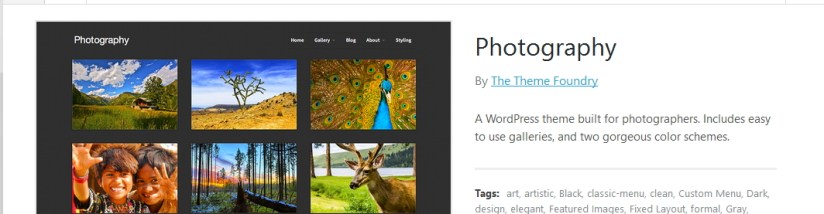
Here now I am sharing the styling and modifications of Photography By The Theme Foundry which is a WordPress.com premium theme built for photographers. It includes easy to use galleries, and two gorgeous color schemes. You can check the demo of Photography theme
You can use my shared code and ask question in the comments section.
Question1. How to change theme foundry Photography theme’s background color?
Answer: In custom css use this code
body {

background: darkred !important;

}
Or, if you want to use any image as background instead of color in Photography theme, try this code
body {

background-img: url("Your image URL here")  !important;
}
Question2. How to change sidebar widget title’s font color, font size and family in Photography theme?
Answer: To do this change try to use this css code in the custom css portion
h3.widgettitle {

font-size: 17px;

font-family: cursive !important;

color: white !important;

}
Question 3: If you want to change sidebar widget link’s color, font size and family in Photography theme
.widget a, .widget a * {

color: white !important;

font-family: cursive !important;

font-size: 14px !important;

}
** to change hover link color use this code
.widget a:hover, .widget a *:hover {

color: white !important;

font-family: cursive !important;

font-size: 14px !important;

}
Question 4: How to change top navigation menu style in Photography theme by The Theme Foundry
nav[role="navigation"] .nav a {

font-weight: 600;

color: white;

font-family: cursive !important;

font-size: 16px !important;

}
To change top navigation menu hover font color
nav[role="navigation"] .nav a:hover {

color: darkred !important;

}

Question 5: To change sub menu dropdown background color in Photography theme
nav[role="navigation"] .nav ul.sub-menu li, nav[role="navigation"] .nav ul.children li {

background: darkblue;
}
Question 6: How to change single post page content color, font size and family in Photography theme?
Try this css code
.single-post .single-gallery-content * {

font-family: cursive !important;

color: white !important;

font-size: 15px !important;

}
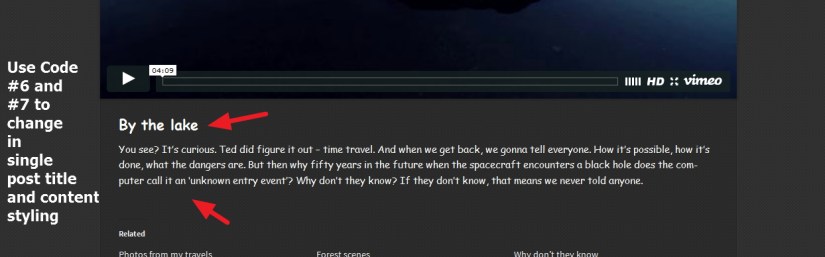
Question 7: How to change single post and blog posts title styling in Photography theme?
try this css code
h2.title {

font-weight: bold;

font-size: 22px !important;

font-family: cursive !important;

color: white !important;

}
Question 8: Hide or remove blog post date from Blog page
try this code
.blog .clear.post-detail {

display: none !important;

}
or
Hide or remove post date from allover the page (blog, archive,category and search page)
.post-detail {

display: none !important;

}
Question 9: To increase font size or change font color in Photography theme
.main-content *, .main-content {

font-family: cursive;

font-size: 14px !important;

color: white !important;

}

Question 10: To change footer credit text (info) color or font styling
To do this use the following code
footer[role="contentinfo"] a {

color: white !important;

font-size: 16px !important;

font-family: cursive !important;

}

 All About Basic
Hi, great site. Do you know if it is possible in Twenty Seventeen to change frontpage sections order ? Like adding a frontpage section and then placing it just after About one and before Blog or Contact one ?
LikeLike
HI Paulo
what is ur site URL?
share me that please
OM
LikeLike