
With bold featured images and bright, cheerful colors, Dara is ready to get to work for your business.
Home | Need Help? | Archives
February 4, 2017 12:37 pm
With bold featured images and bright, cheerful colors, Dara is ready to get to work for your business.
Here I am sharing some css styling which you can use to styling your site if you are using Dara by Automattic.
You can use my shared code and ask question in the comments section.
Question 1: How to change social icons background color in Dara theme?
Answer: Try the following code
.jetpack-social-navigation ul li {
background: darkblue;
}
Question 2: How to change or edit site title’s font color, font size and font family
.site-title a {
color: darkblue;
font-weight: bold !important;
font-family: cursive;
font-size: 52px !important;
}

Question 3: If you want to change or edit site description’s font color, font size and family
p.site-description, p.site-description * {
color: darkblue;
font-size: 19px !important;
font-family: cursive !important;
font-wight: inherit;
}
** If you don’t want to show or hide / remove site description
Question 4 : How to change navigation menu background color
.main-navigation {
background-color: darkblue;
}

Question 5 : How to change dropdown menu background color
.main-navigation ul ul {
background-color: darkblue !important;}
Question 6 : How to change Navigation menu font color, size and font family?nav.main-navigation ul#top-menu a {
color: red !important;
font-family: cursive !important;
font-size: 15px !important;
}
******** Blog Page Modifications ********
Question 7 : If you don’t want to show post category at the top of post title in blog page
.blog span.cat-links {
display: none !important;
}
Or
If you want to make the category links looks outstanding by changing font color, size and font family
.blog span.cat-links a {
color: darkblue !important;
font-family: cursive;
font-size: 16px !important;
}
Question 8 : I don’t want to show blog post date and post date. How to do that?
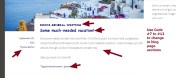
Question 10 : How to make the blog post title outstanding by changing title font, family, size and color
h2.entry-title, h2.entry-title * {
color: darkblue;
font-size: 23px;
font-family: cursive;
font-weight: bold;
}
Question 11: I don’t want to show tags link at the bottom of posts in blog page
Question 12 : How to change blog page posts content font styling
Question 13 : In grid (page template) view of posts, if you want to remove the post summary
.page-template-grid-page .entry-summary {
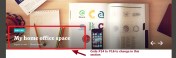
Question 16: How to remove Featured post title in slider
.featured-posts h2.entry-title {


Download Dara Theme (parent) and Dara Theme (Child) by Automattic
Question 20: How to replace “PROUDLY POWERED BY WORDPRESS | THEME: DARA BY AUTOMATTIC.”
Answer:
in the child theme i shared. Check footer.php (as per the screenshot below)
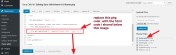
<div class="site-info">
  <a href="https://wordpress.org/">Proudly powered by WordPress</a>
  <span class="sep"> | </span>
  Theme: Dara by <a href="https://automattic.com/" rel="designer">Automattic</a>.
</div>

Posted by allaboutbasic
Categories: Web Development & WordPress
Tags:
Mobile Site | Full Site
Get a free blog at WordPress.com Theme: WordPress Mobile Edition by Alex King.
I am currently using this theme. I really like it. However, my social icons cannot display in the header. It isn’t an option. Why is the example you are using showing them in the header. I would love to be able to move them to the header but the only options are sidebar, footer 1, footer 2, & footer 3. It is not showing there is an update available if this is a recent change. Thanks.
LikeLike
By emilyk74 on July 18, 2017 at 9:10 pm
hello, how can I change the default color of the contact form button?
LikeLike
By fhallab on August 9, 2017 at 10:21 am
Hi
share me the page url where you want to change the contact form button
Om
LikeLike
By allaboutbasic on August 9, 2017 at 10:28 am
https://thaiboxsetup123.blog/alhallab/
LikeLike
By fhallab on August 9, 2017 at 10:36 am
Try this code
form button {
background: green !important;
color: white !important;
}
let me know if it helps
Om
LikeLike
By allaboutbasic on August 9, 2017 at 10:47 am
thanks a lot!
LikeLike
By fhallab on August 9, 2017 at 12:38 pm
may i know how can i disable blog and directly go to my home page?
LikeLike
By fhallab on August 19, 2017 at 8:34 am
Would you mind to clarify?
sorry didn’t understand your requirement
Om
LikeLike
By allaboutbasic on August 19, 2017 at 9:19 am
here’s my website
https://thaiboxsetup123.blog/
but i want to directly go to
https://thaiboxsetup123.blog/alhallab
LikeLike
By fhallab on August 19, 2017 at 9:22 am
Hi
you can do it either directly from cpanel
or
you can use plugins to redirect it
:)
Om
LikeLike
By allaboutbasic on August 19, 2017 at 11:14 am
hi! how can i delete the title in my site.
i want to delete the “- -” in my get in contact us here’s my site. thank you!
https://thaiboxsetup123.blog/alhallab
LikeLike
By fhallab on August 26, 2017 at 8:41 am
Hi
you want to remove the About Us, Menu, Location, Order Online titles?
let me know
also…where the “_ _” is showing?
let me know
Om
LikeLike
By allaboutbasic on August 26, 2017 at 11:59 am
nop… at the buttom of my site if you click the contact us. you will see the “Get intouch” and “Career”…
LikeLike
By fhallab on August 26, 2017 at 12:05 pm
Hi
i think in any of your footer widget…you used that “_ _ ” in the title
please check that
OM
LikeLike
By allaboutbasic on August 26, 2017 at 12:21 pm
i used different plugins in “Getintouch” and “Career” and automatically it pop-up the “–” in my widget
LikeLike
By fhallab on August 26, 2017 at 12:25 pm
Hi I want to change the default color of the contact form button but it doesn’t work with the code you suggested above?
LikeLike
By Simone on August 23, 2017 at 10:31 pm
Hi Simone
share me the contact page URL
i will check
Om
LikeLike
By allaboutbasic on August 24, 2017 at 2:39 am
Can I delete the content slider completely?
LikeLike
By jessalynecoble on September 18, 2017 at 11:39 pm
Hi
share me your site URL please
OM
LikeLike
By allaboutbasic on September 19, 2017 at 4:05 am
LikeLike
By jessalynecoble on September 19, 2017 at 12:23 pm
Hi Jessalyn
try this code
.flexslider.hero {
display: none !important;
}
let me know if it helps
Om
LikeLike
By allaboutbasic on September 19, 2017 at 12:54 pm
Juste un très grand et gros merci pour votre article ! Il m’a vraiment beaucoup aidé !
LikeLike
By Sehria on September 21, 2017 at 9:24 am
Please share me your question in English :)
Om
LikeLike
By allaboutbasic on September 21, 2017 at 10:13 am
I have no just question to ask tell you a very big thank you for your article! it really helped a lot me!
LikeLike
By Sehria on September 22, 2017 at 12:50 pm
thank you :)
Om
LikeLike
By allaboutbasic on September 22, 2017 at 12:51 pm
Can someone please help me figure out how to modify the size of the white space above the header menu? I would like to reduce so that the site starts with the header menu at the very top. Thanks so much.
LikeLike
By tasteofthaieastlansing on October 12, 2017 at 5:16 pm
Hi tasteofthaieastlansing
try this code
.site-branding {
display: none !important;
}
let me know…
if it helps
Om
LikeLike
By allaboutbasic on October 13, 2017 at 4:09 pm
How to modify the image size at the header ? At the moment, it is fixed to 1180 × 360 pixels and I want to make it smaller.
LikeLike
By collinchang on November 7, 2017 at 8:52 am
HI Collin
would u mind to share me your site url to check?
Om
LikeLike
By allaboutbasic on November 7, 2017 at 8:55 am
https://atpasiaohse.wordpress.com/. I did not do much until this is resolved.
LikeLike
By collinchang on November 7, 2017 at 9:19 am
Hi Collin
try this code
.custom-header img {
height: 271px !important;
width: auto !important;
display: block;
margin-left: auto !important;
margin-right: auto !important;
float: none !important;
}
let me know if it works
Om
LikeLiked by 1 person
By allaboutbasic on November 7, 2017 at 9:24 am
Is there an email that I can communicate with you? I want to show you a screenshot
LikeLike
By collinchang on November 7, 2017 at 9:47 am
Hi Collin
you can paste the image url here?
Om
LikeLike
By allaboutbasic on November 7, 2017 at 10:15 am
Hi ,
Please download the screenshot from here.
1) When I apply your CSS, the picture shrinks as desired but I am getting the dark grey area red arrow) to the left and right of the picture. Can you please let me know how to replace the grey area with the white space as shown in the area “ATP Asia OHSE?
2) As for the green arrow, can you confirm the Dara theme is optimised to what resolution? I am using a monitor with 1920 x 1080 resolution.
Hope to hear from you.
https://wetransfer.com/downloads/7134da72442c6a5ffaea450dc5104d2020171108032127/5399afd741ae7d077489c229c4d6627b20171108032127/5c3e99
LikeLike
By collinchang on November 8, 2017 at 3:26 am
Hi Collin
actually if you don’t implement my changes..then it would touch to check the issue
Om
LikeLike
By allaboutbasic on November 8, 2017 at 4:59 am
Hi,
I do not understand your comment “then it would touch to check the issue”? Your code works to my expectation on resizubg and hope to see a rectification CSS code for the red arrow area. Any way to help?
Yes, if I remove the CSS code that you recommended, the red arrow section disappear and will align with the page. fyi. I am using custom CSS code plug in to implement the code change.
LikeLike
By collinchang on November 8, 2017 at 5:40 am
Hi Collin,
i mean, use the code i shared so that i can see the issue :)
Om
LikeLike
By allaboutbasic on November 8, 2017 at 5:43 am
HI What’s the current pantone of DAra?
LikeLike
By Sky on November 9, 2017 at 6:25 am
Hi,
would you mind to clarify?
sorry didn’t understand the question
Om
LikeLike
By allaboutbasic on November 9, 2017 at 9:50 am
Hi,
I managed to change the page background color in the front page, although when I click to go to another page, the page appears white. I did try inserting:
.page {
background-color: #232323;
}
It does change the page color, although a section of the page stays white.
Also, thank you for this article and theme. It was so helpful.
LikeLike
By drea on November 17, 2017 at 3:47 pm
HI Drea
share me the site url to check
Om
LikeLike
By allaboutbasic on November 18, 2017 at 4:22 am
Hi, I have changed the navigation menu and drop down menu background color, however, when browsing with a mobile or a tablet, the “Menu” is still outlined with the original color. It is hard to describe so I’ll join a screenshot :
Thank you for your help.
LikeLike
By testshiastu on November 19, 2017 at 5:29 pm
HI,
please share me your site url to check
Om
LikeLiked by 1 person
By allaboutbasic on November 20, 2017 at 8:14 am
Hello, Thank you for such a useful set of examples. I have tried your Question 12 : How to change blog page posts content font styling. This does change the styling of the font for blogs but it also changes the styling everywhere that uses entry-content.
Is to possible to restrict the change to only the content of blogs?
I also have a supplementary question. How do I make use of a google font e.g. Itim for blog content when the font is not included in the Dara Theme?
Thank you very much.
Tim
LikeLike
By elemaha on December 11, 2017 at 5:05 pm
Hi Tim
so you want to change single posts font?
share me any of your blog post URL
Om
LikeLike
By allaboutbasic on December 11, 2017 at 5:35 pm
Thank you for getting back to me so quickly. I have solved the first part of my question by slightly modifying what you proposed in your Q12:
.entry-body .entry-content { font-family: cursive
}
Now I need to work out how to import and reference a google font.
You can see what I am doing here:
https://thealbionschool.com/blog/
LikeLike
By elemaha on December 11, 2017 at 7:09 pm
Just to clarify what I would like to do.
I would like to be able to replace “cursive” in my previous comment with any font that I choose to import from Google.
Thanks a lot.
Tim
LikeLike
By elemaha on December 11, 2017 at 7:20 pm
Hi Tim
share me the google font url to check
Om
LikeLike
By allaboutbasic on December 12, 2017 at 5:30 am
https://fonts.googleapis.com/css?family=Itim
LikeLike
By elemaha on December 12, 2017 at 9:25 am
HI Tim
ok put this code in your custom css portion ( i shared the thai code)
/* thai */
@font-face {
font-family: ‘Itim’;
font-style: normal;
font-weight: 400;
src: local(‘Itim’), local(‘Itim-Regular’), url(https://fonts.gstatic.com/s/itim/v2/K0fGzmj4WhCGfRyqF-GWtw.woff2) format(‘woff2’);
unicode-range: U+0E01-0E5B, U+200B-200D, U+25CC;
}
and then use
.entry-body .entry-content
font-family : Iitm !important;
}
you got the point?
Om
LikeLike
By allaboutbasic on December 12, 2017 at 10:24 am
Hi….how would I just replace the fonts of the headings? For example, the titles of the three featured content pages, titles of widgets, titles of page titles, etc? I thought I had figured out where to do it but nothing changes on the page. I want to swap out the Yrsa font there for Roboto.
LikeLike
By mostlyforward on January 11, 2018 at 2:20 pm
Hi
are you using wordpress.com free plan or premium one?
please let me know
Om
LikeLike
By allaboutbasic on January 12, 2018 at 2:47 pm
Hi, I am using an install of WordPress on a GoDaddy web hosting platform. Not on a free wordpress account.
LikeLike
By mostlyforward on January 12, 2018 at 6:40 pm
HI
ok…in such case you can use or change other fonts :)
you can check Use Any Font plugins for that
Om
LikeLike
By allaboutbasic on January 14, 2018 at 3:22 pm
Thank you so much for this post, it has helped me greatly. However, I do have a few questions.
I was wondering how I can change the color of the “Older Posts” and “Follow” buttons at the bottom of my site.
For reference, my website is: http://www.satinrussell.com
Also, I changed the color of my category tags on the main page, but I noticed that when I click on an actual blog post, the categories revert back to the original color. How can I change this so that it stays the same from main page to post page?
For reference:
Here is the the main page showing #317d93 font color for categories: https://satinrussell.com/blog/
And here is a post page example that shows the original font color for categories: https://satinrussell.com/2017/11/17/author-events-part-three/
I am SO close to getting this page looking how I want it to. A lot of that is due to your help and this article!
LikeLike
By Satin Russell on January 29, 2018 at 12:19 am
Hi Satin
sorry for the late reply
would you mind to try this first please
button, input[type=button], input[type=reset], input[type=submit], #infinite-handle span, .button {
background-color: red !important;
}
let me know if the button color changed or not
Om
LikeLike
By allaboutbasic on January 31, 2018 at 1:21 pm
Hi
Great site with at lot a useful information! Thanks!
I have changes the drop down menu colour, but then I look at my website from my mobil, the navigation with “menu” is still the wrong colour.
You can se it here: http://www.byedelgaard.dk.
The colour is aqua blue, but I want it to be grey. At desktop version it looks just fine, but not on mobile. Can you help?
LikeLike
By Christina on January 29, 2018 at 6:35 pm
Hi Christina
sorry for the late response
i have checked your issue and seems you already solved it?
:)
Om
LikeLike
By allaboutbasic on January 31, 2018 at 1:19 pm
Can you look at contigopm.com and tell me how to remove the extra white space above the footer? I’ve tried half a dozen different .CSS doses and nothing works.
LikeLike
By Troy McCormick on January 31, 2018 at 5:43 pm
I found a solution that works.
.site-content {
margin-bottom: -130px;
}
LikeLike
By Troy McCormick on January 31, 2018 at 6:32 pm
that’s great :)
LikeLike
By allaboutbasic on February 1, 2018 at 12:58 pm
Thank you! This is very helpful. Can you also provide the css to change the background color of my pages other than the home page?
LikeLike
By David Green on February 9, 2018 at 4:30 am
HI David
share me your site url to check
Om
LikeLike
By allaboutbasic on February 9, 2018 at 4:36 am
https://dgreenruf.wordpress.com
LikeLike
By David Green on February 9, 2018 at 5:52 am
Hi David
try this
body.home {
background: #E3E3E4 !important;
}
body.page {
background-color: red !important;
}
let me know if it helps
Om
LikeLike
By allaboutbasic on February 9, 2018 at 6:39 am
That made no difference! I am puzzled that this is so difficult. Thanks for looking at it for me.
LikeLike
By David Green on February 9, 2018 at 1:01 pm
Hi David
where you pasted my provided code?
LikeLike
By allaboutbasic on February 9, 2018 at 1:12 pm
The same place I posted the other codes you provided in this page – in the CSS customization area.
LikeLike
By dgreenruf on February 9, 2018 at 1:25 pm
Hi David
i see.
sorry…without checking the dashboard …seems can’t help properly
Om
LikeLike
By allaboutbasic on February 9, 2018 at 2:11 pm
Did you find a solution? I’m stuck with the same problem.
LikeLike
By imbianchinicarboni15 on September 15, 2018 at 7:36 pm
Hi
are you using wordpress.com free hosted plan?
let me know
Om
LikeLike
By allaboutbasic on September 15, 2018 at 7:39 pm
No. I’m using a business plan. I write down the same code you gave David but it didn’t works. I can only change the color on the home page. In the other pages I can see the color only on the borders and not behind the text
LikeLike
By imbianchinicarboni15 on September 15, 2018 at 7:50 pm
THanks, sorry for the late reply.
I prefer you check, you saved the code in Preview Mode or Published Mode….you will see that (Preview mode, Published MOde) at the top of the Advance css customization option
LikeLike
By allaboutbasic on September 16, 2018 at 8:24 am
Thank you for your time. The code is published.If you want to take a look the site is https://imbianchinicarboni.com
LikeLike
By imbianchinicarboni15 on September 16, 2018 at 6:13 pm
Can u share me the code you used please?
Om
LikeLike
By allaboutbasic on September 16, 2018 at 6:57 pm
No problem. This is the CSS code:
.site-content {
background-color: #FFFAF0;
}
body.page {
background-color: #FFFAF0 !important;
}
.site-branding {
background: #FFFAF0 !important;
}
.site-description {
color: #333 !important;
}
.widget {
background-color: #FFFAF0;
color: #333;
}
——————————————————————————————–
This is the html code for the page Paintwork
Inside paintworks
[gallery ids="239,240,241,242" type="columns" link="file"]
When the frame meets the glaze they create lines effect and geometries that give life and harmonies to your space.
In the photo you can see the frame made up of extruded polystyrene enriched by paintworks and glazed pearlescent or geometric lines with harmonious paintworks.
Outside paintworks
[gallery ids="244,245,246" type="columns" link="file"]
Enhance the characteristics of a house is the goal of a study of lines and colours. In these tre exemples you can see how the various colours, lines and personality of the house are harmonized and highlighted; creating a pleseant diversity.
———————————————————————————————
If you take a look at the home page you’ll see that the color #FFFAF0 is on the background of all the page, meanwhile in the Paintwork page is only on the frame while behind the text the background is still white.
I will so happy with you can tell me where I make a mistake. Thank you in advance for your time
LikeLike
By imbianchinicarboni15 on September 16, 2018 at 7:55 pm
I checked your gallery page https://imbianchinicarboni.com/galleria/
and found the content section is white (background)
to change that white background…try this code
.content-wrapper {
background: #FFFAF0 !important;
}
that is what you wanted..right?
please let me know
Om
LikeLike
By allaboutbasic on September 16, 2018 at 8:07 pm
It works. Thank you so much, I was stuck with this problem for like two weeks. Thank you very much
LikeLike
By imbianchinicarboni15 on September 17, 2018 at 6:31 pm
Pleasure :)
LikeLike
By allaboutbasic on September 17, 2018 at 6:32 pm
Another question please. Here is a screenshot from my phone. Do you know the code to change the color of small menu block in the middle of the mobile display? I want it gray, not aqua.
https://dgreenruf.wordpress.com/home/
Screenshot: https://drive.google.com/file/d/1SwTN9BQsuBA2TJ9NMMRIaRDJB9Gll13D/view?usp=sharing
LikeLike
By David Green on February 13, 2018 at 2:40 pm
Hi David
please try this code
button.menu-toggle {
background: grey !important;
padding-left: 3px !important;
padding-right: 3px !important;
}
please let me know if it helps
Om
LikeLike
By allaboutbasic on February 13, 2018 at 4:20 pm
It worked! Thanks so much! I’d never figure this out myself.
LikeLike
By David Green on February 13, 2018 at 4:47 pm
Pleasure David
LikeLike
By allaboutbasic on February 13, 2018 at 5:20 pm
Om, the search window on the pages of my site seems to be in a sidebar, but it is much larger than it needs to be. Do you know how to shrink that sidebar? Thanks for your help!
https://dgreenruf.wordpress.com/home/
LikeLiked by 1 person
By David Green on February 17, 2018 at 3:00 am
Hi David
would u mind to check the following code please
@media screen and (min-width: 1000px){
#secondary.widget-area {
width: 20% !important;
max-width: 250px;
}
.content-wrapper .content-area {
width: 78% !important;
max-width: 752px !important;
}
}
LikeLike
By allaboutbasic on February 17, 2018 at 3:47 am
Om, thanks for your help. Unfortunately, that did not change the width of my sidebar. Any other thoughts?
LikeLike
By David Green on February 17, 2018 at 11:43 am
Hi David
i just checked and found my code worked?
not sure why you mentioned “That didnot change the width of sidebar” ?
please let me know
Om
LikeLike
By allaboutbasic on February 17, 2018 at 12:54 pm
Wow, that’s really strange. I tried 3 browsers: Chrome, Firefox, and Edge, and they did not display any change in the width of the sidebar. I am confused. I don’t know what that means.
LikeLike
By David Green on February 17, 2018 at 1:02 pm
This is how it is looking in my end?
LikeLike
By allaboutbasic on February 17, 2018 at 1:14 pm
OK, I discovered something. When I came home I tried my site on my wife’s computer with and without your code, and you are right – it does work! Upon further experimenting I discovered that when I narrow the browser, there comes a point where the sidebar reverts to its original size. If I keep narrowing the browser, the sidebar snaps to the bottom. That explains why I didn’t see any difference at first. I am working on a notebook computer, and I had the browser widow in that size where the sidebar stays its original size. If I widen it, the sidebar narrows as you said.
This is all far beyond my understanding of CSS. Perhaps I should let well enough alone. But if you can think of a way to keep the sidebar *always* narrow, that would be ideal.
Thanks again for your wonderful help!
LikeLike
By David Green on February 17, 2018 at 10:52 pm
HI David
the code i shared will be working for desktop view…. the mobile or small screen view will remain unchanged…….
Om
LikeLike
By allaboutbasic on February 18, 2018 at 1:44 pm
OK, here’s another one. Can you share the code to change the color of the tagline? I’d like it darker. Mine says, “David Green’s ministry as an Area Coordinator with Reformed University Fellowship” on dgreenruf.wordpress.com. Thanks so much!
LikeLike
By David Green on February 19, 2018 at 1:37 am
HI David
try this code
.site-description {
color: #333 !important;
}
Regards
Om
LikeLike
By allaboutbasic on February 19, 2018 at 2:01 pm
Perfect! Thank you so much!
LikeLike
By David Green on February 19, 2018 at 2:48 pm
Hi, do you know if there is an easy way to create image galleries (e.g. 3 columns), that open into a slideshow as soon as one of the images is clicked (with arrows on the right and left to click through the enlarged images)? I want to include some photo galleries in some of my websites pages. Many thanks for you help, Julia
LikeLike
By grotenburgschule on March 16, 2018 at 8:27 pm
Hi Julia
would you mind to go to your post editor and click on Media (to add image) and check the screenshot
LikeLike
By allaboutbasic on March 17, 2018 at 3:49 am
Many thanks for you quick reply! :-) I already created galleries in my posts and sites, but I just can’t find out what I have to do to create a popup slider, when clicking on one image of the gallery. At the moment the images open in a separate page when I click them. I’m lost… Do you have an idea? Maybe an addition to the CSS? Thanks a lot!
LikeLike
By grotenburgschule on March 17, 2018 at 10:56 am
are u using wordpress.com site?
if yes which plan you are using?
LikeLike
By allaboutbasic on March 17, 2018 at 12:10 pm
No, I’m using wordpress.org. I started off with wordpress.com and then installed .org on our server and moved my .com site to the new .org site.
LikeLike
By grotenburgschule on March 17, 2018 at 4:29 pm
To be precise: The popup slider worked in wordpress.com but in wordpress.org the images only open separately on a new page. Is there anything I’m missing? Anything I can change?
LikeLike
By grotenburgschule on March 17, 2018 at 7:48 pm
:)
i see, as you are using wordpress.org ……then you need to search such plugins. Actually as it depends on your choice , so i think you better to search either free plugins or in themeforest.net to get premium plugins
Om
LikeLike
By allaboutbasic on March 18, 2018 at 5:44 am
Thank you so much for your help! It’s a shame that some fuctions from .com are not included in .org Best, Julia
LikeLike
By grotenburgschule on April 1, 2018 at 12:32 pm
I think if you search for pluigns…u should get some
LikeLike
By allaboutbasic on April 2, 2018 at 12:00 pm
Hi –
I am currently using this theme and created a sidebar that I only want to show on a few pages. I set all other pages to “full width, no sidebar” however when I integrate WooCommerce the plugin forces the integrated page back to the default (with sidebar) setting and will not allow me to change it back to full width. Any tips on how to delete the sidebar from that one page?
LikeLike
By Katrina on May 3, 2018 at 4:52 am
Hi Katrina
yes, i can help. share me that page url where u want to delete that sidebar.
Regards
Om
LikeLike
By allaboutbasic on May 3, 2018 at 8:51 am
/Om-
Site isn’t currently published so Idk if you can see this: http://box5405.temp.domains/~maniffh1/store/
Also, I’m new to this can you tell me where exactly to put the coding so it will work?
Thanks
LikeLike
By Katrina on May 3, 2018 at 9:55 am
HI Katrina
that page is showing Coming Soon?
you have to put the code in Appearance (Design) > Customization > Additional CSS
Om
LikeLike
By allaboutbasic on May 3, 2018 at 1:54 pm
Yes I’m in the process of building the site to publish it so others are not able to see it at the moment. Is there another way to show you what i need in order for you to assist with creating a code for this issue? Would a screenshot help?
LikeLike
By Katrina on May 3, 2018 at 1:58 pm
umm..no..screenshot cant help, i prefer u open it for 20minutes and let me check?
LikeLike
By allaboutbasic on May 3, 2018 at 1:59 pm
Site is up! Also, would you happen to know how to make the title or the headline image show up on the blog page. It disappears once the blog integration takes place. Thanks again for your help
LikeLike
By Katrina on May 3, 2018 at 2:12 pm
Try this code regarding sidebar issue
.archive.woocommerce #primary {
width: 100% !important;
max-width: 100% !important;
}
.archive.woocommerce #secondary {
display: none !important;
}
Let me know if it helps
Om
LikeLike
By allaboutbasic on May 3, 2018 at 2:16 pm
IT WORKED!!!! This is amazing… I’ve been trying to figure this out for days. Thank you
LikeLike
By Katrina on May 3, 2018 at 2:20 pm
:)
would u mind to clarify me your title issue? sorry didn’t understand it
Om
LikeLike
By allaboutbasic on May 3, 2018 at 2:23 pm
All pages have option to contain titles like “contact” “shop” and a also allows for a featured image to be placed at the top of each page however once the page is selected as posts page (page where blogs are posted) the title and featured image disappear
LikeLike
By Katrina on May 3, 2018 at 2:31 pm
can u share me any of ur page where u used that feature?
and what is ur blog post page url?
LikeLike
By allaboutbasic on May 3, 2018 at 2:40 pm
Blog: http://box5405.temp.domains/~maniffh1/blogposts/
Page with featured image and title: http://box5405.temp.domains/~maniffh1/offerings/events/manifesting-sisterhood/
LikeLike
By Katrina on May 3, 2018 at 2:44 pm
Hi Katrina
just checked
actually it is not only css issue…so without checking from dashboard… cant help properly
Om
LikeLike
By allaboutbasic on May 3, 2018 at 2:47 pm
Alright thank you for checking and for the sidebar fix!!! Your help is much appreciated
LikeLike
By Katrina on May 3, 2018 at 2:49 pm
Pleasure :)
LikeLike
By allaboutbasic on May 3, 2018 at 2:49 pm
Hi Om-
Hate to bother you again but I seem to be having the same problem with the sidebar on the product pages once the products have been added. Is there an edit to the code you sent that will cover the product pages as well? Here is the link to one of the product pages for your reference: http://box5405.temp.domains/~maniffh1/store/young-living-products/
Thanks again
LikeLike
By Katrina on May 5, 2018 at 4:51 am
Hi Katrina
it is showing maintenance mode in my end
Om
LikeLike
By allaboutbasic on May 5, 2018 at 7:04 am
try this: http://box5405.temp.domains/~maniffh1/product/peppermint-essential-oil/
LikeLike
By Katrina on May 5, 2018 at 7:43 am
same..maintenance mode
LikeLike
By allaboutbasic on May 5, 2018 at 7:44 am
sorry somehow it reverted back. Let me know if it works this time: http://box5405.temp.domains/~maniffh1/product/peppermint-essential-oil/
LikeLike
By Katrina on May 5, 2018 at 7:52 am
Hi Katrina
try this code
.single-product #primary {
width: 100% !important;
max-width: 100% !important;
}
.single-product #secondary {
display: none !important;
}
let me know if it helps
Om
LikeLike
By allaboutbasic on May 5, 2018 at 7:55 am
Thank you again! It worked just fine
LikeLike
By Katrina on May 8, 2018 at 7:18 am
Hello !!
How can you modify the font-weight and color of the slogan?
LikeLike
By Village des thés on May 28, 2018 at 3:20 pm
Hi Village
would you mind to tell which slogan in your site you are referring?
Om
LikeLike
By allaboutbasic on May 28, 2018 at 6:45 pm
Hola! I can change the social menu icons in the Dara theme. I will create a link to an external personal forum and I want to customize the icon. Is it possible to do that? Which file should I edit?
LikeLiked by 1 person
By Fellow Fitzgerald on May 28, 2018 at 4:26 pm
Hi Fellow
are you using wordpress.com free plan?
please let me know
Om
LikeLike
By allaboutbasic on May 28, 2018 at 6:44 pm
Hello, I would like to move the menu to be above the header image and at the very top of the page, is this possible?
LikeLike
By She's On To Something on July 28, 2018 at 3:19 am
thanks
please share me the site url you are working on
Om
LikeLiked by 1 person
By allaboutbasic on July 28, 2018 at 7:03 am
Hello, the url is: https://shesontosomethingblog.com/
Thank you for your help
LikeLike
By She's On To Something on July 28, 2018 at 10:47 pm
Thanks
sorry for the late response
not sure..but
are you searching this?
#site-navigation {
position: fixed;
top: 0;
right: 0;
left: 0;
}
please let me know
Om
LikeLike
By allaboutbasic on July 29, 2018 at 8:15 pm
hello, I’m not looking for the nav bar to be fixed, I just want it to be above the header image. Any thoughts? Thanks
LikeLike
By She's On To Something on July 30, 2018 at 12:05 am
which plan of wordpress.com you are using?
LikeLike
By allaboutbasic on July 30, 2018 at 7:35 am
Thank you very much for the helpful informations 😉
LikeLike
By Gutberatenelisabeth on August 7, 2018 at 2:08 pm
Hi there, what size logo does the theme Dara expect? I can’t seem to work it out
LikeLike
By blogpartyger on August 23, 2018 at 10:35 am
the current logo size is 270×150
Om
LikeLike
By allaboutbasic on August 23, 2018 at 10:48 pm
Hi! How do I/can I change the Testimonials archive page url? It says now http://www.ourpage.com/testimonial BUT as we are working in Finnish and not English, we’d like to change that page url into Finnish. Is there a place in the code I can do that or something I can add somewhere?
LikeLike
By mimosalan on October 23, 2018 at 3:47 pm
Hi
sorry i could not check the comments due to sudden illness
do you still need help?
please let me know
Om
LikeLike
By allaboutbasic on November 9, 2018 at 3:04 pm
HELLO – I am looking for the full page of example formats, that show all header styles, buttons, and any other formatting options built into the theme. I;ve been to the demo page and I dont see it anywhere.
how do I display such a page? maybe there is a way to do it from the stylesheet? I am not very css savvy.
thank you
LikeLike
By PatriseArts on January 30, 2019 at 9:32 pm
I’m looking for something like a Call-to-Action box I can add to a page layout
LikeLike
By PatriseArts on January 30, 2019 at 9:35 pm
Hi Patrise
thanks,sorry for the late response
i found , your site (patrisearts.wordpress.com) is not showing/registered?
please let me know
Om
LikeLiked by 1 person
By allaboutbasic on February 1, 2019 at 3:30 am
hah! I am not working on my own site – but this one:
https://storyweaving.com/2019b/
1 I found the theme demo that shows default headlines.
2.designed a solution to the CTA (although being able to place a text area on the HOME page below the 3 Featured boxes would still be useful)
3. My hottest question today is how to modify the CSS to make all and permanantly color #007399.
Thank you!
LikeLike
By PatriseArts on March 1, 2019 at 9:24 am
Thanks
as you mentioned
1 I found the theme demo that shows default headlines.
** Great..what help you need there?
2.designed a solution to the CTA (although being able to place a text area on the HOME page below the 3 Featured boxes would still be useful)
** So any help you need there?
3. My hottest question today is how to modify the CSS to make all and permanantly color #007399.
** which section color you are referring?
Om
LikeLike
By allaboutbasic on March 1, 2019 at 10:02 am
Hello and thank you for this article! It is extremely helpful!
I still need help changing the “Continue Reading…” link at the end of excerpts, links in the widgets in the sidebar (such as the tag cloud), and the link hover color of a title. Also, in a post, the same turquoise in the categories list above the title.
Could you help with that? My site is not live yet but here is a preview link that I hope you can view:
https://dalynnrmc.com/?customize_changeset_uuid=9dda1765-91d3-4abd-885c-c3297982210b
LikeLiked by 1 person
By dalynnrmc on March 6, 2019 at 10:57 am
it is showing Coming Soon in my end
is there any way i can check it please?
Om
LikeLike
By allaboutbasic on March 6, 2019 at 1:17 pm
Awww. The site has not gone live yet so I was hoping you’d be able to see that preview link. I can take a screenshot to email to you?
LikeLike
By dalynnrmc on March 7, 2019 at 11:16 am
Hi, great posts on Dara, so thank you…
I want my logo to be aligned to the right hand side and to lose the white space above and below…is that possible and how might it be done?
https://ryujujutsu.co.uk/
Thank you in advance
Greg
LikeLike
By ryuadmin on March 8, 2019 at 8:00 pm
Hi Greg
would you mind to try this please?
.site-branding a {
float: right;
}
.site-branding {
padding-top: 0px !important;
padding-bottom: 0px !important;
}
please let me know if it is ok?
Om
LikeLike
By allaboutbasic on March 8, 2019 at 9:39 pm
Hey Om
That worked perfectly :-)
Thank you so much for your help,
All the best
Greg
LikeLike
By ryuadmin on March 9, 2019 at 5:03 am
Pleasure Greg
LikeLike
By allaboutbasic on March 9, 2019 at 10:34 am
Hi Om, thanks for all this info. Do you know how I can make the testimonials on the static home page into a clickable link? Tracey
LikeLike
By jetpacktracey on March 10, 2019 at 12:45 am
Hi Tracey
would you mind to share me the page url you are working on please?
Om
LikeLike
By allaboutbasic on March 10, 2019 at 12:46 am
Hi,
Trying to change the font family of the menu, this isn’t working. help please!
nav.main-navigation ul#top-menu a {font-family: ‘abril-text’,’abril-text-1′,sans-serif}
http://nestspace.net
(the font family string listed is the same as used for h1 h2 etc.)
thank you!
Chad
LikeLike
By cdl500 on April 18, 2019 at 8:22 am
HI Chad
sorry for my being late.
is that abril-text font and Abril Fatface same
#top-menu a {
font-family: Abril Fatface !important;
}
would you mind to try this please?
please let me know
Om
LikeLike
By allaboutbasic on April 20, 2019 at 9:30 am
Hi,
You know what, it WAS that font all along, it was just all caps, which made me think it was a different font. I figured it out – thank you!
LikeLike
By cdl500 on April 20, 2019 at 8:38 pm
Great :)
LikeLike
By allaboutbasic on April 20, 2019 at 10:22 pm
Hi, are you able to help me please I have unchecked ‘display share and likes’ on the front featured pages however ‘shares’ has gone but ‘likes’ still show. Is it because they have been liked?
LikeLike
By Hayley Ellis on April 26, 2019 at 3:10 pm
All good, I found it!!
LikeLike
By Hayley Ellis on April 26, 2019 at 3:42 pm
that’s great Hayley
:)
Om
LikeLike
By allaboutbasic on April 27, 2019 at 4:29 am
Hello!I love this template, but I need to know how can I insert in the homepage the sidebar….i’m starting to desperate. Thank you!
LikeLike
By podologoromanord on June 7, 2019 at 9:58 pm
I think you are showing specific page for your homepage
just show blog posts
LikeLike
By allaboutbasic on June 8, 2019 at 2:37 am
Hi, I have two issues i can not solve:
1. tried to remove footer as you wrote in the article but does not work. In my page the exact content is”KÖSZÖNJÜK WORDPRESS! | SABLON: DARA, AUTOMATTIC FEJLESZTÉSÉBEN.”
2. The footer I set does not appear
Thanks for your help!
LikeLike
By Thomas on July 6, 2019 at 2:46 pm
Thanks Thomas
for your kind support
:)
LikeLike
By allaboutbasic on July 6, 2019 at 6:05 pm
Good morning Om,
I would change the links color in my site but it doesn’t work…
I try with this code in css:
a {
color: blue !important;
}
Could you please help me?
Thank you so much,
janina
http://www.placandreu.com
LikeLike
By placandreu2019 on August 5, 2019 at 12:59 pm
Hi Janina
try this code
div.entry-content a {
color: blue !important;
}
let me know if it helps
Om
LikeLike
By allaboutbasic on August 5, 2019 at 1:12 pm
Unfortunatelly it seems it doesn’t work at all, thank you for trying Om!
LikeLike
By placandreu2019 on August 5, 2019 at 7:40 pm
Where u placed the code?
LikeLike
By allaboutbasic on August 5, 2019 at 7:42 pm
In my Dara Child Theme, in theme options – additional css
LikeLike
By placandreu2019 on August 5, 2019 at 7:56 pm
Hi Janina
when i checked your site now..I am not seeing my provided code there
so please check this
1. if there is any error showing when u published the code
2. if you have cleared the cache
Om
LikeLike
By allaboutbasic on August 5, 2019 at 8:08 pm
Hi Om,
1. no, there’s any error showing
2. i have cleaned teh cache
Thank you,
Janina
LikeLike
By placandreu2019 on August 6, 2019 at 12:01 pm
ok..though i am not seeing the provided code in the live site
so..i think the way u r using my code is not effecting in live site
LikeLike
By allaboutbasic on August 6, 2019 at 12:03 pm
Hi there. I don’t think there’s enough difference in the color of all the copy and a word or phrase that is a link. When you hover over the words they change to a teal color but I’d like them to have more of a contrast without hovering…. you almost can’t see that they’re a link. Suggestions?
LikeLike
By Dree on October 23, 2019 at 8:29 am
Hi Dree
you want to change the hover link color?
please let me know
Regards
Om
LikeLike
By allaboutbasic on October 23, 2019 at 7:25 pm
Hi Om,
Thank you so much for this article and the help you are offering. I’m in the process of migrating my site from wordpress.com to another hosting platform. My problem is that the featured images no longer display correctly. They appear smaller than the space allocated to them, and off to the left. So far, searching online, I’ve found a solution for the pages by adding some css code (see at the bottom of this message), but the blog articles still have the problem. Since I have not yet updated the DNS codes, I cannot link to the problematic webpages, but I can send or upload a screenshot if you tell me how.
Thanks again,
Simona
* * *
Here is the code I’ve added to solve the problem on the pages:
.hero .entry-thumbnail img {
width: 100%;
}
LikeLike
By Tea-time on May 29, 2020 at 6:57 pm
Hi Simona
can u share me any of the post url where u r facing that?
i will check and let u know
Regards
Om
LikeLike
By allaboutbasic on May 29, 2020 at 11:47 pm
The problematic pages (on my new server) are not visible to others at the moment because I haven’t updated the DNS codes yet (I would rather not do it before I fix the problem), but I have uploaded a picture of one of the faulty webpages here for you to see: https://www.dropbox.com/s/4eq8gkiq960en10/Schermata%20a%202020-05-29%2014-47-39.png?dl=0
I hope this is useful.
If you’d like to see what this webpage SHOULD look like, here’s the link to my site on the old server (wordpress.com) – https://tea-time.it/your-mind-as-a-container/
Thanks again for your efforts :)
LikeLike
By Tea-time on May 30, 2020 at 12:39 am
Hi Simona
actually it would better if i could check the issue live
Regards
Om
LikeLike
By allaboutbasic on May 30, 2020 at 2:29 pm
Hi Om! I changed the DNS so now you can check the issue live. Here’s the link to an example. All of the blog pages have the same problem, of course.
http://tea-time.it/your-mind-as-a-container/
Thanks again!
LikeLike
By Tea-time on May 31, 2020 at 5:05 pm
Thanks

it seems looking ok in my end?
LikeLike
By allaboutbasic on May 31, 2020 at 10:04 pm
You are right… I can’t explain it. This morning it was still displaying funny, and now it seems ok.
The only thing that changed since I wrote to you, is that I configured Jetpack. So perhaps that was what caused the problem…
Thank you anyway for your good will.
LikeLike
By Tea-time on May 31, 2020 at 10:55 pm
Great
LikeLike
By allaboutbasic on May 31, 2020 at 10:58 pm
Great! Thank you
LikeLike
By elisaazul on October 5, 2020 at 8:17 pm
This is a great blog. Thank you so much! I have just moved from wordpress.com to wordpress.org and wanted to keep the Dara theme and the same colours and fonts. But .org is more limited because Dara is a wp.com design. These hacks fixed everything! Thank you.
LikeLike
By UnderstandingAnimals on November 23, 2020 at 6:30 pm
better you install JetPack and connect to wordpress.com
that may help
Regards
Om
LikeLike
By allaboutbasic on November 23, 2020 at 7:48 pm
How can I change the social media buttons so that the icon is grey not white? I have already changed the background colour.
LikeLike
By Jacqueline Buckingham on November 23, 2020 at 6:31 pm
Hi Jacqueline
would you mind to share me the site url you are working please?
Regards
Om
LikeLike
By allaboutbasic on November 23, 2020 at 7:36 pm
Hi… the white space above footer to the last word in the homepage is too big.. how to rectify that?
LikeLike
By Indra on January 6, 2021 at 5:11 pm
Hi Indra
please share me your site url to check
Regards
Om
LikeLike
By allaboutbasic on January 6, 2021 at 5:34 pm
Hello… Im using Dara theme… there is a big white space between the last line in body/content of homepage to footer.. how do i correct this? thank you
LikeLike
By Indra on February 4, 2021 at 12:00 pm
Hi Indra
please try this
.home div#quaternary {
padding-bottom: 0px !important;
}
.home div#primary {
padding-bottom: 0px !important;
}
Regards
Om
LikeLike
By allaboutbasic on February 4, 2021 at 1:02 pm
I have two questions – website is hosted not via wp.com
1.
Is there any way I can add another text block below the featured pages on the static homepage?
2.
How can I change the powered by wordpress to show:
Copyright &c 2014 to (current year) and then sitename
Address is http://www.tiptreeacademy.co.uk
LikeLike
By andrewlennox1 on August 10, 2021 at 9:43 pm
Hi Andrew
actually wordpress.com has limitation, are u using personal plan?
Regards
Om
LikeLike
By allaboutbasic on August 10, 2021 at 10:09 pm
Yes it is a non-worpress.com hosted site
I have a child theme set up to make the necessary changes and can do via FTP if easier
Thank you
LikeLike
By andrewlennox1 on August 10, 2021 at 10:12 pm
Regarding the “powered by wordpress ” would you mind to check footer.php please?
Regarding the homepage issue–sorry that i didnt understand what you are referring.
LikeLike
By allaboutbasic on August 10, 2021 at 10:34 pm
Here is the footer,php
For the homepage I would like to be able to add text below the native front page feature pages which are at the bottom of the homepage. There are two on the site
LikeLike
By andrewlennox1 on August 10, 2021 at 10:40 pm