Web Development & WordPress

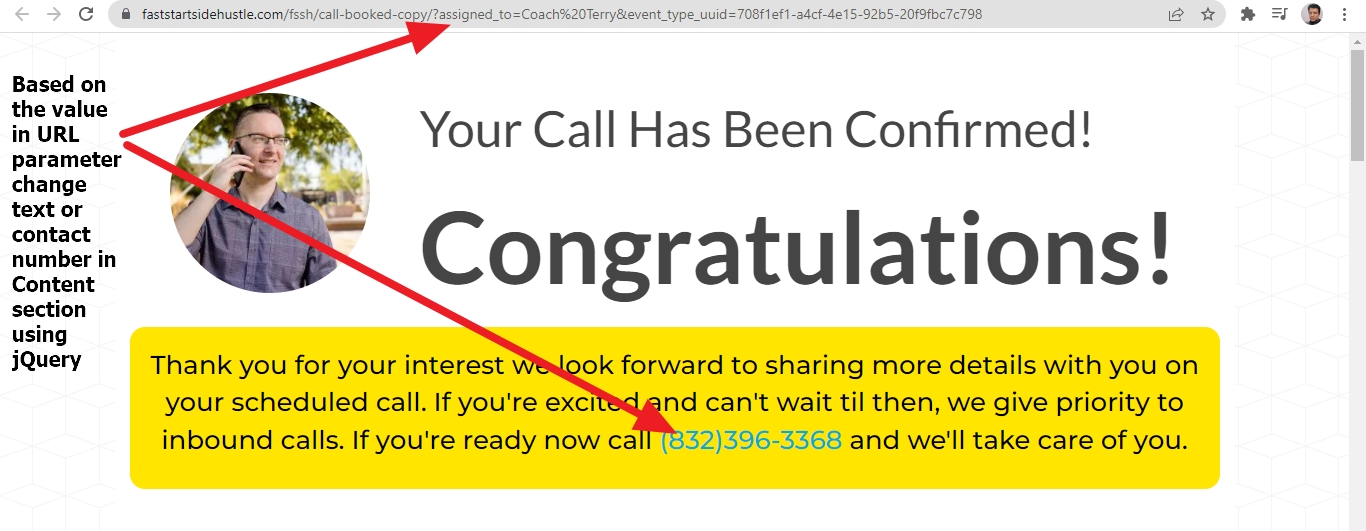
Based on the value in URL parameter change text or contact number in Content section

This post is for those who has knowledge about HTML and jQuery. I am sharing the code directly here, If you have any question or facing similar issue, feel free to ask question in comments section

<script>

 	jQuery(document).ready(function(){
  
var params = new window.URLSearchParams(window.location.search);
console.log(params.get('assigned_to'));
var coach=params.get('assigned_to');
	if (coach.toLowerCase().indexOf("terry") >= 0){
	var terryNumber='(832)xxx-xxxx';
	 
jQuery("div#call a").text(terryNumber);
jQuery("div#call a").attr("href", "tel:"+terryNumber);
	}
	else if(coach.toLowerCase().indexOf("paul") >= 0){
	var jimNumber='(760)xxxx-xxxx';
	 
jQuery("div#call a").text(jimNumber);
jQuery("div#call a").attr("href", "tel:"+jimNumber);
	}
else if(coach.toLowerCase().indexOf("newname") >= 0){
	var newnameNumber='(760)xxx-xxxx';
	 
jQuery("div#call a").text(newnameNumber);
jQuery("div#call a").attr("href", "tel:"+newnameNumber);
	} 
	
 }); 		
 

</script>
Web Development & WordPress

Click Button and show Drop down menu using CSS and jQuery

You can use it in your html css based website.

	<script>


jQuery(document).ready(function() {
   

jQuery('.dropdown button#menu1').on('click',function(){
 var count=0;

if (  jQuery('ul.menu' ).hasClass("active")     ){ 

 jQuery('ul.menu').hide();
  jQuery('ul.menu').removeClass('active');
count=1
}

if(count!=1){
   jQuery('ul.menu').addClass('active');
   jQuery('ul.menu').show();
}


});


});

</script>
<style>
 
 
ul.menu.active {
    height: 150px !IMPORTANT;
    overflow-y: scroll;
}
 
 
.dropdown {
    display: block;
    margin-left: auto !IMPORTANT;
    margin-right: auto;
    width: 120px;
}
.dropdown ul.menu {
    width: 120px;
}
.dropdown ul.menu li.menu-item {
    line-height: 1rem;
    list-style: none;
}
.dropdown button#menu1 {
    width: 120px;
}
.dropdown ul.menu {
    width: 120px;
    margin-top: 0px;
    position: absolute;
}
 
</style>		
<div class="dropdown">
  <button class="btn btn-default dropdown-toggle" type="button" id="menu1" data-toggle="dropdown">Menu
  <span class="caret"></span></button>
  <ul class="menu" style="display:none;">


	<li class="menu-item"><a href="#123">Home</a></li>
    <li class="menu-item"><a href="#0">About</a></li>
    <li class="menu-item"><a href="#0">Shop</a></li>
	<li class="menu-item"><a href="#0">Streamers</a></li>
    <li class="menu-item"><a href="#456">ABC</a></li>
    <li class="menu-item"><a href="#456">DEF</a></li>
    <li class="menu-item"><a href="#0">12345</a></li>
	<li class="menu-item"><a href="#0">Gallery</a></li>
    <li class="menu-item"><a href="#789">Submenu 1</a></li>
                <li class="menu-item"><a href="#0">Submenu 2</a></li>
                <li class="menu-item"><a href="#0">Submenu 3</a></li>
                <li class="menu-item"><a href="#0">Random Text</a></li>
                <li class="menu-item"><a href="#0">Submenu 5</a></li>
                <li class="menu-item"><a href="#0">Submenu 6</a></li>
				<li class="menu-item"><a href="#0">Contact</a></li>
	 		
   </ul>
</div>		
Web Development & WordPress

WordPress Twenty Twenty-Two theme By the WordPress team : Modify header and content width using css

Here I am sharing you 2 technique using css. Please Feel Free to do comments if you have any question regarding Twenty Twenty Two theme of wordpress by Automattic.

1 ) To change font size, color and font family and spacing of H1 header tag for Page titles

h1 {
    font-family: cursive !IMPORTANT;
    color: darkred;
    font-size: 25px !important;
    margin-bottom: 12px !IMPORTANT;
    margin-top: 12px !IMPORTANT;
}

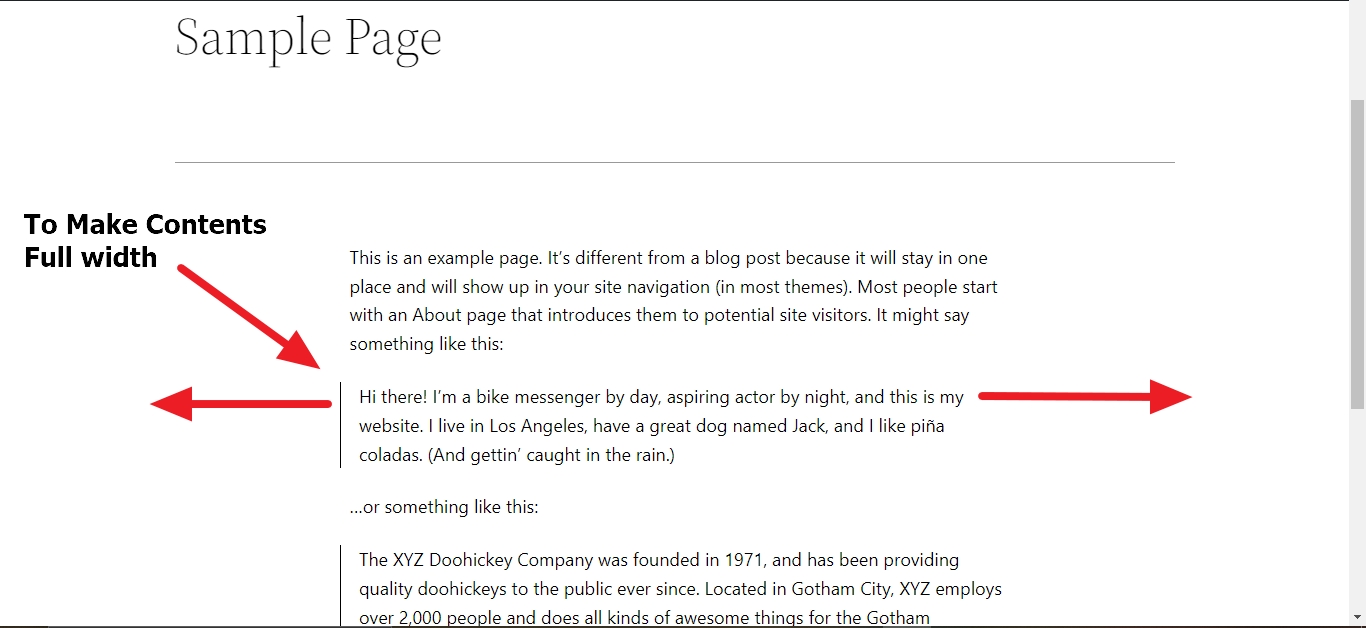
2) To make contents full width using css in Twenty Twenty Two theme

.wp-block-post-content > * {
    max-width: 1022px !important;
}

3) Reduce space between two blog posts using css in Twenty Twenty two theme

.blog .wp-block-group .wp-block-spacer {
    height: 50px !important;
}

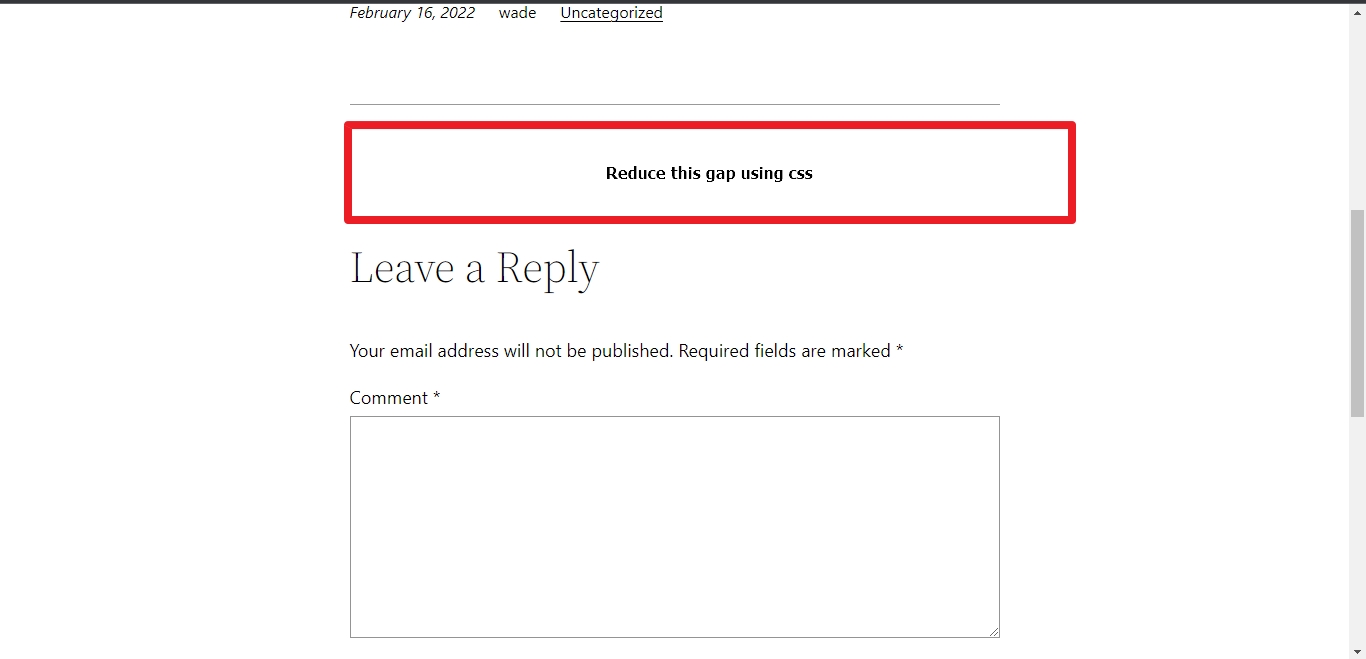
4) To reduce gap at the top of Leave A Reply Comment box in Twenty Twenty Two theme

.wp-block-post-comments {
    margin-top: 0px !IMPORTANT;
    padding-top: 0px !important;
}

5) To change font size, color, font family, font weight and using background color and alignment of “Leave a Reply” in twenty twenty two theme

h3#reply-title {
    font-size: 25px;
    color: white !IMPORTANT;
    font-weight: bold;
    font-family: cursive !important;
    background: green;
    padding: 12px;
    text-align: center;
}

6) To Change font size, background color of this Post Comment button

input#submit {
    background: darkred;
    font-size: 14px;
    font-weight: bold;
} 

7) If you don’t want to show comments date in your blog post in Twenty Twenty Two theme

.comment-metadata {
    display: none;
}

8) If you want to change font size, color and font family of comments author in twenty twenty two theme

.comment-author, .comment-author * {
    font-size: 16px !IMPORTANT;
    color: darkblue;
    font-family: cursive;
}

9) If you want to make body background red and content header and footer background white

.wp-site-blocks header {
    background: white;
}
.wp-site-blocks main {
    background: white;
    margin-top: 0px;
}
.wp-site-blocks footer {
    background: white;
    margin-top: 0px !IMPORTANT;
    padding-top: 0px !IMPORTANT;
}
body {
    background: red;
}
Web Development & WordPress

Stretch image so that it touches the edges of mobile screen using – WordPress pages or posts

If you want to stretch the images to full width or want the images to touch the edges of mobile screen then you can implement that using this jQuery and css. You can apply this in your wordpress post and pages images too.

Image will be touching the edge of mobile screen like this screenshot above

Here is the jQuery ( you will need to change the CSS Class in the code)

<script>
	jQuery(document).ready(function(){
	jQuery(".entry img").each(function(index, element) {
   jQuery(element).wrap("<span class='stretch'></span>");
});
		});
</script>

Related CSS

@media (min-width: 320px) and (max-width: 767px) { 
.stretch {
    margin-left: -25px !IMPORTANT;
    margin-right: -25px !IMPORTANT;
	display:block;
	}}
Web Development & WordPress

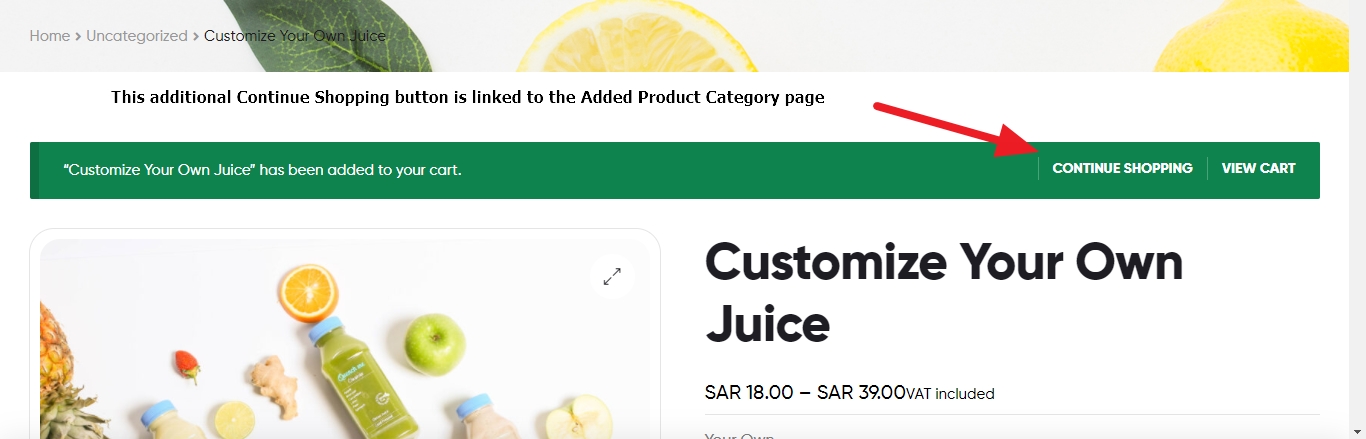
Add additional Continue Shopping button beside View Cart which linked to the Added Product Category page

Just wanted to add an additional button in the woocommerce message bar and beside the View Cart button, which will be linked to the added product category page.

function filter_wc_add_to_cart_message_html( $message, $products ) { 
global $wp_query;
//echo $products[0] ;
$catID=array_keys($products);
$catID=$catID[0];
 	
 $terms = get_the_terms($catID, 'product_cat' );
 
 
foreach ($terms  as $term  ) {
            $product_cat_id = $term->term_id;
            $product_cat_name = $term->name;
            break;
        }	
$productCategoryUrl = get_category_link($product_cat_id);	
 
 $continue   = '<a href="'.$productCategoryUrl.'" class="button wc-forward cat"> Continue shopping </a>'; 
        
    $message .= $continue;
    return $message; 
}; 

add_filter( 'wc_add_to_cart_message_html', 'filter_wc_add_to_cart_message_html', 10, 2 );
Web Development & WordPress

Pass Country Name in English and Show Norway Translated Country Name using PHP function

Here is the PHP code, you can use it if you need it, the code courtesy is one of my valued client.

function en_country_to_no_country_code($country)
{

$countries = array(
'Afghanistan' => 'Afghanistan',
'Ålandsøyene' => 'Aland Islands',
'Albania' => 'Albania',
'Algerie' => 'Algeria',
'Amerikansk Samoa' => 'American Samoa',
'Andorra' => 'Andorra',
'Angola' => 'Angola',
'Anguilla' => 'Anguilla',
'Antarktis' => 'Antarctica',
'Antigua og Barbuda' => 'Antigua And Barbuda',
'Argentina' => 'Argentina',
'Armenia' => 'Armenia',
'Aruba' => 'Aruba',
'Australia' => 'Australia',
'Østerrike' => 'Austria',
'Aserbajdsjan' => 'Azerbaijan',
'Bahamas' => 'Bahamas',
'Bahrain' => 'Bahrain',
'Bangladesh' => 'Bangladesh',
'Barbados' => 'Barbados',
'Hviterussland' => 'Belarus',
'Belgia' => 'Belgium',
'Belize' => 'Belize',
'Benin' => 'Benin',
'Bermuda' => 'Bermuda',
'Bhutan' => 'Bhutan',
'Bolivia' => 'Bolivia',
'Bosnia-Hertsegovina' => 'Bosnia And Herzegovina',
'Botswana' => 'Botswana',
'Bouvetøya' => 'Bouvet Island',
'Brasil' => 'Brazil',
'Britisk territorium i det indiske hav' => 'British Indian Ocean Territory',
'Brunei Darussalam' => 'Brunei Darussalam',
'Bulgaria' => 'Bulgaria',
'Burkina Faso' => 'Burkina Faso',
'Burundi' => 'Burundi',
'Kambodsja' => 'Cambodia',
'Kamerun' => 'Cameroon',
'Canada' => 'Canada',
'Kapp Verde' => 'Cape Verde',
'Caymanøyene' => 'Cayman Islands',
'Den sentralafrikanske republikk'  => 'Central African Republic',
'Tsjad' => 'Chad',
'Chile' => 'Chile',
'Kina' => 'China',
'Juleøya' => 'Christmas Island',
'Kokosøyene (Keeling)' => 'Cocos (Keeling) Islands',
'Colombia' => 'Colombia',
'Komorene' => 'Comoros',
'Kongo' => 'Congo',
'Kongo, Den demokratiske republikken'  => 'Congo, Democratic Republic',
'Cookøyene' => 'Cook Islands',
'Costa Rica' => 'Costa Rica',
'Cote D\'Ivoire' => 'Cote D\'Ivoire',
'Kroatia' => 'Croatia',
'Cuba' => 'Cuba',
'Kypros' => 'Cyprus',
'Tsjekkia' => 'Czech Republic',
'Danmark' => 'Denmark',
'Djibouti' => 'Djibouti',
'Dominica' => 'Dominica',
'Den dominikanske republikk' => 'Dominican Republic',
'Ecuador' => 'Ecuador',
'Egypt' => 'Egypt',
'El Salvador' => 'El Salvador',
'Ekvatorial-Guinea' => 'Equatorial Guinea',
'Eritrea' => 'Eritrea',
'Estland' => 'Estonia',
'Etiopia' => 'Ethiopia',
'Falklandsøyene (Malvinas)' => 'Falkland Islands (Malvinas)',
'Færøyene' => 'Faroe Islands',
'Fiji' => 'Fiji',
'Finland' => 'Finland',
'Frankrike' => 'France',
'Fransk Guyana' => 'French Guiana',
'Fransk Polynesia' => 'French Polynesia',
'Franske sørlige territorier' => 'French Southern Territories',
'Gabon' => 'Gabon',
'Gambia' => 'Gambia',
'Georgia' => 'Georgia',
'Tyskland' => 'Germany',
'Ghana' => 'Ghana',
'Gibraltar' => 'Gibraltar',
'Hellas' => 'Greece',
'Grønland' => 'Greenland',
'Grenada' => 'Grenada',
'Guadeloupe' => 'Guadeloupe',
'Guam' => 'Guam',
'Guatemala' => 'Guatemala',
'Guernsey' => 'Guernsey',
'Guinea' => 'Guinea',
'Guinea-Bissau' => 'Guinea-Bissau',
'Guyana' => 'Guyana',
'Haiti' => 'Haiti',
'Heard Island og Mcdonald Islands' => 'Heard Island & Mcdonald Islands',
'Holy See(Vatikanstaten)' => 'Holy See (Vatican City State)',
'Honduras' => 'Honduras',
'Hong Kong' => 'Hong Kong',
'Ungarn' => 'Hungary',
'Island' => 'Iceland',
'India' => 'India',
'Indonesia' => 'Indonesia',
'Iran, Islamsk Republikk Av' => 'Iran, Islamic Republic Of',
'Irak' => 'Iraq',
'Irlanti' => 'Ireland',
'Mansaarella' => 'Isle Of Man',
'Israel' => 'Israel',
'Italia' => 'Italy',
'Jamaica' => 'Jamaica',
'Japan' => 'Japan',
'Jersey' => 'Jersey',
'Jordan' => 'Jordan',
'Kazakhstan' => 'Kazakhstan',
'Kenya' => 'Kenya',
'Kiribati' => 'Kiribati',
'Korea' => 'Korea',
'Kuwait' => 'Kuwait',
'Kirgisistan' => 'Kyrgyzstan',
'Lao' => 'Lao',
'Latvia' => 'Latvia',
'Libanon' => 'Lebanon',
'Lesotho' => 'Lesotho',
'Liberia' => 'Liberia',
'Libyske arabiske Jamahiriya' => 'Libyan Arab Jamahiriya',
'Liechtenstein' => 'Liechtenstein',
'Litauen' => 'Lithuania',
'Luxembourg' => 'Luxembourg',
'Macao' => 'Macao',
'Makedonia' => 'Macedonia',
'Madagaskar' => 'Madagascar',
'Malawi' => 'Malawi',
'Malaysia' => 'Malaysia',
'Maldivene' => 'Maldives',
'Mali' => 'Mali',
'Malta' => 'Malta',
'Marshalløyene' => 'Marshall Islands',
'Martinique' => 'Martinique',
'Mauritania' => 'Mauritania',
'Mauritius' => 'Mauritius',
'Mayotte' => 'Mayotte',
'Mexico' => 'Mexico',
'Mikronesia, fødererte stater' => 'Micronesia, Federated States Of',
'Moldova' => 'Moldova',
'Monaco' => 'Monaco',
'Mongolia' => 'Mongolia',
'Montenegro' => 'Montenegro',
'Montserrat' => 'Montserrat',
'Marokko' => 'Morocco',
'Mosambik' => 'Mozambique',
'Myanmar' => 'Myanmar',
'Namibia' => 'Namibia',
'Nauru' => 'Nauru',
'Nepal' => 'Nepal',
'Nederland' => 'Netherlands',
'De nederlandske Antillene' => 'Netherlands Antilles',
'Ny-Caledonia' => 'New Caledonia',
'New Zealand' => 'New Zealand',
'Nicaragua' => 'Nicaragua',
'Niger' => 'Niger',
'Nigeria' => 'Nigeria',
'Niue' => 'Niue',
'Norfolkøya' => 'Norfolk Island',
'Nord-Marianene' => 'Northern Mariana Islands',
'Norge' => 'Norway',
'Oman' => 'Oman',
'Pakistan' => 'Pakistan',
'Palau' => 'Palau',
'Palestinsk territorium, Okkupert' => 'Palestinian Territory, Occupied',
'Panama' => 'Panama',
'Papua Ny-Guinea' => 'Papua New Guinea',
'Paraguay' => 'Paraguay',
'Peru' => 'Peru',
'Filippinene' => 'Philippines',
'Pitcairn' => 'Pitcairn',
'Polen' => 'Poland',
'Portugal' => 'Portugal',
'Puerto Rico' => 'Puerto Rico',
'Qatar' => 'Qatar',
'Gjenforening' => 'Reunion',
'Romania' => 'Romania',
'Russland'  => 'Russian Federation',
'Rwanda' => 'Rwanda',
'Saint Barthelemy' => 'Saint Barthelemy',
'Saint Helena' => 'Saint Helena',
'Saint Kitts og Nevis' => 'Saint Kitts And Nevis',
'Saint Lucia' => 'Saint Lucia',
'Sankt Martin' => 'Saint Martin',
'Saint Pierre og Miquelon' => 'Saint Pierre And Miquelon',
'Saint Vincent og Grenadiner' => 'Saint Vincent And Grenadines',
'Samoa' => 'Samoa',
'San Marino' => 'San Marino',
'Sao Tome og Principe' => 'Sao Tome And Principe',
'Saudi-Arabia' => 'Saudi-Arabia',
'Senegal' => 'Senegal',
'Serbia' => 'Serbia',
'Seychellene',
'Sierra Leone' => 'Sierra Leone',
'Singapore' => 'Singapore',
'Slovakia' => 'Slovakia',
'Slovenia' => 'Slovenia',
'Salomonøyene' => 'Solomon Islands',
'Somalia' => 'Somalia',
'Sør-Afrika' => 'South Africa',
'South Georgia og Sandwich Isl.' => 'South Georgia And Sandwich Isl.',
'Spania' => 'Spain',
'Sri Lanka' => 'Sri Lanka',
'Sudan' => 'Sudan',
'Surinam' => 'Suriname',
'Svalbard og Jan Mayen' => 'Svalbard And Jan Mayen',
'Swazimaa' => 'Swaziland',
'Sverige' => 'Sweden',
'Sveits' => 'Switzerland',
'Den Syriske Arabiske Republikken' => 'Syrian Arab Republic',
'Taiwan' => 'Taiwan',
'Tadsjikistan' => 'Tajikistan',
'Tanzania' => 'Tanzania',
'Thailand' => 'Thailand',
'Timor-Leste' => 'Timor-Leste',
'Togo' => 'Togo',
'Tokelau' => 'Tokelau',
'Tonga' => 'Tonga',
'Trinidad og Tobago' => 'Trinidad And Tobago',
'Tunisia' => 'Tunisia',
'Tyrkia' => 'Turkey',
'Turkmenistan' => 'Turkmenistan',
'Turks- og Caicosøyene' => 'Turks And Caicos Islands',
'Tuvalu' => 'Tuvalu',
'Uganda' => 'Uganda',
'Ukraina' => 'Ukraine',
'De forente arabiske emirater' => 'United Arab Emirates',
'Storbritannia' => 'United Kingdom',
'Amerikas forente stater' => 'United States',
'Amerikas forente stater' => 'United States Outlying Islands',
'Uruguay' => 'Uruguay',
'Usbekistan' => 'Uzbekistan',
'Vanuatu' => 'Vanuatu',
'Venezuela' => 'Venezuela',
'Viet Nam' => 'Viet Nam',
'Jomfruøyene, Britisk' => 'Virgin Islands, British',
'Jomfruøyene, USA' => 'Jomfruøyene, USA',
'Wallis og Futuna' => 'Wallis And Futuna',
'Vest-Sahara' => 'Western Sahara',
'Jemen' => 'Yemen',
'Zambia' => 'Zambia',
'Zimbabwe' => 'Zimbabwe',
'NORD-AMERIKA' => 'NORTH AMERICA',
'EUROPA' => 'EUROPE',
'SØR-AMERIKA' => 'SOUTH AMERICA',
'ASIA' => 'ASIA',
'AFRIKA' => 'AFRICA',
'OSEANIA' => 'OCEANIA',
);

	// Set ISO
	$iso_code = strtolower(array_search(strtolower($country), array_map('strtolower', $countries)));

	return $iso_code;
}
Web Development & WordPress

Show custom dropdown based on visited url in woocommerce category page

Suppose in some specific url ( mainly your product category page url) you want to show some specific or customize dropdown. Here I am sharing you such code which you can use by customizing it.

add_action( 'woocommerce_before_shop_loop', 'showcustomdropdown', 31 );
 
function showcustomdropdown() {      
   if ( is_product_category() ) {      
     // wc_product_dropdown_categories();
	$url = 'http://' . $_SERVER['SERVER_NAME'] . $_SERVER['REQUEST_URI'];


if ((strpos($url,'?product_cat=wall-mounted+single-zone') !== false) || strpos($url,'?product_cat=floor-mounted+single-zone') !== false || strpos($url,'?product_cat=ceilling-cassettes+single-zone') !== false || strpos($url,'?product_cat=concealed-duct+single-zone') !== false || strpos($url,'/mini-split-ac/single-zone/') !== false)  {
	echo "<select id='product_cat'>";
	echo '<option value=" ">'."Select Category"."</option>"; 
   echo '<option value="?product_cat=wall-mounted+single-zone">'. "Wall Mounted" .  '</option>';
	echo '<option value="?product_cat=floor-mounted+single-zone">'."Floor Mounted"  .  '</option>';
	echo '<option value="?product_cat=ceilling-cassettes+single-zone">'. "Ceilling Cassettes" .  '</option>';
	echo '<option value="?product_cat=concealed-duct+single-zone">'. "Concealed Duct" .  '</option>';
	echo "</select>";
} else {
    
}
	   
   } 
   wc_enqueue_js( "
      $('#product_cat').change(function () {
         location.href = '/shop/' + $(this).val();
      });
   " );
}
Web Development & WordPress

Remove Links and keep text in table or Div : Use it either for mobile or desktop

Suppose you have a table and you have information with links there. So in Desktop view you want to keep those information with links, but in mobile view you just want the information to show without wrapping links. Here is the JQuery code which i used to implement that. Basically i collected the code from stackoverflow and modified as per my requirements.

Here is the code

 <script>
$(document).ready(function() {
	  	 
	
	if( /Android|webOS|iPhone|iPad|iPod|BlackBerry|IEMobile|Opera Mini/i.test(navigator.userAgent) ) {
		console.log(" mobile ");
  $('table tr td,table tr td').each(function(){
  
    if($(this).hasClass("nolink")){ 
    $(this).find("a").contents().unwrap();
    }
    });
}
});
 </script>
Web Development & WordPress

WordPress theme Zoologist by Automattic: CSS Customization of header, footer, contents and more

Zoologist by Automattic
Image Courtesy WordPress.com

Zoologist  by Automattic is a simple single column theme. If you are searching for a single column layout theme with basic design then this theme can be a good choice for you. Here I am going to share you CSS tricks to modify header, footer, fonts style and more.

Live Demo of Zoologist by Automattic

If you want to install it in your self hosted wordpress site, you can download them from WordPress.com repository.

Download Zoologist Parent theme Blockbase

Download Zoologist Child theme

Also You need to Install Gutenberg Plugins by Gutenberg Team

So, Here I am sharing you the css tricks which you can use to change the style of the theme.

Continue reading “WordPress theme Zoologist by Automattic: CSS Customization of header, footer, contents and more”