Sometimes in programming while we do our work with JTable cell, we may need to make the JTable cell Such that it will allow or accept only numeric or number type data from users and will not allow any other type of data in that cell. In the following example(Check the picture), I have made the cells of Column-2 such that they will allow only numeric data and it will show a warning message if any character or string type entry is detected. Just Copy the code and run it.
Author: allaboutbasic
JTable cell Color: How to color your JTable individual cell background.
Here I am going to share with you a little solution by which you can color the background of individual JTable cell. In the following code I colored the cell’s background in click event i.e when you will click on the JTable Cell the background of that cell will be red. This solution is just to give you a basic idea; you can modify it as your own. The code is given below.
Continue reading “JTable cell Color: How to color your JTable individual cell background.”
JTable Cell Click Event: Click on the JTable Cell and show the Value of that cell.
Sometimes while programming we may need to check and show the value of JTable Cell in click event.
Here, in the given example, I did the coding in such a way that while clicking on a cell of JTable
It will show the value of that JTable cell in MessageDialog Box.
Code Example:
import java.awt.*;
import java.awt.event.*;
import javax.swing.*;
import javax.swing.table.*;
class SimpleTableTest extends JFrame
{
private JPanel topPanel ;
private JTable table;
private JScrollPane scrollPane;
private String[] columnNames= new String[3];
private String[][] dataValues=new String[3][3] ;
Continue reading “JTable Cell Click Event: Click on the JTable Cell and show the Value of that cell.”
Java :How to know in which Row and Column I have clicked on JTable
In this post I have shared you the solution about how to know in which Row and Column of JTable I have clicked.
According to the solution, wherever you have clicked on the JTable the result will be shown using
Message Dialog Box (Check the OUTPUT picture below).
Code Example:
import java.awt.*;
import java.awt.event.*;
import javax.swing.*;
import javax.swing.table.*;
class SimpleTableTest extends JFrame
{
private JPanel topPanel ;
private JTable table;
private JScrollPane scrollPane;
private String[] columnNames= new String[3];
private String[][] dataValues=new String[3][3] ;
public SimpleTableTest()
{
setTitle(“JTable Cell Click”);
setSize(300,300);
topPanel= new JPanel();
topPanel.setLayout(new BorderLayout());
getContentPane().add(topPanel);
setDefaultCloseOperation(EXIT_ON_CLOSE);
columnNames=new String[] {“Column 1” , “Column 2” , “Column 3”};
dataValues = new String[][] {
{“1″,”2″,”3”},
{“4″,”5″,”6”},
{“7″,”8″,”9″}
};
TableModel model=new myTableModel();
table =new JTable( );
table.setRowHeight(50);
table.setModel(model);
scrollPane=new JScrollPane(table);
topPanel.add(scrollPane,BorderLayout.CENTER);
table.addMouseListener(new java.awt.event.MouseAdapter()
{
public void mouseClicked(java.awt.event.MouseEvent e)
{
int row=table.rowAtPoint(e.getPoint());
int col= table.columnAtPoint(e.getPoint());
JOptionPane.showMessageDialog(null,”You have Clicked on Column :” +(col+1)+ ” : and Row : ” +(row+1));
System.out.println(table.getValueAt(row,col).toString());
}
}
);
}
public class myTableModel extends DefaultTableModel
{
myTableModel( )
{
super(dataValues,columnNames);
System.out.println(“Inside myTableModel”);
}
public boolean isCellEditable(int row,int cols)
{
return false;
}
}
public static void main(String args[])
{
SimpleTableTest mainFrame=new SimpleTableTest();
mainFrame.setVisible(true);
}
}
OUTPUT:
JTable Java : How to make JTable cells editable or not editable using DefaultTableModel.
Here is a little solution to make the cells of JTable editable or not editable.
Here I have coded to make the cells of Column-1 not editable but cells of Column-2 and Column-3 are editable.
Code Example:
import java.awt.*;
import java.awt.event.*;
import javax.swing.*;
import javax.swing.table.*;
class SimpleTableTest extends JFrame
{
private JPanel topPanel ;
private JTable table;
private JScrollPane scrollPane;
private String[] columnNames= new String[3];
private String[][] dataValues=new String[3][3] ;
public SimpleTableTest()
{
setTitle(“JTable Cell Not Editable”);
setSize(300,300);
topPanel= new JPanel();
topPanel.setLayout(new BorderLayout());
getContentPane().add(topPanel);
setDefaultCloseOperation(EXIT_ON_CLOSE);
columnNames=new String[] {“Column 1” , “Column 2” , “Column 3”};
dataValues = new String[][] {
{“1″,”2″,”3”},
{“4″,”5″,”6”},
{“7″,”8″,”9”}
};
TableModel model=new myTableModel();
table =new JTable( );
table.setRowHeight(50);
table.setModel(model);
scrollPane=new JScrollPane(table);
topPanel.add(scrollPane,BorderLayout.CENTER);
}
public class myTableModel extends DefaultTableModel
{
myTableModel( )
{
super(dataValues,columnNames);
System.out.println(“Inside myTableModel”);
}
public boolean isCellEditable(int row,int cols)
{
if(cols==0 ){return false;}
//It will make the cells of Column-1 not Editable
return true;
}
}
public static void main(String args[])
{
SimpleTableTest mainFrame=new SimpleTableTest();
mainFrame.setVisible(true);
}
}
OUTPUT:
Java:How to make your JTable appear in the whole JFrame Window
If you want your JTable need to appear in the full page i.e JTable will cover the full JFrame window then just add the below line in your code.
panel.setLayout(new BorderLayout());
Here panel is the JPanel where you will add your JTable
Also you can see “How to add data in JTable using TableModel“
Java:How to count the number of JTable row and column?
If you want to count the number of Row and Column of your JTable,then just add the below lines in your code
int noc=table.getColumnCount();
int nor=table.getRowCount();
System.out.println(“Row:”+nor);
Here table is the name of the JTable you declared in your code.
Also you can see “How to add data in JTable without using TableModel“
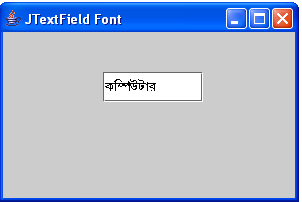
Java JTextFiled Font: How to show Bangla (Bengali) in JTextField
Here I have share you a solution to show the Bengali (Bangla) font in java JTextField.
Code Example:
import java.awt.*;
import javax.swing.*;
public class BanglaFont extends JFrame
{
JTextField text2;
public BanglaFont()
{
Font displayFont1=new Font(“SutonnyMJ”, Font.BOLD,15);
setSize(300,200);
setTitle(“JTextField Font”);
setDefaultCloseOperation(EXIT_ON_CLOSE);
JPanel panel=new JPanel();
getContentPane().add(panel);
panel.setLayout(null);
text2=new JTextField(“Kw¤úDUvi”);
text2.setFont(displayFont1);
text2.setBounds(100,40,100,30);
panel.add(text2,BorderLayout.WEST);
}
public static void main(String args[])
{
BanglaFont x=new BanglaFont();
x.setVisible(true);
}
}
OUTPUT:
Java:How to add data to JTable by declaring and using DefaultTableModel.
If you want to add data in JTable by using DefaultTableModel then this solution will be helpful for you. But,if you don’t want to use DefaultTablelModel then CLICK HERE.
Code Example:
import java.awt.*;
import java.awt.event.*;
import javax.swing.*;
import javax.swing.table.*;
class SimpleTableTest extends JFrame
{
private JPanel topPanel ;
private JTable table;
private JScrollPane scrollPane;
private String[] columnNames= new String[3];
private String[][] dataValues=new String[3][3] ;
public SimpleTableTest()
{
setTitle(“JTable and DefaultTableModel”);
setSize(300,300);
topPanel= new JPanel();
topPanel.setLayout(new BorderLayout());
getContentPane().add(topPanel);
setDefaultCloseOperation(EXIT_ON_CLOSE);
columnNames=new String[] {“Column 1” , “Column 2” , “Column 3”};
dataValues = new String[][] {
{“1″,”2″,”3”},
{“4″,”5″,”6”},
{“7″,”8″,”9”}
};
TableModel model=new myTableModel(“owntable”);
table =new JTable( );
table.setRowHeight(50);
table.setModel(model);
scrollPane=new JScrollPane(table);
topPanel.add(scrollPane,BorderLayout.CENTER);
}
public class myTableModel extends DefaultTableModel
{
myTableModel(String tname)
{
super(dataValues,columnNames);
System.out.println(“Inside myTableModel”);
}
public boolean isCellEditable(int row,int cols)
{
return true;
}
}
public static void main(String args[])
{
SimpleTableTest mainFrame=new SimpleTableTest();
mainFrame.setVisible(true);
}
}
OUTPUT:
Java: How to add data to JTable using the easiest way.
Here I have shared with you the basic procedure to add data in a JTable without declaring the DefaultTableModel.
Code Example:
import java.awt.*;
import javax.swing.*;
class simpletable extends JFrame
{
private JPanel topPanel;
private JTable table;
private JScrollPane scrollPane;
private String[] columnNames= new String[3];
private String[][] dataValues=new String[3][3] ;
public simpletable()
{
setTitle(“Simple Table Application”);
setSize(300,300);
topPanel= new JPanel();
topPanel.setLayout(new BorderLayout());
getContentPane().add(topPanel);
setDefaultCloseOperation(EXIT_ON_CLOSE);
columnNames=new String[] {“Column 1” , “Column 2” , “Column 3”};
dataValues = new String[][] {
{“1″,”2″,”3”},
{“4″,”5″,”6”},
{“7″,”8″,”9”}
};
table =new JTable(dataValues,columnNames );
table.setRowHeight(50);
scrollPane=new JScrollPane(table);
topPanel.add(scrollPane,BorderLayout.CENTER);
}
public static void main(String args[])
{
simpletable mainFrame=new simpletable();
mainFrame.setVisible(true);
}
}
OUTPUT: