Java Basic Problems

JTable Java : How to make JTable cells editable or not editable using DefaultTableModel.

Here is a little solution to make the cells of JTable  editable or not editable.

Here I have coded to make the cells of  Column-1 not editable but cells of Column-2 and Column-3 are editable.

Code Example:

import java.awt.*;

import java.awt.event.*;

import javax.swing.*;

import javax.swing.table.*;

class SimpleTableTest extends JFrame

                {

private JPanel topPanel ;

private JTable table;

private JScrollPane scrollPane;

private String[] columnNames= new String[3];

private String[][] dataValues=new String[3][3] ;

public SimpleTableTest()

    {

setTitle(“JTable Cell Not Editable”);

setSize(300,300);

topPanel= new JPanel();

topPanel.setLayout(new BorderLayout());

getContentPane().add(topPanel);

setDefaultCloseOperation(EXIT_ON_CLOSE);

columnNames=new String[] {“Column 1” , “Column 2” , “Column 3”};

 dataValues = new String[][]   {

                        {“1″,”2″,”3”},

                        {“4″,”5″,”6”},

                        {“7″,”8″,”9”}

                                            };

 TableModel model=new myTableModel();

 table =new JTable( );

 table.setRowHeight(50);

 table.setModel(model);

 scrollPane=new JScrollPane(table);

 topPanel.add(scrollPane,BorderLayout.CENTER);    

            }

            public class myTableModel extends DefaultTableModel

                        {

                myTableModel( )

                         {

                          super(dataValues,columnNames);

                          System.out.println(“Inside myTableModel”);

                                     }

                        public boolean isCellEditable(int row,int cols)

                         {

                           if(cols==0 ){return false;}

      //It will make the cells of Column-1 not Editable

                              return true;                                                                                    

                                                }

                                                }         

            public static void main(String args[])

            {

            SimpleTableTest mainFrame=new SimpleTableTest();

            mainFrame.setVisible(true);

            }         

            }

OUTPUT:

JTable cell editable or non editable

Java Basic Problems

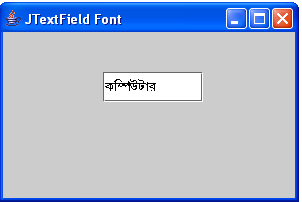
Java JTextFiled Font: How to show Bangla (Bengali) in JTextField

Here I have share you a solution to show the Bengali (Bangla) font in java JTextField.

Code Example:

import java.awt.*;

import javax.swing.*;

public class BanglaFont extends JFrame

{

JTextField text2;

                        public BanglaFont()

                        {

                        Font displayFont1=new Font(“SutonnyMJ”, Font.BOLD,15);

                        setSize(300,200);

                        setTitle(“JTextField Font”);

                        setDefaultCloseOperation(EXIT_ON_CLOSE);

                        JPanel panel=new JPanel();

                        getContentPane().add(panel);

                        panel.setLayout(null);

                        text2=new JTextField(“Kw¤úDUvi”);

                        text2.setFont(displayFont1);

                        text2.setBounds(100,40,100,30);

                        panel.add(text2,BorderLayout.WEST);

                        }

                        public static void main(String args[])

                        {

                        BanglaFont x=new BanglaFont();

                        x.setVisible(true);

                                    }

                                      }
OUTPUT:

JTextField Font Bangla

Java Basic Problems

Java:How to add data to JTable by declaring and using DefaultTableModel.

If you want to add data in JTable by using DefaultTableModel then this solution will be helpful for you. But,if you don’t want to use DefaultTablelModel then CLICK HERE.

Code Example:

import java.awt.*;

import java.awt.event.*;

import javax.swing.*;

import javax.swing.table.*;

class SimpleTableTest extends JFrame

                {

private JPanel topPanel ;

private JTable table;

private JScrollPane scrollPane;

private String[] columnNames= new String[3];

private String[][] dataValues=new String[3][3] ;

public SimpleTableTest()

    {

setTitle(“JTable and DefaultTableModel”);

setSize(300,300);

topPanel= new JPanel();

topPanel.setLayout(new BorderLayout());

getContentPane().add(topPanel);

setDefaultCloseOperation(EXIT_ON_CLOSE);

columnNames=new String[] {“Column 1” , “Column 2” , “Column 3”};

 dataValues = new String[][]   {

                                                                        {“1″,”2″,”3”},

                                                                        {“4″,”5″,”6”},

                                                                        {“7″,”8″,”9”}

                                                                    };

  TableModel model=new myTableModel(“owntable”);

  table =new JTable( );

  table.setRowHeight(50);

  table.setModel(model);

  scrollPane=new JScrollPane(table);

  topPanel.add(scrollPane,BorderLayout.CENTER);   

            }

            public class myTableModel extends DefaultTableModel

                                                                                    {

                                                                                     myTableModel(String tname)

                                                                                                 {

                                                                                       super(dataValues,columnNames);

                                                                                       System.out.println(“Inside myTableModel”);

                                                                                                 }

                                                                                    public boolean isCellEditable(int row,int cols)

                                                                                                 {

                                                                                                  return true;

                                                                                                 }

                                                                                    }         

            public static void main(String args[])

            {

            SimpleTableTest mainFrame=new SimpleTableTest();

            mainFrame.setVisible(true);

            }         

                        }


OUTPUT:
JTable using DefaultTableModel

Java Basic Problems

Java: How to add data to JTable using the easiest way.

Here I have shared with you the basic procedure to add data in a JTable  without declaring the DefaultTableModel.

Code Example:

import java.awt.*;

import javax.swing.*;

class simpletable extends JFrame

                {

private JPanel topPanel;

private JTable table;

private JScrollPane scrollPane;

private String[] columnNames= new String[3];

private String[][] dataValues=new String[3][3] ;

public simpletable()

    {

setTitle(“Simple Table Application”);

setSize(300,300);

 topPanel= new JPanel();

topPanel.setLayout(new BorderLayout());

getContentPane().add(topPanel);

setDefaultCloseOperation(EXIT_ON_CLOSE);

columnNames=new String[] {“Column 1” , “Column 2” , “Column 3”};

dataValues = new String[][]     {

                                                                        {“1″,”2″,”3”},

                                                                        {“4″,”5″,”6”},

                                                                        {“7″,”8″,”9”}

                                                                    };

    table =new JTable(dataValues,columnNames );

    table.setRowHeight(50);

    scrollPane=new JScrollPane(table);

    topPanel.add(scrollPane,BorderLayout.CENTER); 

            }

            public static void main(String args[])

            {

            simpletable mainFrame=new simpletable();

            mainFrame.setVisible(true);

            }         

             }        

OUTPUT:

add data in jTable

Java Basic Problems

Java:How to insert a word in the middle and at the last position of a String.

Here is the solution to insert a word in the middle and at the last position of a string.

class StringManipulation
{
 public static void main(String args[])
{
StringBuffer str= new StringBuffer(“Object Language”);
System.out.println(“\n”);
System.out.println(“Original String:”+str);
System.out.println(“\n”);
System.out.println(“Length of String:”+str.length());

 for(int i=0;i<str.length();i++)
{
int p=i+1;
System.out.println(“Character at position:”+p+”:is:”+str.charAt(i));

}
String aString=new String(str.toString());
int pos=aString.indexOf(“Language”);
System.out.println(“\n”);
 
 str.insert(pos,”Oriented”);

System.out.println(“Modified string:”+str);
 str.setCharAt(6,’-‘);
System.out.println(“\n”);
System.out.println(“String now:”+str);
System.out.println(“\n”);
str.append(“improves security”);
System.out.println(“Appended string:”+str);
}
}

OUTPUT:

 insert word in the middle of string

Java Basic Problems

Java: How to use image as background icon on JButton

Here I have shared a way to use image as background icon on JButton.


Code Example:
import java.awt.*;
import java.awt.event.*;
import javax.swing.*;
 

public class simpletest extends JFrame
{

String conversion;

  public simpletest()
  {
  setSize(300,200);
  setTitle(“Button Icon”);
  setDefaultCloseOperation(EXIT_ON_CLOSE);
  
  ImageIcon iconA = new ImageIcon(“image002.jpg”);
  JPanel panel=new JPanel();
  getContentPane().add(panel);
  panel.setLayout(null);
  
  JButton beep;
  beep= new JButton(“Click”,iconA);
  beep.setRolloverIcon(iconA);
  beep.setBounds(100,60,120,50);
  
  panel.add(beep);
  
  }
          public static void main(String args[])
          {
          simpletest x=new simpletest();
          x.setVisible(true);
          }

}

OUTPUT:

button icon java

Java Basic Problems

Java: How to find out the position of a character in a String using StringBuffer.

Here, I want to share you a solution to find out the position of  characters  in a String using StringBuffer  in  java.


Code Example:


class StringManipulation

{

 public static void main(String args[])

{

StringBuffer str= new StringBuffer(“Software Engineering”);

System.out.println(“\n”);

System.out.println(“Original String:”+str);

System.out.println(“\n”);

System.out.println(“length of String:”+str.length());

System.out.println(“\n”);

 for(int i=0;i<str.length();i++)

{

int p=i+1;

System.out.println(“Character at position:”+p+”:is:”+str.charAt(i));


}

System.out.println(“\n”);

}

}

OUTPUT:

Character Position in a string java

Java Basic Problems

Java: How to know it is AM or PM using Time / DateFormat in java.

If you are trying to separate the AM or PM from the Time or DateFormat using java, then the following solution will be helpful for you.

Code Example:

import java.text.*;

import java.util.*;

import java.util.StringTokenizer;

class DateFormatDemo {

public static void main(String args[]) {

Date date = new Date();

DateFormat df;

df = DateFormat.getDateInstance(DateFormat.SHORT);

System.out.println(“\n”);

System.out.println(“Short form: ” + df.format(date));

df = DateFormat.getDateInstance(DateFormat.LONG);

System.out.println(“Long form: ” + df.format(date));

System.out.println();

df = DateFormat.getTimeInstance(DateFormat.SHORT);

System.out.println(“Short form: ” + df.format(date));

df = DateFormat.getTimeInstance(DateFormat.LONG);

System.out.println(“Long form: ” + df.format(date));

String daate=df.format(date).toString();

System.out.println(“\n”);

StringTokenizer st_time=new StringTokenizer(daate,” “);

                         String timeStr[] = new String[7];

                         int i=0;

                         while ( st_time.hasMoreElements()) {

                         timeStr[i++] = st_time.nextToken();   

                         }

System.out.println(“It is AM or PM ?:”+timeStr[1]);

}

}

OUTPUT:

AM or PM java