Java Basic Problems

Java: How to Know in which line Java Exception Occurred?

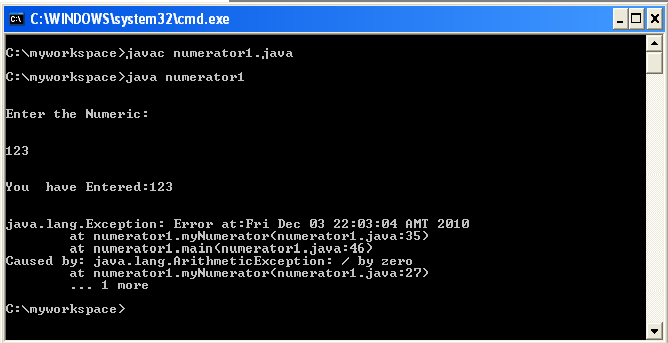
There is  a very simple way to know where and which line exception occurs in your java code, and it is  very useful tool for diagnosing an Exception.printStackTrace()  is that simple tool which will help you to diagnose your code in an easy way

It  will tell you what happened  and  where (in which line )  in the code this exception  happened

 printStackTrace()  is  a method of the Throwable class. All Exceptions are a subclass of that class.

It’s a great debugging tool.

Here is the code example with output to show the function of  printStackTrace()

import java.io.*;

class numerator1

{

static String input;

static int intInput;

                        public void myNumerator()

                        {

                                                            try

                                                            {

            BufferedReader br=new BufferedReader(new InputStreamReader(System.in));

            System.out.println(“\n”);

                                                            System.out.println(“Enter the Numeric:”);

                                                            System.out.println(“\n”);

                                                            input=br.readLine();

                                                            intInput=Integer.parseInt(input);

                                                            System.out.println(“\n”);

                                                            System.out.println(“You  have Entered:”+intInput);

                                                            System.out.println(“\n”);

                                                            intInput=intInput/0;

      //It will cause an error as I have divided the input number by zero(0)

      //java.lang.ArithmeticException: / by zero  (Check the Output)        

                                                            System.out.println(“\n”);

                                                            }

                                                            catch(Exception e)

                                                            {

                                                            //System.out.println(“Error:”+e.getMessage());

                                    Exception newEx = new Exception(“Error at:”+new java.util.Date()+””,e);

                                    newEx.printStackTrace();

                                                            }

                        }

public static void main(String args[])

{

numerator1 x=new numerator1();

x.myNumerator();

}

}OUTPUT:

Java Basic Problems

Java: Comparison between Vector value and String Value

If you want to compare the String value stored  in a Vector with another  String value then its for you. I have given here a better Comparison solution to compare the value in

 a Vector with another String.
Here is the code example:
import java.util.Vector;
public class MainClass {

 public MainClass() {

 Vector vec=new Vector();

 vec.add(“Jhony”);

 String name=”Jhony”;

 /*********************Better Way***************************/

  if(vec.get(0).toString().trim().equalsIgnoreCase(name))

  {

   System.out.println(“First Try Name Match”); 

  }

  else

  {

   System.out.println(“First Try Name Not Matched”); 

  }

   /*********************End of: Better Way***************************/

 /*********************Not so Better Way***************************/

  if(vec.get(0).toString()==name)

  {

  System.out.println(“Second Try Name Match”);

  }

  else

  {

  System.out.println(“Second Try Name Not Matched”);

  }

  /****************End of : Not so Better Way**********************/

  }

public static void main(String[] args) {

MainClass x=new MainClass();

  }

}


Java Basic Problems

Java: Checkbox value to Vector

If CheckBox is selected  True will be added in the Vector    if CheckBox is not selected  False will be added.

Sometimes we may need in java programming to do such code where  if any CheckBox is selected than  True should need to be added in the Vector  in the same way, if  CheckBox is not selected then False will be added in Vector.

Here is the code snippet by which you can solve the problem described  above.

Vector data=new Vector();

 data.add((chkbox_buyer_name.isSelected()?”true”:”false”)+””);

 data.add((chkbox_item_number.isSelected()?”true”:”false”)+””);

 data.add((cb_order_number.isSelected()?”true”:”false”)+””);

 data.add((chkbox_style_number.isSelected()?”true”:”false”)+””);

 data.add((chkbox_style_description.isSelected()?”true”:”false”)+””);


Java Basic Problems

Java: How to know which menu item is clicked??

Sometimes in java, while we do GUI programming to prepare software we add menu bar(For example javax.swing.JMenuItem jMenuItem).In the menu bar we add various menu items according to our necessity.
While adding menu item, we have to indicate which menu item is clicked and which action need to be performed on that click.


Here I have given a code snippet to identify which menu item is clicked.                                              

             private javax.swing.JMenuItem jMenuItem = null;

              private javax.swing.JMenuItem jMenuItem1 = null;

                                                jMenuItem.setText(“Approve” );

                                                jMenuItem1.setText(“Reject” );

               if(jMenuItem.getText().trim().equalsIgnoreCase(“Approve” )   )

                                    {

                                                           Do the following action

——-

—-

                                      }


Java Basic Problems

Java: Integer (numeric) to String (word) conversion

Here is a little example of java where I have converted the integer or numeric value,  entered by the user, to String or word.

The given code will work for 1 to 1999. You can increase the limit by doing little change  in the given code.

 Here is the full code example:

import java.io.*;

class numerator

{

static String input;

static int intInput;

static String strRemainder;

static int intRemainder;

static String inWord=””;

static int firstCount=0;

                        public void myNumerator()

                        {

                                                            try

                                                            {

                        BufferedReader br=new BufferedReader(new InputStreamReader(System.in));

                                                            System.out.println(“\n”);

                                                            System.out.println(“Enter the Numeric:”);

                                                            System.out.println(“\n”);

                                                            input=br.readLine();

                                                            intInput=Integer.parseInt(input);

                                                            System.out.println(“\n”);

                                                            System.out.println(“You  have Entered:”+intInput);

                                                            beforeCalculator(intInput);

                                                            System.out.println(“\n”);

                                                            System.out.println(“In Word:”+inWord);

                                                            }

                                                            catch(Exception e)

                                                            {

                                                            System.out.println(“Error:”+e.getMessage());

                                                            }

                        }

                                                                        public void beforeCalculator(int inputa)

                                                                        {

                                                                        int length;

                                                                        String dividor=”1″;

                                                                        int intDividor;

                                                                        int intFirstValue;

                                                                        String strFirstValue=””;

                                                                        if (calculator(inputa).trim().toString()==”0″)

                                                                                    {

                                                                                    firstCount++;

                                                                                    strRemainder=Integer.toString(inputa);   

                                                                                    length=strRemainder.length();           

                                                                                    for(int i=0;i<length-1;i++)

                                                                                    {

                                                                                    dividor=dividor+”0″;

                                                                                    }

                                                                          intDividor=Integer.parseInt(dividor);          

                                                                          intFirstValue= inputa/intDividor;   

                                                                          intRemainder=inputa%intDividor;   

                                                                          int intRemainval= intFirstValue* intDividor;

                                                                          strFirstValue=calculator(intRemainval);  

                                                                          inWord=inWord+” “+strFirstValue;

                                                                          beforeCalculator(intRemainder);

                                                                        }

                                                                        else

                                                                        {

                                                                        //beforeCalculator(intRemainval);

                                                                          if(firstCount==0)

                                                                          {

                                                                          inWord=calculator(inputa);

                                                                          }

                                                                          else

                                                                          {

                                                                          inWord=inWord+” “+calculator(intRemainder);

                                                                          }

                                                                        }

                                                            }

                                      private String calculator(int d)

                                                                        {

                                                                        switch(d)

                                                                                                            {

                                                                                                            case 1:

                                                                                                            return “One”;

                                                                                                            case 2:

                                                                                                            return “Two”;

                                                                                                            case 3:

                                                                                                            return “Three”;

                                                                                                            case 4:

                                                                                                            return “Four”;

                                                                                                            case 5:

                                                                                                            return “Five”;

                                                                                                            case 6:

                                                                                                            return “Six”;

                                                                                                            case 7:

                                                                                                            return “Seven”;

                                                                                                            case 8:

                                                                                                            return “Eight”;

                                                                                                            case 9:

                                                                                                            return “Nine”;

                                                                                                            case 10:

                                                                                                            return “Ten”;

case 11:

return “Eleven”;

case 12:

return “Twelve”;

case 13:

return “Thirteen”;

case 14:

return “Forteen”;

case 15:

return “Fifteen”;

case 16:

return “Sixteen”;

case 17:

return “SevenTeen”;

case 18:

return “Eighteen”;

case 19:

return “Ninteen”;                                                                                            

                                    case 20:

                                                                                                            return “Twenty”;

                                                                                                            case 30:

                                                                                                            return “Thirty”;

                                                                                                            case 40:

                                                                                                            return “Forty”;

                                                                                                            case 50:

                                                                                                            return “Fifty”;

                                                                                                            case 60:

                                                                                                            return “Sixty”;

                                                                                                            case 70:

                                                                                                            return “Seventy”;

                                                                                                            case 80:

                                                                                                            return “Eighty”;

                                                                                                            case 90:

                                                                                                            return “Ninety”;

                                                                                                            case 100:

                                                                                                            return “One Hundred”;

                                                                                                            case 200:

                                                                                                            return “Two Hundred”;

                                                                                                            case 300:

                                                                                                            return “Three Hundred”;

                                                                                                            case 400:

                                                                                                            return “Four Hundred”;

                                                                                                            case 500:

                                                                                                            return “Five Hundred”;

                                                                                                            case 600:

                                                                                                            return “Six Hundred”;

                                                                                                            case 700:

                                                                                                            return “Seven Hundred”;

                                                                                                            case 800:

                                                                                                            return “Eight Hundred”;

                                                                                                            case 900:

                                                                                                            return “Nine Hundred”;

                                                                                                            case 1000:

                                                                                                            return “One Thousand”;

                                                                                                            default:

                                                                                                            return “0”;

                                                                                                            }

                                                                        }

 public static void main(String args[])

{

numerator x=new numerator();

x.myNumerator();

}

}

OUTPUT:

Java Basic Problems

Java:Set Checkbox selected according to the value of database

Sometimes we may need to set the checkbox selected according to the value in database.

In our example  buyer_name,item_number, order_number, and style_number are the database field and  their value  in database is set to True or False according to software  requirement

Sample Database :

Config_parameter (varchar) Config_value (varchar)
buyer_name True
item_number False
order_number True
style_number True
user_name admin
password xyz


Here is the sample code 

                        Vector heading=new Vector();

                        heading.add(” About”);

                        heading.add(“Value”);

                        Vector config=new Vector();

                        Vector data=new Vector();

                        try {

         config=Inter.getDetails();  //  function Inter.getDetails()  Collects data from database

                         data=(Vector)config.get(0);

                        } catch (RemoteException e) {   

                                    e.printStackTrace();

                        }

                        jtableView.setModel(new MyModel(data,heading));

                         jtableView.repaint();

HashMap hm=(HashMap)config.get(1);

                if(hm.get(“buyer_name”)!=null)   

                {

 // if database field (buyer_name)= =true  then chkbox_buyer_name   will be  setSelected

 chkbox_buyer_name.setSelected((hm.get(“buyer_name”).toString().equalsIgnoreCase(“true”) ? true : false));

                }

                if(hm.get(“item_number”)!=null)

                {

// if database field (item_number)= =true  then chkbox_item_number   will be  setSelected

chkbox_item_number.setSelected((hm.get(“item_number”).toString().equalsIgnoreCase(“true”) ? true : false));

                }

                if(hm.get(“order_number”)!=null)

                {

// if database field (order_number)= =true  then chkbox_order_number will be  setSelected

chkbox_order_number.setSelected((hm.get(“order_number”).toString().equalsIgnoreCase(“true”) ? true : false));

                }

                if(hm.get(“style_number”)!=null)

                {

chkbox_style_number.setSelected((hm.get(“style_number”).toString().equalsIgnoreCase(“true”) ? true : false));

                }

                if(hm.get(“style_description”)!=null)

                {

                chkbox_style_description.setSelected((hm.get(“style_description”).toString().equalsIgnoreCase(“true”) ? true : false));

                }

Java Basic Problems

Java: Collect JTable value to Vector

Sometimes in Java programming we may need to collect the value in the JTable to a Vector

Here is a portion of the java  code  which   is used to  collect JTable value to Vector.                                                  


Code Example:

                                                     try

                                                  {

                                                            Vector data=new Vector(); // import java.util.Vector;                           

                                                            for(int i=0;i<jtable_config.getRowCount();i++)

                                                            {                     

                                                                        data.add(jtable_config.getValueAt(i,0));

                                                                        data.add(jtable_config.getValueAt(i,1));

                                                                        System.out.println(“id”+data);

                                                                        System.out.println(“name”+temp.VALUE);

                                                            }

                                                           }

                                               catch (RemoteException e1)

                                                   {      

                                                   e1.printStackTrace();

                                                   }

Java Basic Problems

Java: Database to HashMap

Sometimes we may need to collect data or information from database to HashMap in java. Here I have given an example to show how to collect data from database and then  use it as key of HashMap.
HashMap, you may know that, takes two values, first one is KEY Value ( must be Unique) and the second one is Actual Value. Using that key value in HashMap you may search that actual value you entered.
For example:
if ( hmData.get(itMat1)==”1″)
     
     {
      row.add(“Yes”);
     }

In the given example   hmData.put(itMat,”1″);   itMat is the  key value  and regarding this KeyValue I have entered “1” as the actual value to  use in my software.

Here is the sample code to collect or retrieve data from database to HashMap:

HashMap hmData=new HashMap();
   Connection conNew =  PuConnection.DB_Connection();
   String newsql = “select distinct item_no,mat_no from a_nr_allocate_temp”;
   try
   {
   Statement stmtnew = conNew.createStatement();
   ResultSet rsNew = stmtnew.executeQuery(newsql);
   int i=1;
   while(rsNew.next()){
    String itemNo=rsNew.getString(“item_no”);
    String matNo=rsNew.getString(“mat_no”);
    String itMat= itemNo+matNo;
    
    hmData.put(itMat,”1″);
    System.out.println(“Inside Hashmap:for itMat”+ itMat+”Hashmap:value is:”+hmData.get(itMat));
    
    }
   rsNew.close();
   stmtnew.close();
   conNew.close();
   }
   catch(Exception e){}

Java Basic Problems

Java: Break String into individual Character

In String manipulation sometimes we may need to break the string into each separate or individual character.

In java we can do it easily using  toCharArray() function.

In the given example, string   “Java Programming ”  is broken down into characters where you can see that the length of that string is 16 (including the space between  “Java” and “Programming”) and the whole string is broken into each individual character , where we have stored that characters into  an array.

Here is the code to convert  string into array:

class StringBreaker

{

StringBreaker()

{

String s=”Java Programming”;

char[] allchars=new char[s.length()];  

allchars = s.toCharArray();

System.out.println(“****************************”);

System.out.println(“\n”);

 System.out.println(“Length of S:”+s.length());

System.out.println(“\n”);

 for (int n=0; n<s.length(); n++)

{

try

            {

            System.out.println(“Character::”+(n+1)+”::”+allchars[n]);

            }

catch(Exception e){}

              }

 System.out.println(“\n”);

 System.out.println(“****************************”);

}

public static void main(String args[])

{

StringBreaker test=new StringBreaker();

}

}

OUTPUT:

Java Basic Problems

Java: How to pass array to another function

Sometimes we may need in java programming to pass the value of array in another function.

Here I have given an example about the procedure of passing an array to a function.

Also, here I have shown how to find out the length of an array and how to retrieve or get the value of the array after passing it to another function.

This tutorial will help you to understand the basic of array and how to declare array in java.

Code:

 class ArrayPassing

{

 public static void checking(String[] u)

  {

 System.out.println(“\n”);

System.out.println(“****************************************”);

  System.out.println(“Array is entered into Checking function”);

  System.out.println(“Array Length:”+u.length);

  System.out.println(“Third index value is:”+u[2]);

  System.out.println(“\n”);

  System.out.println(“****************************************”);

  }

         public static void main(String args[])

                        {

                                    String[] d;

                                    d = new String[3];

                                    d[0]=”1″;

                                    d[1]=”2″;

                                    d[2]=”5″;

                                     checking(d);

                                     }

}

OUTPUT: