
Before i shared you CSS customization of Twenty Seventeen theme. Today I am sharing you how to create Single Page Website using Twenty Seventeen Theme.
In Single Page Website, when you will click on menus, it will go scrolling to the related point or content in homepage.
You can use my shared method and ask question in the comments section.
Here are the Steps.
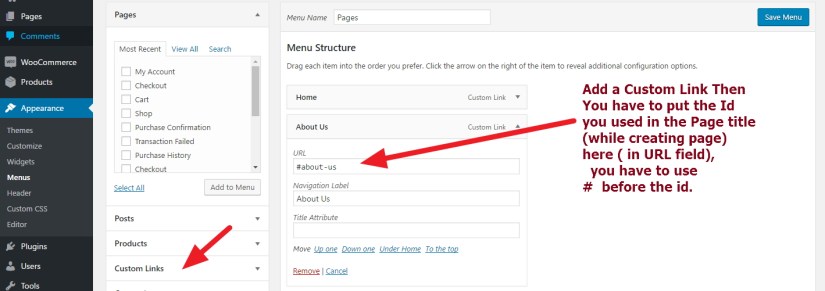
1. Install Page Scroll to id plugins. This pluigns will help us to scroll or go to the targetted / related content in homepage with an scrolling effect.

2. For simplicity lets assume our page will have only 3 menus : “Home”, “About” and “Contact”. When Clicking on “About” and “Contact” menu it will scroll to About and Contact section in Homepage.

3. Creating Pages for Single page Site in twenty Seventeen theme:
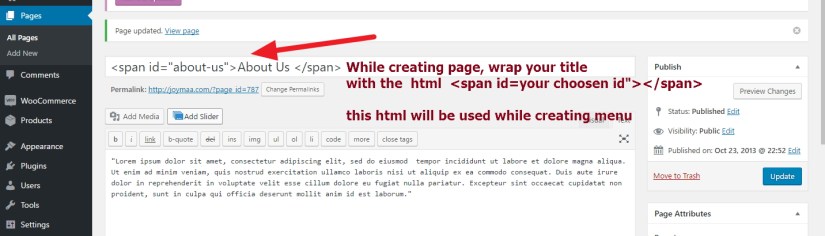
To Create the pages for single page website you have to wrap the Title with a little html like the image attached
<span id="any_id_you_use"> your title</span>
4. Adding Created page in Menu to scroll
5. How to show the Created page in Homepage in Twenty Seventeen Theme?
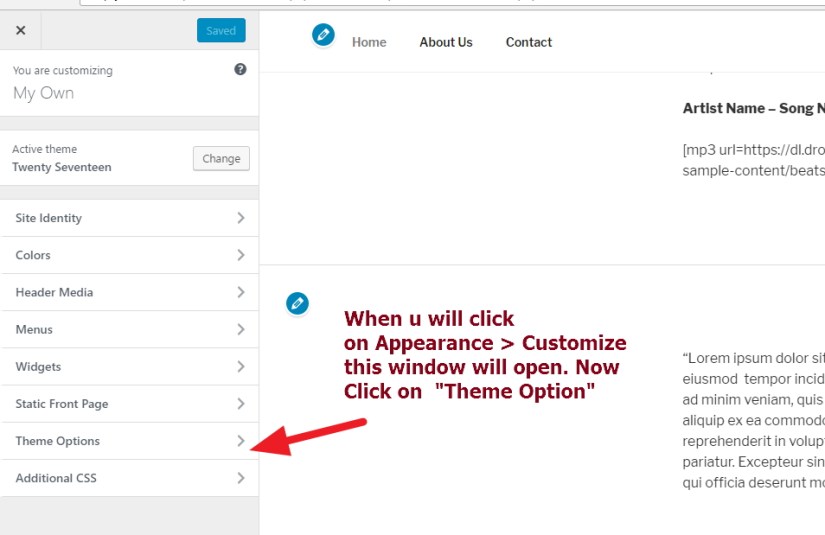
At First go to Appearance > Customize and the Twenty Seventeen theme Customiztion section will appear
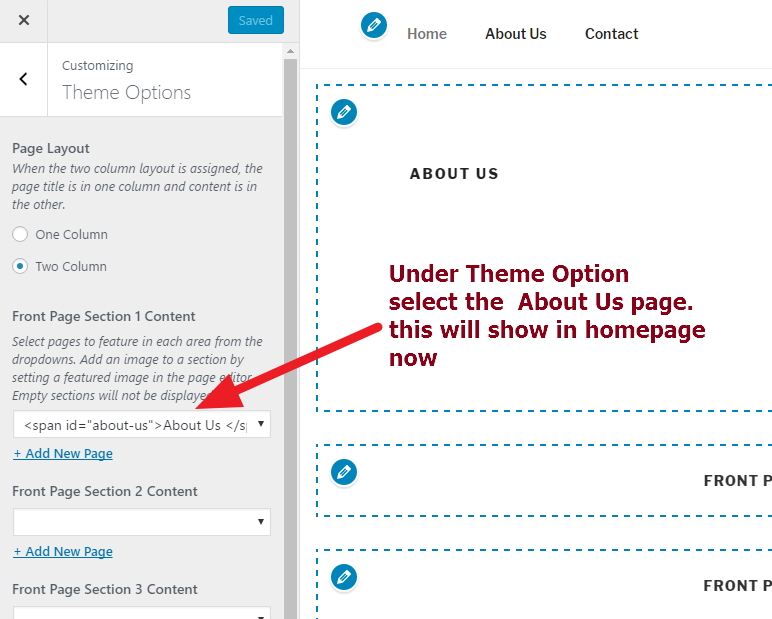
Check the image attached how to add About Us page to show in homepage
First Step:
2nd Step:
Viola you are done :)
now Click on About Menu and you will see it is scrolling down and showing the About us Content

 All About Basic
I like the information you have here but I am finding the links slide past where they should go. The seem to end halfway through the text section instead of opening to the top of the section. Thoughts?
LikeLike
HI Mogrianne
would u mind to clarify me the issue some more please?
sorry didn’t understand your issue
Om
LikeLike
So what happens when i put in the anchor links, is that clicking on the navigation link brings the user to halfway through the text of the correct section of the one page layout 2017 WP theme.
Clicking on the link should bring the user to the top of the correct section of the text where the span is located. It does not.
LikeLike
Hi
would u mind to share me the site url where you are working please?
Om
LikeLike
Hallo,
did you find a solution? It seems i have the same Problem, it all scrolls very fine to the content of the site but the titel is always hide behind main manu.
LikeLike
HI
please share me the site URL you are working on
Om
LikeLike
Anchors have always been a problem in HTML – they have never worked correctly and they are worse on the 2017 Theme :( No matter where you put them the tool is just faulty and the 2017 theme even more so. smh
So no I do not have a solution.
LikeLike
Do you find that sites created with twentyseventeen have jumpy images when scrolling (with internet explorer and edge)?
LikeLike
Hi Mike
would you mind to clarify me the issue some more?
sorry didn’t understand it properly
OM
LikeLike
Sorry. When viewing any site which uses the twentyseventeen theme (including the sample on the wordpress site), using internet explorer or edge, when you scroll down the page, the photos in the background jitter / shake…
LikeLike
umm..ok Mike…sorry i didn’t notice it as i am not using windows 10
i am on windows 7
Om
LikeLike
could you check on my site http://www.praxis-bauer.at/test/ when using the second link the content is scrolling underneath the menu. please help.
kiind regards, hubert
LikeLike
HI Hubert
while scrolling ..some of your top contents is cutting off..
that is the issue you are facing…right?
please let me know
Om
LikeLike
Yes, like the title “Psychotherapie” is hid behind the menu, which is sticky by default
LikeLike
Seems like Arndt postet the same problem above…
LikeLike
Ok great then :)
LikeLike
Thing is that when you have a single column selected (time options) the scroll passes the page title and scrolls directly to the page content…
LikeLike
Hi Peter
sorry for the late reply
would u mind to clarify me the issue some more please?
i am available now
Om
LikeLike