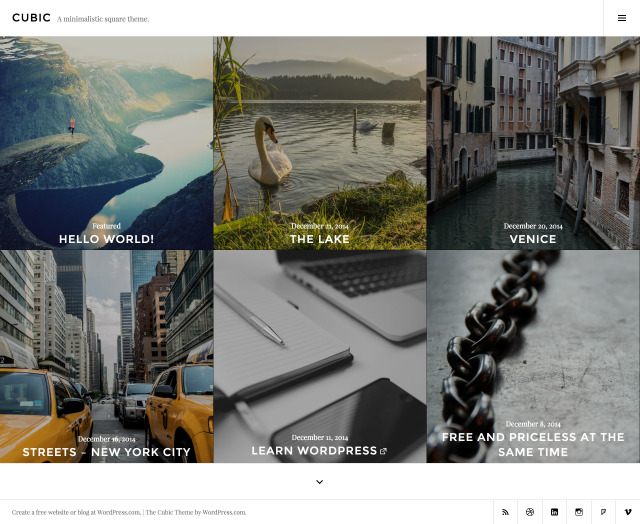
Cubic, a single-column, grid-based theme with large featured images, perfect for photoblogging. Though I shared customization of WordPress theme Photography by The Theme Foundry , Photographer By Organic Themes which are also great for photography or photoblogging. Now I am sharing the modifications of Cubic theme by Automattic.
Cubic Theme by Automattic zip download
You can use my shared css code or can ask question in the comments section.
Question 1: How to change top header color, Homepage Image hover color, background color in Cubic theme by Automattic
Answer:
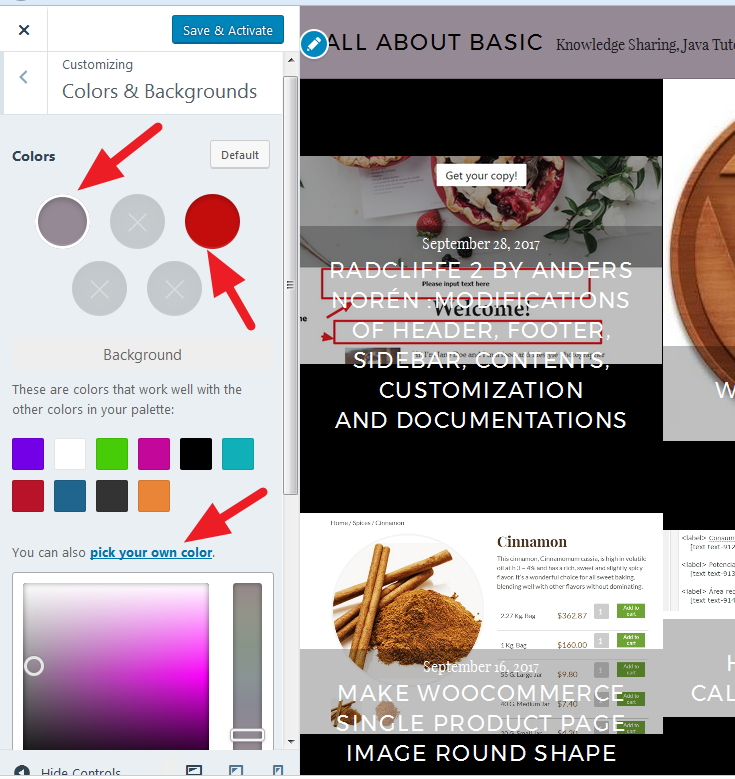
Go to Dashboard then Appearance > Customize >Colors & Backgrounds, from there you can play with the backgrounds and image hover effect.
check the screenshot
Question 2: How to change only the footer background color and the corresponding social icons color
#colophon {
background: darkred !important;
}
*** To change footer site info font color, font size and font family
.site-info {
color: white !important;
font-size: 14px !important;
font-family: cursive !important;
}

*** to change the footer social icons background color and icons color
.social-navigation a {
background: darkred !Important;
color: white !important;
}
*** To change footer social icons hover color
.social-navigation a:hover {
background: green;
}
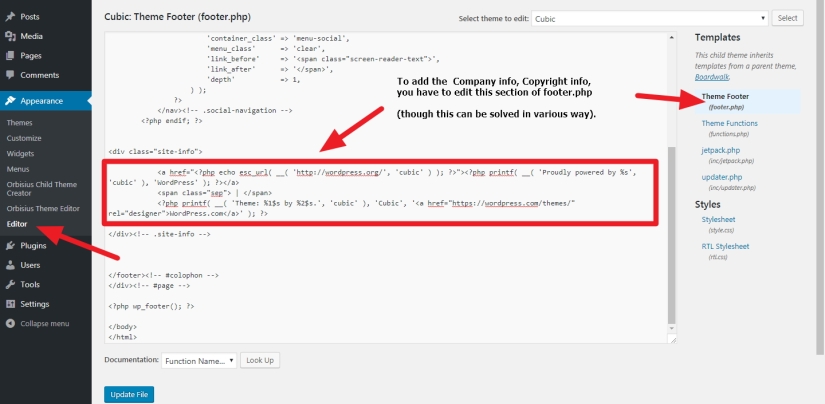
Question 3 : How to add company info and copyright info in the footer of wordpress theme
Answer: In the theme I shared. Check footer.php (as per the screenshot below)
Question 4 : How to change font color, font size and font family of site title in Cubic theme
.site-title {
color: darkred !important;
font-size: 31px;
font-family: cursive !important;
}
Question 5 : How to change font color, font size and font family of site description or tagline in cubic theme
.site-description{
color: darkred !important;
font-size: 31px;
font-family: cursive !important;
}
Question 6 : How to show the top site title centered instead of left aligned
.site-branding {
width: 100%;
max-width: 100% !important;
}
.site-description {
display: none !important;
}
.site-title {
float: none !important;
text-align: center;
}
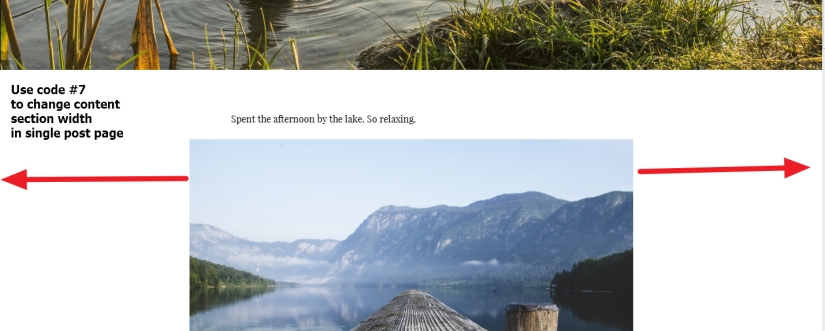
Question 7 : How to change content section width in single post page
Answer
.single-post .entry-author,.single-post .entry-content,.single-post .entry-footer {
width: 80% !important;
}
** To do same i.e increasing content width of the pages
.page .entry-author, .page .entry-content, .page .entry-footer {
width: 80% !important;
}
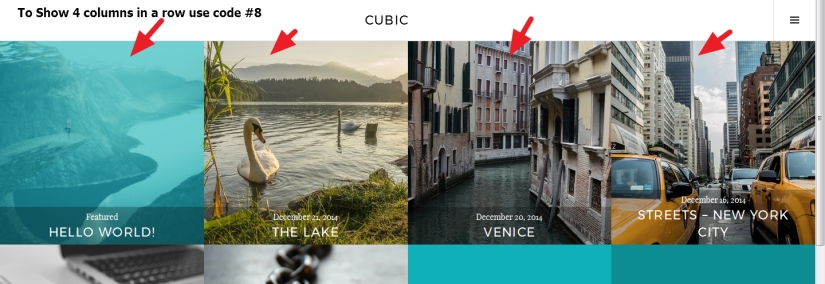
Question 8: How to change number of columns or to show 4 posts instead of 3 in homepage
.home article {
width: 25% !important;
padding-bottom: 25% !important;
float: left !important;
clear: none !important;
}
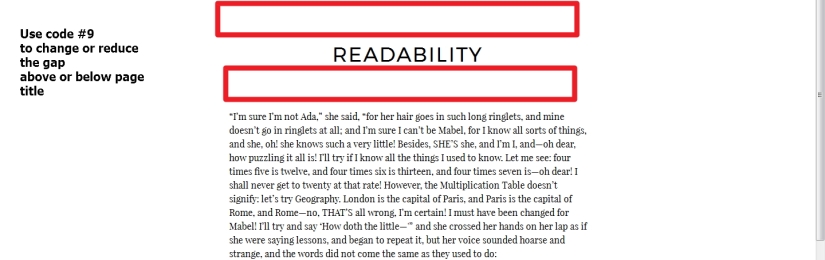
Question 9 : How to reduce gap just above or below the page title in Cubic theme by Automattic
Answer:
Reduce top gap ( gap above the page title)
body.page .entry-header {
padding-top: 24px !important;
}
Reduce bottom gap (gap between page title and content)
body.page .entry-content {
padding-top: 24px !important;
}

Question 10: In archive or search result page, if you want to change font size, font color or font family
.archive .page-title, .search-results .page-title {
font-size: 24px !important;
color: darkred !important;
font-family: cursive;
}
Or,
If you don’t want to show the title in Archive or Search Result page
.archive .page-title, .search-results .page-title {
display:none !important;
}
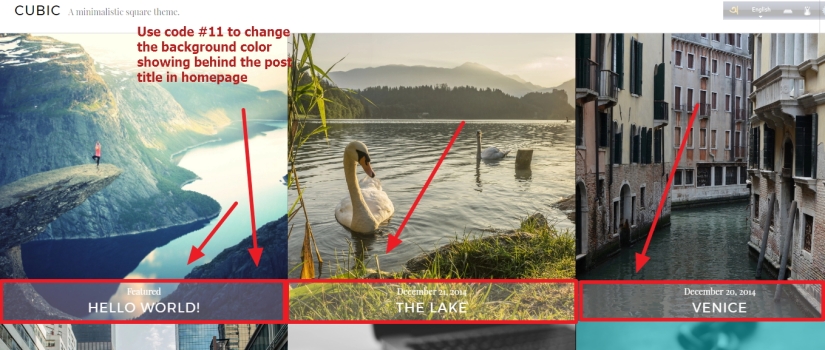
Question 11: How to change the background color showing behind the post titles in homepage grid layout
body:not(.filter-on) .hentry.has-post-thumbnail .entry-header {
background: rgba(255, 233, 244, 0.25);
}
** If you don’t want to show the post title in homepage then use the following code
header.entry-header {
visibility: hidden;
}
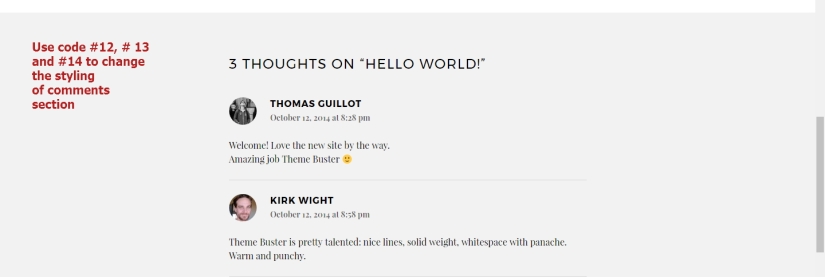
Question 12 : If you don’t want to show comments date in post comment section
.comment-metadata {
display: none !important;
}
.comment-author.vcard .fn {
padding-top: 12px !important;
display: block;
}
.comment-meta {
margin-bottom: 7px !important;
}
Question 13: If you don’t want to show comments or comments section in your posts
background: blue;
}

 All About Basic
hello, Prakash
thanks for the great tutorial! i want to change color scheme for cubic, but there’s no such path as you specified (appearance > customize > colors & backgrounds) in my cubic version…
the site is http://www.noraradu.ro, and i want to change the turquoise palette in a violet color, like in the logo i created for my friend.
if you’re kind, how can i solve this?
thanks,
octanyum
LikeLike
Hi Octanyum
you need to configure / setup jetpack plugins as i guess
:)
Om
LikeLike
Hi, does the Cubic theme supports social media plugins placed at individual posts? Meaning if I want to share individual photos via instagram, for example, can I do that by placing a widget under the photos? Thank you!
LikeLike
HI Andra
you mean, you want to place instagram widget in homepage photos? so that u can let viewers to share the images?
please let me know
Om
LikeLike
Hi, thank you for the fast reply. Yes, I would like to have fast share of content on social platforms. For each individual photo, I would like to have social media share options (widget placed below the photo or on the right side). Is that possible? Regards, Andra
LikeLike
there are plugins for this
check this out
https://wordpress.org/plugins/accesspress-instagram-feed/
and this
https://accesspressthemes.com/wordpress-plugins/accesspress-instagram-feed-pro/
Om
LikeLike
Hi Octanyum,
Great theme. Is there a way to change the colour of the background and frame for galleries created in the posts? Regards, Frank
LikeLike
Hi Frank
please share me the post url where you are using gallery please
Om
LikeLike
https://dearondogu.wordpress.com/
Regards,Frank
LikeLike
Hi Dearondogu
if you want to change the hover background color of the homepage images, try this code
.hentry.has-post-thumbnail .entry-link {
background: red !important;
}
let me know if it helps
Om
LikeLiked by 1 person
Hi Om,
That is very handy to know, but my problem lies somewhere else. It is the appearance of the posts itself.
I have created three posts: ‘test’, ‘dresden’ and ‘cats’. Each of them showing a standard gallery, but as different post formats: ‘gallery’, ‘image’ and ‘standard’. Depending on the post format the pictures in the post show a white frame with a light grey border (image and standard) or black frame with light grey border with another black frame around it. I would like to change/omit the frames and borders. It would be great if you could have a second look at the blog posts.
Best, Frank
LikeLiked by 1 person
Hi Frank
would you mind to try this please
.gallery, .gallery *, .gallery .gallery-item::before {
border: none !important;
box-shadow: none !important;
}
.gallery {
background: transparent !important;
}
let me know if it helps
Om
LikeLike
Hi Om,
Seems my last reply got lost… Your last pieces of additional CSS helped to omit the black frame and light grey border. Last thing remaining is a black frame around the post itself. Btw, the black frame only occurs when the post format is set to gallery, which I would like to do.
Many thanks so far. Hope you can help with the last remaining problem.
Best,Frank
LikeLike
Hi Frank
try this code
.format-gallery .gallery .gallery-item {
border: none !important;
background: transparent !important;
}
.format-gallery .gallery {
background: transparent !important;
border: none !important;
}
let me know if it helps
Om
LikeLike
Amazing, super quick reply and it worked. Fantastic! Thanks so much!
LikeLike
Pleasure Frank
LikeLike
Hi Om,
My wife loves her photo blog with your theme. There are only a few things she asked me to change:)
1. Can the posts on the homepage only display the year or month+year instead of the full date?
2. Posts set to ‘visibility:private’, show ‘private’ in front of the post title on the homepage. Can it only show the title or the title plus a letter?
3. How do you change the hover colour of the site title?
Thanks,
Frank
LikeLike
HI Frank
are you using free plan of wordpress.com?
*** i am not the creator of the theme :) but i can help to modify it ( if you are using it in your own hosting or business plan of wordpress.com )
Om
LikeLike
Hi Om, we host the site ourselves and under your direction I already did some changes to the site (gallery background, site description colour etc).
Best, Frank
LikeLike
Share me the site url again please
LikeLike
georgeandclementine.com
LikeLike
Hi Frank
to change site title hover color
.site-title a:hover {
color: green !important;
}
To change date format, try this
go to dashboard, then Settings > General > Date format and check custom format. Hope that will help
For Private posts, do you have any posts which is showing private?
also
that issue will need modify theme file if u want to add additional text for private posts
Om
LikeLike
Hi Om,
Changed title hover and date format. Thanks so much!!
Re private posts, apologies I meant password protected posts. There is one on the blog now. It reads ‘protected: post title’. It would be amazing if this can be changed. Ready to create a child theme and dive into the css :)
But would completely understand if this is going to far. You have already gone above and beyond with your help.
Best, Frank
LikeLike
Hi Frank
the text in title which is showing for protected posts ( protected:post) can be changed to only title…
but
it will need me to modify the theme files as it is not only css issue
if you need help for this…you can communicate me in my Personal Help profile i shared in the post
Om
LikeLike
Hi!! How can I change the size of the logo in the header next to the site title?
LikeLike
Hi,
would you mind to share me your site URL you are working on please?
Om
LikeLike
It’s musiconrepeat.io but I have removed the logo for now because it looked a bit too big.
LikeLike
thanks
actually it would better if you add the logo and i check and let u know?
Om
LikeLike
Hey Om! I have added that logo now. I’d like it to be smaller so that the header isn’t so wide (and also so that it looks better on mobile).Cheers!
LikeLike
thanks
i have checked
i found the desktop view logo is already smaller? you want the logo to be more smaller??
for mobile view ( to make the alignment of logo and site title to be good) try this code
@media (min-width: 240px) and (max-width: 560px) {
.site-branding {
text-align: center;
}
site-branding a.site-logo-link img, .site-branding a.site-logo-link {
display: inline !important;
float: none;
margin-left: 0 !important;
margin-right: 0 !important;
}
}
let me know if it helps
Om
LikeLike
Thanks Om! It would be nice if I could make it a little bit smaller, maybe 75% or even 50%?
LikeLike
would you mind to try this code please?
@media (min-width: 760px) and (max-width: 12000px) {
.site-logo-link .site-logo {
max-height: 53px;
margin-top: 23px;
}
}
let me know if it helps
Om
LikeLike
Hey Om! It worked! Thanks a lot. Just wondering now, is there a way to make the white space at the top and bottom smaller? Also, on mobile, the site name still appears underneath the logo. any way you might know how to fix that so that they’re inline? Cheers!
LikeLike
Thanks
To reduce top gap, try this code
@media (min-width: 760px) and (max-width: 12000px) {
.site-branding {
margin-top: 4px !important;
margin-bottom: 4px !important;
}
.site-logo-link .site-logo {
margin-top: 8px !important;
}
.site-branding .clear {
margin-top: 10px !important;
}
}
For mobile logo and title issue, try this code
@media (min-width: 240px) and (max-width: 560px) {
.site-branding {
width: 100% !important;
}
.site-logo-link .site-logo {
max-height: 37px;
}
.site-branding .clear {
float: left;
font-size: 10px !important;
}
}
let me know if it works or not
Om
LikeLike
Hey Om! That seems to work too! Thank you so much (and sorry for taking so long to try it out)!
Cheers!
Suzie
LikeLike
Hey Om. How do i hide the featured image in the single post view? Thanks a lot
LikeLike
thanks
in which site you are working on?
let me know please
Om
LikeLike
http://www.caecilielotz.com/portfolio/
This is the site and i want to hide the featured image in the single post (when you click on a blog entry).
Is it possible to have one big page instead of multiple small pages where you have to navigate through arrows?
LikeLike
Ok, to hide the featured image only from single post page try this code
.single .entry-thumbnail {
display: none !important;
}
Om
LikeLike
Wow, thank you really much. So im trying to fix some Issues where i cant find any answers.
1. Is there an option/code to have every post on the same page? Actually, there are max 10 Posts possible
2. Is it possible to delete the “newest posts” section in the Menu?
3. The standard secondary color in my page is by default turquoise (hover, links etc) where do i change it to black?
LikeLike
thanks
if you want to show all posts instead of 10 there are option to change in code..but
i think i prefer you check Dashboard > Settings > Reading and change the Number of posts you want to show first
Also
in the menu if you want to delete the latest posts.. i prefer you check Appearance > Widgets section
Om
LikeLike
How do i add the Instagram feed to my home page like they did on this site.
Example: http://www.alinasemjonov.com/
My Site: http://blazgallegos.com/
Instagram code:
Thanks
LikeLike
Thanks, i have checked the Example site..but not seeing any instagram feed there?
LikeLike
It’s under the Search and Social right before the copyright.
LikeLike
Hi Blaz
got it, sorry the feed was not showing in my office desktop..i just checked now and it is showing..
so they used this pluigns for instagram feed
https://wordpress.org/plugins/instagram-feed/
i think you should try it
Om
LikeLike
I don’t know where to put the short code or PHP code so that it shows up there
LikeLike
I got it working ,, thaks
LikeLike
Goodmorning :)
Nice to know you got it
Om
LikeLike
I’ve literally searched for hours on how to fix this issues. I just integrated woocommerce with my site to sell an ebook. On the product page, there is a large black space on top… I’m pretty sure this is due to the featured image. Using this code:
.entry-thumbnail{
display: none;
}
I was able to fix the issue –however, it also removed all of my featured images on my blogs :\ Do you know how to just remove the featured image on the product page? (there’s no option in the edit product page back end to do this either…) Here’s the link to my ebook https://outofbroken.com/product/change-your-story-change-your-life-ebook/
LikeLike
Hi Amy
sorry i could not check the comments due to sudden illness
do you still need help?
please let me know
Om
LikeLiked by 1 person
Sorry you were sick! I’m good though, thank you!!
LikeLike
Hello,
can you tell me how can show all the post in the main homepage? not in a differents pages?
Thanks
LikeLike
Hi
sorry i could not check the comments due to sudden illness
do you still need help?
please let me know
Om
LikeLike
Hi, I hope you are feeling better.
Yes I still need help in order to have only one homepage with all my post :)
Thanks in advance for your help
Best
LikeLike
Hi Ferran
just set your Homepage as Posts page from dashboard Settings >Reading
hope that helps
Om
LikeLike
Thx Om,
it works perfect :)
Regards
LikeLike
Dear Om,
I would like to place a code in the header.php (for Google Tag Manager), but I can’t seem to find this .php file. Do you know in which file I can add the code; it has to be placed between the and tags.
thank you very much in advance
LikeLike
Are you using wordpress.com?
LikeLike
I found the file, it was within another template which Cubic uses certain files from. Yes I’m using WordPress.
Another question: the theme seems to load very slow, is that due to the fact that all images are loaded simultaneously when opening the website? And what can I do to make the load time shorter?
Thank you
LikeLike
Thanks
site generally loads slowly due to various reasons
in which site you are working on?
share me the site URL
Om
LikeLike
the url is: getagrip.humanitas.nl. it still seems to load very slow.
LikeLike
Thanks,
i prefer you check first by disabling the pluigns you installed please
Om
LikeLike
Hi Om,
I try to add google tag manager as well in wordpress.org. But can not find where to edit the header. Is there a specific place on cubic where to add the snippet?
Thanks,
LikeLike
you can use child theme to modify header.php
or
can use plugins like
https://wordpress.org/plugins/custom-css-js/
LikeLike
hi om, thanks for the answer. I was trying to make a child theme, but cubic already is a child theme. So am a bit lost here. Any recommendations?
LikeLike
yes it is a child theme of broadwalk theme (if i am not wrong)
so..u dont need to create child theme again
LikeLike
Dear om,
I would like to change the color of the preloader on top of the screen. How can I do that? Where can I find the preloader? Tnx in advance.
LikeLike
HI jeroenboschcom
would you mind to share me the site URL you are working on please?
Om
LikeLike
sure its http://www.hetwildeweten.nl/
LikeLike
Hi jeroenboschcom
try this code
.pace .pace-progress {
background: darkred !important;
}
please let me know if it helps
Om
LikeLike
yes, thanks, much obliged. Quick answer, spot on! Are there setting for the preloader I can adjust pe. fastness, loading time etc?
LikeLike
would you mind to try changing the MS(milisecond value) in this code and try please?
.pace .pace-progress {
-webkit-transition: all 125ms ease-out !important;
-moz-transition: all 125ms ease-out !important;
-o-transition: all 125ms ease-out !important;
transition: all 125ms ease-out !important;
}
Om
LikeLike
Hello, how can I completely show the Primary Menu on the start page?
LikeLike
Hi
thanks
so you dont want to show hamburger menu?
Om
LikeLike
Yeah, that’s right.
LikeLike
in wordpress.com (if you are using free hosted site) it is not possible
Om
LikeLike
Hi, if you can help, i want remove color of thumbnail post and i dont want show hamburger menu, is there any way to do it?
Thanks for the others post, help a lot ;)
LikeLike
HI José
share me the post url please
Om
LikeLike
https://framedudes.com/
thx ;)
LikeLike
Hi Jose
as you mentioned
“i want remove color of thumbnail post”
*** you mean u want to show them as Greyish ( which is showing when u hover over it) ?
” i dont want show hamburger menu, is there any way to do it?”
** please check the code..is that something you are asking?
button.sidebar-toggle {
display: none;
}
LikeLike
Hello,
I wanted to remove the effect and the color you do by hovering over each post, and also wanted to move the menu to the top bar.
LikeLike
sorry Jose
may be i didnt get your point
if you dont want the image color to be change
try this
img {
filter: none !important;
}
not sure u r referring this or not?
LikeLiked by 1 person
it worked, about the menu its possible put in top bar?
LikeLike
possible..but it will need theme file modifications..only css cant help
LikeLiked by 1 person
Dear Om,
I have the same problem as ‘Dearondogu’ ..
When I paste the below code in the ‘Text’ field, nothing happens — the black background with grey border does not disappear ..
–>> What am I doing wrong?
.format-gallery .gallery .gallery-item {
border: none !important;
background: transparent !important;
}
.format-gallery .gallery {
background: transparent !important;
border: none !important;
}
Thanks
Christo
LikeLike
Hi Christo
have u pasted it in Appearance > Customize > Additional css?
or
share me the site url
Regards
Om
LikeLike
Hi, thanks for the beautiful theme!
I would like to know if, in the main screen, it is possible to replace the date with other text of my choice (different for each of my posts) … In my case, I would like to replace the date with the name of the newspaper from which the link comes! Thank you
My site url is singuia.earth
LikeLike
hi Riccardo
yes
you can check Advanced Custom field
though it will need to modify theme file
Regards
Om
LikeLike
Hi, thanks for your helpful tips. I activated cubic theme, but in Appearance > Customize > it doesn’t show: Colors & Backgrounds. So how can I change this black blocks in the background? Thank you very much!!!
LikeLike
Hi Tarja
are you using wordpress.com Personal plan?
let me know
Om
LikeLike