Web Development & WordPress

Create a Reusable WordPress Button Shortcode (Custom URL & Label Support)

If you want to add a reusable button to your WordPress posts or pages, creating a simple shortcode is the easiest way. With this shortcode, you can place a custom button anywhere on your website by passing a URL and button label as parameters.

This means you can use the same shortcode on multiple posts while changing only the link and text. For example:

[button url="https://google.com" label="Google"]
[button url="https://yahoo.com" label="Yahoo"]

Below is the code you need to add to your functions.php file. This custom shortcode will generate a styled button with hover effects, and it automatically opens the link in a new tab.

Continue reading “Create a Reusable WordPress Button Shortcode (Custom URL & Label Support)”
Web Development & WordPress

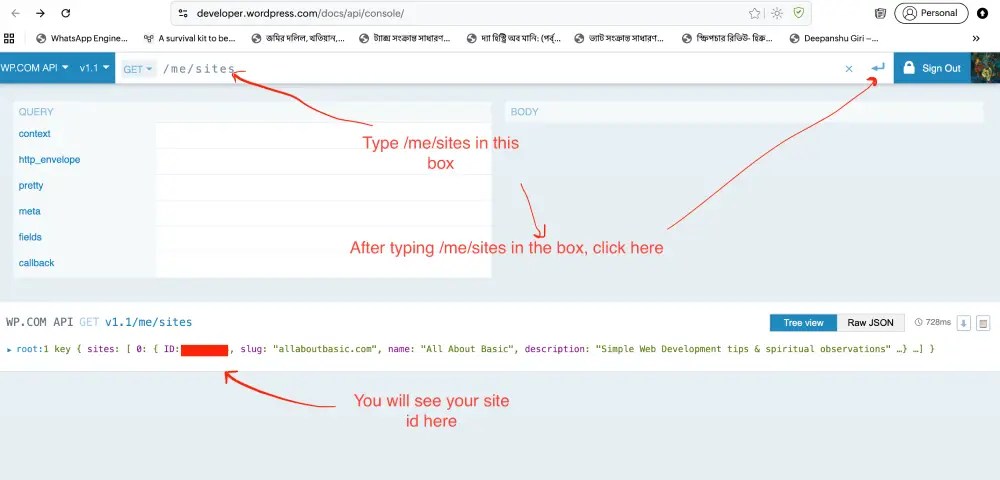
How to Find Your WordPress.com Site ID for Headless WordPress Development Using React or Next.js

Disclaimer: This technique is specially for wordpress.com sites

wordpress.com site id findout

If you’re planning to build a Headless WordPress site using React or Next.js, one of the first things you’ll need is your WordPress.com Site ID. This Site ID allows you to connect your WordPress.com content with modern frontend frameworks through the WordPress.com REST API.

Continue reading “How to Find Your WordPress.com Site ID for Headless WordPress Development Using React or Next.js”
Web Development & WordPress

Olsen Theme Customization Guide (CSSIgniter) – CSS Tweaks for Header, Sidebar & Fonts

Olsen by cssignitor

 Olsen is a stylish blogging theme WordPress  created By CSSIgniter . You can check the  Olsen theme demo . If you are using WordPress.com  premium plan you can use this theme. It features a focused layout with crisp fonts, providing a fluid and relaxing reading experience. Its minimal design and unobtrusive color palette make it ideal for lifestyle and fashion bloggers who need their images to pop next to their content.

Here i am sharing css code to style your Olsen theme.  So You can use my shared code and ask question in the comments section.

Continue reading “Olsen Theme Customization Guide (CSSIgniter) – CSS Tweaks for Header, Sidebar & Fonts”

Web Development & WordPress

WordPress PHP 8.3 Fix: Jetimpex Dashboard & TM Photo Gallery Updated Versions

When I updated my WordPress site to PHP 8.3, both the Jetimpex Dashboard (tm-dashboard) and TM Photo Gallery (tm-photo-gallery) plugins caused fatal errors, breaking the site.

After debugging, I identified compatibility issues with deprecated PHP functions and syntax changes introduced in PHP 8.3.

Continue reading “WordPress PHP 8.3 Fix: Jetimpex Dashboard & TM Photo Gallery Updated Versions”
Web Development & WordPress

Remove duplicate images with same name and url but different ids from wordpress media library

Add the code below to your theme’s functions.php or use Code Snippet Plugins. Then Go to Tools > Duplicate Media in your WordPress admin, Click “Find Duplicates” to see what would be affected. Backup your Site and Media first, then click “Remove Duplicates”

Continue reading “Remove duplicate images with same name and url but different ids from wordpress media library”
Web Development & WordPress

Check if it is mobile then show something : wordpress template php code

For coders sometimes it is needed to show something only for mobile in template fiile. So here is the coding

for functions.php file

function is_mobile_device() {
    $user_agent = $_SERVER['HTTP_USER_AGENT'] ?? '';
    $mobile_agents = ['Android', 'iPhone', 'iPad', 'iPod', 'Windows Phone', 'BlackBerry'];
    
    foreach ($mobile_agents as $agent) {
        if (stripos($user_agent, $agent) !== false) {
            return true;
        }
    }
    return false;
}

in template file ( like single.php, page.php etc)

 <?php
 
  $is_mobileb = wp_is_mobile() || is_mobile_device();
  if( $is_mobileb){ 
    
?> 
YOUR CODE WILL GO HERE 

<?php } ?>
Web Development & WordPress

WordPress Shortcode to Show Different Images for Desktop & Mobile

Basically client was asking to show different image in desktop view and mobile view. So the idea which hits in my mind to create a shortcode which will check if client is visiting the site from mobile or from desktop/laptop and return the image based on it

So the shortcode need to be used in the following way, put it in the img html tag where u want to show the different image

Continue reading “WordPress Shortcode to Show Different Images for Desktop & Mobile”