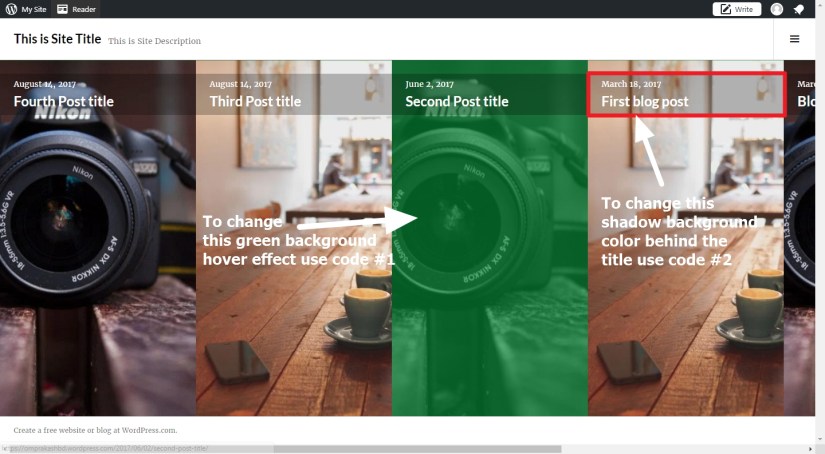
Before I shared you modifications or styling of a beautiful wordpress theme Toujours by Automattic. Today I am sharing with you the customization of another theme named Boardwalk. Theme Board by Automattic is a minimalistic theme with horizontal scrolling. Using my provided css code you can give the theme a new look.
I am sharing you the theme and child theme ( to do your own customization)
Theme Boardwalk By Automattic Parent Theme
Theme Boardwalk By Automattic Child Theme
So You can use my shared code to modify Boardwalk theme and ask question in the comments section.
Question 1: How to change the Hover background color of the image in theme Boardwalk by Automattic
Answer: Try this css code
.hentry.has-post-thumbnail .entry-link {
background: yellow !important;
}
Question 2: How to change the shadow background behind the post title in scrolling slider
Answer : Try this css code
body:not(.filter-on) .hentry.has-post-thumbnail .entry-header {
background: rgba(34,233, 233, 0.25);
}
Question 3: If you don’t want to show post date just above the post title in the scolling homepage image
Answer :
.entry-meta {
display: none !important;
}
Question 4: How to change the Post title’s font color, font size and font family showing in scrolling image
Answer: Try this code
.entry-title a {
font-size: 23px !IMPORTANT;
color: red !important;
font-family: cursive !important;
}
Question 5: How to change top site title, font color, font size and font family
Answer: Try this code
.site-title {
color: red !important;
font-size: 32px;
font-family: cursive !important;
}
Question 6: How to change top site description font color, font size and font family
Answer: Try this code
.site-description {
font-family: Merriweather, serif;
font-size: 17px;
color: red !important;
}

Question 7: If you want to change the background color of the top header section
header#masthead {
background: red !important;
}
Question 8 : How to remove the top right side toogle button
Answer : Try this code
button.sidebar-toggle {
display: none !important;
}
Question 9 : How to show the Site title and Site description center in the header and one below another instead of side by side
Answer : Try this code
.site-title {
text-align: center;
line-height: 1.09090909;
margin-left: auto;
margin-right: auto;
display: block;
float: none !important;
}
.site-branding {
float: none !important;
}
.site-description {
text-align: center;
line-height: 1.09090909;
margin-left: auto;
margin-right: auto;
display: block;
float: none !important;
margin-top: 12px;
}
button.sidebar-toggle {
display: none !important;
}
Question 10 : If you don’t want to show featured image in single post page in Boardwalk theme wordpress
Answer: Try this code
.single-post .entry-thumbnail {
display: none !important;
}
.single-post header.entry-header {
position: relative !important;
}
Question 11: How to increase single post page width
Answer: Try this code
.single-post header.entry-header {
position: relative !important;
left: auto !IMPORTANT;
right: auto !important;
margin-left: auto !important;
margin-right: auto !important;
float: left;
clear: both;
display: block;
}
.single main#main {
width: 80%;
margin-left: auto;
margin-right: auto;
}
.single-post .entry-content {
width: auto !IMPORTANT;
clear: both;
padding-left: 0px !important;
padding-top: 32px;
}
Question 12 : How to disable comments on pages and posts
Answer :
For wordpress.com free hosted users
div#comments {
display: none;
}
For those who are using their own domain and hosting, try this plugins
https://wordpress.org/plugins/no-page-comment/

 All About Basic
Is the demo content for Boardwalk available anywhere? I’d like to do a one-click demo import to get started and then customize the website from there.
LikeLike
no sorry, that i dont have too
Regards
Om
LikeLike
Hi Sir, I’ve been trying to add custom icon into “Social Menu” using specific code from FontAwesome but not displaying correctly. Here is my css code :
/* WhatsApp */
.social-navigation a[href*=”api.whatsapp.com”]:before {
content: “\f40c”;
}
/* Telp */
.social-navigation a[href*=”tel:”]:before {
content: ” \f87b”;
}
/* Maps */
.social-navigation a[href*=”goo.gl”]:before {
content: “\f3c5”;
}
Just you can see, I want to add icon for WhatsApp, Telphone and Google Map, so I can used it in the menu. Also can I add “open in new window/_blank” target behaviour?
LikeLike
Hi
please try this
.menu-social li a::before {
font-family: fontawesome !important;
}
let me know if it helps
Regards
Om
LikeLike
Hi Sir, thank you for your reply. I try find it by my self, right before I read your reply. Here is my code
.social-navigation a:before {
font-family: FontAwesome;
}
it works, but is it better with your code?
also about “target:_blank” behaviour, I try to Google it, they said not able to do it in css yet. Is that right?
LikeLike
yes your code and my code is similar
so you can use your one, no issue is there
Regarding
target=”_blank” — it cant be implemented using css, but that can be implemented using either direct php code modification or using jquery, but at first you need to check if the social icons u r using, they provide such function or not
otherwise u can use jquery code ( if u dont want to modify theme file etc)
i can share you jquery code
Regards
Om
LikeLike
I also input your code for backup :)
about “target:_blank” I think I’m gonna leave it for now, because when I view my site via mobile, the link always open directly to the proper app, so I guess it works the way I want it :) it become matters when I view my site from desktop, but I think my client not gonna complain for now :)
Thank you so much for your time.
Best Regards
God Bless
LikeLike
Ok Great
LikeLike