Web Development & WordPress

Redirect Logged out users to different page based on Body Class : WordPress redirection using php and jQuery

Suppose you want your visitor not to see any specific pages and want them to redirect to login or register page, then you can do this using this following code. Here i used the body class of wordpress page. Using the Body class and using php and jquery you can redirect it .

<?php
   $classes = get_body_class();
if (in_array('my-profile',$classes)   || in_array('page-id-2324',$classes)    ) {

if( ! is_user_logged_in() ) {
     ?>
  <script>
 window.location.href = "https://yoursiteurl.com/register/";
  </script>	      
     
<?php
}} 
?>

Web Development & WordPress

WordPress theme Twenty Twenty-One: Modifications and customizations of headers, fonts, styles and more

WordPress 5.6 comes with a brand new default theme: Twenty Twenty-One. Here I am sharing you some basic css or style modifications using which you can give it a look of your own. I have added the child theme below which you can download and use without any issue.

Download Twenty Twentyone Child theme.

wordpress theme twenty twenty-one
Continue reading “WordPress theme Twenty Twenty-One: Modifications and customizations of headers, fonts, styles and more”
Web Development & WordPress

HTML Tab without bootstrap : Tabbed menu with only css, jQuery and html

Tabbed menu without bootstrap ( using css, jquery and html)

In most of the cases we uses bootstrap, which is easy to use. But sometimes we may need to create tabbed menu without bootstrap. Here I am sharing you the related html, css and jQuery code using which you can use Tabbed menu without using bootstrap (screenshot above). You can use this in WordPress, Shopify or any other platform where you can use html,css and jQuery.

Continue reading “HTML Tab without bootstrap : Tabbed menu with only css, jQuery and html”
Web Development & WordPress

WordPress Podcasting theme Spearhead by Automattic : Modifications of header, footer, fonts, widgets, titles and more

Spearhead is a new wordpress theme designed with podcasting in mind. A minimal, elegant wordpress theme which lets your content speak for itself. It is a Child theme of Seedlet theme. Here I am sharing you some css modifications which you can use to style the theme. See the Demo of Spearhead theme. You can download Spearhead Theme from WordPress Repository. Download Parent Theme Seedlet by Automattic.

Continue reading “WordPress Podcasting theme Spearhead by Automattic : Modifications of header, footer, fonts, widgets, titles and more”
Web Development & WordPress

Seedlet by Automattic: A writing and content based theme’s Modifications, Support and Customization

Seedlet  by Automattic is a free WordPress theme which is designed to focus on typography allowing your writing and content to shine. If you want to use this theme, i have shared some css which you can use to change the design, like font, color, size etc of the theme.

You can download Seedlet by Automattic from WordPress Repository.

Download Child theme of Seedlet

Continue reading “Seedlet by Automattic: A writing and content based theme’s Modifications, Support and Customization”

Web Development & WordPress

How to show company logo side by side and vertically centered

If you want to show company logo side by side and vertically centered, i have shared the related html and css for your convenience

HTML Part To Show Company Logos side by side

<div id="logos">
 			<span> <img src="https://allaboutbasic.com/wp-content/uploads/2020/08/jw-logo.png"> </span>
			<span> <img src="https://allaboutbasic.com/wp-content/uploads/2020/08/printex-logo.png"> </span>
			<span> <img src="https://allaboutbasic.com/wp-content/uploads/2020/08/sitepod-logo.png"> </span>
			<span><img src="https://allaboutbasic.com/wp-content/uploads/2020/08/swingit-logo.png"></span>
</div>

CSS Part To Show Company Logos Side by Side

    #logos {
    box-shadow: 11px 1px 8px 2px #888888!IMPORTANT;
    padding: 10px;
    margin-bottom: 24px;
    margin-top: 1px;
    overflow: hidden;
    padding-top: 0px;
    padding-bottom: 0px;
}
   #logos span {
    min-height: 160px;
    max-height: 200px;
    display: flex;
    justify-content: center;
    align-items: center;
    border-right: 1px solid #2b93d1;
    height: 200px;
    text-align: center;
    margin-right: 0px!important;
    padding-left: 50px;
    padding-right: 50px;
    width: 17%;
    float: left;
}
		
div#logos img {
    width: 100%;
}
@media (min-width: 320px) and (max-width: 668px) { 
div#logos img {
    width: auto !important;
    height: auto !IMPORTANT;
}
div#logos span {
    border: none !important;
    border-bottom: 1px solid #2b93d1 !IMPORTANT;
    display: block !IMPORTANT;
    width: auto !important;
    height: auto !IMPORTANT;
    overflow: hidden;
    max-height: 100%;
    min-height: auto;
    float: none;
    padding-top: 50px;
    padding-bottom: 50px;
}
div#logos {
    width: 100%;
}
}
Web Development & WordPress

Contact Form 7 Hidden Field to get the Page or Post URL where the form is used

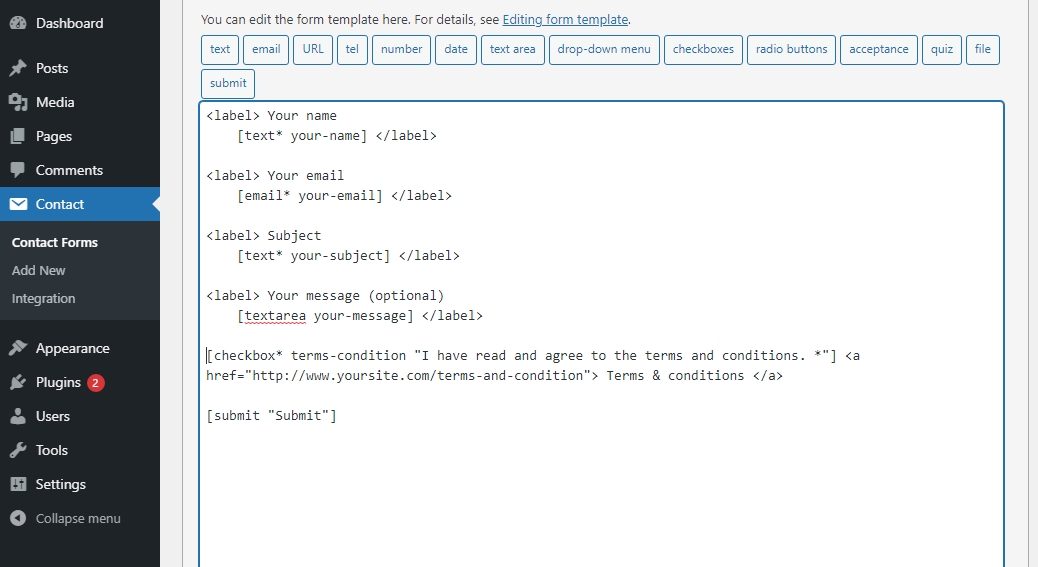
Sometimes you may need to use Hidden Field in Contact Form 7 to get the URL of the Post or page where the form is used.

I have used [hidden url] as field field (screenshot below), to get the URL of the page I used the form.

At last, use this JQuery code to get the URL value Automatically

<script>

jQuery(document).ready(function(){
var url      = window.location.href;  
console.log("url"+url);		 
jQuery('input.wpcf7-form-control.wpcf7-hidden').attr("value",url) ; 	
 }); 	
</script>
Web Development & WordPress

Theme Monet By Pro Theme Design: Customization of Header, footer, fonts , color and More

If you are a Creative Photographer then wordpress theme Monet is for you. Monet is a delicate responsive grid-layout theme targeted at photographers and other creatives. Here I am sharing you some css tricks using which you can modify the header color, fonts, font family and more. If you have any Question feel free to ask in comment section.

To change font size, color and font family of Header title in homepage

.main .post-archive article h2.entry-title {
    font-size: 26px !IMPORTANT;
    color: white !IMPORTANT;
    font-family: cursive !important;
}

Continue reading “Theme Monet By Pro Theme Design: Customization of Header, footer, fonts , color and More”

Web Development & WordPress

Custom Homepage HTML code section for Shopify

Sometimes you may need to put some html code in the Homepage of your shopify site. Here I am sharing you the steps and code to create custom html section.

Create home-custom-html.liquid file under section ( screenshot attached )

Paste this code in the newly created home-custom-html.liquid

<div id="section-cta">
  <div class="container">
    {{ section.settings.text }}  
    
  </div>
</div>
{% schema %}
{
  "name": "HomePage Custom HTML",
  "settings": [
    {
      "id": "text",
        "type": "html",
        "label": "Add custom html below",
        "default": "<p>Add your text here</p>"
    } 
  ],
  "presets": [
    {
      "name": "HomePage Custom HTML",
      "category": "Custom HTML"
    }
  ]
}
{% endschema %}

{% stylesheet %}
{% endstylesheet %}

{% javascript %}
{% endjavascript %}